

What is API monitoring?
API monitoring is the practice of continuously observing the performance, availability, and functional correctness of API endpoints in production. When a single API call fails in a modern cloud-native application, the consequences ripple across authentication flows, payment processing, and dozens of dependent microservices.
Most production applications now rely on hundreds of APIs connecting internal microservices, third-party services, and cloud infrastructure. That interconnection means a latency spike in one endpoint can cascade through an entire request-response cycle before anyone notices. API monitoring lets teams catch those problems early, validate service-level commitments, and keep the whole system running smoothly.
API security best practices
Strengthen your API security posture with practical guidance for cloud-native teams.

How API monitoring differs from API testing
API testing validates correctness before deployment. Teams run test suites in CI/CD pipelines and staging environments to catch bugs, verify contracts, and prevent regressions from reaching production. Once those tests pass, the code ships.
API monitoring picks up where testing leaves off. It watches endpoints continuously in production, catching failures, performance degradation, and behavioral drift that only appear under real-world conditions. A test suite might confirm that your checkout endpoint returns the right response in staging, but monitoring reveals that the same endpoint slows to a crawl every Tuesday at 2 PM when a batch job competes for database connections.
The distinction matters because production environments introduce variables that no staging environment fully replicates: real user load patterns, network latency from every geography, third-party dependency behavior, and data volumes that grow unpredictably. Testing catches known failure modes before release. Monitoring catches unknown failures after deployment. Both are essential for API reliability.
Why API monitoring matters for cloud-native teams
API monitoring gives cloud-native teams confidence that their interconnected services stay healthy under real-world conditions. In microservices architectures, a single authentication endpoint, payment API, or geolocation service connects to dozens of dependent services. Monitoring those endpoints continuously means catching latency spikes, error surges, and behavioral drift before they cascade across the system.
The shadow API problem
You cannot monitor an API you do not know exists. Shadow APIs are undocumented, unmanaged endpoints running in production without the security team's awareness. They appear when developers deploy a quick internal tool, when a deprecated service stays online longer than planned, or when a third-party integration creates endpoints that never make it into the API inventory.
These untracked endpoints represent a critical blind spot. They skip authentication policies, miss security patches, and sit outside every monitoring dashboard. According to the Wiz Cloud Data Security Report, 4% of cloud environments have misconfigured HTTP/S application endpoints exposing sensitive data, which shows how substantial the web-app attack surface can grow when APIs go unmanaged. For many organizations, the gap between their known API inventory and their actual API attack surface is wider than they realize.
Third-party API dependencies
Modern applications depend on external APIs for payments, authentication, geolocation, messaging, and dozens of other functions. When a third-party payment API degrades, your checkout experience degrades from the user's perspective, regardless of who owns the problem.
This creates a tricky accountability gap. Your SLA commitments to customers do not pause because a vendor's service stumbles. Teams that monitor third-party dependencies separately can distinguish between their own issues and vendor problems, respond faster, and communicate more clearly during incidents.
A practical example: if your payment provider's API latency doubles during a flash sale, your checkout completion rate drops even though your own infrastructure is healthy. Without separate monitoring for that dependency, your team spends the first 30 minutes of the incident debugging your own code instead of escalating with the vendor.
Key API monitoring metrics
Five core metrics give teams a clear picture of API health. The table below breaks down what each one measures and why it matters in practice.
| Metric | What it measures | Why it matters |
|---|---|---|
| Response time (p50/p95/p99) | Time from request to response at percentile levels | Averages hide tail latency; p99 reveals the worst-case user experience |
| Error rate | Percentage of requests returning 4xx or 5xx status codes | Distinguishing client errors from server errors speeds troubleshooting |
| Uptime/availability | Percentage of time the API responds successfully | Directly tied to SLA compliance and customer trust |
| Throughput | Requests processed per second or minute | Reveals capacity constraints and informs scaling decisions |
| Request rate | Volume of incoming API calls over time | Sudden spikes can indicate abuse, DDoS attempts, or viral adoption |
Watch 12-min demo
See how Wiz gives cloud-native teams full visibility into API risks and attack paths.

Types of API monitoring
Different monitoring approaches serve different goals. Most mature teams combine multiple types to cover blind spots that any single approach would miss.
Synthetic monitoring
Synthetic monitoring sends simulated requests to API endpoints on a schedule from multiple geographic locations. These probes run whether or not real users are active, which makes them ideal for catching issues proactively. If your checkout API goes down at 3 AM, synthetic checks alert the on-call engineer before the first customer hits the error.
This approach works best for uptime validation, SLA compliance tracking, and detecting regional performance variations. A synthetic probe running from Frankfurt might reveal that your API responds in 80ms from US-East but takes 900ms from Europe due to a CDN misconfiguration.
Real user monitoring (RUM)
Real user monitoring captures data from actual production traffic. Instead of simulated requests, RUM shows how real users experience your API under genuine load, network conditions, and usage patterns. It surfaces issues that synthetic tests miss, such as device-specific failures, peak-traffic degradation, or problems tied to specific client versions.
The tradeoff is that RUM only works when real traffic flows through the system. It cannot catch a 3 AM outage on a low-traffic endpoint. Pairing RUM with synthetic monitoring gives teams both proactive coverage and ground-truth data from real sessions.
Security monitoring
Security monitoring tracks authentication failures, anomalous request patterns, rate-limit violations, and data access anomalies. It detects credential stuffing, unauthorized access attempts, and potential data exfiltration through API channels. The Wiz Cloud Attack Retrospective found that 26% of breaches stem from exploiting public-facing applications, making internet-exposed APIs the second most common entry point for attackers. This is where traditional API monitoring intersects with API security posture.
For example, a sudden spike in 401 errors from a single IP range might indicate a brute-force attack against your authentication endpoint. Teams that follow API security best practices build these detection patterns directly into their monitoring configuration. Without security-focused monitoring, that spike shows up as just another error rate fluctuation on a dashboard. With it, the pattern triggers an immediate investigation.
GraphQL API security risks every developer should know about
GraphQL API security is a set of specialized practices and controls for protecting GraphQL endpoints.
Leggi di più

How API monitoring works
At its core, the mechanics are straightforward. A monitoring tool sends requests to API endpoints at regular intervals, validates responses against expected status codes, data formats, and latency thresholds, and triggers alerts when responses fall outside acceptable bounds. Teams typically set it up in six steps.
Configure endpoints: Specify the URL, HTTP method, expected status code, headers, and authentication credentials for each API you want to monitor.
Set check frequency: Critical APIs warrant checks every 30 to 60 seconds. Standard endpoints can run on 1- to 5-minute intervals.
Define assertions: Validate response body structure, status codes, and response time thresholds. An assertion might verify that the response contains a valid JSON payload and returns within 500ms.
Choose monitoring locations: Test from multiple geographic regions to detect location-specific routing, CDN, or infrastructure issues.
Configure alerts: Notify the right team via Slack, PagerDuty, email, or webhook when thresholds are breached. Set severity levels so a 2-second latency increase does not page someone at midnight.
Analyze and iterate: Review dashboards, historical trends, and incident data to refine thresholds and expand coverage over time.
The key is starting with meaningful assertions rather than monitoring everything loosely. A well-configured check on 20 critical endpoints catches more real problems than a vague health check on 200. As your team gains confidence in the setup, expand coverage incrementally and tighten thresholds based on what you learn from real incidents.
API monitoring best practices
Set baselines and SLOs before configuring alerts. Use 2 to 4 weeks of historical data to establish normal behavior, then set thresholds based on actual patterns rather than arbitrary round numbers. An alert set at 500ms response time means nothing if your baseline is already 480ms.
Monitor from multiple geographic regions. An API performing well from your primary data center may be slow or unreachable in another region due to routing differences, CDN configuration, or regional infrastructure issues.
Integrate monitoring into CI/CD pipelines. Run API tests as pre-deployment gates and increase alert sensitivity during post-deployment windows to catch regressions immediately. A canary deployment that triggers a latency spike should halt the rollout, not wait for users to complain.
Track third-party API dependencies separately. When your application depends on external APIs for payments, authentication, or geolocation, monitor those endpoints independently so you can distinguish between your own issues and vendor problems.
Connect monitoring data to security posture. API monitoring signals like unusual error spikes, authentication failures, and anomalous traffic patterns often indicate security incidents. Feed monitoring data into your cloud security monitoring workflow to detect threats early.
What to look for in an API monitoring solution
Not every monitoring tool covers the same ground. When evaluating solutions, consider these criteria through the lens of what your team actually needs day to day.
Multi-protocol support: Your stack likely includes REST, GraphQL, gRPC, or SOAP endpoints. The tool should handle them all without workarounds.
Multi-region monitoring: Distributed check locations reveal performance variations that single-region monitoring misses entirely.
Flexible alerting with escalation paths: Severity levels, escalation chains, and integration with your existing incident management tools (PagerDuty, Slack, OpsGenie) prevent both alert fatigue and missed pages.
CI/CD integration: Deployment-triggered checks catch regressions at the moment they ship, not hours later when users report them.
Dashboard and historical trend analysis: Teams need both real-time views and the ability to compare current performance against historical baselines.
Security signal correlation: The tool should surface authentication failures, rate-limit breaches, and anomalous patterns alongside performance data, not in a separate silo.
API discovery capabilities: The most valuable monitoring covers every endpoint, including the ones nobody documented. Tools that detect undocumented APIs close the gap between your known inventory and your actual attack surface.
Those last two criteria point to a broader shift in how teams think about API health. Monitoring availability and performance is necessary, but it is no longer sufficient on its own. Teams increasingly need visibility into the security posture of their APIs, covering who can access them, what data they expose, and whether they meet API compliance requirements. The tools that pair performance monitoring with security context show practitioners the full scope of API risk.
How Wiz approaches API monitoring
Traditional API monitoring answers two questions: is the endpoint up, and is it fast? Those answers matter, but they leave a gap. A perfectly healthy API can still expose sensitive data, skip authentication checks, or create an exploitable path into your infrastructure, and no uptime dashboard will tell you that.
Wiz extends API monitoring into that gap. Rather than treating performance and security as separate concerns, Wiz API Security Posture Management (API-SPM) combines them in a single platform so teams can see not just whether an API is responding, but whether it should be exposed at all, what data it can reach, and what an attacker could do with it.
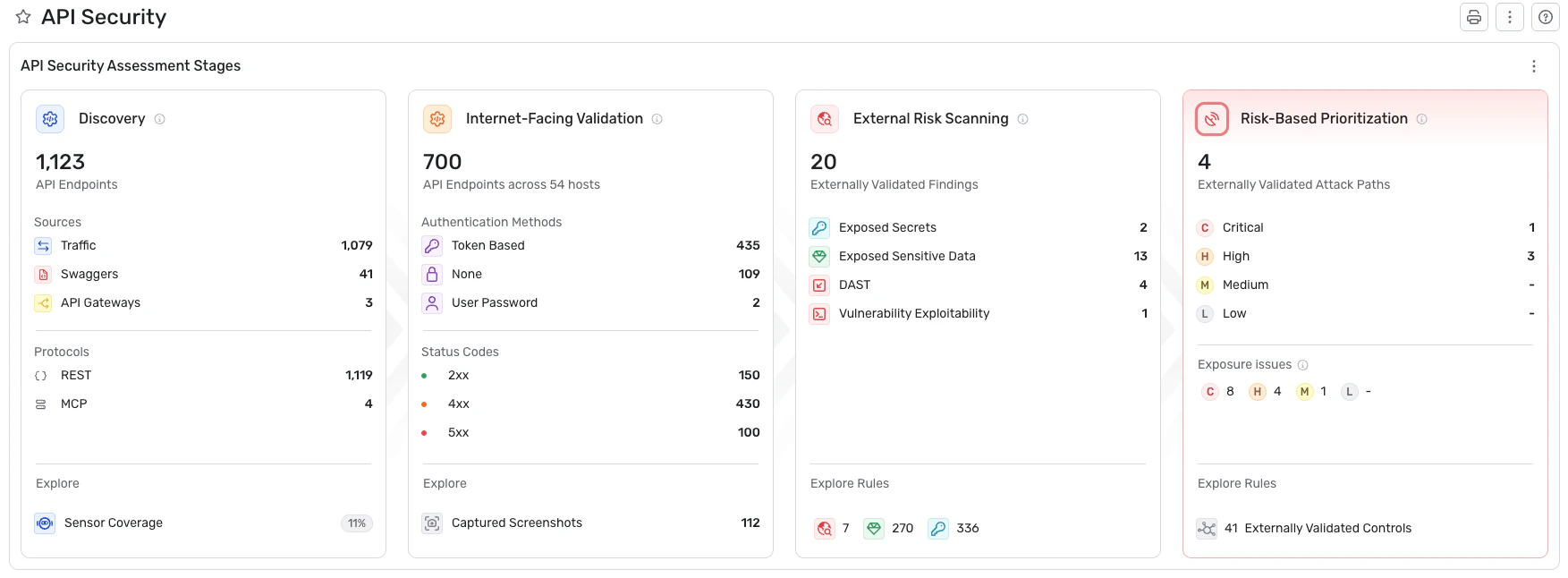
Here's what that looks like in practice:
API discovery: Wiz discovers APIs agentlessly across AWS API Gateway, Microsoft API Management, GCP API Gateway, and Apigee. It also identifies APIs through external attack surface scanning and API specs. This process uncovers shadow and zombie APIs that traditional monitoring tools never see, because those endpoints were never registered in the first place.
Context-rich API inventory: Every discovered API feeds into a continuously updated catalog that includes external exposure status, sensitive data access patterns, and authentication configuration. Teams end up with one complete, continuously updated catalog of every API they own.
Risk-based prioritization with toxic combinations: Wiz maps relationships between vulnerable APIs, cloud resources, and sensitive data to identify exploitable attack paths. Instead of presenting a flat list of hundreds of API vulnerabilities, it highlights the toxic combinations where an exposed API connects to a misconfigured cloud resource that stores sensitive data. That context cuts through noise and focuses remediation on real risk.
AI-powered API security validation: The Red Agent autonomously crawls client-side JavaScript to find shadow APIs, then reads API specs to reason about application logic and validates risks against the OWASP API Security Top 10. The Blue Agent automates investigation of API-related threats, correlating cloud telemetry and identity context to deliver immediate verdicts and remediation steps.
Code-to-cloud traceability: Wiz traces API risks back to the implementing code repository through Wiz Code, connecting runtime findings to source-level remediation. When an API security posture issue surfaces in production, teams can follow it directly to the responsible code and fix it at the source.
Whether your team needs to discover every API across a multi-cloud environment, understand which exposed endpoints create real attack paths, or trace a vulnerability back to the line of code that introduced it, Wiz maps those connections in a single platform. Get a demo to see how it works for your environment.
Get a demo
See how Wiz helps teams move from reactive API monitoring to proactive API security posture management.
