
What is Kubernetes networking?
Kubernetes networking is the system that enables all parts of a cluster to find and communicate with each other, including containers, pods, services, and external clients. This matters because your applications cannot function without reliable internal communication, and attackers can exploit network paths you do not control.
The Kubernetes network model creates a flat network where every pod receives a routable IP address. Containers within a pod share a network namespace and communicate over localhost. Pods on different nodes reach each other through their node's IP ranges without needing NAT. This design keeps networking simple for applications but shifts complexity to the underlying infrastructure.
External traffic enters the cluster through load balancers or ingress controllers that route requests to the right services. The control plane coordinates which pods are healthy and where traffic should flow. Understanding these pieces helps you build reliable applications and spot security gaps before attackers do.
Kubernetes Security Best Practices Cheat Sheet
Get a quick-reference guide covering secrets management, RBAC, network policies, and more for securing your Kubernetes clusters.

The Kubernetes network model: the rules every cluster follows
Kubernetes defines a network model that every cluster must implement. The model has four core rules that keep networking consistent across different environments and cloud providers.
First, every pod gets a unique IP address. Second, all pods can communicate with any other pod without NAT. Third, nodes can reach all pods directly. Fourth, a pod sees its own IP address the same way other pods see it. These rules create what is called an IP-per-pod model where each pod behaves like a separate host on the network.
This approach differs from traditional Docker networking. Docker by default uses a single-host bridge where containers share the host's network through port mapping. Kubernetes instead creates a distributed flat network across all nodes. Each node receives a pod CIDR block, and the cluster routes traffic between these blocks automatically.
At the node level, pods connect to a bridge through virtual ethernet (veth) pairs. One end of the veth pair sits in the pod's network namespace while the other connects to the root network namespace on the node. Traffic leaving the node follows routes that point to other nodes based on their pod CIDR ranges.
Kubernetes Nodes vs Pods: Key Differences Explained
Nodes are the physical or virtual machines that provide computing resources in a Kubernetes cluster, while pods are the smallest deployable units that contain one or more containers
Leggi di più

How Kubernetes networking works: the four communication types
All traffic in a Kubernetes cluster falls into four categories. Understanding each type helps you design applications correctly and troubleshoot network issues when they appear.
Container-to-container (inside a pod)
Containers in the same pod share a network namespace. They communicate over localhost using different ports, just like processes on the same machine. This pattern works well for sidecar containers that handle logging, proxying, or other supporting tasks alongside a main application container.
Pod-to-pod (same and different nodes)
When two pods run on the same node, traffic flows through the local bridge. The source pod sends a packet out its eth0 interface through the veth pair to the bridge. The bridge looks up the destination MAC address and forwards the packet to the target pod's veth pair.
When pods run on different nodes, the process involves more steps. Imagine Pod A at 10.244.1.5 on Node 1 wants to reach Pod B at 10.244.2.8 on Node 2. The packet leaves Pod A, hits the node's routing table, and finds that 10.244.2.0/24 routes through Node 2's IP. The packet travels across the physical network to Node 2, which then delivers it to Pod B through its local bridge. The CNI plugin installed in your cluster sets up these cross-node routes, whether through an overlay or direct routing, since Kubernetes itself does not move packets between nodes.
Pod-to-service
Services provide stable endpoints for groups of pods. When a pod sends traffic to a service's ClusterIP, kube-proxy intercepts the packet and rewrites the destination to a healthy backend pod. This happens transparently so the application never needs to track individual pod IPs.
External-to-service
Traffic from outside the cluster enters through LoadBalancer services, NodePort services, or ingress controllers. A cloud load balancer forwards requests to node ports where kube-proxy routes them to the appropriate pods. Ingress controllers add HTTP routing rules that direct traffic based on hostnames and paths.
Kubernetes as a service
Kubernetes as a service (KaaS) is a model in which hyperscalers like AWS, GCP, and Azure allow you to quickly and easily start a Kubernetes cluster and begin deploying workloads on it instantly.
Leggi di più

Kubernetes services and how traffic gets routed
Pod IP addresses are ephemeral. When a pod crashes and restarts, it gets a new IP. When you scale a deployment, new pods appear with different addresses. Services solve this by creating a stable virtual IP that routes traffic to whichever pods currently match its label selector.
Kubernetes offers three main service types for different use cases:
| Service type | How it works | When to use it |
|---|---|---|
| ClusterIP | Creates an internal virtual IP reachable only within the cluster | Internal communication between services |
| NodePort | Opens a fixed port (30000-32767) on every node that routes to the service | Development or when you manage your own load balancer |
| LoadBalancer | Provisions a cloud load balancer that routes to the service | Production external traffic on cloud providers |
The kube-proxy component running on each node handles the actual routing. It supports several modes. The iptables mode programs packet filtering rules that redirect traffic. IPVS mode uses the Linux IP Virtual Server for better performance at scale. Newer options include nftables, now the recommended mode for Linux nodes in current Kubernetes releases, and eBPF-based implementations that offer improved observability and speed.
CoreDNS handles name resolution within the cluster. It automatically creates DNS records for services so pods can reach them by name instead of IP. A pod looking for the "api" service in the "production" namespace queries api.production.svc.cluster.local and receives the ClusterIP in response.
CNI plugins: what actually builds the network
Kubernetes defines what the network should do but ships no implementation. The Container Network Interface (CNI) specification fills this gap. CNI plugins handle IP address management (IPAM), network connectivity, and often network policy enforcement.
Different plugins take different approaches to building the network:
| CNI plugin | Approach | Best for |
|---|---|---|
| Calico | BGP routing with strong network policy support | Large clusters needing granular policy control |
| Cilium | eBPF-based dataplane with advanced observability | High performance and deep visibility requirements |
| Flannel | Simple VXLAN overlay network | Getting started quickly with minimal configuration |
| Weave | Mesh overlay with encryption options | Legacy clusters (now community-maintained) |
Calico uses BGP to advertise pod routes across your network infrastructure. This avoids encapsulation overhead but requires network hardware that supports BGP. Cilium replaces iptables with eBPF programs attached directly to the Linux kernel for faster packet processing. Flannel wraps pod traffic in VXLAN packets, creating an overlay that works on any network. Your choice depends on performance needs, policy requirements, and operational expertise.
Watch 12-min demo
See how Wiz maps cluster networking and exposure across your CNI, services, and pods in a short guided demo.

Network policies and the default-allow risk
By default, Kubernetes allows all pods to communicate with all other pods. This open model simplifies development but creates serious security risks. An attacker who compromises one pod can immediately reach every other workload in the cluster.
Network policies flip this model to explicit allow. You define which pods can send traffic to which other pods based on labels, namespaces, and ports. When you apply a network policy to a pod, all traffic not explicitly permitted gets blocked.
Here is a simple network policy that allows only pods with the label app=frontend to reach pods labeled app=api on port 8080:
apiVersion: networking.k8s.io/v1
kind: NetworkPolicy
metadata:
  name: api-allow-frontend
  namespace: production
spec:
  podSelector:
    matchLabels:
      app: api
  policyTypes:
    - Ingress
  ingress:
    - from:
        - podSelector:
            matchLabels:
              app: frontend
      ports:
        - protocol: TCP
          port: 8080
Good practice starts with denying all traffic to a namespace, then adding specific allow rules. This approach implements microsegmentation and the principle of least privilege at the network layer. The challenge is knowing what policies you need and verifying they work as expected.
Where Kubernetes networking becomes a security problem
The flat network model that makes Kubernetes easy to use also makes it easy to attack. When every pod can reach every other pod, a single compromised container gives attackers a foothold to move laterally across your entire cluster.
The Wiz Kubernetes Security Report shows progress: publicly exposed pods with severe vulnerabilities dropped 50% since the previous report. But weak defaults persist, with 81% of EKS clusters still relying on the deprecated CONFIG_MAP authentication mode against AWS security best practices. Until teams harden these configurations, exposed clusters remain common entry points for attackers.
Ingress controllers present another attack surface. The IngressNightmare vulnerability (CVE-2025-1974) demonstrated how dangerous this can be. Wiz Research found approximately 43% of cloud environments were vulnerable to Ingress NGINX remote code execution flaws, with over 6,500 clusters exposing vulnerable admission controllers directly to the internet. Attackers who exploit these controllers can bypass network policies entirely because they sit at the cluster edge.
The combination of flat networks, over-permissive identities, and external exposure creates blast radius problems that manual review cannot catch. Bouygues Telecom uses Wiz to scan Kubernetes clusters and identify network exposure across their containerized workloads, gaining visibility into risks that would otherwise remain hidden.
Securing the network you cannot see by hand
Manual security reviews cannot keep pace with the complexity of Kubernetes networking. Clusters change constantly as pods scale, deployments update, and new services appear. You need automated tooling that maps your actual network topology and identifies risks in context.
Wiz takes an agentless approach to Kubernetes security posture management (KSPM). It continuously audits cluster configurations against security benchmarks without requiring you to deploy agents on every node. This gives you visibility across all your clusters within minutes, whether they run on EKS, AKS, GKE, or on-premises infrastructure.
The Wiz Security Graph connects network exposure to the context that determines real risk. A publicly accessible pod matters more when it has a critical vulnerability, runs with elevated privileges, and can reach sensitive data. By correlating these factors automatically, Wiz shows you the attack paths that actually threaten your environment rather than flooding you with isolated alerts.
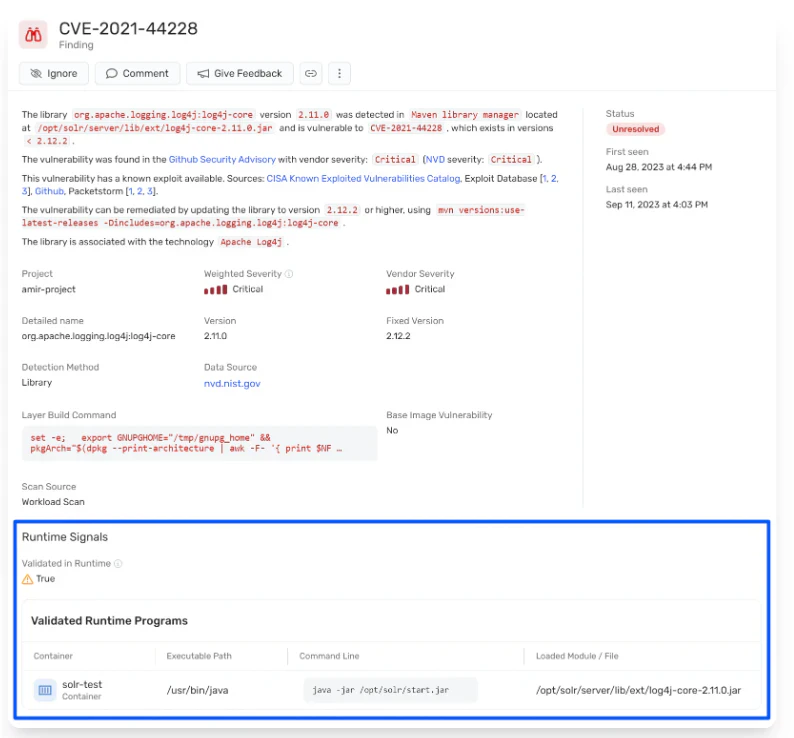
For runtime protection, the Wiz Runtime Sensor adds real-time threat detection using eBPF. It monitors pod behavior and identifies malicious activity as it happens. The Wiz Admission Controller prevents risky configurations from deploying in the first place by enforcing policies at deployment time. Together, these capabilities close the loop from visibility through prevention to detection.
When your network grows beyond what you can inspect by hand, automated context becomes essential. Get a demo to see how Wiz maps your Kubernetes network exposure and prioritizes the risks that matter most.
See your Kubernetes attack paths in context
Wiz connects network exposure, identities, and vulnerabilities so your team can fix what actually matters first.
