


Kubernetes security: a refresher
Kubernetes security protects clusters, workloads, and the control plane from misconfigurations and attacks across their lifecycle, but its open-source foundation makes it a frequent target. With 82% of container users now running Kubernetes in production, more teams are hardening clusters before problems reach live environments.
The following tools build on that foundation. The specific risks and components they protect are covered later in this piece.
Kubernetes Security Best Practices Cheat Sheet
Put these security fundamentals into practice with a quick-reference guide covering hardening, policy enforcement, and runtime protection.

Kubernetes security tools
Open-source Kubernetes security tools provide enterprise-grade protection without licensing costs, offering transparency and customization that closed-source solutions often lack. These tools address specific security domains (from configuration scanning to runtime protection) allowing you to build a comprehensive defense strategy tailored to your environment's needs.
The following tools are organized by security function to help you identify the right combination for your cluster's protection requirements.
| Tool | Security function | Best for |
|---|---|---|
| kube-bench | Config & compliance scanning | CIS benchmark cluster hardening |
| Checkov | IaC/manifest scanning | Catching misconfigurations pre-deployment |
| Terrascan | IaC scanning | Policy violations across Terraform/K8s/Docker |
| KubeLinter | Static YAML/Helm linting | Shift-left manifest checks |
| Falco | Runtime threat detection | Real-time abnormal behavior alerts |
| Trivy | Vulnerability & config scanning | All-in-one image and cluster scans |
| Open Policy Agent | Policy enforcement | Policy-as-code across K8s and CI/CD |
| kubeaudit | Config auditing | Auditing clusters against best practices |
| Calico | Network policy & segmentation | Controlling pod-to-pod traffic |
| Istio | Service mesh | mTLS and traffic control between services |
| Kubescape | Exploit/misconfig detection | Framework-based risk and compliance scans |
Configuration and compliance scanners
Configuration scanners analyze Kubernetes YAML files, Helm charts, and cluster settings to identify security misconfigurations before deployment. These tools compare your configurations against security benchmarks like CIS Kubernetes Benchmark and industry best practices, flagging issues like excessive permissions, unencrypted secrets, or exposed services that could lead to breaches.
Wiz Research found that 12% of cloud environments run publicly exposed containers with critical vulnerabilities, which is exactly the kind of exposure these scanners catch before deployment.
kube-bench
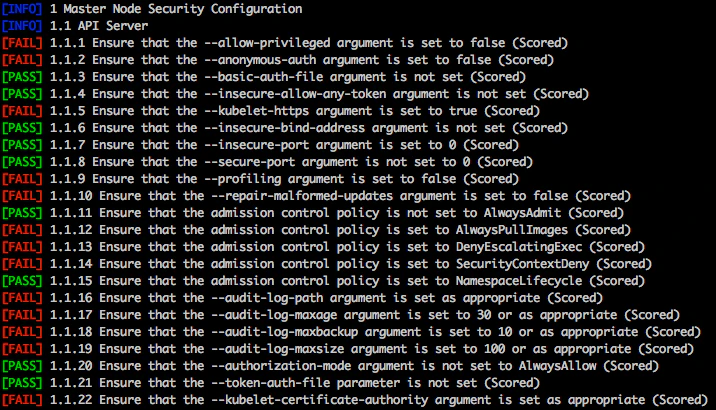
kube-bench is an open-source tool that verifies the secure deployment of Kubernetes based on the CIS Kubernetes Benchmark guidelines. With its YAML-configured tests, updating the tool as standards change is straightforward.
Use cases:
| Use Case | Description |
|---|---|
| Cluster hardening | With kube-bench, you can automatically check a cluster's setup against the security standards set by the CIS Benchmarks. |
| Policy enforcement | Verify RBAC setup to make sure service accounts and users have minimal privileges. The tool also examines pod security practices and how secrets are managed. |
| Network segmentation | kube-bench can check CNI and ensure every namespace has defined network policies. |
Checkov
Checkov is a static code analysis tool built by Bridgecrew and maintained by Prisma Cloud. It scans cloud infrastructure configurations to identify security misconfigurations before deployment.
Checkov supports a wide range of infrastructure as code (IaC) languages, including Terraform, CloudFormation, and Kubernetes YAML files. It also comes with built-in policies that adhere to Kubernetes security best practices and lets you write custom policies in Python or YAML.
# Installing Checkov using pip
pip install checkov

# Running a Checkov scan on a specific file
checkov -f main.tf

# Running a Checkov scan on a directory
checkov --directory /user/path/to/iac/code

# Specifying a framework to scan (e.g., terraform, cloudformation, kubernetes)
checkov --framework kubernetes
Use cases:
| Use Case | Description |
|---|---|
| Scanning Terraform files for misconfigurations | Spot and correct mistakes in Terraform files that might pose security and compliance threats. For instance, Checkov can detect if a sensitive resource is exposed to the public internet or if encryption or logging is not enabled for a storage bucket. |
| Scanning Kubernetes manifests | Checkov examines Kubernetes manifests for vulnerabilities and misconfigurations so that you can maintain a secure and compliant Kubernetes environment. |
Terrascan
Terrascan is a tool that scans IaC for potential issues. It checks for misconfigurations in IaC and keeps an eye on cloud setups for any changes that might weaken security.
Before you set up cloud native systems, Terrascan helps catch and fix security gaps and compliance breaches. You can use it on its own or add it to your CI/CD process. It works with many IaC languages, like Terraform, Kubernetes, and Dockerfile, and it’s compatible with cloud giants like AWS, Azure, and GCP.
Use cases:
| Use Case | Description |
|---|---|
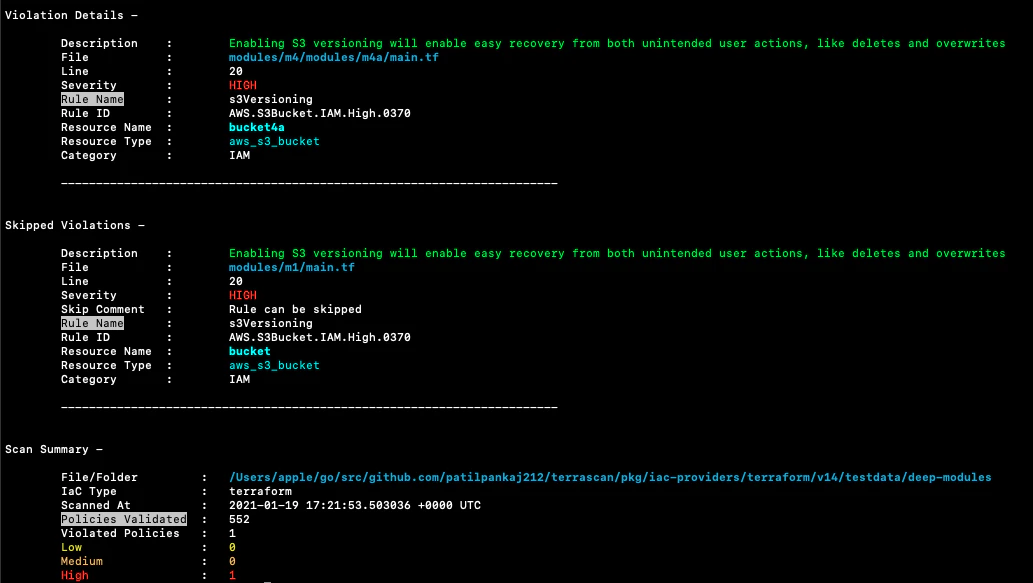
| Scanning Terraform files | Terrascan can review your Terraform files and flag any discrepancies it detects. For instance, it can detect high-severity violations, such as when S3 bucket versioning is not enabled, simplifying recovery from unintended user actions. |
| Scanning Kubernetes manifests | Terrascan is adept at scanning Kubernetes manifests to identify security and compliance policy violations. |
| Creating custom policies | You can create custom policies using Rego, a declarative language for policy enforcement. |
KubeLinter
KubeLinter is an open-source command-line tool that spots misconfigurations in Kubernetes objects. It reviews Kubernetes YAML files and Helm charts before they're deployed to a cluster.
With 19 default checks and the option to add your own, KubeLinter quickly alerts you to any missteps or security breaches in Kubernetes. Developed using Go, KubeLinter requires minimal configuration and is easy to use in various command-line shells.
# Installing KubeLinter using Homebrew
brew install kube-linter

# Linting a single Kubernetes YAML file
kube-linter lint path/to/yaml-file.yaml

# Linting an entire directory and its subcontents
kube-linter lint path/to/directory/containing/yaml-files/

# Linting a Helm chart
kube-linter lint path/to/directory/containing/Chart.yaml-file/
Use cases:
| Use Case | Description |
|---|---|
| Linting YAML files | KubeLinter can lint individual YAML files or entire directories containing YAML files, helping developers identify and fix misconfigurations and security violations before deploying them into a Kubernetes cluster. |
| Linting Helm charts | Helm charts, which package Kubernetes applications, can also be linted using KubeLinter to ensure they adhere to security best practices and are free from misconfigurations. |
| Custom checks | Create custom checks to enforce specific policies within your organization. |
Runtime security and threat detection tools
Runtime security tools watch active Kubernetes workloads for malicious behavior that static scanning misses. Static scans flag every theoretical risk before deployment, but only a fraction of those findings are actually reachable once workloads run, so pairing pre-deployment scanning with runtime detection tells you which risks matter.
Unlike pre-deployment scanners, these tools observe actual container execution, system calls, and network activity to identify threats like privilege escalation, container escape attempts, and unauthorized file modifications as they occur in production environments.
Falco
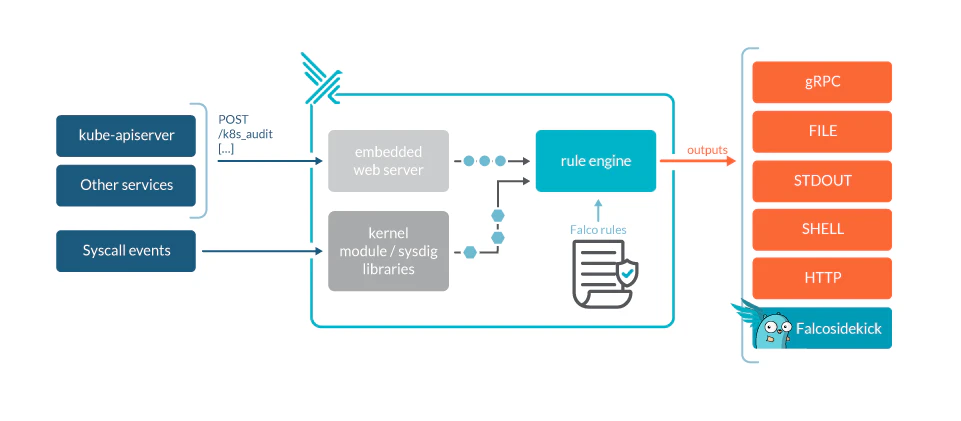
Falco is a cloud native runtime security project initially created by Sysdig and now maintained by the Cloud Native Computing Foundation (CNCF). It leverages system calls at the kernel level to monitor the runtime behavior of a system, integrating metadata from container runtime and Kubernetes to clarify what's happening.
Falco can detect abnormal behavior and potential security threats in real time, offering a powerful rules engine to assert the stream of syscalls and alert users when rules are violated.
Use cases:
| Use Case | Description |
|---|---|
| Compliance with industry regulations | Falco can help you comply with industry regulations and meet requirements with security frameworks like PCI, DSS, and NIST by actively detecting misconfigurations and threats in real time. |
| Monitoring legacy and cloud native infrastructures | Falco monitors both legacy infrastructures and modern cloud native environments, including containers and Kubernetes, ensuring secure operations. |
| Custom detections | You can add custom detections to Falco, enhancing its ability to identify a broader range of threats and misconfigurations and tailoring the tool to meet your specific security needs. |
Trivy
Trivy is an open-source, all-in-one scanner for containers and Kubernetes that identifies vulnerabilities and misconfigurations across images, file systems, and cluster resources. It supports Kubernetes cluster and manifest scanning, including exposed secrets and policy issues, and integrates into CI/CD to stop risky workloads before deployment.
Trivy offers multiple scanning modes, from image and repository scans to cluster-wide audits, providing a comprehensive view of your Kubernetes security posture.
# Installing Trivy
brew install trivy

# Scanning a container image
trivy image nginx:latest

# Scanning a Kubernetes cluster
trivy k8s --report summary cluster

# Scanning IaC files
trivy config ./kubernetes-manifests/
Use cases:
| Use Case | Description |
|---|---|
| Container image scanning | Trivy scans container images for vulnerabilities in OS packages and application dependencies, helping you identify security issues before deployment. |
| Kubernetes cluster auditing | Trivy can audit running Kubernetes clusters to detect misconfigurations, exposed secrets, and compliance violations across all cluster resources. |
| CI/CD integration | Integrate Trivy into your CI/CD pipeline to automatically scan images and manifests, preventing vulnerable workloads from reaching production environments. |
Policy management and enforcement
Policy enforcement engines automatically validate Kubernetes resources against predefined security rules before they're deployed to your cluster. These tools act as admission controllers, blocking deployments that violate security policies, such as containers running as root, missing resource limits, or prohibited image registries. This ensures only compliant workloads enter your environment.
Wiz Research found more than 6,500 clusters exposing vulnerable admission controllers to the internet.
Open Policy Agent (OPA)
Open Policy Agent (OPA) is an open-source policy engine that streamlines policy application across different areas, such as microservices, Kubernetes, CI/CD processes, and API gateways. OPA allows you to specify policies as code using Rego.
It can also easily connect with your software, making policy decisions based on various data inputs. This flexibility makes it a powerful tool for policy enforcement in a wide range of applications.

ONCE A BUILD HAS BEEN APPROVED, KUBERNETES ENVIRONMENTS, CONTAINER HOSTS, AND CLUSTERS SHOULD BE HARDENED USING OPEN POLICY AGENT (OPA)-BASED CONFIGURATION RULES AND KUBERNETES ADMISSION POLICIES.
Use cases:
| Use Case | Description |
|---|---|
| Microservices policy enforcement | OPA can be used to enforce policies in microservices, ensuring that only authorized users can access specific resources and that traffic is allowed only through secure channels. |
| Kubernetes security | OPA can work with Kubernetes to set policies on user access to resources, determine where a workload should be deployed, and specify which OS functions a container can run, among other tasks. |
| CI/CD pipelines | In CI/CD pipelines, OPA can enforce policies that govern the deployment process, ensuring compliance with organizational and industry standards. |
kubeaudit
kubeaudit helps you audit Kubernetes clusters for various security concerns, including the detection of misconfigurations and non-compliance with best practices. It's tailored for Red Hat OpenShift and can scan user code for recognized mismatches, assisting in resolving them before integrating the code into OpenShift.
A static analyzer that is easy to use and extend, kubeaudit also offers a platform for community contributions, so its library of checks keeps growing as the project evolves.
# Example audit report of a YAML file with kubeaudit
$ kubeaudit all -f "deployment--v1.yml"

---------------- Results for ---------------

  apiVersion: apps/v1
  kind: Deployment
  metadata:
    name: deployment
    namespace: deployment-v1

--------------------------------------------
...
-- [error] AutomountServiceAccountTokenTrueAndDefaultSA
   Message: Default service account with token mounted. automountServiceAccountToken should be set to 'false' or a non-default service account should be used.

-- [error] CapabilityShouldDropAll
   Message: Capability not set to ALL. Ideally, you should drop ALL capabilities and add the specific ones you need to the add list.
   Metadata:
      Container: container
      Capability: AUDIT_WRITE
...
Use cases:
| Use Case | Description |
|---|---|
| Identifying pod security admission issues | kubeaudit can identify issues related to pod security configuration in manifests, and it also suggests resolutions. |
| NetworkPolicy analysis | Use kubeaudit to analyze NetworkPolicy configurations and identify issues. |
| Custom audits | Developers can add custom audits to kubeaudit to meet specific organizational security needs with a simple initialization (INI) syntax, defining various fields to create a comprehensive audit that includes severity levels and diagnostic messages. |
Watch 12-min demo
See how Wiz unifies configuration scanning, policy enforcement, and runtime protection for Kubernetes in a single platform.

Network security and service mesh
Network security and service mesh tools provide network policies, segmentation, and service mesh capabilities to secure communications within Kubernetes. This is critical because, according to NSA and CISA guidance, Kubernetes applies no network policies by default, resulting in unrestricted traffic within the Pod network.
These tools prevent unauthorized access and ensure data integrity during transmission.
Calico
Calico is an open-source networking solution and network policy engine for containers. It operates at layer three of the networking stack, providing both networking and network policy for Kubernetes. The tool uses the Border Gateway Protocol (BGP) to handle packet routing to pods. Calico can be used as a standalone tool or in conjunction with others, like Flannel.
Calico also extends the features of the built-in Kubernetes NetworkPolicy API, allowing you to apply policies to a broader range of objects and offering more granular control over traffic flow in your Kubernetes environment.
# Example of allowing ingress traffic to endpoints in the production namespace with database label is permitted, only if it comes from a pod in the same namespace with backend label, on port 6379
apiVersion: projectcalico.org/v3
kind: NetworkPolicy
metadata:
  name: allow-tcp-6379
  namespace: production
spec:
  selector: app == 'database'
  ingress:
    - action: Allow
      protocol: TCP
      source:
        selector: app == 'backend'
      destination:
        ports:
          - 6379
Use cases:
| Use Case | Description |
|---|---|
| Enhanced network policies | Calico lets you create network policies that are more comprehensive than those available through the Kubernetes NetworkPolicy API, including the ability to specify actions (allow, deny, log) and to use a wider range of selectors and attributes in policy rules. |
| Integration with existing Kubernetes features | Calico can be used alongside existing Kubernetes networking features, enhancing those features with its APIs to provide more flexible network policy capabilities. |
| Multi-environment policies | For consistent policy enforcement across different environments, Calico policies can be applied not just to pods but to a range of objects, including containers, virtual machines, and network interfaces. |
Istio
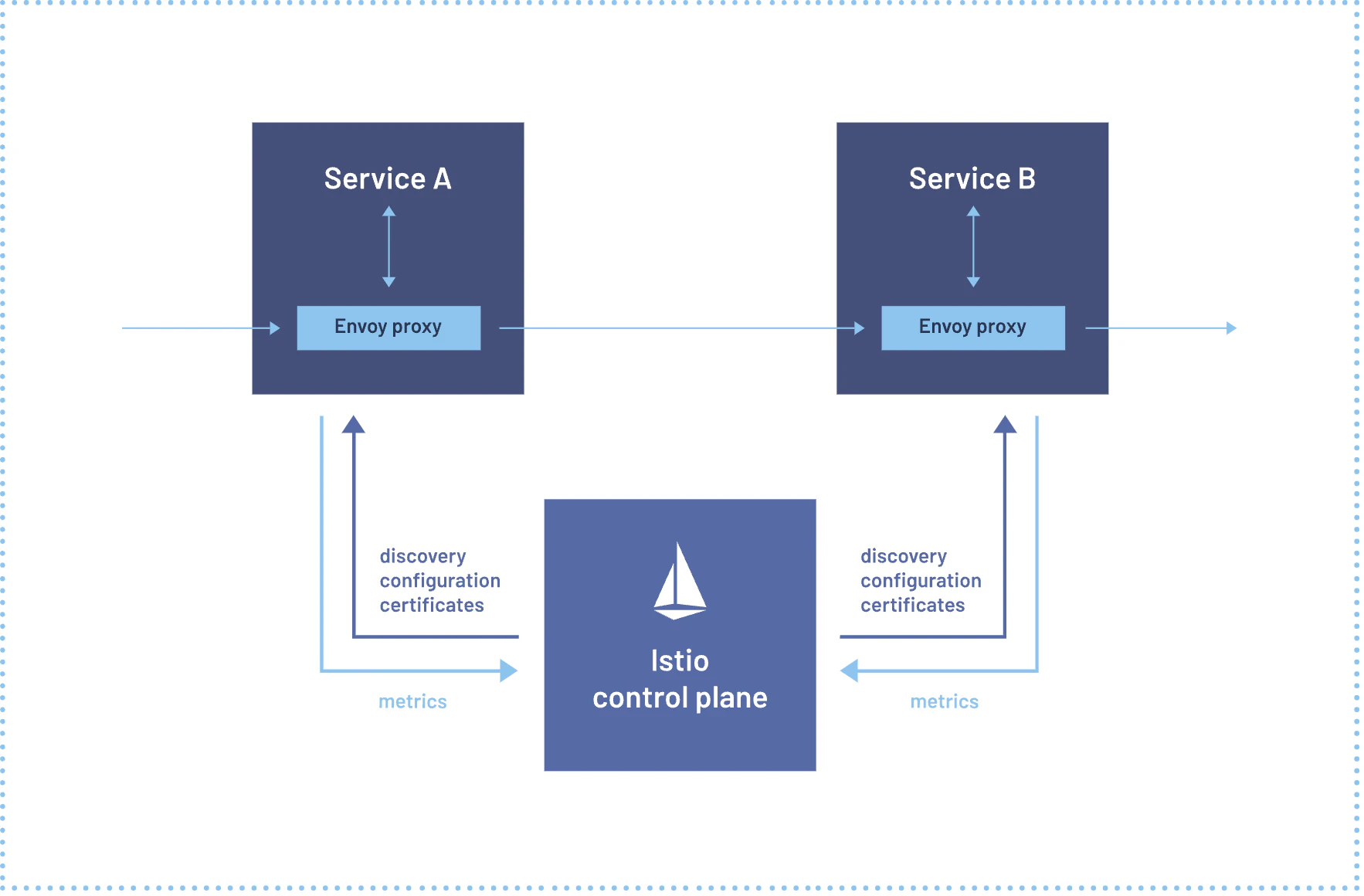
Istio is an open-source service mesh designed for Kubernetes, facilitating the connection, security, management, and monitoring of services. It boasts features like traffic control, security measures, monitoring options, and adaptability.
Istio deploys a sidecar proxy (Envoy) with each service instance, so it can intercept and manage all incoming and outgoing traffic. This architecture enables Istio to enforce policies, collect telemetry, and facilitate advanced traffic routing patterns like canary deployments and circuit breaking.
Use cases:
| Use Case | Description |
|---|---|
| Traffic management | Istio's traffic management capabilities accommodate advanced routing patterns, such as directing traffic to different versions of a service based on request headers or weights. This is particularly useful for canary deployments and A/B testing. |
| Security | Istio offers a strong security setup with features such as mutual TLS authentication between services, detailed access management, and identity checks, guaranteeing safe communication inside the cluster. |
| Observability | With Istio, you gain deep insights into your service mesh with features like distributed tracing, monitoring, and logging, and the result is efficient debugging and performance optimization. |
Exploit detection
Exploit detection tools identify potential escape techniques and exploits in Kubernetes environments. By actively monitoring and analyzing system behaviors, these tools catch unauthorized breaches and ensure the overall security of the environment.
Kubescape
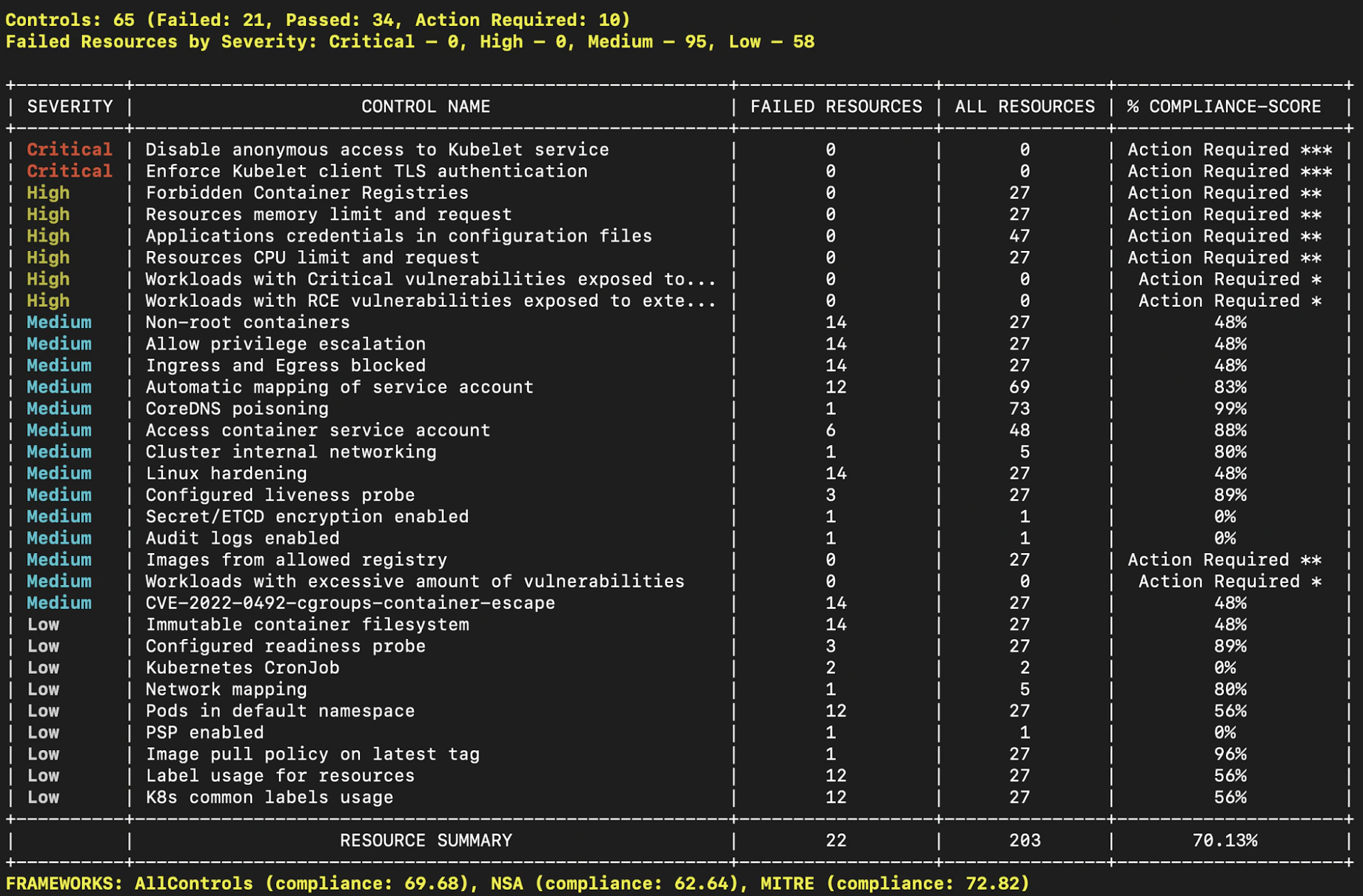
Kubescape, developed by ARMO, is a Kubernetes security platform that’s a Cloud Native Computing Foundation (CNCF) sandbox project. The platform facilitates risk analysis, security compliance, and misconfiguration scanning in Kubernetes environments.
Kubescape can check clusters, YAML files, and Helm charts, detecting misconfigurations using frameworks including NSA/CISA, MITRE ATT&CK®, and the CIS Benchmarks.
Use cases:
| Use Case | Description |
|---|---|
| Risk analysis | Kubescape can perform risk analysis on your Kubernetes configurations, helping identify potential vulnerabilities and areas where best practices aren’t being followed. |
| Security compliance | To ensure compliance with various security frameworks, Kubescape provides detailed reports that help you understand your compliance status and areas where improvements are needed. |
| Automated scanning in CI/CD pipelines | By integrating Kubescape into your CI/CD pipelines, you can automatically scan Kubernetes configurations and catch potential issues early in the development lifecycle. |
Key features to look for in Kubernetes security tools
Key features to evaluate when choosing Kubernetes security tools include:
Comprehensive coverage: Protection at every layer, including configuration, workloads, network, runtime, and policy enforcement
Open source and community support: Active communities mean timely fixes and new features
Easy integration: Fits into CI/CD pipelines, GitOps, or your monitoring stack
Automated scanning and policy enforcement: Catches misconfigurations and compliance issues without manual intervention
Real-time detection and alerting: Flags suspicious activity instantly
Customizability: Lets you write custom rules and checks
Clear reporting and actionable insights: Shows you what to fix first and how
Scalability: Handles your current and future cluster size
Test a few tools in a non-production environment before rolling out cluster-wide.
Common vulnerabilities and threats in Kubernetes environments
Wiz Research found that malicious probing can begin within 18 minutes of a new cluster being exposed. The most critical threats include:
Exposed APIs that give attackers direct access to cluster functions
Vulnerable container images that create entry points
Misconfigured network policies, role-based access control (RBAC), or secrets management that enable privilege escalation
Components and domains to secure in Kubernetes
Protecting Kubernetes means securing multiple layers so no single gap compromises the cluster.
Control plane: The API server is the primary gateway and requires strict authentication and audit logging.
Data protection: etcd stores configuration data and secrets, so encryption at rest is essential.
Node hardening: Worker nodes and kubelet agents need secure configs and restricted access.
Network isolation: Pod-to-pod traffic must be controlled to prevent lateral movement.
Workload permissions: Applications should run under least privilege.
Secrets management: Credentials require encryption and rotation. Secret exposure affects 61% of organizations, making this domain especially critical.
Challenges in Kubernetes security
Securing a Kubernetes environment is no easy task. Most gaps trace back to misconfigurations, lax network policies, poor resource isolation, and insufficient monitoring, not exotic attacks.
How security tools can help
Kubernetes security tools address the complexity and scale challenges that manual security processes can’t handle effectively:
Automated scanning checks configurations for gaps
Policy-as-code keeps standards consistent
Runtime monitoring flags active threats in real time
Compliance automation maintains adherence to frameworks like CIS and SOC 2
Securing K8s across the entire development lifecycle
Securing Kubernetes is a continuous process that spans the entire development lifecycle.
The importance of continuous security
Treating security as continuous, starting at planning, keeps fixes cheap and clusters compliant as they change:
Early detection: Integrating security from the outset drives earlier detection of Kubernetes vulnerabilities, reducing risk in later stages.
Cost efficiency: Post-deployment breaches are expensive to fix. Early integration is significantly cheaper.
Regulatory compliance: Continuous monitoring keeps systems aligned with evolving standards, reducing the risk of noncompliance penalties.
Risks of late-stage security implementations
Shifting security left keeps clusters simpler to secure. When you wait until late in the lifecycle, accumulated dependencies make every change harder to reason about. Workloads also run unprotected longer, so problems surface in production instead of in a pull request.
Wiz's container and Kubernetes security solution
The tools above each cover one slice of Kubernetes security. Wiz connects those slices, correlating container, cluster, and cloud risk in a single graph so you see which combinations create real attack paths. The same context is extended to AI workloads running inside clusters.
Standout features of Wiz include:
Comprehensive security: Covers all aspects of Kubernetes security in one platform
Ease of integration: Fits into existing workflows without disrupting them
Real-time monitoring: Provides instant alerts across the environment so you can respond to threats fast
Ready to see full-lifecycle Kubernetes protection in your environment? Get a demo.
See Wiz for Kubernetes in action
Wiz gives security and platform teams full-stack visibility into Kubernetes risks—from build to runtime—without agents or pipeline changes.
