
エージェントレススキャンのアーキテクチャ
エージェントレススキャンは、APIを通じてクラウドプロバイダーのコントロールプレーンへ直接接続します。スキャナーはワークロードの外側で動作するため、仮想マシンやコンテナ上でコードを実行する必要がありません。
具体的な処理フローは、主に以下の2段階で行われます。
1.インベントリと構成分析
読み取り専用のAPI権限を用いて全リソースをリスト化し、設定、ネットワーク構成、権限設定を分析します。
2.ディープスキャン(スナップショット分析)
より詳細な分析が必要な場合、仮想マシンのストレージボリューム(AWS の EBS volumes、Azure の managed disks、GCP の persistent disks)から、一時的な暗号化スナップショットを作成します。
作成されたスナップショットは、スキャニングプラットフォームが制御する隔離環境(ネットワーク制限・ストレージ暗号化が施された専用インスタンス)にて分析されます。これにより、稼働中のワークロードに影響を与えることなく、脆弱性やマルウェア、機密情報の露出 を検出可能です。分析完了後、スナップショットおよび関連データは、設定したセキュリティと監査証跡要件のバランスを考慮したポリシーに基づき、速やかに削除されます。
この仕組みこそが、エージェントレススキャンを高速かつ包括的にしているのです。
「Log4j」の脆弱性が顕在化した際、エージェントレススキャンを導入していた企業は、短時間でクラウド環境全体の全ての影響インスタンスを特定できました。従来のエージェントベースのツールでは、導入漏れや更新サイクルの影響により、同等のカバレッジを得るのに多大な時間と労力を要していたのが実態です。
Watch 12-minute Wiz Cloud demo
Watch a recorded walkthrough of the Wiz platform and learn how to achieve full coverage across AWS, Azure, and GCP in minutes

エージェントレス型と エージェント型の使い分け
包括的なセキュリティ戦略において、エージェントレス(Agentless)と エージェント型(agent-based)は、それぞれ異なる役割を担います。両者の主要な機能比較は以下の通りです。
| エージェントレススキャン | エージェント型スキャン | |
|---|---|---|
| カバレッジ | クラウド API経由で全リソースを自動検出 | エージェント導入済みのリソースのみ |
| 導入期間 | 数分(クラウドアカウントレベルで接続) | 数日〜数週間(ワークロードへの展開) |
| システム負荷 | 本番環境への影響なし | CPU/メモリ1%〜5%程度の負荷 |
| ファイル分析 | スナップショットによる深層ディスクスキャン | リアルタイムのファイル監視 |
| 実行時の検知能力 | 限定的(ソフトウェア資産の把握まで) | プロセス実行やメモリまで完全可視化 |
| ネットワーク可視化 | API による設定・構成の分析 | ライブトラフィックの直接監視 |
| 主な用途 | 脆弱性管理、コンプライアンス、設定監査 | ランタイム脅威検知(EDR)、能動的な防御 |
結論:ハイブリッド運用の推奨
多くの組織では、両者を組み合わせた運用が最適解となります。エージェントレススキャンによってクラウド環境全体を網羅的に把握し、ベースラインとなる脆弱性管理を確立。その上で、リアルタイムの 脅威検知・対応が必要な重要ワークロードに対してのみ、エージェント型ツールを追加して多層的な保護を実現するのがベストプラクティスです。
Agentless vs. Agent-Based Security: Which Is Better for the Cloud?
Agentless and agent-based security each have a role in cloud environments. Learn the key differences and how to choose the right model for your infrastructure.
もっと読む

マルチクラウドにおけるエージェントレス導入戦略
エージェントレススキャンは各クラウドプロバイダーの標準APIを利用するため、複数クラウド環境への展開がシンプルです。AWS、Azure、Google Cloudといった主要プロバイダーごとに、組織レベルで1つの安全な接続を確立するだけで、環境全体をカバーできます。
主要クラウドプロバイダーごとの要件は次のとおりです。
AWS: SecurityAudit(マネージドポリシー)を付与したクロスアカウントIAM ロールを作成します。ディスク分析には、スコープを絞ったEBSスナップショット権限(ec2:CreateSnapshot、ec2:CreateVolume、ec2:AttachVolume)および暗号化ボリューム復号用のkms:Decryptを追加します。
Azure: サブスクリプションまたは管理グループ レベルでReaderロールを割り当てた サービスプリンシパルを用意します。
GCP: ViewerおよびCloud Asset Inventoryロールを持つサービスアカウントを使用します。ディスク分析を有効化する場合は、Computeスナップショット権限(compute.snapshots.createなど)を追加します。
Multi-cloud: クラウドプロバイダーごとに1つのコネクターを作成し、各社の組織管理機能(AWS Organizations、Azure Management Groups、GCP Folders/Organizations)と連携させます。これにより、配下のアカウント、プロジェクト、サブスクリプションを列挙・オンボーディングすることが可能です。組織レベルでの適切な読み取り権限が必要です。


パフォーマンスの最適化とネットワークに関する考慮事項
エージェントレススキャンは、稼働中ワークロード(ゲストOS)内のパフォーマンス影響を回避できる一方で、プロバイダー側のリソース消費やクォータ(制限)への影響については考慮が必要です。
スキャン実行時には、スナップショット作成時のストレージ I/O、データ転送時の内部ネットワーク帯域、継続的なインベントリのためのAPIクォータ消費といったリソースの消費が発生します。特に大容量ディスクをスキャンする場合、プロバイダーネットワーク内でデータ転送が発生するため、コストや帯域への影響を無視できません。
最近のエージェントレスソリューションは、増分スキャンでこれに対応します。前回スキャンから変更されたディスクブロックのみを分析することで、データ転送量を大幅に削減するのです。
APIのレート制限も重要です。API コールを賢くバッチ化し、各プロバイダーのスロットリング制限を順守しましょう。初回のフルスキャンなど、リソース負荷の高い処理は「オフピーク(低負荷時間帯)」にスケジュールすることを推奨します。これにより、高トラフィック時のAPIクォータを奪い合うことなく、迅速にスキャンを完了できます。
エージェントレス導入におけるセキュリティ強化とガバナンス
転送中および保存時のデータはすべて暗号化します。可能であればスナップショットには顧客管理鍵(AWS KMS、Azure Key Vault、GCP Cloud KMS)を使用し、スキャナーのアイデンティティが「分析中のみ」復号できるよう、key grantやIAM条件を強制します。
API通信はTLS 1.2以上を必須とし、クラウドプロバイダーが対応している場合は、セキュリティとパフォーマンスに優れたTLS 1.3を優先します。厳格なデータ所在地要件(GDPR、データ主権)がある場合は、スキャン処理を完全に同一リージョン内で実施し、エグレス(送信トラフィック)を制限します。これにより、スキャナーのコントロールプレーン、一時スナップショットストレージ、分析用コンピュートが、ワークロードと同一の地理リージョンに留まるように構成します。
プライベートエンドポイントを利用することで、スキャンの通信をプロバイダーのプライベートネットワーク内に限定できます。
AWS PrivateLink: スキャナートラフィックをプライベート VPCエンドポイント経由でルーティングします。
Azure Private Link: スキャン通信を Azureバックボーン内に留めます。
GCP Private Service Connect: 通信をGoogleネットワーク内部に留めます。
これらのプライベートエンドポイントを構成することで、メタデータ収集を含めたプロバイダーのバックボーン上で完結し、パブリックインターネットへの露出を完全に回避できます。
IAM のガードレールと境界
スキャナーのアイデンティティは追加のIAMコントロールによって保護します。
AWS permission boundaries: スキャナーロールに権限境界(ermission Boundary)を付与し、付与可能な最大権限を厳格に制限します。
{ "Version": "2012-10-17", "Statement": [ { "Effect": "Allow", "Action": [ "ec2:*", "kms:Decrypt", "kms:DescribeKey" ], "Resource": "*", "Condition": { "StringEquals": { "aws:SourceVpce": "vpce-xxxxx" } } } ] }これにより、スキャナーがVPCエンドポイント経由でのみ動作することを保証し、認証情報の流出(Credential Exfiltrationを防ぎます。
Azure Conditional Access: サービスプリンシパル(Service Principal)に条件付きアクセス(Conditional Access)ポリシーを適用し、以下を要求します。
特定 IP レンジ(スキャナーのインフラ環境)からのアクセス
マネージドアイデンティティ(Managed Identity)による認証(サービスプリンシパルキーを使用しない)
対話的アクセスに対する MFA(多要素認証)
GCP Workload Identity Federation: サービスアカウントキーの代わりに Workload Identity Federation を使用します。
gcloud iam workload-identity-pools create scanner-pool \ --location="global" \ --display-name="Agentless Scanner Pool" これにより長期的な認証情報を排除し、認証をスキャナーインフラのアイデンティティに結び付けることが可能です。
データプライバシーと所在地制御
規制要件に合わせて、データの所在地(データレジデンシー)を厳格に制御します。
リージョン固定(Region Pinning): スキャナーを設定し、すべてのデータ処理を特定のリージョン内で実行します。
AWS:eu-west-1にスキャナーインフラを配置し、スナップショット作成を同一リージョンに制限します。
Azure:Azure Policyを用いて 指定(例:EU)リージョン外でのリソース作成を拒否します。
GCP: 組織ポリシー制約機能により、リソースロケーションを制限します。
プライベートエンドポイント設計:
プライベートエンドポイントを活用することで、データがリージョン境界の外へ出ないことを保証します。
# AWS PrivateLink endpoint for scanner in eu-west-1 aws ec2 create-vpc-endpoint \ --vpc-id vpc-xxxxx \ --service-name com.amazonaws.vpce.eu-west-1.scanner \ --subnet-ids subnet-xxxxx 検証と監査:
各クラウドのフローログ(AWS VPC Flow Logs、Azure NSG Flow Logs、GCP VPC Flow Logs)を有効化し、クロスリージョントラフィックが発生していないことを検証します。
クラウドの監査ログを確認し、すべてのスナップショット操作が承認リージョン内で行われていることを担保します。
指定リージョン外でリソースが作成された際のアラートを設定します。
このアーキテクチャにより、個人データ処理をEU域内で完結させ、GDPR第44条へのコンプライアンスを確実にします。
CI/CD pipeline 連携のベストプラクティス
エージェントレススキャンは、開発ライフサイクルに統合することでさらにその効果が高まります。CI/CD pipelineで Infrastructure as Code(Terraform、CloudFormation、Kubernetesマニフェスト、Helmチャート)をスキャンし、本番デプロイ前に設定ミスや機密情報の露出(Exposed Secrets)、ポリシー違反を検出します。
これにより「セキュリティゲート」が形成され、不安全なの構築を未然に防ぐことが可能です。開発者は既存ワークフロー内で、セキュリティ課題の即時フィードバックを得られます。
例えば、開発者が「公開設定」のストレージバケットを作成するTerraformファイルをコミットした場合、スキャンによって即座にフラグが立てられます。設定次第では、問題が修正されるまでビルドをブロックすることも可能です。
この「シフトレフト(Shift-left:開発の早期段階でセキュリティを組み込むアプローチ)」により、セキュリティチームの負担を軽減しつつ、開発者が初期段階から安全な構成を維持できるようになります。この方法を採用している組織では、リスクを早期に捕捉し、本番環境への到達を効果的に防いでいます。
エージェントレススキャンのコンプライアンス/監査フレームワーク
全クラウドアセットの完全かつ監査可能なインベントリを提供し、各種コンプライアンス要件の達成を支援します。非侵襲的なワークロードに変更を加えないため、「職務分離(SoD)」を求めるセキュリティフレームワークとも高い整合性を保てます。
また、GDPRのようなデータ所在地に関する規制に対しても、分析処理を特定のリージョン内で完結するよう設定が可能です。スキャン活動は以下のネイティブな監査ログとして記録されます。
AWS:CloudTrail(API コール)
Azure:Activity Logs(リソース操作)
GCP:Cloud Audit Logs(管理およびデータアクセスイベント)
これらのログは、クラウドプロバイダーが提供する保持・整合性コントロールにより、改ざん検知可能な監査証跡になります。さらに、AWS CloudTrailログファイル検証や、Azure/GCPの不変(Immutable)ストレージ・リテンションロック機能を併用することで、監査人に対して「環境全体の網羅性」と「証跡の真正性」を証明できます。
主要コンプライアンスフレームワークと対応関係
エージェントレススキャンは、以下のコントロール要件を直接的に支援します。
1. ISO 27001:
A.5.9(資産目録):クラウドリソース全体の自動検出
A.8.8/A.12.6.1(技術的脆弱性の管理):継続的な脆弱性の特定と修復トラッキング
2. SOC 2:
CC7.1(システム監視):設定と脆弱性の継続監視
CC7.2(異常検知):不正変更と設定ミスの検知
3. PCI DSS:
要件 11.2(脆弱性スキャン):四半期ごとの内部・外部スキャン
要件11.5(変更検知):スナップショット比較によるファイル整合性監視
※インターネット公開のカード会員データ環境では外部 ASVスキャンが別途必須です。
4. HIPAA:
164.308(a)(1)(ii)(A)(リスク分析):包括的なアセットと脆弱性の評価
164.312(b)(監査コントロール):スキャン活動の完全な監査証跡
5. FedRAMP:
RA-5(脆弱性スキャン):規定頻度での認証済みスキャン(高影響は月次)
CM-8(情報システム構成要素の目録):アセットインベントリの自動化
エージェントレスシステムの監視とトラブルシューティング
エージェントレススキャンはメンテナンス負荷が低い一方、継続的な健全性の監視が不可欠です。優れたプラットフォームでは、スキャンの進捗や、リソースカバレッジ、失敗状況を可視化するダッシュボードが提供されます。
よくある課題と解決策
最も一般的なトラブルはIAM権限の不足です。スキャンが失敗する場合、まずは以下の項目を再確認してください。
クロスアカウントロールにSecurityAudit ポリシーが正しく付与されているか
詳細スキャン用のスナップショット制作権限が含まれているか
暗号化ボリューム向けの KMS Key Grantが設定されているか
また、クラウドネイティブなネットワーク構成においても、ネットワークセキュリティグループのルールやプライベートエンドポイントの設定不備により、トラフィックが遮断されるケースがあります。
Failed scans: スキャンが正常に完了しなかった場合の通知
Coverage gaps: 新しいリソースがスキャン対象から漏れている場合のアラート
Permission errors: アクセス権不足によるエラーの検知
API throttling: クラウドプロバイダーのレート制限に到達した場合の通知
コスト最適化戦略
コスト効率に優れているエージェントレススキャンは、さらなる最適化が可能です。主なコスト要因はスナップショットストレージ(深いスキャン中に作られる一時ボリューム)とAPIコール(継続的なインベントリと設定クエリ)です。
スナップショット保持ポリシーの徹底
スキャン終了後、一時スナップショットを即時削除します。これにより、不要なスナップショットが蓄積してストレージコストを圧迫する事態を防ぎます。
APIリクエストの効率化
APIコールのバッチ化とキャッシュ機能を持つソリューションを選定します。Deep disk analysis のようなリソース集約型の処理はオフピークにスケジュールし、APIの競合や内部ネットワーク負荷を抑えます。これにより、高トラフィック時に共有インフラリソースを奪い合うことなく、スキャン完了時間を改善できます。
コスト配賦タグの活用
スキャナーに関連するリソースに「コスト配賦タグ」を付与し、セキュリティ支出を正確にトラッキングします。これにより、セキュリティプログラムのコストを把握し、最適化につなげられます。
クラウドコスト最適化:2026年に支出を削減
クラウドコスト最適化とは、可視性の向上、リソースの適正化、ワークロードの自動化、チームの責任体制の明確化などを通じてクラウドの効率性を改善しつつ、クラウド支出を削減するための体系的な取り組みのことです。
もっと読む
高度な設定パターン
セキュリティプログラムが成熟するにつれ、組織固有のニーズに合わせてエージェントレススキャンをカスタマイズすることが可能です。例えば、Open Policy Agent(OPA)とRegoポリシー言語を用いてカスタムポリシーを作成すれば、標準的なコンプライアンスベンチマークを超えた組織独自ルール(本番リソースへのタグ付与の必須化、インターネット公開DBのブロックなど)を強制できます。
また、リスクスコアリングを調整して、より重要なアセットや環境を優先的に扱うことも可能です。これにより、検出結果をビジネスコンテキストや組織のリスク許容度により整合させられます。
広範なセキュリティエコシステムとの統合は、エージェントレススキャンの価値をさらに高めます。Webhookを設定して、優先度付きの検出結果をSIEMへ送出すれば、他イベントとの相関分析(correlation)が行えるようになります。JiraやServiceNowといったチケッティングシステムとも連携でき、修復ワークフローの自動化も実現可能です。
さらに次のようなカスタムディテクター(detector)も作成できます。
シャドーIT: 未承認のクラウドリソースやサービス
構成ドリフト(Configuration drift): 承認済みベースラインから逸脱したリソース
コンプライアンス違反: 業界固有の規制要件
コストの異常値: セキュリティ問題を示唆し得る異常な支出パターン
Wizが実現する、次世代のエージェントレスクラウドセキュリティ
Wiz Cloud では、クラウド環境をエージェントレスでスキャンし、包括的なリスク評価に必要なローメタデータを抽出します。このアプローチにより、仮想マシンやコンテナからサーバーレス関数、さらにはAIパイプラインにいたるまで、クラウドエステート全体の完全な可視性を数分で実現可能です。ワークロードのパフォーマンスへの影響もゼロに抑えられます。
エージェントレスアーキテクチャには、レガシーツールに対して大きな優位性があります。具体的には、管理者権限ではなく最小権限(least privilege)のみを付与する設計です。新しいコネクターは数分で作成でき、機能拡張に伴って既存のコネクターへ権限を追加することも可能です。
また、すべてのワークロードを自動検出してスキャンするため、死角(blind spot)を排除します。スキャン処理はクラウドプロバイダーのAPIとサービスを活用して実行されることから、ワークロードのCPUやメモリなどの計算リソースを消費せず、スケーラビリティと信頼性を確保できます。
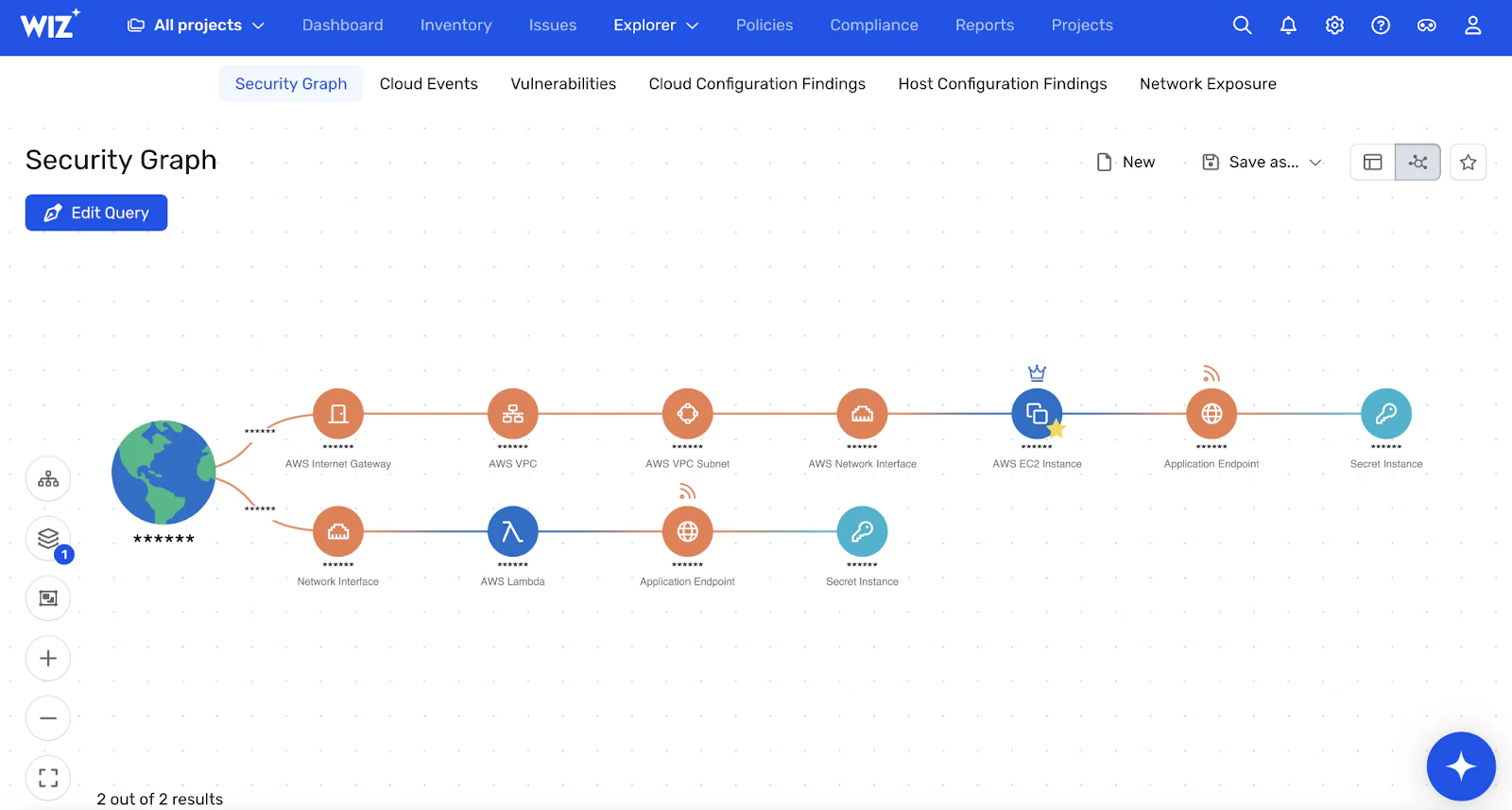
Wiz Security Graphは、このエージェントレススキャン得られたデータを用いて、環境の深く文脈化されたモデルを構築します。あらゆるリソース、権限、脆弱性、設定をマッピングし、実際の攻撃パスを生み出す「リスクの有害な組み合わせ」を分析。無数の孤立アラートの代わりに、本当に重要なクリティカル課題の優先キューを提示します。
Wiz は CSPM、CWPP、CIEM、DSPM など、従来は分断されていたツール群を単一のエージェントレスプラットフォームに統合します。また、双方向の「code-to-cloud correlation(コードからクラウドへの相関)」により、エージェントレススキャンで見つかったランタイムの問題を、該当するコードや作成した開発者までトレースすることが可能です。
この包括的なアプローチによって、ツール・スプロール(ツールの乱立)を解消し、クラウドリスクに関する「単一の信頼できる情報源」を提供します。迅速に展開で価値創出までの時間を短縮し、最大規模のクラウド環境まで無理なくスケールします。Wizのエージェントレススキャンがクラウドポスチャをどう変革するか、ぜひデモでご確認ください。
Watch 12-minute Wiz Cloud demo
Watch a recorded walkthrough of the Wiz platform and learn how to achieve full coverage across AWS, Azure, and GCP in minutes