
What is cloud infrastructure security?
Cloud infrastructure security is the practice of protecting the foundational cloud components that support workloads—compute, storage, databases, networks, and identity controls—to prevent unauthorized access and reduce exposure across cloud environments. It's a distinct subset of broader cloud security, which also covers application security, data governance, DevSecOps, and SaaS.
In practice, cloud infrastructure security combines provider-level physical protections with customer-managed controls like network segmentation, encryption, workload hardening, identity governance, and continuous monitoring to reduce risk from misconfigurations, exposed services, and excessive permissions.
AWS Security Best Practices [Cheat Sheet]
This cheat sheet provides actionable AWS security practices, code snippets, and expert recommendations to harden your environment.

Why is cloud infrastructure security important?
Cloud environments evolve far faster than traditional infrastructure, which makes consistent security harder to maintain: resources scale dynamically, configurations drift, and new deployments routinely introduce unintended exposures.
IBM's 2025 Cost of a Data Breach Report puts the global average breach cost at $4.44 million, and misconfigurations remain one of the leading causes of cloud incidents. A single exposed bucket, unsecured API, or overprivileged account can expose sensitive data within minutes. Cloud infrastructure security reduces these risks by improving visibility, monitoring configuration changes continuously, and surfacing exploitable attack paths before attackers can use them.
Take the Cloud Security Self-Assessment
Get a quick gauge of cloudsec posture to assess your security posture across 9 focus areas and see where you can do better.

Understanding the shared responsibility model
The shared responsibility model defines which security tasks belong to the cloud provider and which remain the customer's, and misunderstanding this division is one of the most common causes of security gaps in cloud infrastructure.
Cloud providers secure the cloud infrastructure (physical data centers, networking hardware, hypervisors, foundational platform services)
Customers secure everything deployed in the cloud (workloads, IAM, operating systems, APIs, data).
The split shifts by service model: in IaaS, customers manage OS patching, network controls, and workload security; in PaaS and SaaS, providers handle more of the stack, but customers still own identity, access, data classification, and compliance. Clear ownership matters because attackers routinely exploit the gaps where organizations assume the provider has them covered.
Key components of cloud infrastructure security
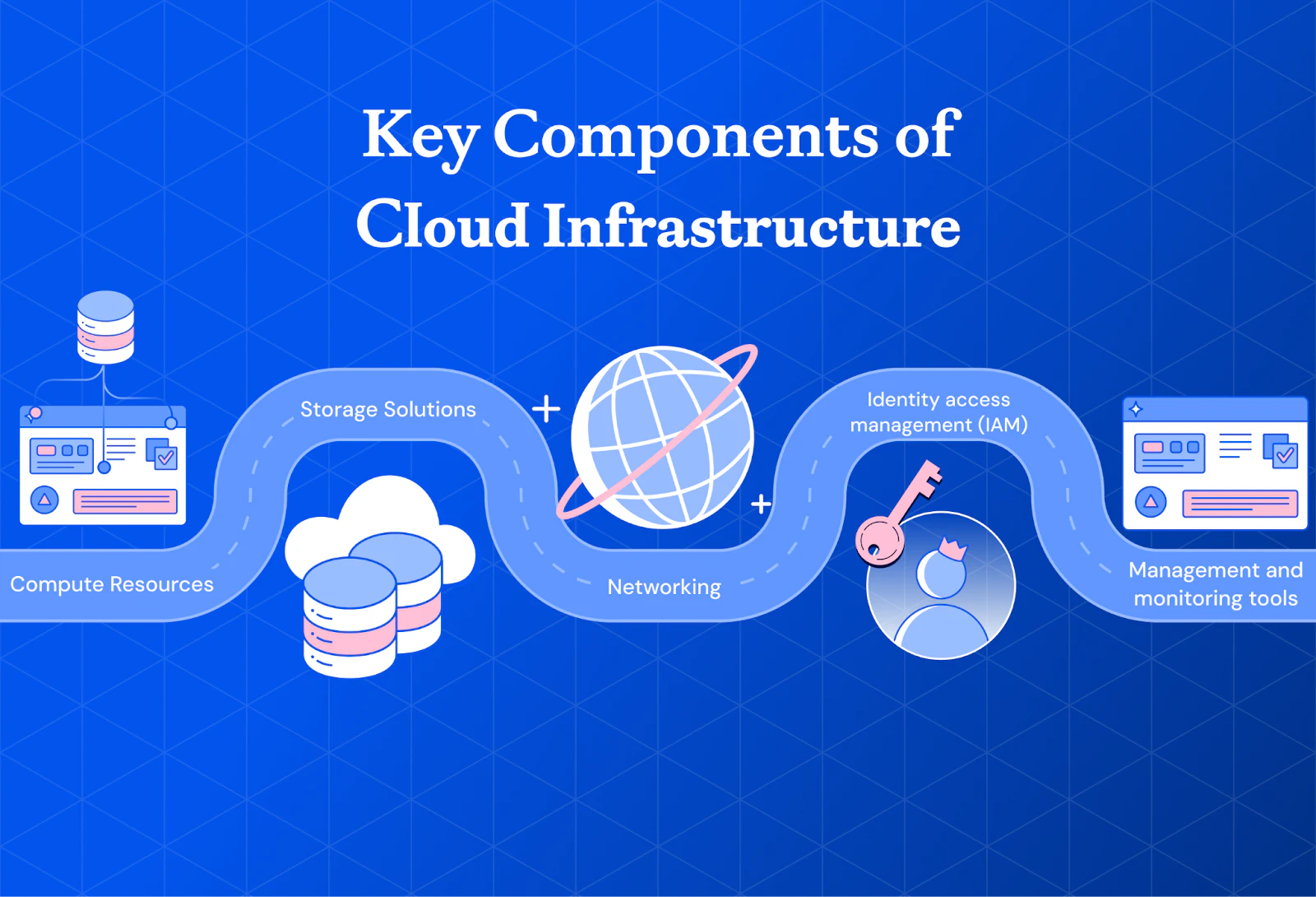
Effective cloud infrastructure security depends on protecting every layer of your environment, from workloads and storage to identity systems and monitoring tools. Each component introduces unique attack surfaces, security risks, and operational responsibilities that require continuous visibility and control.
| Component | Security Focus | Key Risks | Recommended Security Controls |
|---|---|---|---|
| Compute resources | Protect VMs, containers, and serverless workloads | Vulnerable workloads, exposed services, unpatched systems | Harden operating systems, automate patching, secure container images, and enforce runtime monitoring |
| Storage solutions | Secure object, block, and file storage systems | Public exposure, unauthorized access, and data leakage | Encrypt data, restrict public access, implement backup policies, and apply granular access controls |
| Databases | Protect sensitive structured data and database workloads | Credential theft, excessive privileges, unauthorized queries | Use IAM-based authentication, rotate credentials regularly, enable query logging, and apply zero-trust access policies to limit database exposure |
| Networking | Secure communication between cloud resources and users | Misconfigured VPCs, exposed ports, DDoS attacks | Segment networks, secure load balancers, restrict inbound traffic, and monitor network activity continuously |
| Identity and access management (IAM) | Control user and workload access across cloud environments | Excessive permissions, credential compromise, privilege escalation | Enforce least privilege access, require MFA, audit permissions regularly, and secure service accounts |
| Management and monitoring | Maintain visibility into cloud infrastructure activity and risks | Delayed threat detection, configuration drift, and limited visibility | Centralize logging, enable real-time alerting, automate monitoring, and continuously audit cloud configurations |
Each layer plays a critical role in reducing cloud infrastructure risk. Strong cloud security depends on maintaining consistent visibility, enforcing least privilege access, and continuously monitoring for configuration drift, exposed assets, and suspicious activity across multi-cloud environments.
Critical cloud infrastructure security risks
Cloud infrastructure faces specific risks that differ from traditional data center threats. Understanding these risks helps you prioritize security investments.
Misconfigurations: Incorrect cloud settings, often caused by human error, expose critical data and services to attack. A single misconfigured storage bucket or security group can create an entry point for attackers.
Insecure APIs: Unsecured application programming interfaces serve as entry points for attackers to access cloud-based data and services.
Poor IAM controls: Overly permissive identity and access management allows unauthorized users to reach sensitive resources. Excessive permissions create attack paths that are difficult to detect.
Data exposure: Sensitive data becomes exposed through improper configurations, inadequate encryption, or excessive permissions.
Lack of visibility: Without real-time insight into cloud activities, organizations cannot detect or respond to security threats effectively.
Compliance risks: Failure to meet regulatory requirements results in legal penalties and reputational damage, making continuous compliance monitoring essential.
Benefits of secure cloud infrastructure
Strong cloud infrastructure security delivers measurable outcomes beyond risk reduction.
Reduced attack surface: Proper configuration and access controls eliminate the low-hanging fruit that attackers target first.
Faster incident response: Automated monitoring and centralized visibility enable rapid detection and containment of security events, which is critical considering it still takes 73 days on average for organizations to contain an incident.
Scalable protection: Security controls that adapt as infrastructure grows prevent gaps from emerging during expansion.
Regulatory alignment: Consistent security measures simplify compliance with GDPR, HIPAA, SOC 2, and other frameworks.
Operational efficiency: Unified security tooling reduces the overhead of managing multiple point solutions across environments.
Cloud infrastructure security by cloud service model
As companies increasingly adopt cloud service models, balancing security with functionality is crucial. Each cloud service model presents distinct security challenges and requires tailored security strategies.
Platform as a service (PaaS)
PaaS provides tools for developers to build and deploy applications, making it vital to integrate security from the outset. Key best practices include:
Patch management: Automate platform software updates to ensure consistent patching and protect against exploits.
Data encryption: Secure data at rest and in transit with strong encryption to maintain confidentiality and integrity.
Software as a service (SaaS)
Since SaaS applications are online and widely accessible, safeguarding access and data is critical. Best practices include:
User access controls & MFA: Enforce multi-factor authentication and access controls to prevent unauthorized access.
Data backup & recovery: Regular backups and a disaster recovery plan ensure data restoration in case of failures or cyberattacks.
Secure API integrations: Audit and secure API connections to prevent potential data breaches.
Infrastructure as a service (IaaS)
In IaaS, users control virtual environments, so securing configurations and networks is paramount. Best practices include:
Secure VM configurations: Disable unnecessary services and apply security patches promptly.
Network security: Use firewalls and intrusion detection systems while routinely monitoring traffic to mitigate threats.
Vulnerability assessments: Conduct regular scans to identify and fix potential vulnerabilities.
While cloud models offer scalability and flexibility, they also introduce security challenges. Understanding and addressing these challenges with tailored measures will help keep your data and applications secure.
Watch 12-min demo
Learn what makes Wiz the platform to enable your cloud security operation

Types of cloud infrastructure security by cloud architecture
Different cloud architectures introduce different operational and security challenges. Public, private, and hybrid cloud environments each require tailored controls to maintain visibility, reduce risk exposure, and support compliance requirements across distributed infrastructure.
| Cloud Architecture | Primary Security Considerations | Common Risks | Recommended Focus Areas |
|---|---|---|---|
| Public cloud | Managing shared infrastructure exposure and internet-facing services | Misconfigurations, exposed workloads, compliance gaps | Continuous configuration monitoring, workload visibility, centralized IAM governance, and compliance management |
| Private cloud | Securing dedicated infrastructure and sensitive internal workloads | Insider threats, configuration drift, and limited scalability | Physical data center protections, workload isolation, regular security assessments, and operational consistency |
| Hybrid cloud | Maintaining consistent security across connected environments | Visibility gaps, inconsistent policies, and data residency challenges | Unified monitoring, centralized policy enforcement, secure workload portability, and governance across environments |
Your private cloud architecture directly impacts how security teams manage visibility, compliance, and operational risk. Organizations using hybrid or multi-cloud environments should prioritize centralized monitoring and consistent security governance to reduce blind spots across infrastructure deployments.
In short, your choice of cloud architecture greatly influences the security measures your organization should implement.
インフラストラクチャエンジニア:役割、責任、およびキャリアパス
インフラストラクチャエンジニアは、サーバー、ネットワーク、ストレージ、クラウドなど、アプリやビジネスオペレーションを支えるシステムの設計、構築、保守を行います。
もっと読む

The role of zero trust in cloud infrastructure security
Traditional security models rely on the "trust but verify" approach, which is no longer sufficient in today's cloud environments. The zero-trust model, based on the principle of "never trust, always verify," requires rigorous verification of every user, device, and application, treating all access requests as if they come from an untrusted source.
Here are three key ways zero trust enhances cloud security:
Strict user access controls: Unlike perimeter-based security, zero trust enforces access controls consistently, whether users are on-premises, remote, or using a public cloud, ensuring internal resources remain protected.
Continuous monitoring: Zero trust requires real-time monitoring of network traffic to detect and respond to anomalies, mitigating potential threats swiftly.
Micro-segmentation: By isolating workloads into secure zones, micro-segmentation limits lateral movement within the cloud, reducing the impact of breaches.
Zero trust provides a proactive, holistic approach to cloud security, continuously verifying access and monitoring threats to keep environments secure.
Gartner offers a guide for security and risk management leaders looking to protect networks, endpoints, and infrastructure as a service. This primer is especially relevant for enterprises undergoing a transformative period for their digital infrastructures as the threat landscape evolves.
How to secure cloud infrastructure: 8 best practices
1. Regularly update and patch
Unpatched systems remain one of the most exploited attack vectors in cloud environments. Automate patching wherever possible and integrate vulnerability scanning into your CI/CD pipeline to catch issues before deployment. The code snippet below is used to update the package lists for packages that need upgrading, as well as new package installations:
sudo apt-get update
sudo apt-get upgrade
For containerized workloads, rebuild images with updated base images rather than patching running containers. This approach maintains consistency and ensures patches persist across deployments.
2. Implement multi-factor authentication
MFA prevents unauthorized access even when credentials are compromised. Enable it for all accounts with access to cloud management consoles, and prioritize hardware tokens or authenticator apps over SMS-based verification.
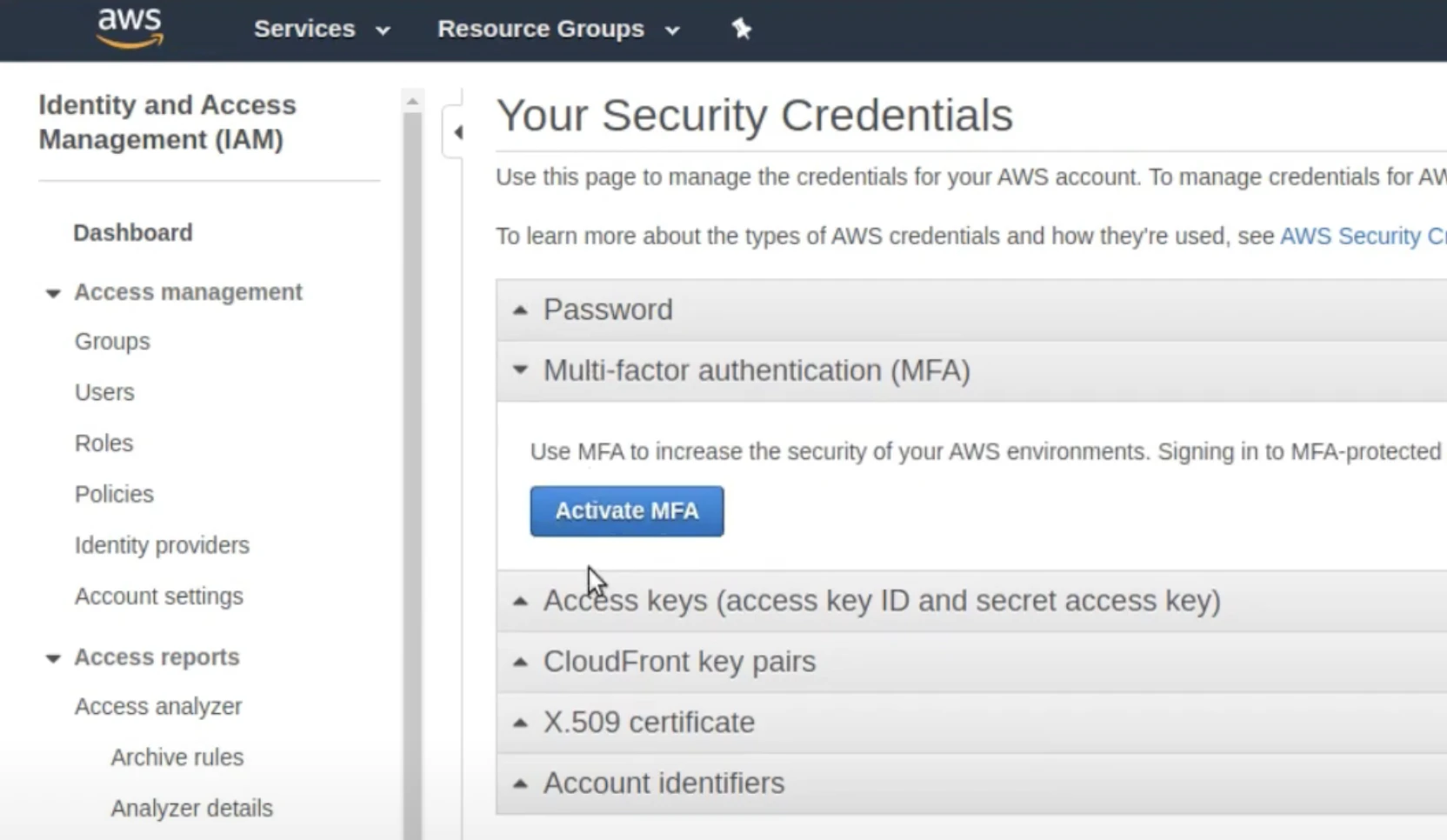
Enforce MFA at the identity provider level to ensure consistent protection across all cloud services. For privileged accounts, consider requiring MFA for every session rather than relying on remembered device tokens.
3. Encrypt data at rest and in transit
Encryption is crucial in protecting your data at rest and in transit to ensure confidentiality and integrity. Employ solutions such as AWS Key Management Service (KMS) or Azure Key Vault to administer your application's cryptographic keys.
Here's a simple Python code snippet to retrieve a key from Azure Key Vault using the Azure SDK for Python:
from azure.identity import DefaultAzureCredential
from azure.keyvault.keys import KeyClient
key_client = KeyClient(vault_url="https://my-key-vault.vault.azure.net/", credential=DefaultAzureCredential())
key = key_client.get_key("my-key-name")
When encrypting data at rest, use encryption algorithms like AES-256 to enhance security. For data in transit, utilize protocols such as Transport Layer Security (TLS) to safeguard against eavesdropping and man-in-the-middle attacks.
By holistically securing data, you can greatly reduce the risk of unauthorized access and data breaches, reinforcing your customers' trust in your cloud solutions.
4. Set up continuous monitoring and auditing
Continuous monitoring and auditing protect your cloud infrastructure in real-time by quickly detecting security issues. This approach sends immediate alerts for unusual activities, enabling a fast response to potential threats.
Regular audits are crucial in maintaining compliance with industry standards. They help verify that your infrastructure remains secure and adheres to ever-evolving regulations. Automated tools facilitate these processes, making it easier to keep your cloud environment secure and compliant.
5. Regularly back up data
Schedule automatic backups for your databases hosted in cloud services like Amazon RDS or Microsoft Azure SQL Database.
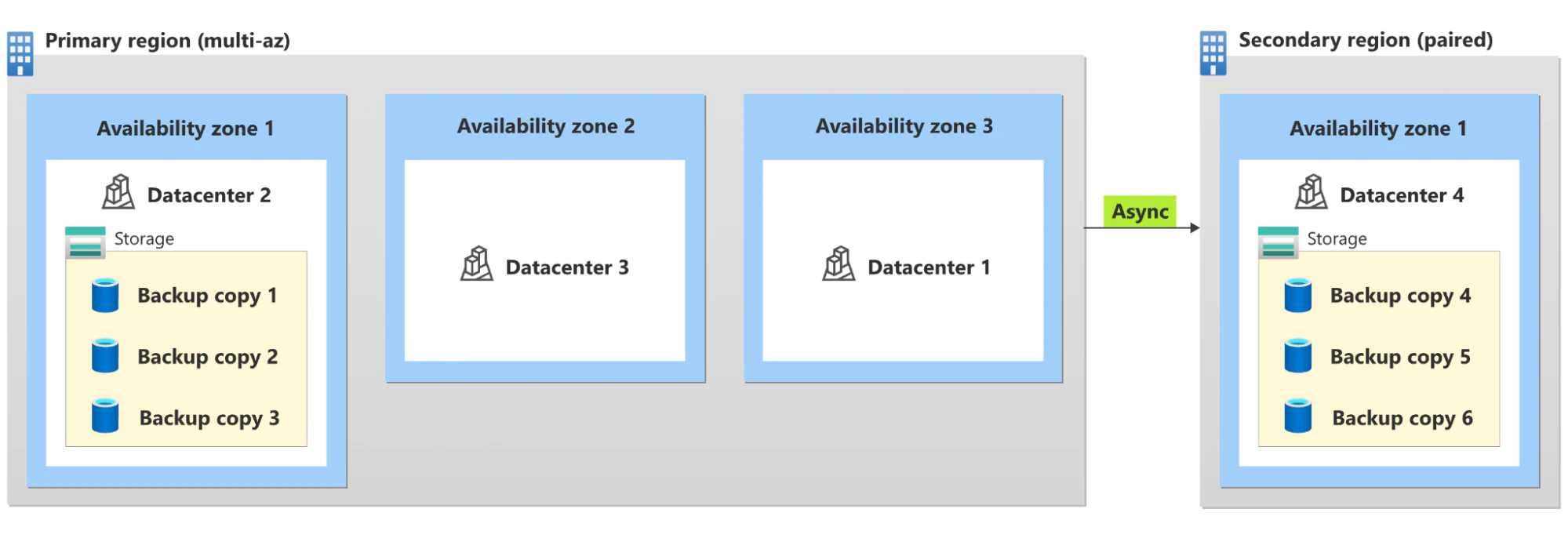
Some best practices for scheduling backups are:
Automate backups: Automate backups to occur during off-peak hours to minimize disruption.
Include incremental backups: Use incremental backups to save storage space and reduce time.
Create redundant storage: Ensure backups are stored in multiple locations to add redundancy.
Conduct backup integrity testing: Regularly test backup integrity to ensure you can restore data correctly.
6. Implement least privilege access
Establishing least privilege access reduces your attack surface by limiting user access to only what they need. You can reduce the risk of unauthorized access and incidents with a solid identity and access management (IAM) system that helps control access effectively.
7. Develop and update an incident response plan
Start by defining clear incident response roles and responsibilities so everyone knows their part in an emergency.
Your incident response plan should mandatorily include these six elements:
Preparation: Conduct regular training sessions and simulations to keep your team ready.
Identification: Utilize cloud monitoring tools to detect unusual activities that could indicate a breach.
Containment: Have predefined procedures for isolating affected systems to prevent further damage.
Eradication: Establish a detailed plan for removing the threat from your environment.
Recovery: Outline steps to restore normal operations safely and efficiently.
Post-incident review: Regularly update your plan based on lessons learned from incident reviews.
8. Educate employees
Conduct frequent training workshops on cloud security protocols and threat identification. For instance, discuss how to spot and respond to fraudulent emails masquerading as legitimate cloud service providers requesting password verification or updates.
Additional strategies for educating staff on cloud security threats and protocols include:
Conducting regular training sessions: Plan and execute routine sessions to keep employees updated on the latest security practices and emerging threats.
Using interactive training modules: Use interactive e-learning modules that engage employees and test their knowledge of cloud security fundamentals.
Integrating phishing simulations: Implement phishing simulations to train staff in identifying and handling phishing attempts effectively.
Establishing clear guidelines and policies: Establish and communicate comprehensive security policies, ensuring employees understand their role in maintaining security.
Cloud security is a shared responsibility. While cloud providers ensure the security of the cloud, customers are responsible for the security of their data and configurations in the cloud.
Secure your cloud infrastructure with Wiz
Fragmented security tools often create operational blind spots. When vulnerabilities, identity risks, misconfigurations, exposed secrets, and sensitive data exist across disconnected dashboards, security teams spend valuable time correlating findings instead of prioritizing real threats.
Wiz unifies these signals into a single security graph that maps toxic combinations and attack paths across AWS, Azure, GCP, Kubernetes, and cloud-native applications. With agentless scanning, organizations gain complete visibility without deployment complexity or performance overhead. Security teams can quickly identify exploitable risks, while developers receive contextual remediation guidance directly within workflows.
As AI adoption accelerates, Wiz also helps secure AI pipelines, model configurations, training datasets, and AI services alongside traditional cloud infrastructure.
See how unified cloud and AI security visibility can reduce risk faster by scheduling a Wiz demo tailored to your environment.
A single platform for everything cloud security
Learn why CISOs at the fastest growing organizations choose Wiz to secure their cloud environments.
