TL;DR
OAuth applications in Microsoft Entra ID are a common persistence and privilege escalation mechanism used by attackers.
Because OAuth apps are frequently created, modified, and forgotten, malicious applications often blend in with legitimate business integrations.
By analyzing known OAuth attack campaigns across multiple environments, we developed OAuth Apps Scout - a proactive detection pipeline that automatically surfaces emerging malicious OAuth applications, and has so far helped us identify many malicious apps across dozens of affected organizations.

Would you click "Accept" on this application?
This app looks like a standard Microsoft prompt, but there’s a catch: the name starts with a zero, not the letter O.
After finding this homoglyph attack in the wild, we started investigating. It quickly led to something much larger. The trail ended with over 20 companies impacted across three distinct malicious OAuth App campaigns. It highlights a common gap in how Azure service principals are managed.
What are Oauth Applications and what is Consent?
A Microsoft Entra application starts with a single application object, which lives in the tenant where the app was originally registered (its “home” tenant). That application object acts as a blueprint: whenever the app is used in another tenant, Entra creates a corresponding service principal there.
In other words, you can think of an OAuth application like a third-party contractor you hire to work on your house. You wouldn't give them your master key (your password), instead, you give them a specific badge (set of permissions) that only lets them into the kitchen and the basement.
In the world of Azure, Consent is that badge. When you see a prompt asking for permission to access your profile or files, clicking "Accept" is telling Azure: "I trust this developer enough to give them this specific set of permissions."
From Global App to Local Identity
This is where it gets interesting for security teams. Most of the apps you use, like Microsoft Teams, don’t actually "live" inside your environment. They are hosted inside the developer’s (i.e. Microsoft) Azure environment.
But for Teams to function within your specific company, your Azure tenant needs a way to recognize and manage it locally. This creates a two-part relationship:
The Application Object: The global "blueprint" of the app that lives in the developer's home tenant.
The Service Principal: Your local "instance" of that app.
As shown in the diagram below, while there is only one global Application ID for Teams, every company that uses it has their own unique Service Principal ID.

The Risk of Azure OAuth Applications
The danger lies in the fact that most of us have "consent fatigue". We see a pop-up, we want to get to work, and we click "Accept" before our brain even registers what we’re looking at. An attacker counts on this. They give their malicious app a legitimate-looking name and wait for an uneducated or rushed user to just open the door for them. Here is how this can be done:
1. Creating the Fake App
First, an attacker creates an application in their own Azure environment. They give it a name that looks legitimate, like "Adobe", to make it look like a trustworthy application. To reinforce the illusion of trust, the actor can configure a familiar logo and specify a homepage URL that looks legitimate.
2. Phishing for a sign-in
The attack’s success depends on a person making a choice, signing in to the app. The attacker sends out a phishing email, perhaps telling the user they need to "update their Adobe settings" or "verify their account". The goal is to get the user to click a link and land on a real Microsoft sign-in page.
3. Getting Consent
After the user signs in, they see a prompt asking for permission to access their data. Because the app name and logo look legitimate, the user often clicks "Accept". By doing this, the user is accidentally "adding" the attacker's app into their company's tenant. As you can see in the diagram, this creates a new Service Principal (a local instance) inside the victim’s tenant, even though the attacker still controls the global application.
4. Capturing Access
Once "Accept" is clicked, the sign-in process is complete. But instead of going to a normal landing page, the access token is sent to the attacker’s Redirect URL. With that token, the attacker now has access to the user's files or emails without ever needing to know their password.
5. Enabling Persistency
As mentioned above, by granting consent, the victim tenant creates a Service Principal for the attacker-controlled application. This Service Principal persists independently of the user’s session and credentials, allowing the application to continue accessing resources as long as the granted permissions remain valid. Unlike traditional credential theft, this access survives password resets, MFA enforcement, and even user offboarding, unless the OAuth grant or Service Principal is explicitly removed.

A Manual Hunt Begins
At this point, it’s clear that malicious OAuth applications represent a real and persistent risk, in part because they closely resemble legitimate SaaS integrations and are difficult to assess in isolation - it’s difficult to know at a glance if an app is malicious or not. With that in mind, we analyzed multiple real-world malicious OAuth applications to understand what distinguishes them from benign ones, and whether those differences could be leveraged to systematically identify other malicious apps.
One illustrative example is an application that presents itself as a DocuSign integration. Although the application appeared legitimate on its own, evaluating it in a broader context revealed multiple red flags compared to the actual legitimate DocuSign app:
Application Name - the malicious app’s name closely mimics the well-known SaaS service and looks completely legitimate. However, the application was published by an unverified entity, providing no strong linkage to the brand it claimed to represent
Publisher verification - the legitimate application is publisher-verified, whereas the malicious application is not.
Homepage - the malicious app does not specify a homepage, while the legitimate app is configured with the official homepage.
Unrelated or suspicious reply URL - the redirect URI of the malicious app pointes to infrastructure unrelated to the claimed service and in this case also uses a free hosting subdomain.
Unusual application owner name and domain - The owning tenant and associated domains did not align with the purported service, further weakening the legitimacy of the application. In some cases, we have reason to believe that legitimate websites were hijacked by the threat actor.
The app prevalence - the real DocuSign app can be found in use by many organizations, whereas the malicious one could only be found in a handful of environments

From Research to Tooling: Operationalizing OAuth App Detection
After manually investigating several malicious applications, we wanted to translate those insights into an automated pipeline capable of proactively detecting future malicious activity. The result is a multi-stage analysis pipeline that incrementally enriches OAuth application data, reduces noise, and enables both newly-observed detection of suspicious applications and cross-environment pivoting to uncover attacker activity.
The pipeline consists of four main stages:
1.Extraction and Establishing the baseline
We start by ingesting OAuth applications observed across environments, focusing on third-party integrations. From this data, we establish a baseline of commonly observed application IDs and names and filter out those that appear broadly across environments, as they are more likely to represent legitimate SaaS services. This baseline is reused in later stages to identify applications that mimic or deviate from known integrations. For the remaining applications, we extract the key characteristics needed for comparative analysis.

2. Enrichment
Each discovered application’s metadata is enriched with additional context to better assess its legitimacy and risk. This enrichment process incorporates multiple signals, including:
Application name analysis - application names are compared against the baseline of commonly observed names identified in the discovery stage to detect potential masquerading or brand impersonation attempts
Homepage URL evaluation - homepage URLs are examined to identify empty, placeholder, or suspicious pages, and are cross-referenced with DNS information to assess domain legitimacy
Reply URL analysis - redirect URIs are analyzed to extract domain ownership and DNS characteristics, helping identify infrastructure that is unrelated to the claimed service
Ownership and publisher context - publisher names, tenant IDs, and associated domains are enriched to provide insight into the entity operating the application.
Adoption and permission usage - tenant distribution and the permissions requested by the application are included to understand how the application is used in practice and to highlight anomalous or high-risk behavior.

3. Decision and Prioritization
To prioritize OAuth applications for investigation, we apply a weighted scoring mechanism across the enriched signals. Rather than relying on a single indicator, the model combines multiple weak signals such as unusual permission usage, low tenant prevalence, name similarity to known integrations, and suspicious reply or homepage URLs - to assign a risk score to each application. This scoring approach helps surface applications that warrant closer inspection while reducing noise from benign integrations that may exhibit one anomalous trait in isolation.
4. AI-Assisted Contextual Evaluation
During our analysis, we found that some aspects of OAuth application assessment are inherently contextual. Indicators such as whether a reply URL aligns with the claimed service, or whether an owning domain makes sense for a given application name, are difficult to evaluate using strict rules alone. To address this, we incorporated an AI-assisted evaluation step that considers the application’s metadata holistically. This step helps assess the overall plausibility of the application by reasoning over relationships between signals, rather than evaluating each signal in isolation.
5. Pivoting and Campaign Discovery
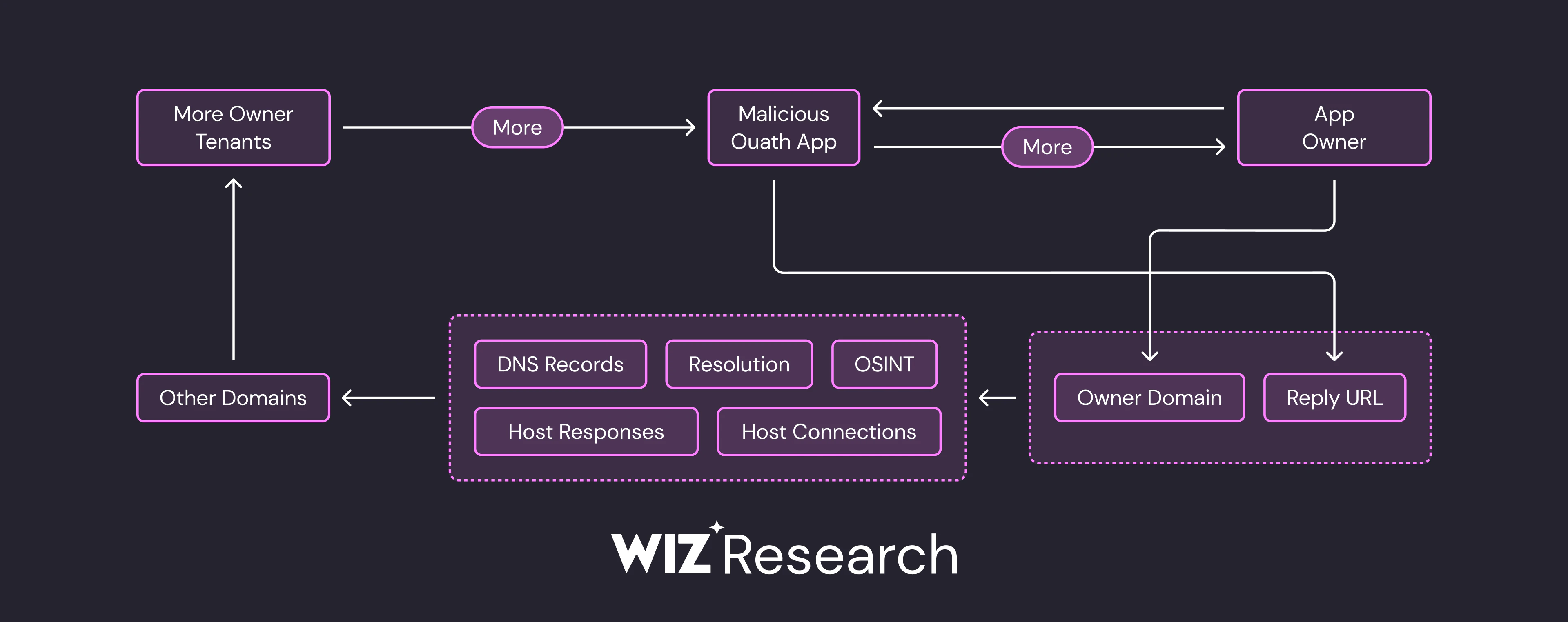
Finally, the pipeline enables pivoting across shared indicators such as reply URLs, ownership domains, application metadata, and naming conventions. By correlating these signals across environments, we are able to cluster related OAuth applications and identify coordinated attacker campaigns operating across multiple organizations. This shifts the focus from isolated detections to campaign-level visibility, providing deeper insight into how attackers reuse and adapt OAuth applications in the wild.
Identifying Malicious OAuth Patterns in the Wild
As a concrete example of the malicious OAuth activity we see in the wild, our detection pipeline identified a large-scale campaign active in early 2025. The campaign involved 19 distinct OAuth applications impersonating well-known brands such as Adobe, DocuSign, and OneDrive, and targeted multiple organizations. The same campaign was independently reported by the Proofpoint research team. Across the apps, we observed clear signs of coordination, including infrastructure reuse - most notably shared reply URLs and placeholder or empty home pages.
The attack flow relied on luring users into granting OAuth consent to fake document-sharing applications, allowing attackers to obtain long-term access without triggering MFA or anomalous login alerts. Once consent was granted, the attackers were able to read user emails and files, maintain access through delegated permissions, and exfiltrate data without generating suspicious authentication activity. A list of indicators of compromise (IOCs) associated with this campaign is provided at the end of this blog.

The Evolution of Attacker Stealth: 2019 vs. 2025
While our model surfaced meaningful results from the previous year, we wanted to assess how far back this trend extends. Given that OAuth applications are known to be abused over long periods, we evaluated our model on data from earlier years.
This led us to detect seven additional malicious applications dating back to 2019. These apps utilized Cyrillic homoglyphs, replacing Latin characters with visually identical non-Latin letters, to mimic legitimate Microsoft services.
Commonly Spoofed Apps (2019):
ОпeDrive for Business (Uses Cyrillic "п")
Sharеpoiпt Cloud (Uses Cyrillic "п")
Мicгoѕоft. Сloud App Ѕесuгity (Uses Cyrillic "г")
These homoglyph apps were found in use across more than 50 organizations, highlighting a long-term gap in traditional detection methods.
2025: A Shift in Strategy
When we compare these legacy campaigns to our latest findings in 2025, the evolution in attacker tradecraft is clear. Attackers have moved away from spoofing Microsoft itself and are now leveraging the trust of third-party productivity tools like Adobe and DocuSign.
The modern attacker is significantly stealthier. They have traded "obvious" typosquatting for sophisticated URL structures and legitimate-looking SaaS platforms to host their redirect points.
Comparative Analysis: Tactical Evolution
| Feature | 2019 (Homoglyph) | 2019 (Obvious) | 2025 (Modern) |
|---|---|---|---|
| App Name | ShaгеPoint Cloud | 0365 Access | DocuSign |
| Target Brand | Microsoft | Microsoft | Third-Party (DocuSign/Adobe) |
| Reply URL | sharepoint.microzoftonline.com | officemtr.com:8081/office | ynapaletsteamworkspace.myclickfunnels.com/ |
| Stealth Level | Moderate (Visual) | Low | High (Contextual) |
Key Takeaways for Defenders
Detecting malicious OAuth applications is achievable, and should therefore be a critical pillar of modern identity security. While the transition from 2019’s "Microsoft-cloning" to 2025’s "SaaS-impersonation" shows that attackers are evolving, they are not invisible. They still operate within the constraints of the OAuth protocol, which requires them to leave detectable traces.
The "Breadcrumbs"
Even the most sophisticated attackers leave identifiable marks across these four vectors:
Application Metadata: Traditional strategies for detecting phishing are just as applicable to OAuth apps; look for names that imply urgency or mimic trusted tools.
Reply URLs: Analyze the redirect URI. Attackers often hide their landing pages on trusted SaaS platforms like ClickFunnels or GitHub Pages to bypass security filters. Since these platforms are used by many legitimate businesses, security tools can’t easily block them without causing major disruptions. This is a common behavior, previously documented by other security companies, including CheckPoint, Infosecurity and iZOOlogic
Requested Scopes (Permissions): High-risk permissions like
Mail.Reador Files.ReadWrite.Allshould always trigger an alert, especially when requested by an external, non-verified publisher.Infrastructure: Every malicious app is tied to a source tenant and a verified (or unverified) domain. Understanding the Tenant’s details and the reputation of the associated domain is vital.
Actionable Defense Strategies
We believe the detection model discussed in this post can be implemented by any resourceful blue team today. To strengthen your posture, we recommend a multi-layered approach:
Restrict User Consent: Limit the ability of non-admin users to grant consent to apps from unverified publishers.
Inventory & Audit: Regularly export and review a list of all OAuth grants in your environment. Look for apps that are consented by only 1 or 2 users, these "low-prevalence" apps are often the result of targeted phishing.
Monitor "First-Time" Apps: Alert on any app that is seen in your tenant for the first time, especially if the reply URL doesn't match a known enterprise service.
Baseline Reply URLs: Use regex or threat intelligence feeds to scan Reply URLs for suspicious strings or known malicious hosting patterns.
Attackers are counting on your trust in familiar names to go unnoticed. This model shifts the power back to the defenders, proving that even the stealthiest application leaves a trail if you know where to look.
IOCs
| Name | App ID | Owner tenant ID | Owner tenant domain | Reply URLs | Last seen |
|---|---|---|---|---|---|
| Adobe | c4d0b015-689a-4bcf-b69b-3ed5005fddb6 | 9c036328-3aba-4d35-aceb-6456f9420b31 | thermion.se; thermionse.mail.onmicrosoft.com; thermionse.onmicrosoft.com | ["https://adobe.mareanebulosasao.it.com/WOWFM"] | 2025 |
| a69a0f78-a77c-451c-b090-b766425caee2 | 31aca3e6-069d-4baa-89b7-6502006fe99e | lnsrc.org; lnsrclub.onmicrosoft.com | ["https://topboysteamworkspace.myclickfunnels.com/sahreddocumentfile"] | 2025 | |
| Adobe | 58427324-4e5d-4441-b029-cd2d532b47d7 | 619849e9-5192-4c3f-b0f3-8469980c3958 | nceconomicresourcecouncil.onmicrosoft.com; ncerc.org | ["https://jaimereintsteamworkspace.myclickfunnels.com/securedfile"] | 2025 |
| Adobe | 706e0542-2dfb-4e7f-98f0-1e17eab6d5b8 | d8320d6d-7982-471e-965c-d001308ed36e | times-7.com; times7research.onmicrosoft.com | ["https://emircoms.com/auto"] | 2025 |
| Docusign | fdcf7337-92bf-4c70-9888-ea234b6ffb0d | bb42fc45-200e-4b7b-a63b-70bbdf1c83ec | ceyanos.info; ceyanos.onmicrosoft.com | ["https://kimharrysteamworkspace.myclickfunnels.com/securedocument"] | 2025 |
| Teams Task Planner | a8ca8dad-f6e6-4b01-9d6b-02e1da6c9d7f | 3a4f221b-5c4b-4665-9f7d-2ee498224e66 | wallsofttech.com; wallsofttech.onmicrosoft.com | ["https://emircoms.com/auto/apc.html"] | 2025 |
| docsign | 6a77659d-dd6f-4c73-a555-aed25926a05f | 619849e9-5192-4c3f-b0f3-8469980c3958 | nceconomicresourcecouncil.onmicrosoft.com; ncerc.org | ["https://jaimereintsteamworkspace.myclickfunnels.com/doc"] | 2025 |
| DocuSign-2025 | f99a0806-7650-4d78-acef-71e445dfc844 | 3a4f221b-5c4b-4665-9f7d-2ee498224e66 | wallsofttech.com; wallsofttech.onmicrosoft.com | ["https://emircoms.com/auto/apc.html"] | 2025 |
| Docusign | 6628b5b8-55af-42b4-9797-5cd5c148313c | b25911e3-9339-4019-90ed-b263339449bc | levenospenkozhotmail.onmicrosoft.com | ["https://embeds.beehiiv.com/2066d619-1342-40ba-893d-6d0e6eee70d5"] | 2025 |
| DocuSign | a3903ccd-ec81-4264-8f6a-a7d4cd395fd5 | e297c7b7-297d-4261-a849-e11e0f2bb10f | cooltekinc.com; cooltekllc.com; cooltekllc.onmicrosoft.com | ["https://myworkspacefea7ffc776.myclickfunnels.com/httpsoutlookofficecom"] | 2025 |
| Adobe | c52517b0-46eb-4d61-975a-771d9978dac0 | a205f03e-e6ab-412e-a1f9-360f848b3705 | anchorsgordon.com; anchorsgordon.onmicrosoft.com | ["https://kimharrysteamworkspace.myclickfunnels.com/sharedfil"] | 2025 |
| adobe | b0d8ea55-bc29-436c-9f8b-f8829030261d | 0648fcb2-de2a-4a11-bd97-872c9b1a452b | damiongosamemorialfo.onmicrosoft.com; dgm-f.org | ["https://workspacesteamworkspace.myclickfunnels.com/offices--af295"] | 2025 |
| Users | 21f81c9e-475d-4c26-9308-1de74a286f73 | 69168d16-9597-47a2-a4eb-a81900185529 | fpwd.com; netorgft8261298.onmicrosoft.com | ["https://myworksspace.myclickfunnels.com/office365com--5b652"] | 2025 |
| sharedoc | 48cb1fac-7195-47b3-98b2-fe3562bee75c | 619849e9-5192-4c3f-b0f3-8469980c3958 | nceconomicresourcecouncil.onmicrosoft.com; ncerc.org | ["https://nmcunhasteamworkspace.myclickfunnels.com/secured-sharepoint-document"] | 2025 |
| Adobe Drive X | 85da47ec-2977-40ab-af03-f3d45aaab169 | 5fddfbb7-41a3-4bbe-b98c-29827d092e19 | ["https://fancy-bush-61e9sydgsyi29s.jennifer-may.workers.dev/"] | 2025 | |
| Adobe | 5037c1a6-7cfc-48b5-b887-f2a045937081 | 0648fcb2-de2a-4a11-bd97-872c9b1a452b | damiongosamemorialfo.onmicrosoft.com; dgm-f.org | ["https://workspacesteamworkspace.myclickfunnels.com/office365--4c3dc"] | 2025 |
| Adobe Drive | 14b2864e-3cff-4d33-b5cd-7f14ca272ea4 | 5fddfbb7-41a3-4bbe-b98c-29827d092e19 | ["https://li.tistateronic.ru/OqgX/"] | 2025 | |
| MyMail Settings | b7cb9a9b-ddc9-4444-935b-1122733c97c4 | 2c08ab0d-eed9-4034-bfb7-765c52eceef9 | 2019 | ||
| 0365 Access | fc5d3843-d0e8-4c3f-b0ee-6d407f667751 | 2c08ab0d-eed9-4034-bfb7-765c52eceef9 | 2019 | ||
| ОпeDrive for Business | 3280b1dc-4b64-4f90-a16a-b0804e6ec4ca | a4afdac5-f28f-4161-87c4-b5f7625bc048 | epsilonservices.onmicrosoft.com | 2019 | |
| Sharеpoiпt Cloud | 482fb03a-5218-43c2-8ce6-61956c7ca99b | 0c05c65c-d311-4821-aa22-46b8abec59d5 | generalimports.onmicrosoft.com | 2019 | |
| OneDгive for Business | c7121e86-fe4d-4dbd-b5f3-e61a62ee533a | a4afdac5-f28f-4161-87c4-b5f7625bc048 | epsilonservices.onmicrosoft.com | 2019 | |
| Мicгoѕоft. Сloud App Ѕесuгity | 626b6813-13dc-45d7-abfe-a7fe09fd5276 | 0c05c65c-d311-4821-aa22-46b8abec59d5 | generalimports.onmicrosoft.com | 2019 | |
| ОneDгive for Business | 443efa1c-8a0a-47a0-bd31-7c30fe32dee4 | 0c05c65c-d311-4821-aa22-46b8abec59d5 | generalimports.onmicrosoft.com | 2019 | |
| ShaгePoint Online | a43a3d51-c821-4b86-9a63-fbc775120fc2 | eac37962-c0fa-45a7-99cc-ba9d1c921e18 | bld.group; creiamc.com; creicapital.com; ekistruct.com; greenpole-ps.com; ieng-group.com; ieng.group; ienggroup.onmicrosoft.com; kkodd.co; noknok-inc.co; noknok.co; noknokgroceries.com; twothirtythree.co | 2019 | |
| ShaгеPoint Cloud | 0bd8e698-4298-405a-bc6b-da5647a4616b | a4afdac5-f28f-4161-87c4-b5f7625bc048 | epsilonservices.onmicrosoft.com | 2019 | |
| ShaгePoint Online | 768a57a0-1c5e-477a-939a-63aebf2e5ecf | cbe2bfff-e8d1-464d-bb32-a952e68be197 | aquaphalts.com; dustdevilbaseball.com; experienccolumbiasc.com; killlpack.com; ledconsultinglc.com; mediabrushmarketings.com; michaelselectrics.com; summitcountysco.com; wgarnett.com; wgarnettassociates.onmicrosoft.com | 2019 | |
| ShaгePoint Online | 4e4d64ac-4a2a-432c-b79e-65ca8213ede5 | 44383e2a-62c5-4d54-ae60-8cdbba60e3b7 | 2019 |