

Azure security best practices are the identity, network, data, and governance controls that keep your subscriptions safe as they grow. In practice, that means working across IAM roles, network security groups, PaaS configurations, and services that change constantly.
As your Azure environment grows, it becomes more important to see how risks connect across subscriptions and regions.
Staying secure in Azure demands more than just enabling built-in controls. It requires continuous visibility, contextual risk prioritization, and a strategy that scales with cloud speed.
How Azure security best practices fit the shared responsibility model
Azure security foundations are the controls you build in from the first code commit through deployment, rather than add after workloads go live. Use infrastructure as code to integrate security directly into your Azure environment, including software supply chain protections.
Azure Security Best Practices [Cheat Sheet]
Explore detailed aspects of Azure best practices, from role-based access control (RBAC) to cloud security posture management, that you can adapt to secure your Azure subscriptions.

Under the shared responsibility model, what your team secures depends on the deployment model:
IaaS: You manage OS security, network security, application security, and identity protection.
PaaS: Azure handles infrastructure security while you focus on securing applications and data.
Six pillars form the backbone of Azure security, and each maps to the Zero Trust principles of verifying explicitly, using least privilege, and assuming breach:
Identity and access management (IAM): Controls who can access your resources and what they can do
Network security: Defines how traffic flows between resources and the internet
Data protection: Encrypts and safeguards sensitive information at rest and in transit
Logging and monitoring: Tracks activities and detects anomalies in real time
Governance and compliance: Enforces policies and maintains regulatory alignment
Application and workload security: Protects VMs, containers, APIs, and code running in Azure
Azure landing zones, management groups, and frameworks like the Microsoft cloud security benchmark (MCSB) and Cloud Adoption Framework set the structure and policy foundation you need before deploying workloads. For SEC-registered firms, that groundwork doubles as exam prep, since the SEC’s fiscal 2027 priorities include access controls, account management, and incident response protocols.
What are the most important Azure security best practices?
Prioritize identity, logging, and network security first, then harden data protections and operational processes. Here’s the checklist at a glance:
| Practice | Risk it closes | First action |
|---|---|---|
| 1. Azure Policy and Defender for Cloud | Configuration drift | Apply deny and deploy-if-not-exists policies |
| 2. Integrate native security controls | Gaps in baseline coverage | Enable Defender for Cloud on all subscriptions |
| 3. Entra ID conditional access and RBAC | Stolen or overprivileged credentials | Enforce MFA for every user with Azure access |
| 4. Enable JIT VM access | Exposed management ports | Enable JIT on internet-facing VMs |
| 5. Key Vault and Managed HSMs | Leaked or mismanaged keys | Rotate customer-managed keys on a schedule |
| 6. NSG and ASG segmentation | Lateral movement | Remove "allow all" NSG rules |
| 7. Sentinel threat hunting | Attacks that go unnoticed | Review access logs for unusual patterns |
| 8. Deploy defense-in-depth | Single points of failure | Map current controls to each layer |
| 9. Cloud Adoption Framework alignment | Unclear ownership and skills gaps | Run a RAMP skills gap assessment |
1. Define your Azure security posture with Azure Policy and Defender for Cloud
New attack patterns emerge constantly, so keep your Azure security posture current with Azure Policy and Microsoft Defender for Cloud. Azure Blueprints entered phased retirement on July 31, 2026, and retires fully on January 31, 2027. Governance workflows now belong in Azure Policy and Deployment Stacks.
Azure Policy enforces security rules at scale. Use built-in definitions to block non-compliant configurations before deployment, and assign initiatives to management groups so guardrails cover every subscription.
Defender for Cloud tracks posture continuously against the MCSB, and its secure score rolls findings across subscriptions into one number. Defender CSPM’s paid tier adds attack path analysis, risk prioritization, and AI security posture management.
To prevent drift:
Use Azure Policy's [deny] and [deploy if not exists] effects to prevent misconfigured resources from reaching production.
Set up Azure Monitor alerts for configurations that drift from your security baseline.
Create a weekly review cadence where teams fix top Defender for Cloud recommendations, starting with those that most affect your secure score.
Document your remediation workflow so everyone knows who owns which type of security issues.
Wiz extends this process across your entire multicloud environment, correlating findings from Azure, AWS, GCP, and beyond into a single prioritized risk view. Your team can stop context-switching and begin focusing on your full exposure.
2. Integrate Azure’s native cloud security controls
Azure’s built-in controls are your quickest wins, giving you a first line of defense from day one:
Microsoft Defender for Cloud for threat detection
Azure Firewall for network security
Microsoft Entra ID for IAM
Together, they set a baseline against network infiltration and known vulnerability exploitation. Then map application requirements to Azure’s security capabilities:
Enable Microsoft Defender for Cloud across all subscriptions and configure email notifications.
Review and tune Azure Firewall rules quarterly to remove unnecessary access.
Audit Entra ID permissions monthly to ensure no privilege creep has occurred.
3. Harden Entra ID with conditional access and RBAC
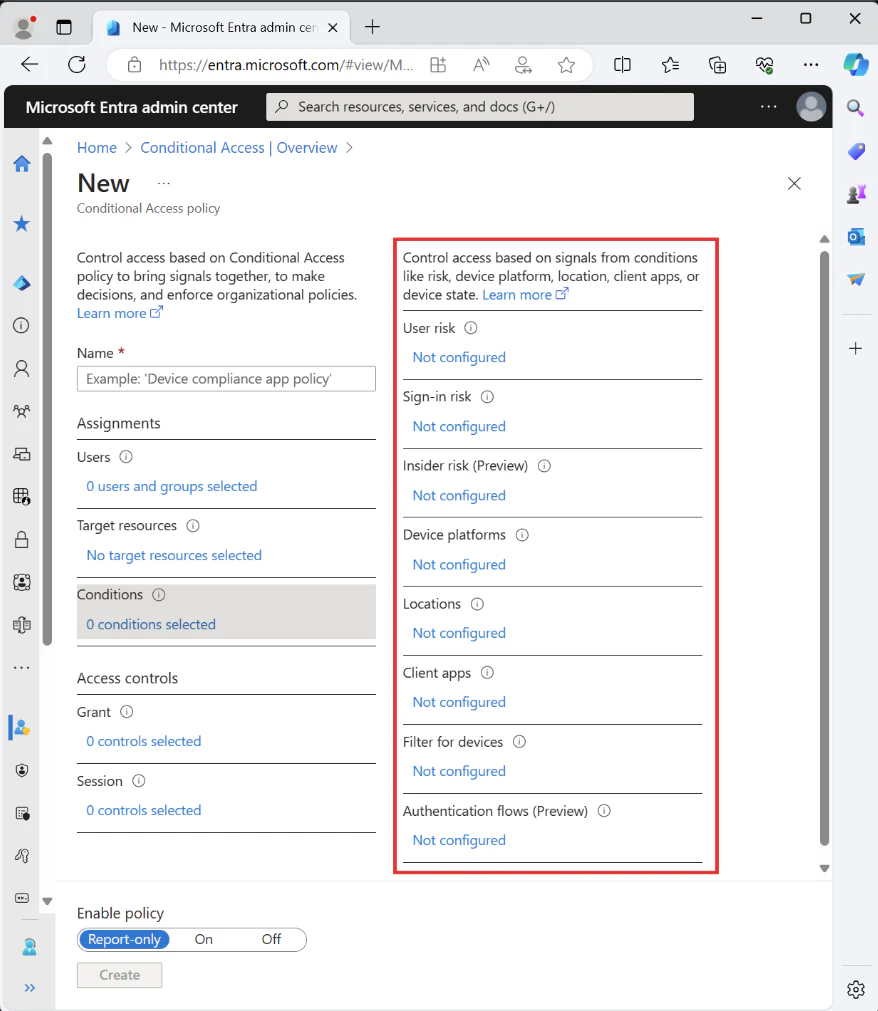
IAM solutions form the foundation of cloud security. Without them, attackers can steal admin credentials and gain full control of your environment.
Use Microsoft Entra ID with role-based access control (RBAC) to grant granular access to Azure resources and stick to the principle of least privilege and a zero-trust approach when assigning access permissions. These security models restrict activities to specific resources, preventing broader lateral movement even if a user’s credentials are compromised.
You can also leverage multi-factor authentication (MFA) to add an additional security layer. Strengthen protection further by implementing just-in-time (JIT) or context-aware access control. Assign administrative access for specific tasks during designated time frames, ensuring that privileges automatically expire once the work is complete.
Start with these steps:
Conduct an access review to identify and remove accounts with standing administrative privileges.
Enforce MFA for all users with access to Azure resources, without exception.
Implement privileged identity management (PIM) for all roles with write permissions to production environments.
Turn on Entra ID Protection and use risk-based Conditional Access to block or challenge risky sign-ins automatically.
4. Enable JIT VM access
Leaving virtual machines (VMs) open to inbound traffic invites unauthorized access, since attackers constantly scan for exposed ports. JIT VM access keeps ports locked by default and opens them briefly, only on approved requests.
PIM adds conditions such as time limits and allowed IP addresses. That limits exposure to brute-force attacks and unauthorized remote access.
Configure JIT in Defender for Cloud and log every request for later investigation:
Enable JIT VM access on all internet-facing VMs.
Set a maximum session duration of four hours or fewer based on your operational requirements.
Create an approval workflow that requires manager sign-off for production VM access.
5. Manage keys via Azure Key Vault and Managed HSMs
Encryption is a baseline in Azure, but real security depends on how you manage the keys behind it.
Azure Key Vault centralizes keys, secrets, and certificates, so reference them at runtime instead of embedding them in code or configuration files. That matters because Wiz Research found 61% of organizations have secrets exposed in public repositories, including cloud credentials. For the highest assurance, Managed HSMs give you single-tenant, FIPS 140-3 Level 3 validated HSM pools.
Then build discipline around rotation and access:
Rotate customer-managed keys on a regular schedule (every 90 days is a common baseline) and document each rotation cycle.
Use managed identities so applications authenticate to Key Vault without storing any credentials in code.
Use Key Vault access policies or Azure RBAC to enforce least-privilege access to keys.
Enable purge protection in Key Vault to guard against accidental or malicious deletion. Soft-delete is on by default, but purge protection needs manual activation.
Alert on attempts to disable encryption or access keys outside expected patterns.
Wiz continuously monitors your Azure environment for key management misconfigurations, such as key vault instances missing access controls or resources using platform-managed keys where customer-managed keys are required. This allows you to catch and fix gaps before they become risks.
6. Segment traffic with Azure NSGs and ASGs
Without network controls, attackers can move laterally and reach exposed resources. Network security groups (NSGs) act like firewalls, allowing or blocking traffic to VMs, subnets, and other resources based on rules. Application security groups (ASGs) group VMs by function, so you apply consistent policies at scale instead of configuring each VM. Pair both with Microsoft Entra ID so only authorized users and services reach critical systems.
Put them to work:
Review NSG rules and remove any overly permissive “allow all” entries.
Group resources by function using ASGs to simplify rule management.
Implement a change control process that requires peer review for NSG modifications.
Use Private Link and private endpoints so PaaS services like Storage and SQL never need a public endpoint, since Wiz's Cloud Data Security Snapshot found 72% of cloud environments have publicly exposed PaaS databases lacking sufficient access controls.
7. Hunt threats with Microsoft Sentinel and Log Analytics
Threat hunting in Azure means pairing Microsoft Sentinel with Log Analytics to search activity across subscriptions for signs of attack. Regular audits feed that process, so gaps get caught before they turn into incidents.
Focus audits on user access, network activity, and data protection, and automate them, since gaps often appear in CI/CD pipelines, container configurations, and code repositories.
For access, use Azure’s monitoring tools to remove unnecessary privileges, especially on high-risk accounts. Rotate Key Vault credentials regularly.
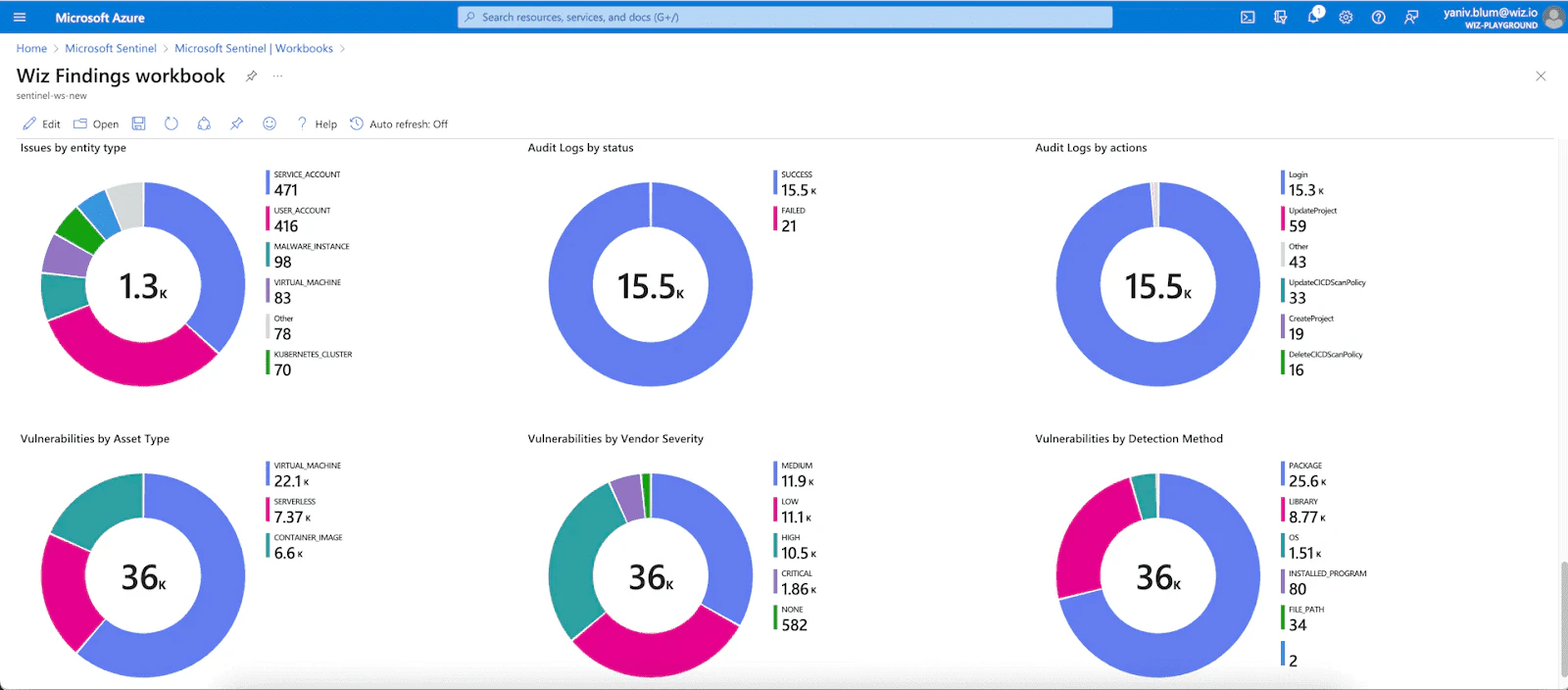
For the network, confirm that firewall rules and NSGs allow only approved traffic. One misconfigured rule can open an entry point.
Use Azure Monitor, Log Analytics, and Microsoft Sentinel for audits and real-time detection. Add Network Watcher NSG flow logs to see which traffic reaches your workloads. Connect Defender for Endpoint so VM alerts land in the same investigation.
Then add these steps:
Schedule monthly automated security scans that check for common misconfigurations.
Review access logs for unusual patterns, such as logins from unexpected geographic locations.
Maintain a security audit log that tracks all identified issues and their resolution status.
8. Deploy a defense-in-depth security model
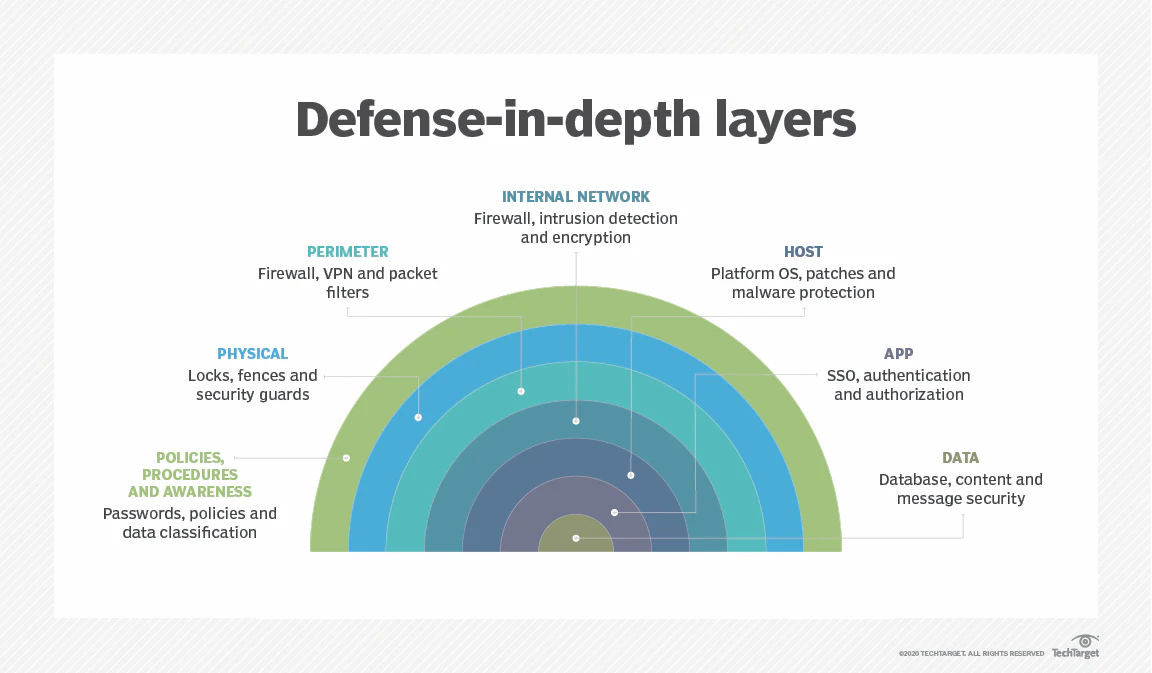
A defense-in-depth security approach layers controls across the application, operating system, network, and access control layers. It removes single points of failure, so if one measure fails, the next layer blocks the attack.
Cover each layer:
Network security: Combine Azure Firewall, NSGs, and distributed denial-of-service (DDoS) protection.
Data layer: Secure data at rest and in transit using encryption and certificates.
Application layer: Run code review and testing, then add API management and web application firewalls.
Threat detection and prevention: Use Microsoft Defender for Cloud, Defender for Identity, and Sentinel to detect and block threats.
Wiz found most documented cloud intrusions in 2025 began with vulnerabilities, exposed secrets, or misconfigurations. If one gets through, run your incident response process, then restore service with Azure Backup, Azure Site Recovery, and Azure Archive Storage.
Then test the model:
Map your current security controls to each layer of the defense-in-depth model to identify gaps.
Test your incident response plan with a tabletop exercise every six months.
Configure Azure Backup for critical workloads with retention that meets your recovery objectives.
9. Align teams with the Azure Cloud Adoption Framework
Under Azure's shared responsibility model, accountability shifts between IaaS, PaaS, and SaaS. Every team touching Azure resources needs to know where its responsibilities begin.
The Azure Cloud Adoption Framework (CAF) Secure Methodology provides a structured way to build that alignment. It embeds security across every phase of cloud adoption, from landing zone design to ongoing operations, treating it as a continuous discipline. Teams can use CAF to map Zero Trust principles to specific roles, whether enforcing least-privilege access, hardening configurations, or integrating security checks into CI/CD pipelines.
Microsoft Learn offers role-aligned training paths and certifications tied directly to Azure, allowing you to build targeted skills beyond generic security awareness. Create an Azure sandbox environment to enable teams to experiment with configurations and controls without risking production workloads.
Put it into practice:
Run a skills gap assessment using the CAF RAMP model (Ready, Administer, Monitor, and Protect) to identify where teams need development.
Assign Azure-specific role certifications, such as Azure Administrator or Azure Security Engineer, to team members responsible for cloud operations.
Create runbooks documenting common Azure misconfiguration scenarios, using Microsoft Defender for Cloud recommendations as a baseline.
Designate security champions within each team to advocate for CAF Secure Methodology practices and flag configuration drift before it compounds.
What Azure security challenges should you prepare for?
Attackers constantly hunt for weaknesses. Deloitte’s 2025 midyear threat report highlights infostealer credential theft, driven by malware such as Lumma Stealer. Misconfigurations and overlooked gaps add risk, but knowing these threats helps you stay a step ahead.
Watch 12-min demo
Azure security teams can explore Wiz’s approach to posture management and risk prioritization in a 12-minute recorded cloud demo.

Here are the major Azure security challenges and the practices that address them:
| Challenge | What it looks like | Practices that address it |
|---|---|---|
| Misconfigurations | One wrong policy exposes data or leaves resources unprotected | Posture management, regular audits, defense-in-depth |
| Unauthorized access | Weak IAM lets attackers sign in | IAM, JIT access |
| Data exposure | Open storage accounts or loose access policies | Encryption, network security |
| Insider threats | Excessive access enables mistakes or misuse | IAM, regular audits |
| Insecure APIs | Weak authentication and no rate limits | Native controls, network security, defense-in-depth |
| Compliance and regulatory risks | Industry rules differ and change | Posture management, regular audits |
| Advanced persistent threats | Stealthy, long-running intrusions | Training, native controls, defense-in-depth |
| DDoS attacks | Traffic floods cause downtime | Native controls, network security, defense-in-depth |
Some risks sit on Microsoft's side of the line, and one recent Wiz Research finding shows why your own layered controls still matter.
Real-world example: CosmosEscape and the limits of shared responsibility
On July 30, 2026, Wiz Research disclosed CosmosEscape, a vulnerability chain in Azure Cosmos DB's Gremlin API. Escaping the query sandbox gave code execution on the DB Gateway and access to a platform-wide signing key, the "Cosmos Master Key." That key could retrieve the primary key of any Cosmos DB account, granting full read and write access, even for private and network-isolated accounts.
Microsoft deployed a mitigation within 48 hours, completed the long-term fix in July 2026, and found no evidence of exploitation beyond the research. Some risk lives on the provider's side of the model. Layered controls such as Entra ID data-plane roles, key rotation, and activity monitoring limit what any single failure can expose.
How Wiz helps you implement Azure security best practices
Wiz turns these nine practices into one continuous workflow by connecting Azure findings with identity, network, and data context across every cloud and hybrid environment. Its agentless, 100% API-based scanning covers VMs, containers, serverless, and PaaS in minutes.
Complete visibility across your Azure estate: Wiz continuously scans every resource and configuration for gaps, and each finding includes specific remediation steps.
Risk-based prioritization: Wiz weighs data sensitivity, network exposure, and active threats to show which risks matter first. The Security Graph maps network paths, flagging permissive NSG rules and public exposure.
Identity and access insights: Wiz shows which users and service principals reach specific resources, surfacing over-privileged accounts and unused permissions for IAM and JIT cleanup.
Automated compliance mapping: Wiz checks your environment against CIS Azure Foundations Benchmark, PCI DSS, and HIPAA and generates audit evidence.
Because Wiz connects through read-only APIs, you keep full control. Many teams see first improvements within hours, and Texas A&M deployed Wiz in one hour across AWS, Azure, and GCP.
Putting Azure security best practices into action takes continuous visibility and clear priorities. Explore how Wiz connects identity, network, and data context to help teams focus remediation efforts. See Wiz in action
Secure Azure with Wiz
Azure security teams can explore how Wiz connects identity, network, and data context to prioritize risks and guide remediation during a demo.
