



What is a container engine?
A container engine is software that creates, runs, and manages containers. It packages application code, runtime dependencies, libraries, and configuration into isolated environments that behave identically across development, testing, and production.
At their core, these engines build and run containers from container images, which are read-only templates containing layered instructions. The engine reads each layer, assembles the image, and spins up an isolated process based on that template.
Container engines give development teams consistent, reproducible environments. Code that works on a developer's laptop runs the same way in staging and production, which cuts environment-related debugging and speeds up release cycles.
This consistency matters most in cloud-native development, where applications must run reliably across diverse environments, from local machines to large-scale cloud platforms. Teams that standardize on a container engine can ship faster because they spend less time troubleshooting "works on my machine" problems.
Container Security Cheat Sheet
Keep container security best practices at your fingertips as you evaluate engines and runtimes.

How do container engines work?
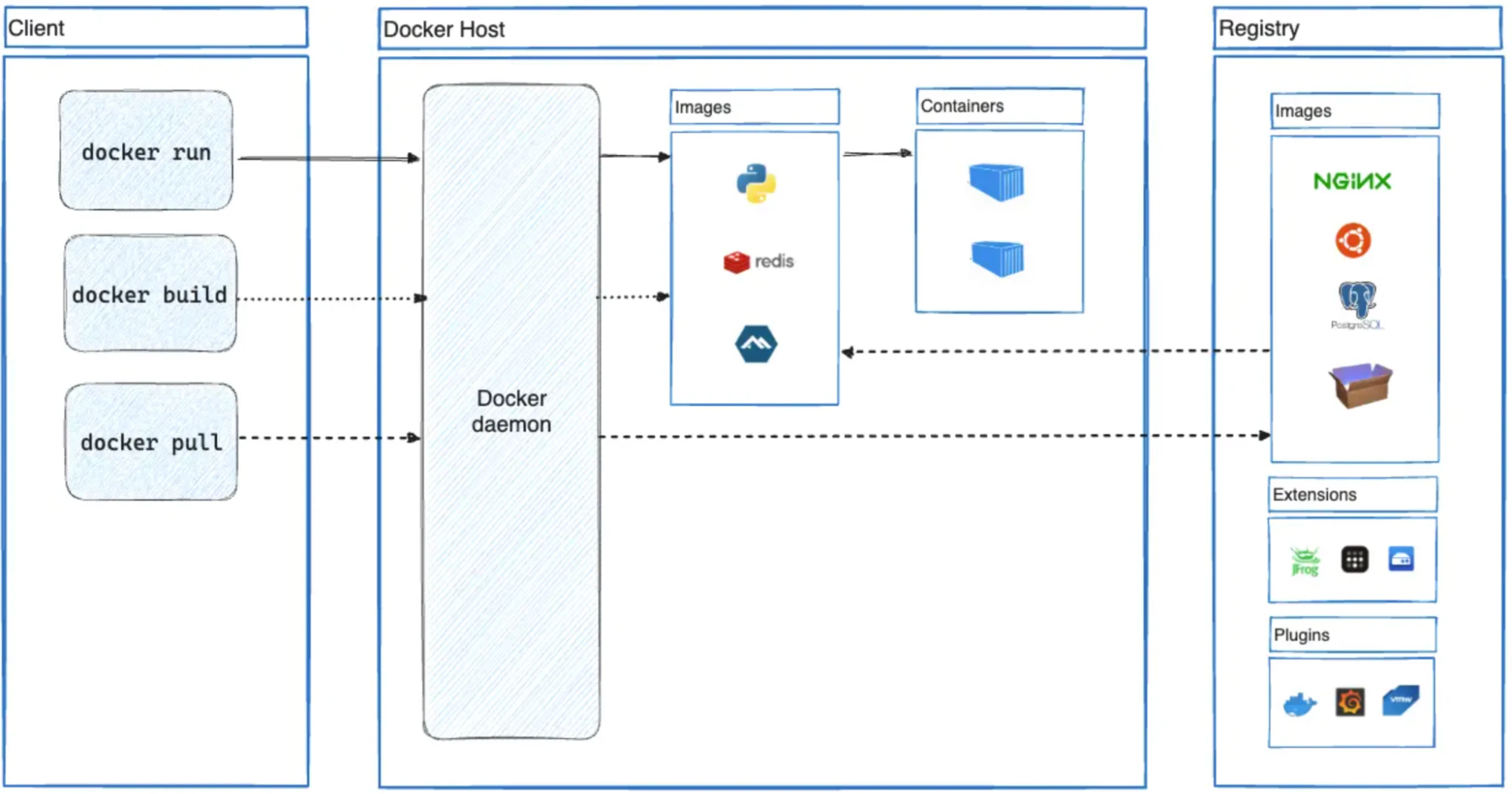
Every container engine has three core components that work together to turn an image into a running process:
Daemon: The daemon runs on the host machine and oversees container operations. It listens for API requests from the client and performs actions such as creating, running, and stopping containers.
Client: A command line interface (CLI) tool used to issue commands to the daemon. For example, when you execute a command such as
docker run, the client forwards this request to the daemon.Container runtime: The component responsible for actually running containers. It creates and manages container processes by interfacing with the operating system kernel.
These components follow the Open Container Initiative (OCI) specification, which standardizes image formats and runtime behavior. OCI compliance means images built with one engine can run on another, giving teams flexibility to swap tools without rebuilding workloads.
The following workflow illustrates how container engines abstract complex tasks into manageable commands, enabling rapid and consistent application deployment:
Container engine vs. container runtime
The terms "container engine" and "container runtime" often get used interchangeably, but they describe different layers. A container engine is the high-level tool that accepts user commands, pulls images from registries, and communicates with orchestrators like Kubernetes. The runtime sits underneath: it makes the actual kernel calls (namespaces, cgroups, seccomp) that isolate a container's processes from the host.
Most engines delegate execution to an OCI-compliant runtime such as runc. This separation means you can swap runtimes for specialized use cases, like gVisor for stronger sandboxing, without changing the engine your team interacts with daily.
Popular container engines
Docker, containerd, Podman, and CRI-O cover the vast majority of container workloads in production environments. The following list is in no particular order.
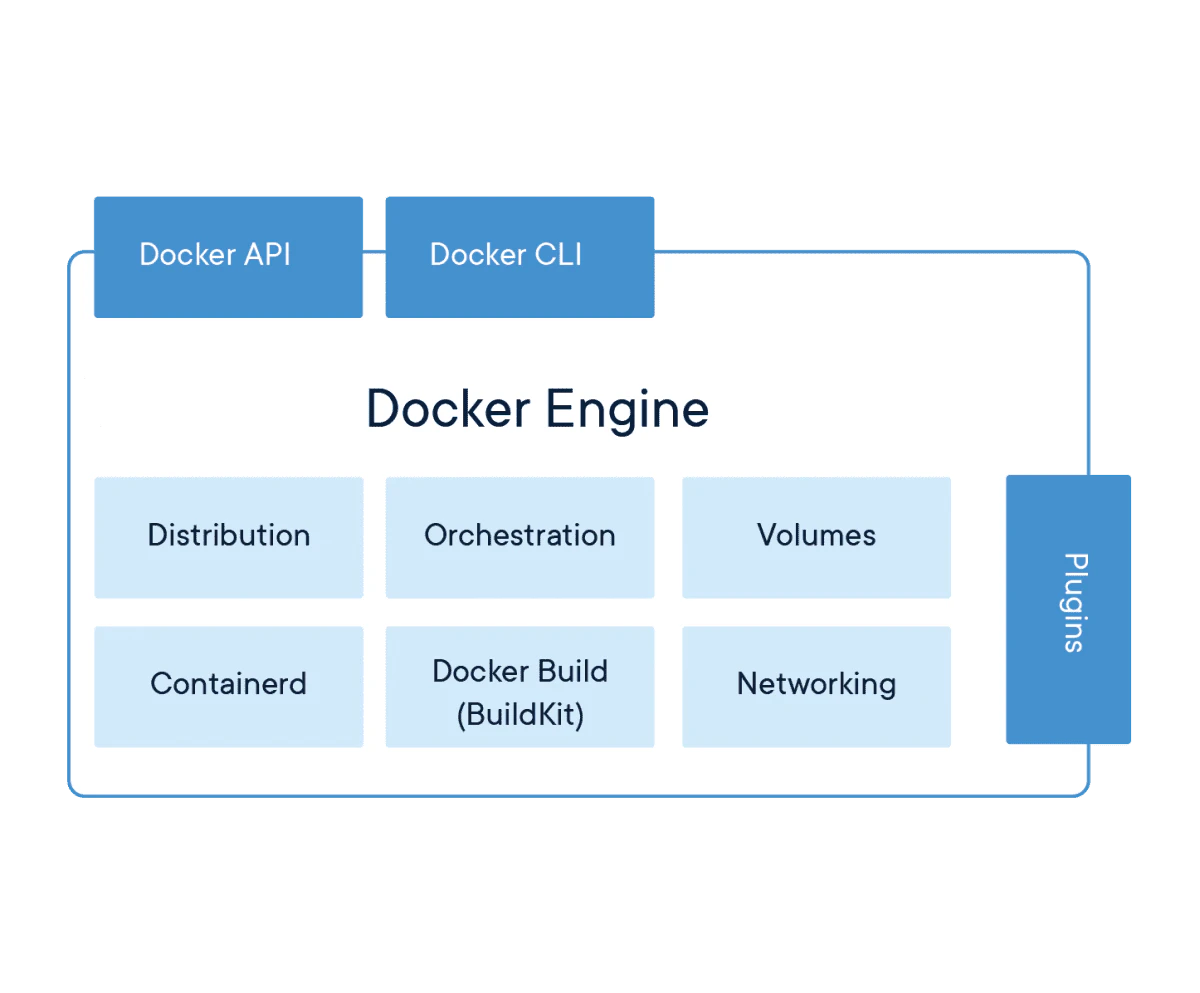
Docker Engine
Among container engines, Docker Engine remains the most widely adopted, thanks to its ease of use and broad ecosystem. Docker exists in 80% of cloud environments, making it the default starting point for most containerization workflows.
Key features include:
User-friendly CLI: Makes it simple for developers to begin with containerization
Portability: Containers built with Docker run on any system that supports the Docker runtime, providing consistency across environments
Extensive library and community support: Comprehensive documentation and a large user community facilitate troubleshooting and best practices
Kubernetes
Kubernetes is an open-source platform for container orchestration. While not a container engine per se, it works closely with container engines to manage large-scale containerized applications.
Key features include:
Scalability: Manages the deployment, scaling, and automation of containerized applications
Resilience: Provides robust mechanisms for maintaining application uptime, including automated rollouts and rollbacks, self-healing, and load balancing
Extensibility: Supports various plugins and integrations, making it adaptable to various needs

containerd
containerd is a CNCF graduated project originally extracted from Docker Engine as a standalone container runtime. It manages the complete container lifecycle on a host: image transfer and storage, container execution, and low-level storage and network attachments.
Most managed Kubernetes services (EKS, AKS, GKE) use containerd as their default runtime. Its lightweight footprint and native Kubernetes integration through the Container Runtime Interface (CRI) make it a go-to choice for production clusters where Docker's full toolchain is unnecessary overhead.
Watch 12-min demo
See how Wiz secures containers and Kubernetes across your cloud environment.

Podman
Podman takes a daemon-less approach to container management. Unlike Docker, it runs containers directly as child processes of the user, which eliminates the need for a central daemon and reduces the attack surface.
Podman runs rootless containers by default, meaning unprivileged users can build and run containers without elevated permissions. Its Docker-compatible CLI lets teams migrate existing scripts and workflows with minimal changes, making it a practical choice for security-conscious organizations.
CRI-O
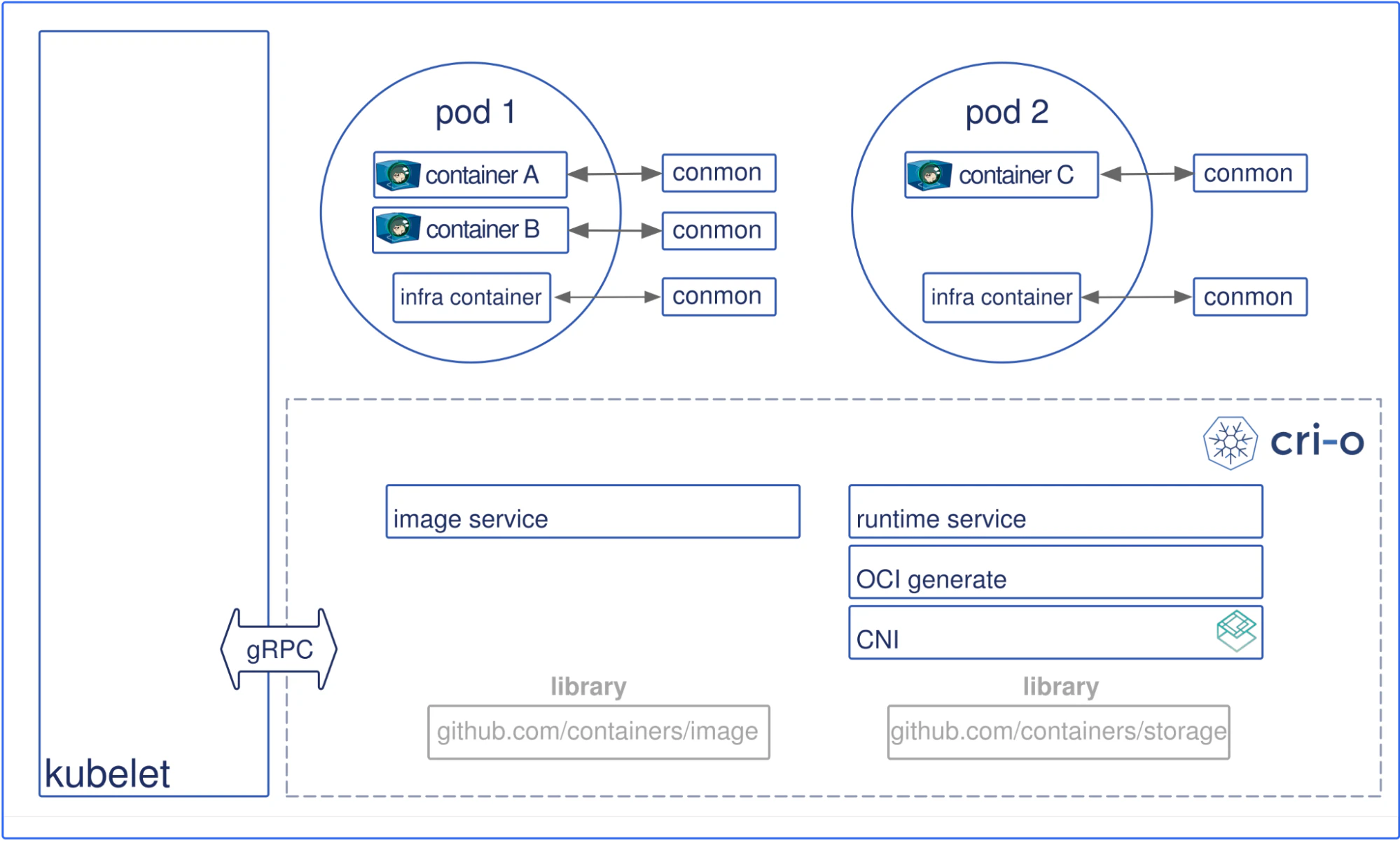
CRI-O is a container runtime built specifically for Kubernetes. It implements the Kubernetes Container Runtime Interface (CRI), so Kubernetes can manage containers directly without additional tooling layers.
Key features include:
Kubernetes-native: Designed to work with Kubernetes, ensuring seamless integration and performance
Lightweight: A minimalistic approach that reduces overhead and improves resource efficiency
Standards-compliant: Built to comply with OCI standards, ensuring compatibility with other tools in the ecosystem
Because Kubernetes orchestrates containers rather than running them, it relies on runtimes like CRI-O and containerd to handle the actual execution. Kubernetes manages scheduling, scaling, and self-healing across clusters, while the runtime underneath handles process isolation on each node.
OpenShift
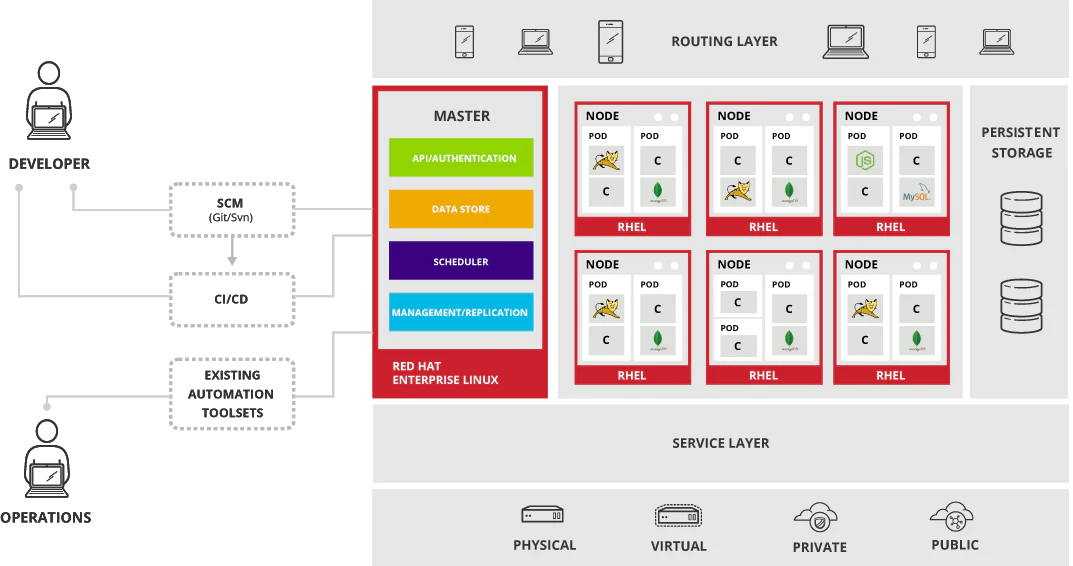
Developed by Red Hat, the OpenShift container application platform enhances Kubernetes with additional developer and operational tools.
Key features include:
Enhanced security: Built-in security features in compliance with enterprise standards
Developer tools: Integrated development environments (IDEs) and continuous integration/continuous delivery (CI/CD) pipelines
Enterprise support: Robust support and services as a Red Hat product
Cloud-specific container engines
In addition to cloud-agnostic solutions, several cloud providers offer their own container engines optimized for their platforms:
| Feature/Aspect | Google Cloud Run | Amazon Elastic Container Service (ECS) | Azure Container Instances (ACI) |
|---|---|---|---|
| Ease of use | Fully managed service; abstracts infrastructure management | Managed service; integrates with AWS CLI | Simplest to use; no orchestration needed |
| Integration | Seamless integration with Google Cloud services | Deep integration with AWS services | Seamless integration with Azure services |
| Scalability | Automatic scaling based on traffic | High scalability with service auto-scaling | Scales based on container needs |
| Security | Google Cloud's security features | AWS security features, IAM integration | Azure security features, identity management |
| Management | No infrastructure management; automatic updates | Managed orchestration, less overhead | No orchestration; focuses on single container instances |
| Cost efficiency | Pay-as-you-go; charges based on usage | Pay-as-you-go with reserved instances options | Pay-as-you-go; cost-effective for short-lived workloads |
| Support | Google Cloud support, community support | AWS support, community support | Microsoft Azure support, community support |
| Use cases | Microservices, stateless apps, APIs, web apps, event-driven workloads | Containerized apps, microservices, serverless | Simple, quick deployments; burst workloads |
These managed services abstract away the underlying engine, letting teams focus on application logic instead of infrastructure. Each integrates tightly with its provider's identity, networking, and monitoring stack, so the best choice typically follows your existing cloud investment.
Security implications of container engines
Container engines introduce specific security challenges alongside their advantages. Understanding these risks and how to address them is critical for maintaining a secure environment.
Common security challenges for container engines
Container engines are powerful tools for deploying applications, but they come with security challenges that require deliberate attention. A container security survey published by ACM cataloged over 200 container-related vulnerabilities spanning 47 exploit types across 11 distinct attack vectors.
The most common risk categories include:
Isolation issues: Containers share the host OS kernel, so any kernel vulnerability could affect every container on that host. Maintaining strict isolation between containers is essential.
Image vulnerabilities: Outdated or unvetted base images can carry known vulnerabilities. Scanning images regularly and pulling only from trusted registries reduces this risk. Wiz's Cloud Data Security Snapshot found that 12% of cloud environments have publicly exposed containers with high or critical-severity vulnerabilities.
Configuration errors: Running containers with root privileges or exposing unnecessary ports creates attack surface. Default-deny configurations and automated policy checks catch these mistakes before deployment.
Secrets management: API keys, passwords, and certificates stored in plain text within container images or environment variables can leak. Dedicated secrets managers and encrypted storage keep credentials safe.
Network security: Containers communicate across internal networks that need proper segmentation. Implementing network policies controls traffic between containers and external services.
Security best practices for containerized applications
These practices help you keep containerized applications safe across the full lifecycle:
Apply the principle of least privilege: Run containers with only the permissions they need. Avoid root, use user namespaces, set resource limits, and apply seccomp profiles or AppArmor/SELinux policies to restrict system calls.
Update and patch container images regularly: Keep images and the underlying host OS current with the latest security patches. The Wiz Kubernetes Security Report found that exposed pods with critical vulnerabilities decreased by 50% year-over-year, suggesting that consistent patching and container security best practices are paying off across the industry.
Secure image repositories: Use trusted registries, sign images to verify integrity, and restrict pull/push access to authorized personnel only.
Use network policies: Control container communication and restrict access to necessary services. For advanced segmentation, use Kubernetes network policies or service meshes.
Implement monitoring and logging: Tools like Prometheus, Grafana, and the ELK stack provide real-time monitoring and log analysis. Integrating these tools ensures continuous security monitoring and quick incident response.
Wiz's approach to container engine security
Securing containers starts before a single workload runs. Wiz takes an agentless-first approach that scans every container image across your estate for vulnerabilities, secrets, misconfigurations, and sensitive data, without deploying agents into clusters. This gives security teams a complete inventory of container risk before anything reaches production.
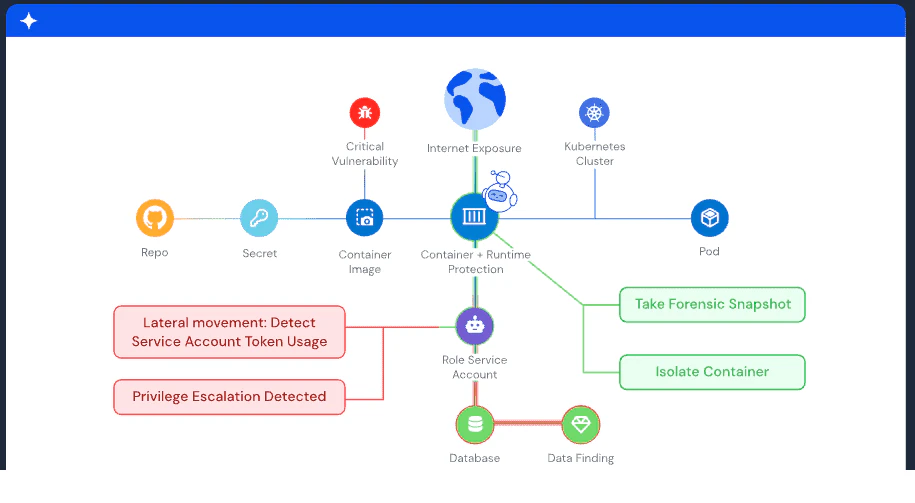
Once workloads are running, Wiz layers on the Runtime Sensor, an eBPF-based agent that detects suspicious behavior in real time across containers, Kubernetes, and VMs. Vulnerability Runtime Validation (VIR) then identifies which vulnerable packages are actively loaded in memory and executing, so your team focuses on the vulnerabilities that actually matter and can reduce backlog by up to 90%. The Wiz Security Graph connects these findings to Kubernetes RBAC, cloud exposure, and identity context to surface real attack paths rather than isolated alerts.
For teams that want security built into the foundation, WizOS provides minimal container images continuously maintained at near-zero CVEs, reducing inherited vulnerabilities and supply chain risk. Integration from the IDE to the CI/CD pipeline catches risks early, and Wiz also discovers AI frameworks running in containers (LangGraph, PydanticAI), detects Rogue Agent behavior, and correlates risk across all four layers of AI app architecture in the Security Graph.
Wiz scans your container estate agentlessly, correlates vulnerabilities with cloud context, and cuts alert noise with VIR. Get a demo to walk through your environment.
Get a demo
See how Wiz gives your team full visibility into container risks, from image build to runtime.
