


SAST vs. DAST: How do they compare?
The core differences between static application security testing (SAST) and dynamic application security testing (DAST) come down to when and how they test. SAST analyzes your source code before the application runs, catching vulnerabilities like SQL injection at the line-of-code level. DAST tests the running application from the outside, simulating attacks to find issues like broken authentication that only appear at runtime.
Both identify security vulnerabilities, but they do so at different stages of the software development lifecycle.
| Dimension | SAST | DAST |
|---|---|---|
| Testing approach | Analyzes source code, bytecode, or binaries | Sends requests to a running app and inspects responses |
| When it runs | Before deployment (IDE, pull requests, CI builds) | After deployment (testing, staging, production-like environments) |
| Source code access | Required | Not required |
| Language dependency | Often language- and framework-specific | Mostly language-agnostic |
| What it is best at | Pinpointing insecure patterns in code and the exact location to fix | Finding real runtime issues like broken auth, insecure headers, or exposed admin paths |
| Common limitation | May flag code that is not actually reachable in production | May miss vulnerabilities on code paths your test traffic never hits |
Get a Wiz SAST demo
Learn how Wiz SAST correlates code flaws with real cloud context, then routes findings to the right owner with AI-powered remediation guidance, directly in pull requests.

What is SAST?
SAST analyzes an application's source code, bytecode, or binaries to detect vulnerabilities without executing the program. It identifies insecure code patterns that lead to issues like SQL injection, buffer overflows, and XML external entity (XXE) attacks before the code ever runs.
How does SAST work?
SAST tools scan your codebase by comparing code patterns against security rulesets. They use pattern matching, control flow analysis, and data flow analysis to trace how data moves through your application and identify where vulnerabilities can occur.
What are the main aspects of SAST methodology?
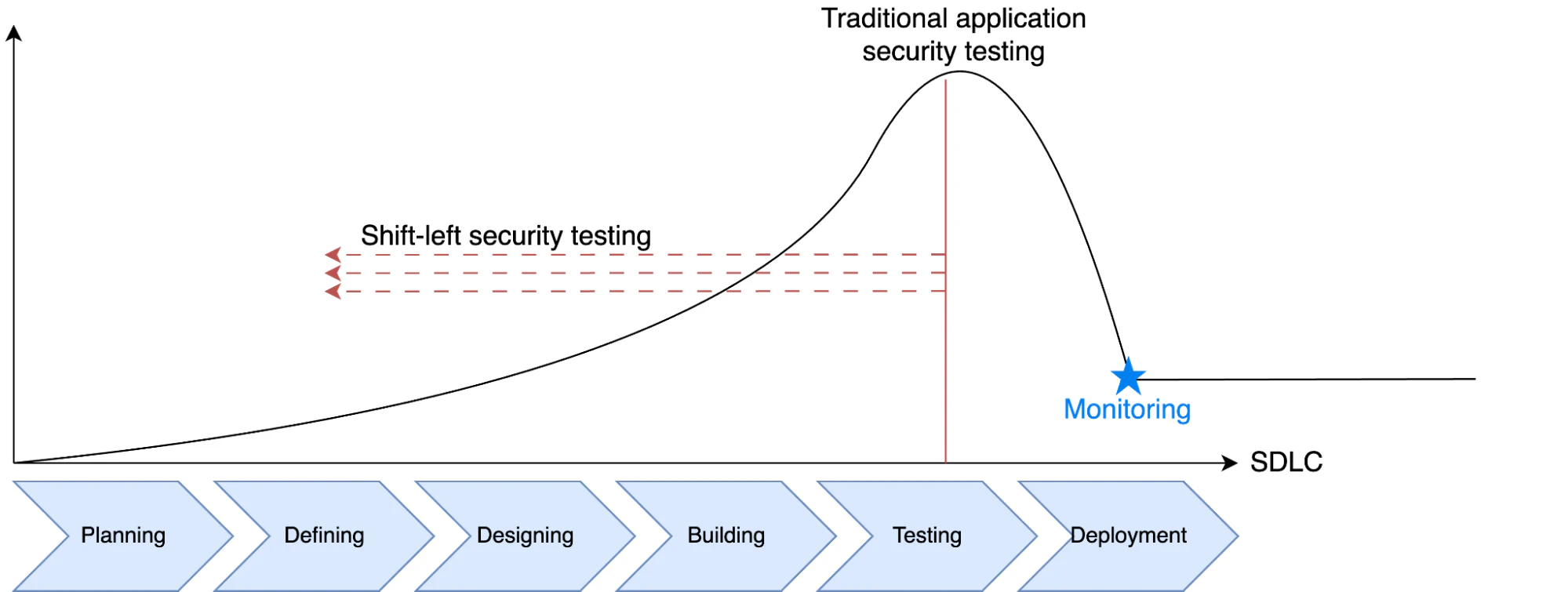
Modern SAST tools share several core capabilities for finding and fixing code issues early. These include:
Shift-left security: By performing code security assurance as early as possible in the software development lifecycle, you can reduce security risks before deployment.
Focus on code quality: By highlighting issues directly in the source code, SAST also enhances code quality.
Policy-as-code extension: Advanced security platforms offer policy-as-code features that allow you to automate compliance checks and ensure consistent enforcement as developers write and test code.
SAST strengths and limitations
SAST is great when you want fast feedback before code ships, but it can also create noise if you treat every finding as equally urgent without checking whether the code path is actually used.
Limitations:
Can produce false positives
Can miss configuration and deployment problems
May not reflect what is actually reachable in production
For example, SAST might flag a SQL injection pattern in a helper function, but if that code is never called in your deployed build, it’s not the first thing you should fix.
What is DAST?
DAST tools check for runtime vulnerabilities by testing applications in their production environment. These tools simulate real attacks to uncover weaknesses that attackers can exploit. Since DAST finds security issues at runtime, it's useful for strengthening defenses against real-world threats.
How does DAST work?
DAST tools interact with a running application to find vulnerabilities that only surface at runtime. They send malicious inputs, probe authentication flows, and test server configurations to see how the application responds. This simulates how an attacker would probe for weaknesses from the outside without any knowledge of the underlying code.
What are the main aspects of DAST methodology?
Modern DAST tools share key capabilities like:
Shift-right security: By testing an application during or after deployment, DAST tools allow you to identify existing security issues, not just potential vulnerabilities.
Attack simulation: These tools simulate real attack vectors, such as token authentication forgery or cross-site scripting.
No need for source code: DAST tools examine running applications, so they're programming language-agnostic and don't require source code access.
Environment-specific testing: Analysts can use DAST to test applications in different environments, from staging to production, to identify environment-specific vulnerabilities.
DAST strengths and limitations
DAST is useful when you want to know what a real attacker can do against a deployed app. It’s less useful when you need a precise line of code to fix since it only sees the app from the outside.
Limitations:
Usually can’t pinpoint the exact code location
Runs later in the delivery cycle when fixes are more expensive
Can miss bugs on endpoints or flows your tests never exercise
For example, DAST can detect that an admin endpoint is reachable without auth in staging, even if the code "looks right" in a review.
Can you use SAST and DAST together?
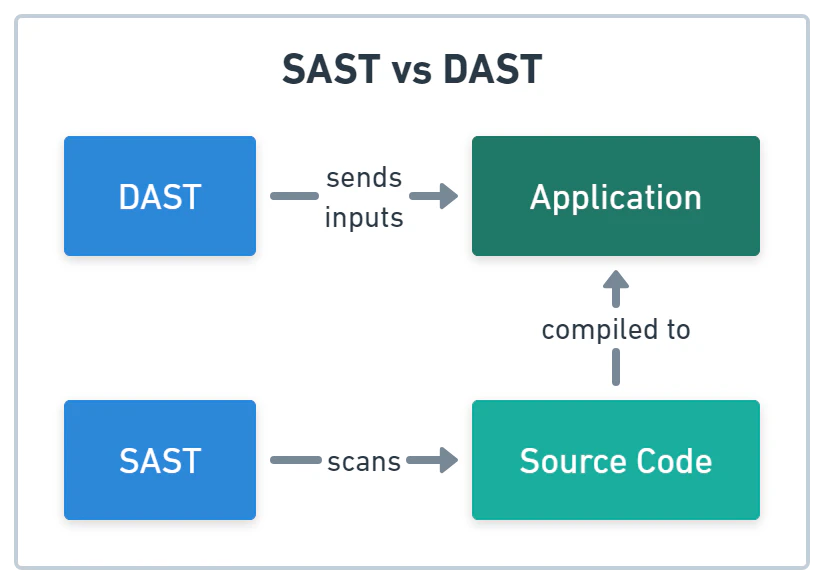
Yes, and you should. SAST catches vulnerabilities in your source code before deployment, while DAST validates that your running application is actually secure. Together, they cover both code-level flaws and runtime issues, eliminating the gaps that either tool leaves when used alone.
Here are some feature overlaps and differences between SAST and DAST.
Where SAST and DAST overlap
Shared standards: Both SAST and DAST rely on vulnerability databases and industry benchmarks, like the OWASP Top 10 (which expanded to analyze 589 common weaknesses in the 2025 edition) and CWE Top 25, to classify and report issues.
Pipeline integration: You can plug both tools into CI/CD pipelines to enable continuous security testing before release.
Actionable reporting: These tools provide detailed reports of the security flaws they find and offer remediation guidance so teams can resolve them.
What are the key differences between SAST and DAST?
Testing approach: SAST analyzes source code without running the app, while DAST inspects running applications.
Accuracy versus context: SAST may trigger false positives due to limited context, while DAST identifies issues that translate to actual threats.
Required skills: SAST requires knowledge of the coding language and framework, while DAST focuses on application behavior and security testing techniques.
Beyond SAST and DAST: IAST and RASP
In addition to SAST and DAST, two related methodologies extend application security testing capabilities:
IAST (interactive application security testing)
RASP (runtime application self-protection)
IAST combines elements of both SAST and DAST approaches by instrumenting the application during testing. It runs inside the application server during QA, providing code-level detail alongside runtime context. Teams already using both SAST and DAST often adopt IAST for deeper integration between the two.
RASP provides post-deployment protection by integrating directly with applications to detect and block attacks in real time. Unlike DAST, which tests periodically, RASP monitors continuously and can take protective action automatically when it detects malicious behavior.
CI/CD Pipeline Security Best Practices [Cheat Sheet]
In this 13 page cheat sheet we'll cover best practices in the following areas of the CI/CD pipeline: Infrastructure security, code security, secrets management, access and authentication, monitoring and response

How do you choose between SAST and DAST?
If your organization is going to prioritize one security testing method over the other, consider the following factors.
SAST vs. DAST: Strategic decision matrix
| Decision Factors | Choose SAST when... (inside-out / early lifecycle) | Choose DAST when... (outside-in / runtime validation) |
|---|---|---|
| Security Maturity | You want to shift left to establish secure coding habits, catch code-level flaws early, and reduce vulnerabilities. | You are in the early stages of security adoption and need to identify high-impact, externally visible vulnerabilities without deep codebase knowledge. |
| Detection Timing | You need immediate source-code analysis to block critical flaws (like SQL injection or XSS) from ever entering the CI/CD pipeline. | You require runtime validation in staging or pre-production to catch live environment issues, such as the misconfigured HTTP/S endpoints that expose sensitive data in cloud environments. |
| Resources & Budget | You need a lean, low-overhead adoption plan; tools are highly cost-effective and plug directly into developer IDEs. | You can invest in accuracy-focused testing to eliminate false positives and reduce the manual triage time spent by security teams. |
| Scalability | You are scaling across multiple in-house projects that share similar technology stacks and want to enforce consistent coding standards. | You need to secure diverse application types across different languages and frameworks, as it operates completely language-agnostic. |
| Application Knowledge | Your team is managing proprietary, in-house code where developers have deep knowledge of the codebase and full source access. | You are testing third-party software, commercial off-the-shelf apps, or compiled binaries where the underlying source code is completely unavailable. |
While choosing one is an excellent starting point based on your immediate constraints, the ultimate goal for mature enterprises is an integrated platform approach.
By combining SAST and DAST within an Application Security Posture Management (ASPM) platform, you create a robust shift-left and validate-right guardrail. This unifies code visibility with runtime context, shrinking your exposure window and simplifying everything from discovery to remediation.
Orchestrate integrated application security workflows
To maximize the value you gain from your SAST and DAST security tools, integrate them into unified workflows rather than running them as standalone tools. Here are some tips on how you can incorporate SAST and DAST testing methods together.
Get the Application Security Best Practices [Cheat Sheet]
This 6-page guide goes beyond basics — it’s a deep dive into advanced, practical AppSec strategies for developers, security engineers, and DevOps teams.

Combine scanning workflows
Unifying SAST and DAST scans ensures you receive complete coverage without duplicating testing efforts or missing critical issues.
Automate CI/CD security: Trigger all relevant security scans on every pull request to catch vulnerabilities before they progress through the pipeline.
Use a central platform: Aggregate findings from multiple scanning tools to remove duplicate alerts and prioritize the most critical issues in one place.
Secure all APIs: Use SAST and DAST together to test all APIs for undocumented endpoints, secrets in code, and runtime exposures like shadow or zombie APIs. To do this effectively, DAST tools often ingest the application API documentation to build an accurate model.
Enable dynamic test orchestration
Ensure dynamic testing runs consistently and at the right stages to catch vulnerabilities before they reach production. By orchestrating DAST scans across build and environment stages, you can uncover issues that slip past code review, such as broken authentication or insecure deployments.
Trigger scans after builds: Configure DAST scans to automatically run after successful builds or deployments to catch issues before the app goes to production.
Test across environments: Run scans in staging, pre-production, and production mirrors to uncover environment-specific issues, like misconfigurations or regressions.
Schedule regular scans: Automate recurring DAST runs to continuously validate applications against emerging attack patterns.
Automate triage and remediation workflows
Reduce alert fatigue and ensure prompt remediation of critical issues by automating triage and remediation workflows. Without proper triage, you may waste time addressing low-priority issues while critical vulnerabilities linger unaddressed. Automating the flow of security issues into developer tools with proper guidance helps fix the most crucial problems quickly.
Sort by priority: Automatically rank issues so developers can handle the most critical risks first.
Send alerts to devs: Push issues directly into tools like Jira, GitHub, or Slack so they reach the right owner quickly.
Add clear fixes: Include step-by-step remediation guidance to help developers resolve issues promptly.
By combining SAST and DAST testing methods, orchestrating dynamic tests, and automating triage, you can create an integrated security workflow that catches issues early, validates them, and accelerates the remediation processes.
Wiz Code makes this orchestration easier by consolidating static and dynamic code security findings in one place, which reduces noise and helps your team focus on shipping fixes instead of chasing duplicate bugs. That approach helped Cushman & Wakefield address significant code issues within one hour.
Boost your code security with Wiz
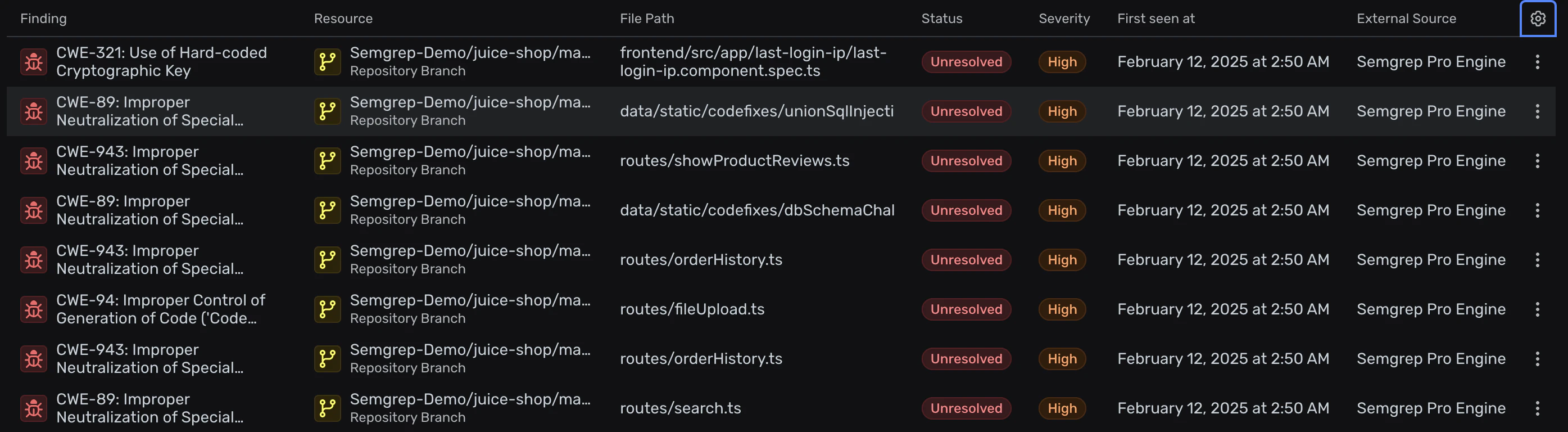
Wiz takes the combined SAST and DAST strategy further by connecting code-level findings to what is actually happening in your cloud environment.
Our native, cloud-aware SAST is built directly into the Wiz platform. Wiz SAST pairs deterministic, rules-based scanning with Wiz AI SAST, the AI code scanner in Wiz Code. It reasons about how your app behaves to catch logic flaws, like broken access control and insecure direct object references (IDOR), that pattern matching misses. Both work alongside capabilities like:
Software composition analysis
IaC scanning
CI/CD posture management
Secret detection
Supply chain security and AI application security
All of this happens in one platform with a unified code-to-cloud view of risk.
Already using a third-party scanner? Wiz Code integrates with leading SAST tools like Checkmarx and Semgrep, ingests their findings, and enriches them with shared code, cloud, and runtime context from the Security Graph. Whether issues come from Wiz SAST, Wiz AI SAST, Atlas, Wiz's autonomous AI vulnerability researcher, or an external tool, teams can see which ones are exposed, reachable, and worth fixing first.

Together, Wiz SAST help teams catch issues early, gain end-to-end visibility, optimize workflows, and cut down on tool sprawl.
As AI-generated code speeds up delivery, Wiz AI SAST scales deep investigation using the same harness that powers Atlas. Mika AI picks which repos get AI scans, while automated retests and semantic deduplication keep findings stable from scan to scan. Each finding comes with a confidence score, an investigation summary, and repro commands. The Red Agent then validates exploitability, and the Green Agent builds a remediation plan grounded in cloud and runtime context.
Schedule a demo to see how Wiz SAST can strengthen your code security from development to production.
Get a Wiz SAST demo
Learn how Wiz SAST correlates code flaws with real cloud context, then routes findings to the right owner with AI-powered remediation guidance, directly in pull requests.