


What is a Kubernetes cluster?
A Kubernetes cluster is a group of machines that work together to run containerized applications at scale. Each cluster consists of a control plane (which manages scheduling and state) and worker nodes (which run your workloads). This architecture lets teams deploy, scale, and update services without manually placing containers on individual servers.
So why does this matter for security? While clusters simplify deployment and scaling, they also expand your attack surface. Every API endpoint, service account, and network path between pods is a potential entry point. Misconfigurations, unpatched images, and overly permissive RBAC policies can expose your entire environment.
Clusters also balance resource consumption across nodes, so no single workload monopolizes CPU or memory. They support automated failover: if a node goes down, the control plane reschedules pods to healthy nodes. These properties make Kubernetes the default choice for production workloads, but they also mean that a single misconfigured cluster can put hundreds of services at risk simultaneously.
Kubernetes Security Cheat Sheet
Keep your Helm deployments and broader container environment locked down with actionable security guidance.

Components of a Kubernetes cluster
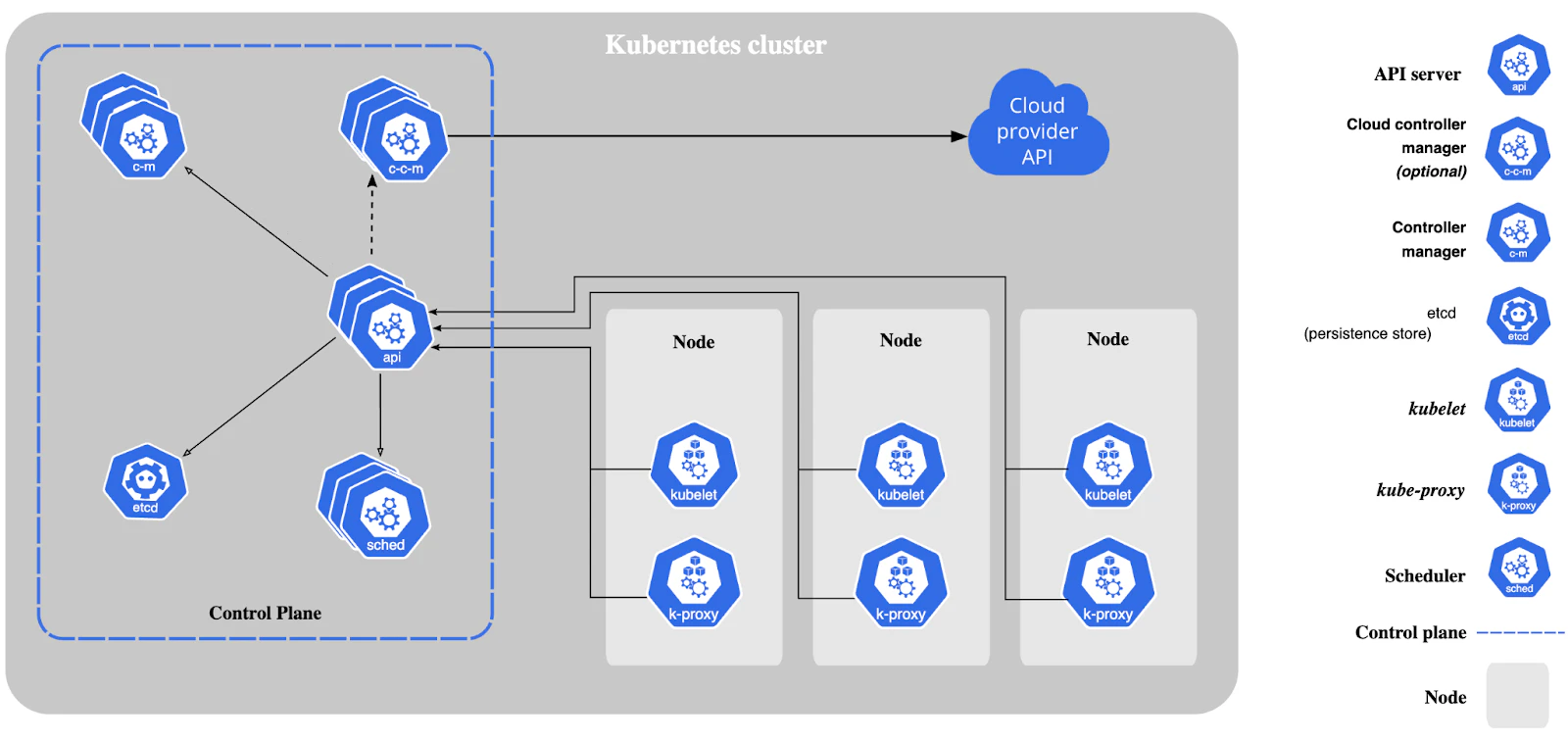
Before you can secure a cluster, you need to understand what you are protecting. A Kubernetes cluster is split into two layers: the control plane that makes decisions and the worker nodes that execute them.
The control plane is the brain of the Kubernetes cluster, responsible for maintaining the system's desired state. Control plane components run on master nodes and include the:
API server: Functions as the central management point and provides the Kubernetes API
Scheduler: Allocates workloads to nodes by considering resource availability and various constraints
Controller manager: Operates multiple controllers to ensure the cluster remains in its desired state
Worker nodes are the cluster nodes where containerized applications are actively executed. Each worker node includes the:
kubelet: Ensures that applications packaged as pods are up and running
kube-proxy: Manages network communication inside and outside the cluster
Container runtime: Operates the containers on nodes
Security risks in Kubernetes clusters
Kubernetes clusters introduce security challenges that traditional VM-based environments never faced. According to the Wiz Kubernetes Security Report, malicious probing begins as little as 18 minutes after a new cluster is staged, underscoring how quickly exposed endpoints attract attackers. The following risks deserve the most attention because each one can escalate from a single misconfigured resource to a full cluster compromise.
Misconfigurations
Misconfigurations are the leading cause of Kubernetes security incidents. Default settings for authentication, authorization, and network access leave the Kubernetes API exposed to unauthorized access. Public infrastructure-as-code (IaC) files that contain hardcoded credentials or overly broad permissions compound the problem.
You can prevent most misconfigurations by enforcing policy-as-code checks in your CI/CD pipeline and auditing cluster configurations against CIS benchmarks. According to the same Wiz research, 81% of EKS clusters still use the outdated CONFIG_MAP authentication mode, showing how slowly teams adopt newer, more secure alternatives.
Container vulnerabilities
Container image vulnerabilities give attackers a foothold inside your cluster. Outdated base images, unpatched OS packages, and third-party images pulled without verification all introduce known CVEs that scanners flag by the hundreds. The real risk is not the count of vulnerabilities but which ones are actually loaded in memory at runtime.
For example, an image might contain a vulnerable version of OpenSSL, but if no running process loads that library, the exposure is theoretical. The proportion of publicly exposed pods with severe vulnerabilities dropped by 50% between 2023 and 2024, suggesting that teams are getting better at patching, but there is still work to do.
Watch 12-min demo
Learn what makes Wiz the platform to enable your cloud security operation

Network threats
Network-based attacks exploit the flat network topology that Kubernetes uses by default. Without explicit network policies, every pod can talk to every other pod, giving an attacker who compromises one workload lateral access across the cluster.
Segmenting the network and defining strict ingress and egress rules limits how far an attacker can move. Treat network policies as firewall rules for your cluster: start with deny-all and open only what each service actually needs.
Secrets management
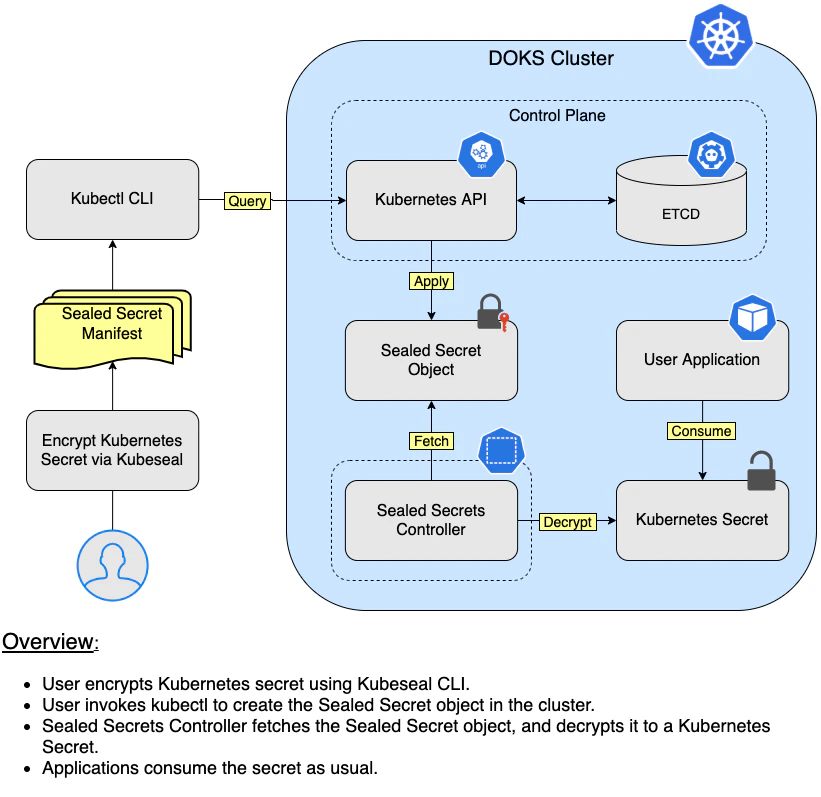
Secrets like passwords, API keys, and TLS certificates are high-value targets inside any cluster. Kubernetes stores secrets in etcd, and without encryption at rest, anyone with access to the datastore can read them in plaintext.
Improper handling goes beyond storage. Mounting secrets as environment variables, logging them accidentally, or granting broad RBAC access to the secrets API all create exposure. Use encryption at rest, restrict access with RBAC, and consider external secret managers for production workloads.
Runtime security
Runtime security protects your cluster while workloads are actively running. Even if you scan every image and harden every configuration, attackers can still create shadow pods, inject malicious processes, or generate drift in running containers. Continuous monitoring and anomaly detection catch threats that static analysis misses.
Runtime threats are particularly dangerous because they bypass every gate in your build and deploy pipeline. A compromised container that passes all admission checks can still download and execute a cryptominer, exfiltrate data, or pivot to the cloud control plane through the Instance Metadata Service (IMDS).
Access control
Overly permissive RBAC policies let users and service accounts perform actions far beyond what they need. A single ClusterRoleBinding that grants cluster-admin to a CI service account gives an attacker full control if that account is compromised.
Kubernetes-native RBAC lets you scope permissions to specific namespaces and resources. Review bindings regularly and follow the principle of least privilege for every identity in the cluster.
Data security
Data flowing between pods, services, and external endpoints must be encrypted in transit with mutual TLS. Data at rest in persistent volumes and etcd needs encryption as well. Without both, an attacker who gains network access or storage access can read sensitive information directly.
How to secure a Kubernetes cluster
The risks above are real, but each one has a well-understood countermeasure. The following best practices map directly to the threats covered in the previous section. For a broader checklist, see our guide to Kubernetes security best practices.
Leverage role-based access control (RBAC)
Define roles: Create specific roles that outline permissions for various operations
Create role bindings: Assign roles to users or groups through role bindings
Audit RBAC policies: Review and audit RBAC policies on a regular basis to make sure they meet current security requirements
The following command creates a role named pod-reader in the default namespace, granting it permissions to get, list, and watch pods:
kubectl create role pod-reader --verb=get --verb=list \
--verb=watch --resource=pods --namespace=default
To bind the pod-reader role to the user jack:
kubectl create rolebinding read-pods --role=pod-reader \
--user=jack --namespace=default
Use network policies
Define ingress and egress rules: Enforce rules about which pods can communicate with each other and which external services they can access
Enforce default deny policies: Implement a default deny-all policy to block all traffic unless explicitly allowed
Regularly update policies: Continuously update network policies to keep up with changes in the application architecture and the threat landscape
Implement namespace isolation
Use namespaces for isolation: Organize resources into namespaces to isolate different environments (e.g., development, testing, and production) and teams, reducing the risk of accidental access or interference
Set resource quotas: Apply resource quotas within namespaces to keep one namespace from overconsuming resources and affecting other namespaces
Monitor namespace usage: Regularly monitor and review namespace usage to ensure compliance with organizational policies and best practices
Scan container images regularly
Integrate image scanning into the CI/CD pipeline: Ensure all container images are scanned for vulnerabilities during the build process
Use trusted base images: Start with secure and trusted base images to minimize vulnerabilities
Regularly update and patch: Continuously update and patch images to address new vulnerabilities
Secure Kubernetes secrets
Use encrypted secrets: Enable encryption for secrets at rest to prevent unauthorized access
Limit secrets access: Restrict access to secrets using RBAC so that only authorized services and users can access them
Avoid storing secrets in config maps: Always use Kubernetes secrets instead of config maps for sensitive data
Harden Kubernetes clusters
Hardening goes beyond individual settings. It means reducing the overall attack surface of your cluster systematically. Wiz Research found that over 6,500 Kubernetes clusters expose vulnerable admission controllers to the internet, putting high-value targets at immediate critical risk.
Adopt Pod Security Standards (PSS): Define and enforce security policies for pod creation and deployment based on predefined security levels (privileged, baseline, and restricted)
Set up the pod security admission controller: Configure the pod security admission controller to apply pod security standards at the namespace level
Regularly audit security policies: Conduct regular audits of your security policies to ensure they keep up with new threats
How Wiz secures Kubernetes clusters
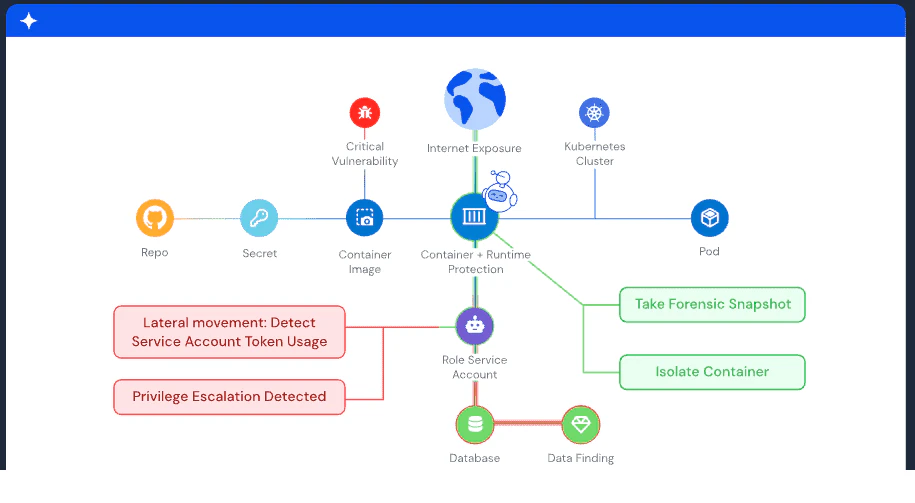
Securing Kubernetes clusters requires visibility across configurations, images, runtime behavior, and cloud permissions simultaneously. Wiz connects these layers through a Security Graph that correlates container vulnerabilities with RBAC permissions and network exposure, surfacing real attack paths rather than isolated findings.
For the risks covered in this article, here is how Wiz addresses each one in practice. Agentless workload scanning inventories every image across your EKS, AKS, and GKE clusters in minutes, without deploying or managing heavy agents. Wiz flags misconfigurations against CIS benchmarks and custom policies continuously, catching RBAC sprawl and exposed APIs before they become incidents.
When you need runtime protection, the Wiz Runtime Sensor adds a lightweight eBPF layer that detects shadow pods, container drift, and malicious processes in real time. Vulnerability Runtime Validation (VIR) goes a step further: it shows which vulnerable packages are actually loaded in memory, so your team fixes what attackers can exploit instead of chasing hundreds of dormant CVEs.
As teams deploy AI workloads inside containers, the same Runtime Sensor identifies AI frameworks like LangGraph and PydanticAI running in your cluster. It detects Rogue Agent behavior, including unauthorized credential harvesting and malicious command execution by autonomous agents, and the Security Graph correlates these signals across infrastructure, models, data, and code layers.
Ready to see how Wiz protects your Kubernetes clusters? Get a demo
Get a demo
Learn what makes Wiz the platform to enable your cloud security operation
