

What is an AI inventory?
An AI inventory is a continuously updated view of every AI system running in your environment – including models, endpoints, SDKs, and the cloud resources they rely on. It gives security, platform, and governance teams a single source of truth for where AI lives, how it’s deployed, and what it can access.
In practice, the most useful AI inventories go beyond model names. They map AI components to their surrounding context: the data they use, the identities that call them, the infrastructure that hosts them, and the teams responsible for them. This turns the inventory from a list into a graph of relationships that shows real exposure and impact.
An AI inventory is often referred to as an AI Bill of Materials (AI-BOM). Similar to a software BOM, it describes the moving parts inside an AI system –model versions, vector stores, orchestrators, endpoints, and underlying cloud services –so you can understand dependencies and risk in a structured way. For cloud environments, this scope typically includes managed AI services (like SageMaker, Azure ML, or Vertex AI), model endpoints, GPU clusters, and supporting storage and data services.
A modern AI inventory also helps reveal shadow AI inside cloud accounts – AI services, endpoints, or SDKs that teams adopted without centralized visibility or review. Shadow AI outside the cloud (such as browser-based tools or local experiments) requires separate governance, but the inventory ensures that anything deployed into your cloud footprint is visible and reviewable.
The most important characteristic of an AI inventory is that it is not a one-time spreadsheet. AI systems appear, change, and retire quickly. To stay trustworthy, the inventory must update automatically as new endpoints are deployed, permissions are updated, or architectures evolve.
AI Security Starter Pack
Get the templates and checklists to inventory and secure AI across your cloud environment.

Why AI inventory matters most when connected to context
An AI inventory is valuable on its own – it tells you what exists, where it runs, and who is responsible. But the real value appears when that inventory is connected to context: the data each model touches, the endpoints that expose it, the identities that can modify it, and the cloud resources it depends on.
The inventory captures the facts you need to govern AI. The contextual layer shows the risk that comes from how those assets interact.
This separation is important. A spreadsheet or list can record model names and owners, but it can’t tell you whether a model has over-exposed access to sensitive data, whether its endpoint is reachable from the internet, or whether a service account can escalate privileges. Those answers come from real-time graph context, not the inventory alone.
When you connect the two, you move from a static list to an operational view of AI risk:
Inventory identifies each model and endpoint
Graph context shows where it’s exposed
Posture engine evaluates misconfigurations and policy gaps
Runtime signals surface anomalies and active threats
Together, this gives you a complete picture, rather than a list of parts.
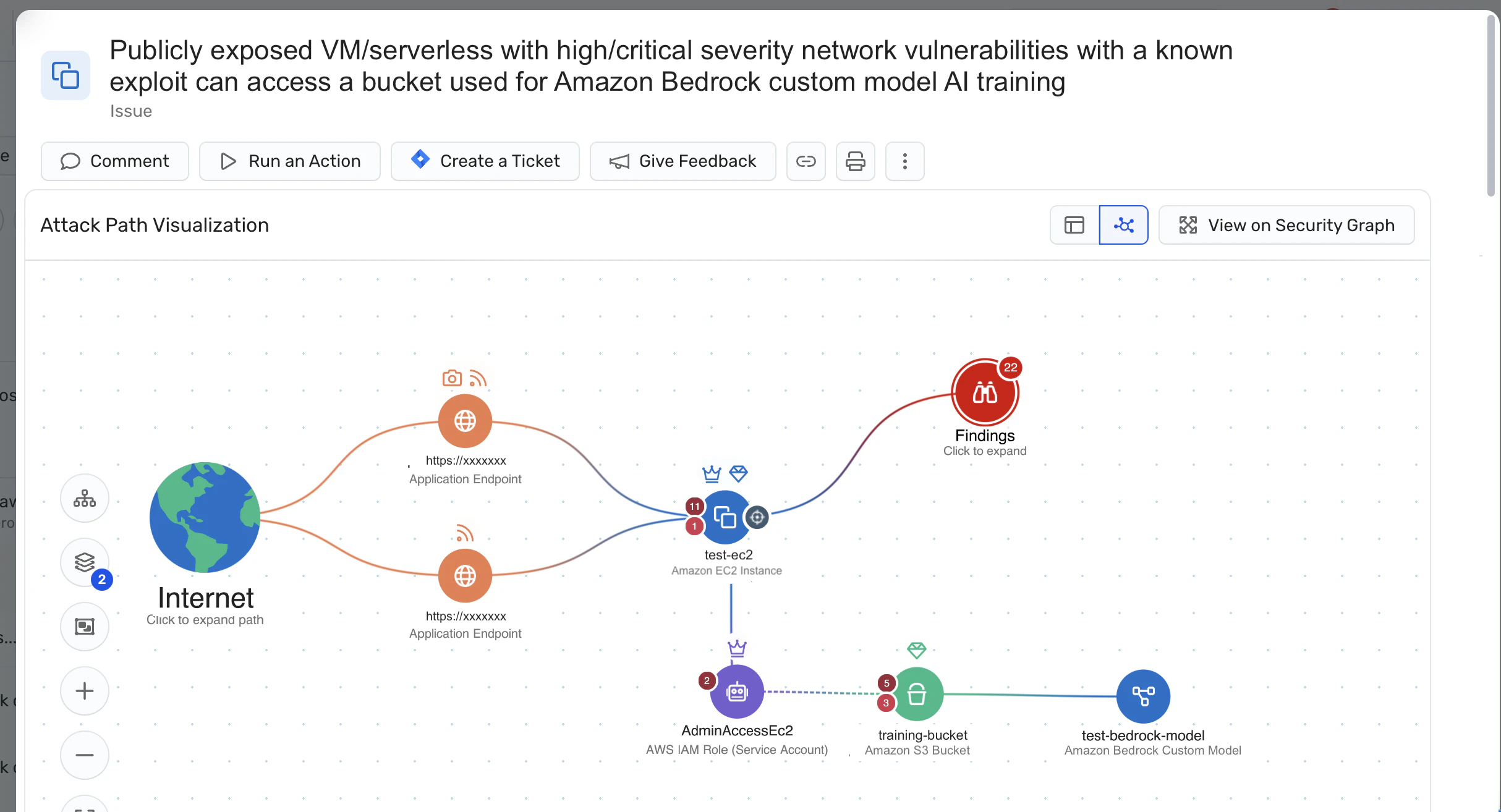
For example:
The inventory tells you there’s a language model running in production.
The context graph shows that endpoint is public, talks to a sensitive dataset, and is using an identity with broad permissions.
The posture engine highlights a misconfiguration in the network path.
And now the team knows exactly where risk comes from – not because the inventory stored it, but because the context was mapped around it.
This is the difference between asking “Where do we use AI?” and being able to answer “Where does AI actually introduce risk?”
And it’s the reason modern AI governance, compliance, and security rely on inventory + context, rather than treating an AI-BOM as a static document.
AI inventory use cases
A live, accurate AI inventory turns AI from something mysterious into something manageable. Instead of hunting for models, endpoints, or ownership information, teams can answer hard questions quickly and make decisions with clear context.
Below are practical ways organizations use an AI inventory across security, governance, operations, and incident response.
Security and risk reduction
Security teams need to see what exists before they can secure it. An AI inventory gives a map of the AI systems already deployed into your cloud footprint and highlights where they may introduce risk.
With an AI inventory, teams can:
Find exposed model endpoints and understand what data they can reach Example: Internet-reachable inference APIs tied to sensitive data stores
Identify risky configurations across AI infrastructure Example: model serving containers running on old images or weak network controls
See privileged access paths Example: service accounts or roles with write access to training data or production models
Because the inventory shows relationships, you can prioritize what matters instead of treating all AI assets as equal. A small internal model in a private network is not the same as a customer-facing endpoint with broad data access.
Compliance, legal, and governance
AI regulations and governance standards increasingly require organizations to demonstrate control, not just intent. An AI inventory becomes the foundation for answering questions from auditors, legal teams, and regulators.
With an AI inventory, teams can:
Show which AI systems process sensitive data (PII, financial records, regulated healthcare data)
Support risk classification of AI systems Example: internal copilots vs. customer-facing recommendation systems
Document ownership, guardrails, and controls Example: policy coverage, change processes, evaluation practices
Instead of assembling evidence during audits, the inventory becomes the source of truth for how AI is deployed and governed across the organization.
Architecture and governance boards
As AI adoption spreads, many organizations find similar capabilities being built multiple ways with different models, technologies, and patterns. Architecture and governance groups use the AI inventory to guide consolidation and repeatability.
With an AI inventory, you can:
Spot duplicate efforts Example: two teams building similar classification models on different stacks
Establish “blessed” platforms and patterns Example: recommended models, SDKs, or serving patterns for new use cases
Track adoption of new AI patterns Example: LLM agents, retrieval-augmented generation, fine-tuning pipelines
Inside MCP Security: A Field Guide
As LLM agents and MCP-based patterns spread across your inventory, understand the emerging risks they introduce.

The inventory creates a shared view that helps guide decisions without slowing down innovation.
How Wiz helps you build and activate an AI inventory
Wiz is not just another inventory tool – it’s a cloud context engine that makes your AI inventory meaningful. Instead of maintaining a static spreadsheet, Wiz automatically discovers AI systems in your cloud environments and maps them into the same Security Graph that powers cloud risk analysis across workloads, identities, and data.
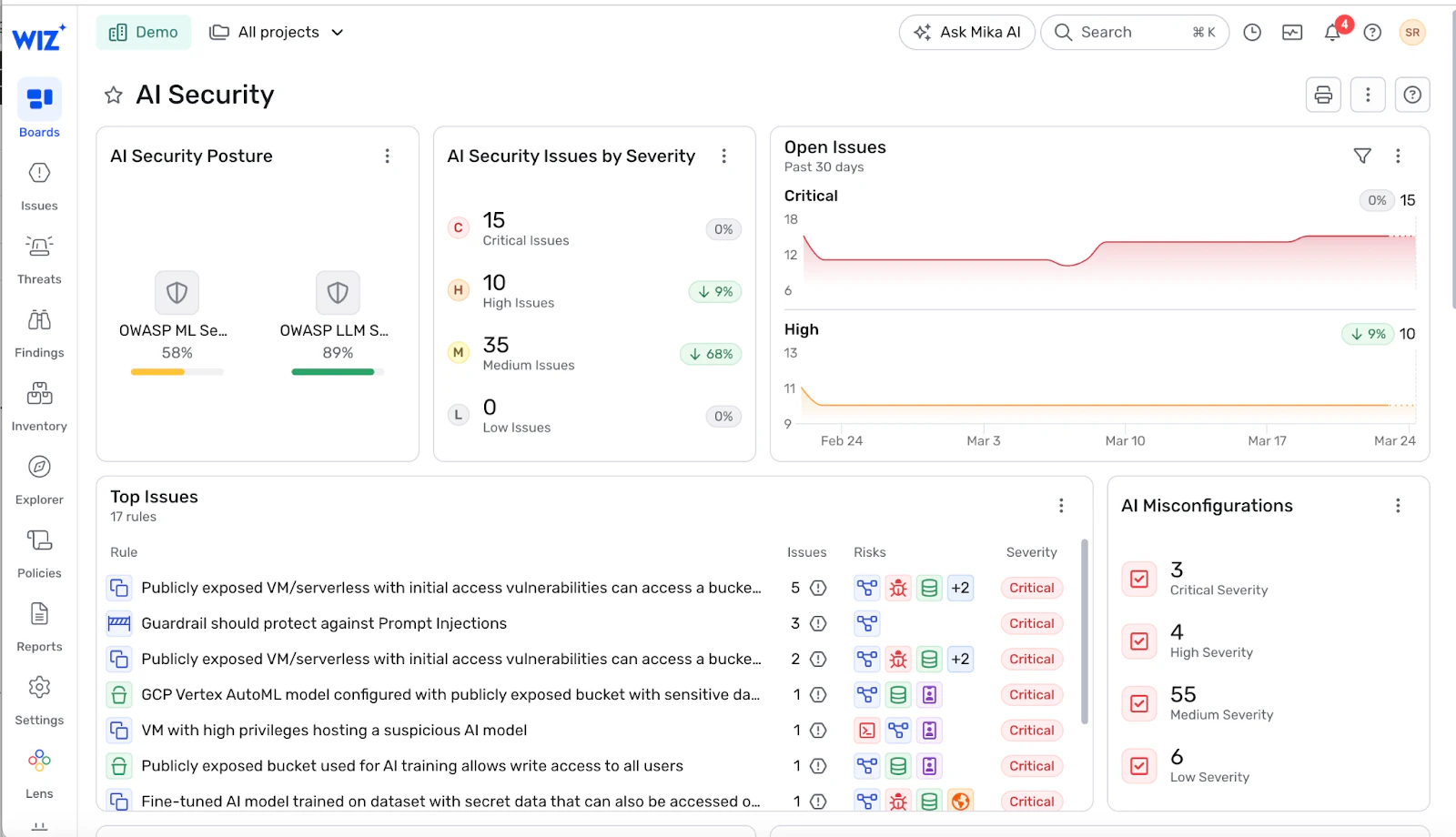
The result is a living AI inventory backed by context: every model, endpoint, dataset, and identity is visible in one place, and connected to the infrastructure that runs it.
Agentless discovery: the foundation
Wiz connects to AWS, Azure, GCP, and Kubernetes using standard APIs. This gives you a complete view of AI-related assets without deploying agents, including:
managed AI/ML services
GPU nodes and containers serving models
model endpoints and API gateways
data stores used for training or inference
Discovery is continuous, so the inventory stays current as teams experiment, deploy new models, or spin up shadow AI.
Graph context: inventory with relationships
In the Wiz Security Graph, each AI asset sits inside the real cloud topology:
which identities can call a model
which networks expose an endpoint
which data sources feed the model
which workloads depend on its outputs
which misconfigurations create attack paths
This is where an AI inventory becomes actionable. You can see how the pieces connect, not just that they exist.
Instead of treating all models as equal, you immediately spot the ones with toxic combinations, like an internet-exposed endpoint tied to a model with access to sensitive data and an over-permitted identity.
AI security posture layered on top
Because Wiz understands both cloud posture and AI resources, the platform can surface real AI misconfigurations, including:
public endpoints without guardrails
models with excessive access to sensitive data
missing isolation controls
exposed secrets tied to AI services
unencrypted datasets feeding training or inference
This is AI-SPM in practice: risk signals are evaluated in context, not scanned in isolation. The inventory points to the model – the graph shows the impact.
Code-to-cloud traceability
Wiz Code scans IaC templates and repositories to identify AI resources before they reach production. That means:
a model endpoint exposed in Terraform is caught during review
a vector database tied to sensitive data is flagged early
changes to IAM roles are visible before deployment
Your AI inventory isn’t just a source-of-truth for “what exists today” – it becomes a control point to prevent risky AI patterns from reaching production in the first place.Get a demo to see how Wiz maps your AI assets, risk paths, and remediation priorities in one unified view. Ready to turn your AI inventory into an operational view of risk? Request a demo to explore how Wiz can secure your cloud environment.
Want to see it in action?
See how Wiz maps your AI assets, risk paths, and remediation priorities in one unified view.
