
Understanding agentless scanning architecture
Agentless scanning connects directly to your cloud provider's control plane using APIs. This means the scanner operates from outside your workloads, never running code on your actual virtual machines or containers.
The process works in two main ways. First, it uses read-only API permissions to inventory all your resources and analyze their configurations, network settings, and permissions. Second, for deeper analysis of workloads, agentless scanners create a temporary encrypted snapshot of a virtual machine's storage volume (EBS volumes in AWS, managed disks in Azure, persistent disks in GCP).
The scanner analyzes this snapshot in a separate, isolated environment controlled by the scanning platform—typically a dedicated compute instance with restricted network access and encrypted storage. The scanner looks for vulnerabilities, malware, and exposed secrets without ever touching your running workload. After analysis completes, snapshots and any derived artifacts are deleted according to your configured retention policy—typically within minutes to hours, balancing security with audit trail requirements.
This approach is what makes agentless scanning so fast and comprehensive. When the Log4j vulnerability emerged, companies using agentless scanning rapidly identified affected instances across their entire cloud footprint in hours, coverage that was significantly harder and slower with traditional agent-based tools due to deployment gaps and update cycles.
Watch 12-minute Wiz Cloud demo
Watch a recorded walkthrough of the Wiz platform and learn how to achieve full coverage across AWS, Azure, and GCP in minutes

When to use agentless vs. agent-based scanning
Agentless and agent-based approaches serve different purposes in a complete security strategy. Here's how they compare:
| Capability | Agentless Scanning | Agent-Based Scanning |
|---|---|---|
| Coverage | Discovers all resources automatically via cloud APIs | Only covers resources where agents are installed |
| Deployment time | Minutes—connects at cloud account level | Days to weeks—requires agent rollout per workload |
| Performance impact | Zero impact on workloads | 1-5% CPU/memory overhead per agent |
| File system analysis | Deep disk scanning via snapshots | Real-time file monitoring |
| Runtime detection | Limited—sees installed software, not running processes | Full visibility into process execution and memory |
| Network visibility | Configuration analysis via APIs | Live network traffic monitoring |
| Best for | Vulnerability discovery, compliance, configuration auditing | Runtime threat detection, EDR, active attack response |
Most organizations use both approaches together. Agentless scanning provides comprehensive discovery and vulnerability management across your entire cloud footprint. Agent-based tools add runtime protection for critical workloads where you need real-time threat detection and response.
Agentless vs. Agent-Based Security: Which Is Better for the Cloud?
Agentless and agent-based security each have a role in cloud environments. Learn the key differences and how to choose the right model for your infrastructure.
Leia mais

Multi-cloud agentless deployment strategies
Deploying agentless scanning across multiple clouds is straightforward because it uses each provider's standard APIs. You establish one secure connection at the organizational level for each cloud provider like AWS, Azure, or Google Cloud.
In AWS, create a cross-account IAM role with read-only permissions plus explicit snapshot permissions for deep disk analysis (ec2:CreateSnapshot, ec2:CreateVolume, ec2:AttachVolume, ec2:DeleteSnapshot, and kms:Decrypt with conditions for encrypted volumes). In Azure, you set up a service principal with a Reader role at the management group level. For GCP, you use a service account with viewer permissions.
Here's what you need for each major cloud provider:
AWS: Cross-account IAM role with SecurityAudit managed policy; add narrowly scoped EBS snapshot permissions (ec2:CreateSnapshot, ec2:CreateVolume, ec2:AttachVolume) if deep disk analysis is enabled
Azure: Service principal assigned Reader role at subscription or management group level
GCP: Service account with Viewer and Cloud Asset Inventory roles; add Compute snapshot permissions (compute.snapshots.create, compute.disks.createSnapshot, compute.snapshots.delete) if deep disk analysis is enabled
Multi-cloud: One connector per cloud provider enumerates and onboards accounts, projects, and subscriptions via organizational constructs—AWS Organizations, Azure Management Groups, and GCP Folders/Organizations—with appropriate read permissions at the org level


Performance optimization and network considerations
Agentless scanning avoids in-guest performance impact on your running workloads. However, you should still account for provider-side resource consumption—storage I/O during snapshot creation, internal network bandwidth for data transfer, and API quota usage for continuous inventory. When scanning large disks, data transfers within the cloud provider's network, which can affect costs and bandwidth.
Modern agentless solutions handle this through incremental scanning. They only analyze the disk blocks that changed since the last scan, dramatically reducing data transfer volumes.
API rate limiting is another consideration. Continuous scanning makes numerous API calls to cloud providers. A well-designed platform manages this by batching API calls intelligently and respecting throttling limits.
Schedule resource-intensive operations like initial full disk scans during off-peak hours to minimize API throttling and reduce contention with other cloud operations. This ensures scans complete faster without competing for API quota during high-traffic periods.
Security hardening for agentless deployments
Encrypt all data in transit and at rest. Use customer-managed keys where possible for snapshots—AWS KMS keys, Azure Key Vault keys, or GCP Cloud KMS keys—and enforce key grants or IAM conditions that allow the scanner identity to decrypt only during analysis.
All API communication must use TLS 1.2 or higher; prefer TLS 1.3 where supported by your cloud provider for improved security and performance. For strict data residency requirements (GDPR, data sovereignty), process scans entirely in-region and restrict egress. Ensure the scanner control plane, temporary snapshot storage, and analysis compute all remain within the same geographic region as your workloads.
You can use private endpoints to keep all scanning traffic on the provider's private network:
AWS PrivateLink: Routes scanner traffic through private VPC endpoints
Azure Private Link: Ensures scanning stays within Azure's backbone network
GCP Private Service Connect: Keeps all communication internal to Google's network
With private endpoints configured (AWS PrivateLink, Azure Private Link, GCP Private Service Connect), even metadata collection stays on provider backbones within your private network pathing, avoiding public internet exposure entirely.
IAM guardrails and boundaries
Secure the scanner identity with additional IAM controls:
AWS permission boundaries: Attach a permission boundary to the scanner role that restricts maximum permissions:
{ "Version": "2012-10-17", "Statement": [ { "Effect": "Allow", "Action": [ "ec2:*", "kms:Decrypt", "kms:DescribeKey" ], "Resource": "*", "Condition": { "StringEquals": { "aws:SourceVpce": "vpce-xxxxx" } } } ] }This ensures the scanner can only operate from your VPC endpoint, preventing credential exfiltration.
Azure Conditional Access: Configure the service principal with Conditional Access policies that require:
Specific IP ranges (your scanner infrastructure)
Managed identity authentication (no service principal keys)
MFA for any interactive access
GCP Workload Identity Federation: Use Workload Identity Federation instead of service account keys:
gcloud iam workload-identity-pools create scanner-pool \ --location="global" \ --display-name="Agentless Scanner Pool" This eliminates long-lived credentials and ties authentication to your scanner infrastructure identity.
Data privacy and residency controls
Enforce data residency for regulatory compliance:
Region pinning: Configure the scanner to process all data within specific regions:
AWS: Deploy scanner infrastructure in eu-west-1, restrict snapshot creation to same region
Azure: Use Azure Policy to deny resources outside EU regions
GCP: Set organization policy constraints to restrict resource locations
Private endpoint design:
Use private endpoints to ensure data never leaves regional boundaries:
# AWS PrivateLink endpoint for scanner in eu-west-1 aws ec2 create-vpc-endpoint \ --vpc-id vpc-xxxxx \ --service-name com.amazonaws.vpce.eu-west-1.scanner \ --subnet-ids subnet-xxxxx Verification and audit:
Enable VPC Flow Logs (AWS), NSG Flow Logs (Azure), or VPC Flow Logs (GCP) to verify no cross-region traffic
Use cloud audit logs to confirm all snapshot operations occur in approved regions
Configure alerts for any resource creation outside designated regions
This architecture ensures GDPR Article 44 compliance by keeping all personal data processing within the EU.
CI/CD pipeline integration best practices
Agentless scanning becomes even more powerful when integrated into your development lifecycle. Scan Infrastructure as Code (Terraform, CloudFormation, Kubernetes manifests, Helm charts) in your CI/CD pipeline to catch misconfigurations, exposed secrets, and policy violations before deployment reaches production.
This creates a security gate that prevents insecure infrastructure from ever being created. Developers get immediate feedback on security issues within their existing workflows.
For example, if a developer commits a Terraform file that creates a publicly exposed storage bucket, the scan flags it immediately. You can even configure the pipeline to block the build until the issue is fixed.
This shift-left approach reduces the burden on security teams while empowering developers to build securely from the start. Organizations using this method catch risks early, preventing them from reaching production environments.

Compliance and audit frameworks for agentless scanning
Agentless scanning helps you meet compliance requirements by providing a complete, auditable inventory of all cloud assets. The method is non-invasive and doesn't modify workloads, which aligns well with frameworks requiring separation of duties.
For data residency rules like GDPR, you can configure agentless solutions to ensure all analysis happens within specific geographic regions. Log all scanning activities via native audit trails—AWS CloudTrail for API calls, Azure Activity Logs for resource operations, and GCP Cloud Audit Logs for admin and data access events.
These logs provide a tamper-evident audit trail of scanner actions under provider retention and integrity controls. For immutability, configure AWS CloudTrail log file validation, Azure Monitor immutable storage, or GCP log sinks with retention locks. This provides clear evidence for compliance audits and helps you prove complete environment coverage to auditors.
Compliance framework mapping
Agentless scanning directly supports multiple compliance controls:
1. ISO 27001:
A.5.9 (Inventory of assets) – Automated discovery of all cloud resources
A.8.8 (Management of technical vulnerabilities) – Continuous vulnerability identification
A.12.6.1 (Management of technical vulnerabilities) – Regular scanning and remediation tracking
2. SOC 2:
CC7.1 (System monitoring) – Continuous configuration and vulnerability monitoring
CC7.2 (System component anomalies) – Detection of unauthorized changes and misconfigurations
3. PCI DSS:
Requirement 11.2 (Vulnerability scanning) – Quarterly internal and external scans
Requirement 11.5 (Change detection) – File integrity monitoring via snapshot comparison
Note: External ASV scans remain mandatory for internet-facing cardholder data environments
4. HIPAA:
164.308(a)(1)(ii)(A) (Risk analysis) – Comprehensive asset and vulnerability assessment
164.312(b) (Audit controls) – Complete audit trail of scanning activities
5. FedRAMP:
RA-5 (Vulnerability scanning) – Authenticated scanning at required frequencies (monthly for high-impact)
CM-8 (Information system component inventory) – Automated asset inventory
Agentless scanning provides the audit evidence (scan reports, asset inventories, remediation tracking) that auditors require for these controls.
Monitoring and troubleshooting agentless systems
Even though agentless scanning requires minimal maintenance, monitoring its health is important. A good platform provides dashboards showing scan status, resource coverage, and any failures.
This helps you quickly identify and fix issues. The most common problems involve IAM permissions—if a scanner can't inspect a resource, it's usually a missing permission in the cross-account role. Check for SecurityAudit policy attachment, snapshot permissions (if using deep scanning), and KMS key grants for encrypted volumes.
Connectivity issues are rare when using cloud-native networks but can happen. Check network security group rules or private endpoint configurations to ensure traffic isn't blocked.
You can also set up alerts for:
Failed scans: Notifications when a scan can't complete
Coverage gaps: Alerts when new resources aren't being scanned
Permission errors: Warnings about insufficient access rights
API throttling: Notifications when hitting rate limits
Cost optimization strategies
Agentless scanning is generally cost-effective, but you can optimize spending further. The main costs come from snapshot storage (temporary volumes created during deep scans) and API calls (continuous inventory and configuration queries).
Implement snapshot retention policies to delete temporary snapshots immediately after scanning. This prevents orphaned snapshots from accumulating storage costs.
Look for solutions that use intelligent call batching and caching to minimize redundant API requests. For resource-intensive operations like deep disk analysis, schedule during off-peak hours to reduce API contention and internal network load. This improves scan completion times without competing for shared infrastructure resources during high-traffic periods.
Use cost allocation tags for scanner resources to accurately track security spending. This helps you understand the true cost of your security program and optimize accordingly.
Cloud Cost Optimization: Reduce Spend in 2026
Cloud cost optimization is the systematic practice of reducing cloud spend while improving cloud efficiency through enhanced visibility, resource rightsizing, workload automation, and team accountability.
Leia mais
Advanced configuration patterns
As your security program matures, you can customize agentless scanning for specific needs. Create custom policies using Open Policy Agent (OPA) and its Rego policy language to enforce organization-specific security rules beyond standard compliance benchmarks—for example, requiring specific tags on all production resources or blocking internet-exposed databases.
Adjust risk-scoring algorithms to prioritize certain assets or environments as more critical. This ensures findings align with your business context and risk tolerance.
Integration with your broader security ecosystem amplifies the value. Configure webhooks to send prioritized findings directly to your SIEM for correlation with other security events. Connect with ticketing systems like Jira or ServiceNow to automate remediation workflows.
You can also create custom detectors for:
Shadow IT: Unauthorized cloud resources or services
Configuration drift: Resources that deviate from approved baselines
Compliance violations: Specific regulatory requirements unique to your industry
Cost anomalies: Unusual spending patterns that might indicate security issues
How Wiz transforms agentless scanning for modern cloud security
Wiz Cloud scans your cloud environment agentlessly to extract the raw metadata required for comprehensive risk assessment. This approach delivers complete visibility across your entire cloud estate—from virtual machines and containers to serverless functions and AI pipelines—in minutes, with zero performance overhead on your workloads.
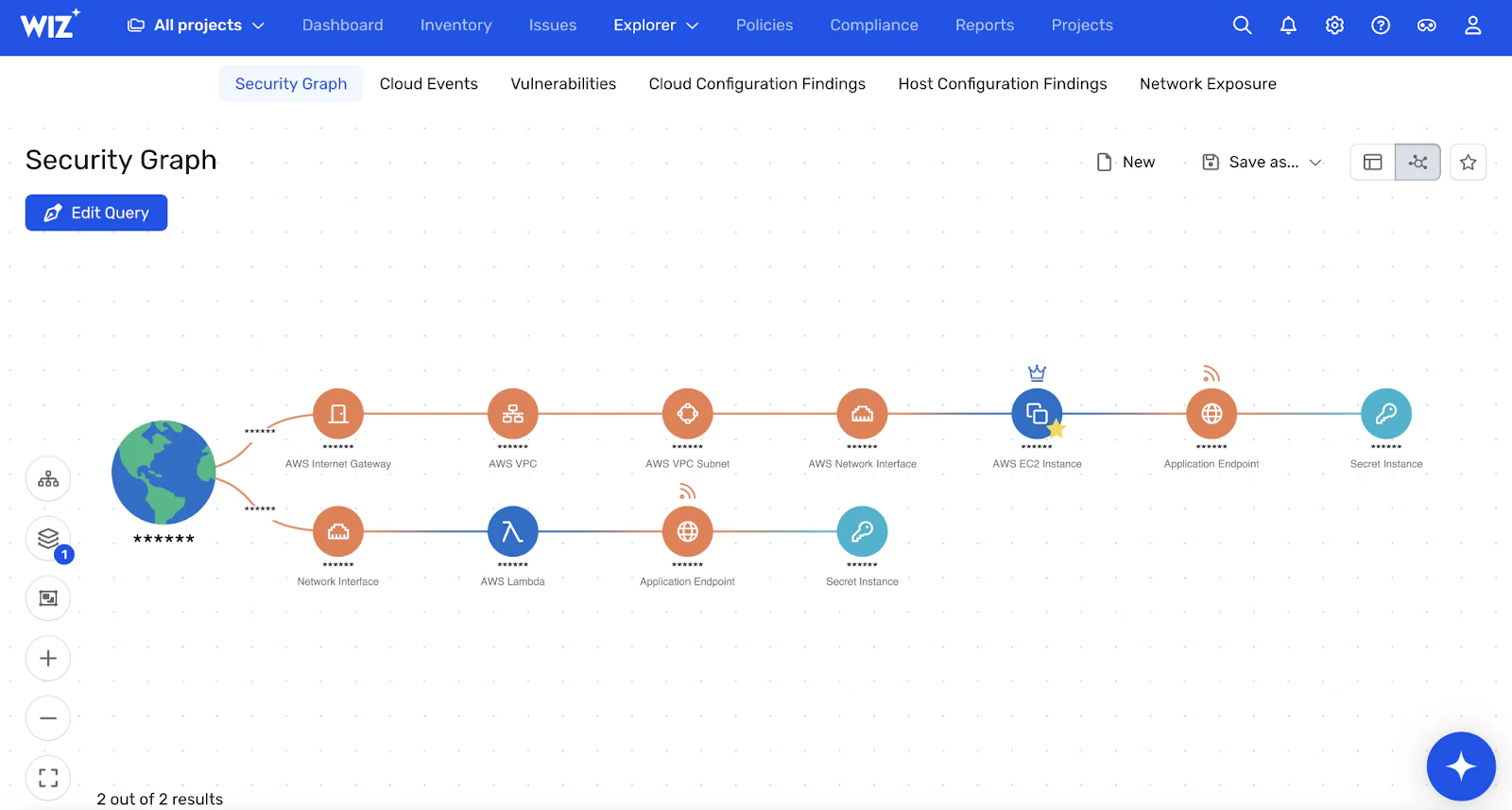
The agentless architecture offers significant advantages over legacy tools. You grant only least-privilege permissions rather than administrative access. New Connectors take just minutes to create, and you can add new permissions to existing Connectors as features expand. Every workload is automatically detected and scanned, eliminating blind spots. The platform leverages cloud provider APIs and services for all scanning operations, ensuring scalability and reliability without consuming your workloads' CPU, memory, or computing resources.
The Wiz Security Graph uses this agentless scanning data to build a deep, contextual model of your environment. It maps every resource, permission, vulnerability, and configuration to analyze toxic combinations of risk that create real attack paths. Instead of thousands of isolated alerts, you get a prioritized queue of critical issues that actually matter.
Wiz unifies previously separate tools like CSPM, CWPP, CIEM, and DSPM into one agentless platform. The platform's bidirectional code-to-cloud correlation traces runtime issues discovered by agentless scanning back to the specific code and developer who wrote it.
This comprehensive approach eliminates tool sprawl while providing a single source of truth for cloud risk, with rapid deployment and immediate time-to-value that scales effortlessly across the largest cloud environments. Get a demo to see how Wiz's agentless scanning can transform your cloud security posture.
Watch 12-minute Wiz Cloud demo
Watch a recorded walkthrough of the Wiz platform and learn how to achieve full coverage across AWS, Azure, and GCP in minutes