

What is container lifecycle management?
Container lifecycle management is the practice of governing every stage a container goes through, from initial image creation and deployment to runtime operation, maintenance, and eventual retirement. It gives your team a consistent framework for building, shipping, and running containerized workloads while maintaining security and compliance at each step.
Without lifecycle management, containers become a collection of disconnected decisions. One team builds images with unvetted base layers. Another deploys them without admission controls. A third monitors runtime without any visibility into what was packaged at build time. The result is fragmented security, where vulnerabilities slip through the gaps between stages and no single team has the full picture.
When you treat each lifecycle stage as part of a connected system, you can trace every container image back to its source, enforce policies before workloads reach production, and respond to threats with the context needed to act quickly.
Container Security Best Practices [Cheat Sheet]
Get the 9-page blueprint for securing your environment. We’ve included specific code examples, visual diagrams, and the best open-source tools to help you harden your containers with confidence.

Why container lifecycle management matters
Containerized workloads are growing fast. Many organizations now run thousands of containers that spin up, serve traffic, and terminate in seconds. CI/CD pipelines push new images multiple times per day, and Kubernetes clusters scale workloads automatically based on demand. Traditional security models that rely on periodic scans and manual reviews simply cannot keep pace.
This speed introduces risk at every stage. Research shows that 12% of cloud environments have publicly exposed containers with high or critical vulnerabilities. A vulnerable dependency pulled during build propagates to every environment the image touches. A misconfigured deployment exposes a service to the public internet. A stale image running in production accumulates unpatched CVEs for weeks because no one tracks when it was last rebuilt. Together, these failures compound into an attack surface that no single team can fully see.
Consider a scenario where your team discovers a critical vulnerability in a widely used base image. Without lifecycle management, you have no reliable way to determine which running containers use that image, which clusters they are deployed to, or whether admission controls would catch the issue if someone redeployed it. You end up triaging manually across teams, losing hours while the exposure persists.
Compliance adds another layer of complexity. Frameworks like SOC 2, PCI DSS, and HIPAA require evidence that your organization controls what runs in production, how it got there, and who authorized it. The NIST Application Container Security Guide (SP 800-190) outlines specific recommendations for securing each lifecycle phase. Lifecycle management provides that continuous audit trail automatically, instead of forcing your team to reconstruct it manually before every audit cycle.
Stages of the container lifecycle
The container lifecycle is cyclical, not linear. Containers move through distinct stages, and each one introduces its own security considerations. Understanding these stages helps your team apply the right controls at the right time.
Creation and build
Every container starts as a Dockerfile or build configuration that specifies a base image, application code, and dependencies. This is where risk enters the supply chain. A base image with known CVEs, an outdated library, or a hardcoded secret becomes part of every container built from that definition.
Scanning images during build and hardening base layers before they reach a registry is the most cost-effective point to catch vulnerabilities. Container image scanning at this stage identifies issues when fixes are cheapest to apply. Teams that skip this step end up discovering issues in production, where remediation is slower and more disruptive.
Deployment
During deployment, your orchestration platform pulls an image from a registry, verifies its signature, and schedules it onto a node. Admission controllers act as gatekeepers here, rejecting images that fail policy checks. Misconfigurations at this stage, such as running containers as root or disabling resource limits, create runtime risks that are harder to fix once workloads are live. Understanding common Kubernetes security issues helps your team configure these controls correctly from the start.
Orchestration
Kubernetes handles scheduling, scaling, networking, and service discovery for your containers. Orchestration decisions directly affect security posture. Pod security standards control what a container can do at the kernel level. RBAC policies determine who can modify workloads. Following Kubernetes security best practices at this stage prevents misconfigurations from becoming exploitable.
Consider a team that leaves default RBAC permissions in place after spinning up a new cluster. Any compromised pod in that cluster could escalate privileges, list secrets, or move laterally across namespaces. Network policies restrict traffic between services, and each of these controls needs to be configured deliberately rather than left at defaults.
Monitoring and observability
Once containers are running, you need visibility into their behavior. Operational observability (logs, metrics, traces) tells you whether workloads are healthy. Security monitoring goes further, using techniques like eBPF-based syscall tracing and behavioral baselines to detect anomalous activity such as unexpected network connections, privilege escalations, or file system modifications. Kubernetes runtime security focuses specifically on catching threats that bypass pre-deployment controls.
Updates and maintenance
Containers need regular patching just like any other software. Rolling updates and canary deployments let your team push new image versions without downtime, but stale images that never get rebuilt accumulate risk quietly. Drift detection helps you identify containers running in production that no longer match their declared configuration or have fallen behind on patches. Industry data shows that 46% of clusters still run on Kubernetes versions past their upstream end-of-life, underscoring how quickly maintenance backlogs accumulate.
Retirement and decommissioning
When a container reaches end of life, secure teardown matters. This includes rotating any secrets the container accessed, revoking service account credentials, cleaning up registry images that are no longer in use, and removing stale entries from orchestration configs.
Skipping this stage leaves orphaned credentials and outdated images that attackers can discover and exploit. Registry cleanup alone can eliminate a significant portion of your unused attack surface.
Container lifecycle security: from code to cloud
Securing containers across their full lifecycle requires controls that span build, deploy, and runtime, and share context between them. Treating each phase in isolation creates the exact blind spots attackers exploit. Four areas of security coverage work together to close those gaps.
Build-time scanning and image hardening catch vulnerabilities at the earliest and cheapest point. Scanning during CI/CD means your team finds a critical CVE in a dependency before the image ever reaches a registry, not after it is running in production. Image hardening, such as using minimal base images, removing unnecessary packages, and never embedding secrets, reduces the attack surface from the start.
Admission control and policy enforcement act as the checkpoint between build and runtime. Kubernetes admission controllers, tools like OPA/Gatekeeper, or native webhooks can block images that have not been scanned, reject containers requesting excessive privileges, or enforce that only signed images from trusted registries are deployed. This prevents misconfigurations from reaching your clusters. The stakes are real: Wiz researchers found that over 6,500 Kubernetes clusters expose vulnerable admission controllers to the internet.
Runtime detection and response provide the real-time layer. When a container starts behaving outside its expected profile, whether through an unexpected outbound connection, a shell execution, or a privilege escalation attempt, runtime sensors flag it immediately. The critical difference is whether that alert includes context about the image, its build history, and its deployment configuration, or whether it is just another noisy notification your team has to investigate from scratch.
Attack path analysis ties everything together. Instead of looking at individual findings in isolation, this approach connects vulnerabilities, misconfigurations, identity permissions, and network exposure to map the paths an attacker could actually exploit. A critical CVE in a container that has no network exposure and runs with minimal privileges is a lower priority than a medium-severity finding in an internet-facing pod with admin-level service account permissions.
Watch 12-minute demo
See how Wiz maps container vulnerabilities, misconfigurations, and identity risks across your cloud environment.

Best practices for container lifecycle management
These practices help your team build a security posture that holds up across every lifecycle stage, not just the ones you have tooling for today. Each one addresses a specific gap that organizations commonly discover only after an incident.
Shift-left security in CI/CD: Scan images during the build pipeline so vulnerabilities are caught before deployment. Fixing a dependency issue in a pull request is far cheaper than remediating it across dozens of running containers.
Automate policy enforcement with admission controllers: Use OPA/Gatekeeper or native Kubernetes admission webhooks to block non-compliant images and configurations at deploy time. Manual approval processes do not scale when your team pushes hundreds of deployments per week.
Prioritize vulnerabilities by risk context, not CVSS alone: A critical CVE in an unreachable container with no sensitive data access is lower priority than a medium-severity finding in an internet-facing pod with admin privileges. Factor in network exposure, identity permissions, and data sensitivity.
Maintain code-to-cloud traceability: Track every container image back to its source repository, commit hash, and CI/CD pipeline run. When an incident occurs, this traceability cuts investigation time from hours to minutes.
Implement continuous compliance monitoring: Treat compliance as a continuous signal, not a periodic audit. Monitor for CIS Kubernetes Benchmark drift, track policy violations in real time, and generate evidence automatically so your team is not scrambling before an audit.
How Wiz secures the container lifecycle
Wiz takes an end-to-end approach to container security, connecting visibility from source code through production without requiring you to deploy agents across your infrastructure. Rather than bolting together separate tools for scanning, posture, and detection, Wiz unifies these capabilities so your team works from shared context at every stage.
Agentless container image scanning analyzes images across your registries and running workloads without installing anything on your nodes. Wiz identifies vulnerabilities, misconfigurations, embedded secrets, and malware in container images by scanning at the cloud control plane level, which means full coverage from day one with no performance overhead on your clusters.
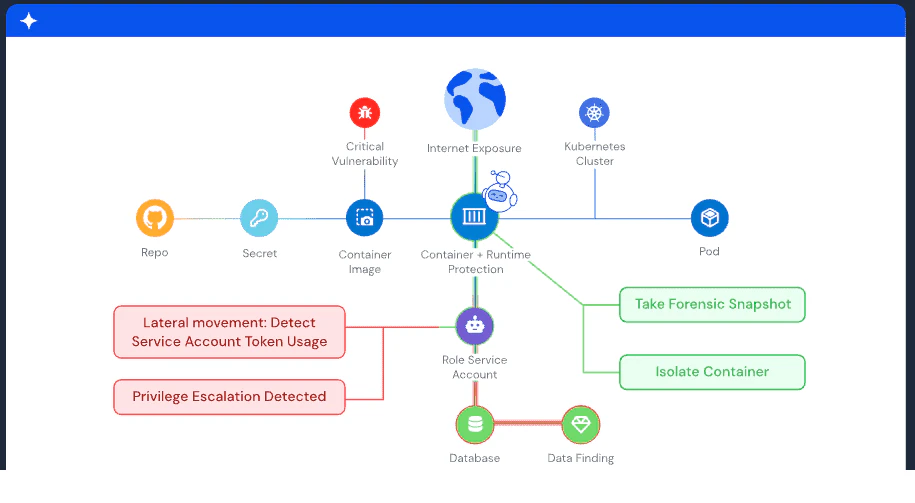
For Kubernetes environments, Wiz provides security posture management (KSPM) that continuously evaluates cluster configurations against CIS benchmarks and organizational policies. This catches overly permissive RBAC roles, missing network policies, and pod security standard violations before they become exploitable.
The Wiz Runtime Sensor adds real-time threat detection directly in your clusters. It uses eBPF-based monitoring to detect suspicious behavior, such as reverse shells, cryptomining processes, or lateral movement attempts, and correlates those runtime signals with the build-time and deployment context already in the platform. When your team gets an alert, they see the full picture: what image is affected, how it was built, what permissions it has, and what data it can access.
The Wiz Security Graph connects all of these signals through attack path analysis. Instead of handing your team a flat list of findings, it maps how vulnerabilities, misconfigurations, identity permissions, and network exposure combine into exploitable paths. This lets you focus on the risks that actually matter rather than chasing alerts that have no realistic path to exploitation.
The same lifecycle security model extends to containers running AI and ML workloads, where model-serving containers and inference pipelines introduce additional risks around data access and compute resources that need the same build-through-runtime visibility. Get a demo to see how Wiz secures containers across every lifecycle stage.
See Wiz in Action
From hardened base images to real-time runtime containment—experience the full container lifecycle on one platform.
