
Protecting endpoints has always been a cornerstone of enterprise security — and it’s more important than ever with the rise of remote work and distributed IT environments. Laptops, servers, and other devices remain prime targets for attackers, making endpoint detection and response (EDR) platforms critical for modern security teams.
At the same time, the line between endpoints and the cloud is blurring. Leading EDR platforms now extend into workloads and cloud services, giving organizations broader visibility and protection beyond the device layer.
That’s where Microsoft Defender and CrowdStrike Falcon come in. Both are leaders in endpoint security, and both have expanded their capabilities into the cloud. But their approaches differ: Defender leverages deep integration with the Microsoft ecosystem, while Falcon takes a cloud-native, cross-platform path.
In this post, we’ll walk through the features, benefits, and trade-offs of each solution so you can decide which aligns best with your organization’s infrastructure and security strategy.
The Board-Ready CISO Report Deck [Template]
This editable template helps you communicate risk, impact, and priorities in language your board will understand—so you can gain buy-in and drive action.

What is Microsoft Defender?
Microsoft Defender is Microsoft’s endpoint security platform, delivered as part of the broader Microsoft 365 Defender suite. It provides endpoint detection and response (EDR), next-generation antivirus, vulnerability management, and threat intelligence – all tightly integrated with Microsoft 365 Defender and the broader Microsoft ecosystem.
Microsoft Defender for Endpoint primarily uses an agent across Windows, macOS, Linux, iOS, and Android devices. For cloud and hybrid environments, Microsoft Defender for Cloud extends visibility and protection with cloud-native controls and agentless options, enabling organizations to secure both traditional endpoints and cloud workloads.
Key features include:
Endpoint detection and response (EDR)
Next-generation antivirus (NGAV)
Vulnerability management and threat intelligence
Automated investigation and remediation
Machine learning and behavioral analysis
ATT&CK-aligned detections and threat hunting, plus compliance reporting through Microsoft 365 compliance tools (such as ISO 27001 mappings)
In practice, Microsoft Defender is especially attractive for organizations already invested in Microsoft 365 or Azure, since it reduces licensing costs and simplifies deployment across a familiar ecosystem.
What is CrowdStrike Falcon?
CrowdStrike is a cybersecurity company ecognized for its endpoint detection and response (EDR) capabilities. Its flagship platform, CrowdStrike Falcon, was designed as a cloud-native security architecture that uses a lightweight agent to provide deep visibility into endpoint and workload activity.
Over time, CrowdStrike has expanded beyond endpoints into broader security coverage, including cloud workload protection, threat intelligence, and managed detection and response. The Falcon platform is backed by the CrowdStrike Threat Graph, which ingests and analyzes massive volumes of security events, enabling real-time detection, hunting, and response.
Key features include:
Lightweight agent-based protection for endpoints, workloads, and cloud assets
AI-powered threat detection and response with real-time visibility
Cloud workload protection for VMs, containers, and services
Integrated threat intelligence and proactive threat hunting
Incident response and forensics capabilities
CrowdStrike remains a strong option for enterprises with diverse endpoint environments or those that need advanced detection and threat hunting services, though organizations may layer it with other platforms to gain deeper context into identities, data, and multi-cloud security.
Watch 12-min demo
See how Wiz gives security teams unified visibility across hybrid environments to surface misconfigurations, identity risks, and critical attack paths.

CrowdStrike Falcon vs. Microsoft Defender: How do they stack up head to head?
When comparing Microsoft Defender and CrowdStrike Falcon, the right choice often comes down to your environment, existing investments, and operational priorities. Both offer strong endpoint protection, but they emphasize different strengths.
Deployment speed & operational complexity
Microsoft Defender: Integrated into the Windows ecosystem, Defender is straightforward for organizations already running Microsoft 365. However, configuration across hybrid or multi-cloud environments can be more involved.
CrowdStrike Falcon: CrowdStrike Falcon provides endpoint and workload protection through a single agent that can be deployed across servers, containers, and virtual machines, with centralized threat detection and response managed through the Falcon platform.
Takeaway: CrowdStrike emphasizes ease of deployment across heterogeneous environments, while Microsoft offers straightforward integration for Windows-centric setups.
Multi-cloud & cross-platform coverage
Microsoft Defender: Optimized for Azure and Windows environments, but also extends support to AWS, GCP, and non-Windows devices.
CrowdStrike Falcon: Built as a cloud-native platform supporting cross-platform protection, covering Windows, macOS, Linux, and major public cloud providers.
Takeaway: CrowdStrike Falcon focuses on multi-cloud and cross-platform coverage, while Microsoft Defender aligns closely with Azure-first environments.
Detection effectiveness & threat response
Microsoft Defender: Leverages Windows telemetry and automation to detect and remediate threats, particularly effective in Microsoft-heavy stacks.
CrowdStrike Falcon: Offers EDR capabilities with a focus on proactive threat hunting and incident response.
Takeaway: Both platforms perform strongly according to independent testing organizations such as AV-Test and MITRE ATT&CK evaluations, with Microsoft Defender leveraging Windows telemetry and automation.
Total cost of ownership
Microsoft Defender: May reduce licensing overhead for organizations already licensed under Microsoft 365 E5, though additional costs such as log ingestion may apply
CrowdStrike Falcon: Uses a per-endpoint pricing model that scales predictably based on usage.
Takeaway: Organizations with existing Microsoft 365 E5 licenses may find Defender more cost-aligned, while those preferring per-endpoint or usage-based pricing may consider CrowdStrike Falcon.
Integration & ecosystem support
Microsoft Defender: Deep integration with the Microsoft ecosystem (e.g., 365, Sentinel, Azure) is helpful in Microsoft-heavy environments.
CrowdStrike Falcon: Offers broad third-party integrations, including SIEMs, SOAR tools, and DevSecOps workflows, for flexible interoperability.
Takeaway: Microsoft Defender in Microsoft-centric environments; CrowdStrike for heterogeneous toolchains.
Compliance & governance
Microsoft Defender: Strong compliance alignment with Microsoft cloud certifications and built-in reporting for regulated industries.
CrowdStrike Falcon: Provides governance features with wide regulatory framework support, particularly valued in global, multi-cloud enterprises.
Takeaway: Microsoft Defender in Azure-first, regulated industries; CrowdStrike Falcon for multi-cloud enterprises with diverse compliance needs.
Top CrowdStrike Alternatives & Competitors in 2026
This guide provides a straightforward comparison between CrowdStrike’s security offerings and other cybersecurity tools in the marketplace.
더 알아보기

Bottom line: Which platform is best for your organization?
Both Microsoft Defender and CrowdStrike Falcon are strong endpoint security platforms, but the better fit depends on your organization’s environment and priorities.
Microsoft Defender typically aligns with organizations that:
• Are invested in Microsoft 365 or Azure ecosystems
• Seek to consolidate security tools under existing licensing
• Operate primarily within Windows or Azure environmentsCrowdStrike Falcon typically aligns with organizations that:
• Operate multi-cloud or mixed-OS environments
• Value agent-based protection with flexible integration options
• Require managed detection and response capabilities across endpoints
Ultimately, the choice isn’t about which platform is ‘better,’ but which aligns best with your technology stack, licensing, and security strategy. Whichever EDR/XDR you choose, pair it with a cloud-native risk platform to correlate endpoint signals with cloud misconfigurations, identities, data exposure, and runtime context.
Securing modern cloud environments with cloud-native solutions
Cloud adoption has reshaped how organizations think about security. Workloads run across multiple cloud platforms, developers move quickly through CI/CD pipelines, and identity is now the primary gateway to sensitive data and services. That shift has expanded the attack surface and increased the need for security approaches that understand how cloud components relate to each other — not just how each layer behaves on its own.
This is the perspective that shaped Wiz: secure cloud environments by connecting signals across workloads, identities, data, and application layers, then prioritizing what matters based on real context.
A cloud-native application protection platform (CNAPP) supports this approach by unifying those signals in one place. Rather than collecting alerts from separate tools, Wiz connects to cloud environments through APIs to automatically discover resources, visualize relationships, and surface risk in context.
With the Wiz Security Graph, teams can see how a misconfiguration, a vulnerable workload, and an overly permissive identity come together to create an attack path – helping them focus on issues that represent actual exposure rather than isolated findings.
Wiz was built for cloud environments, so it emphasizes:
agentless discovery to make onboarding fast
visibility across multi-cloud environments without operational overhead
contextual risk prioritization that highlights exploitable paths
integrations into existing workflows so security and development teams can act quickly
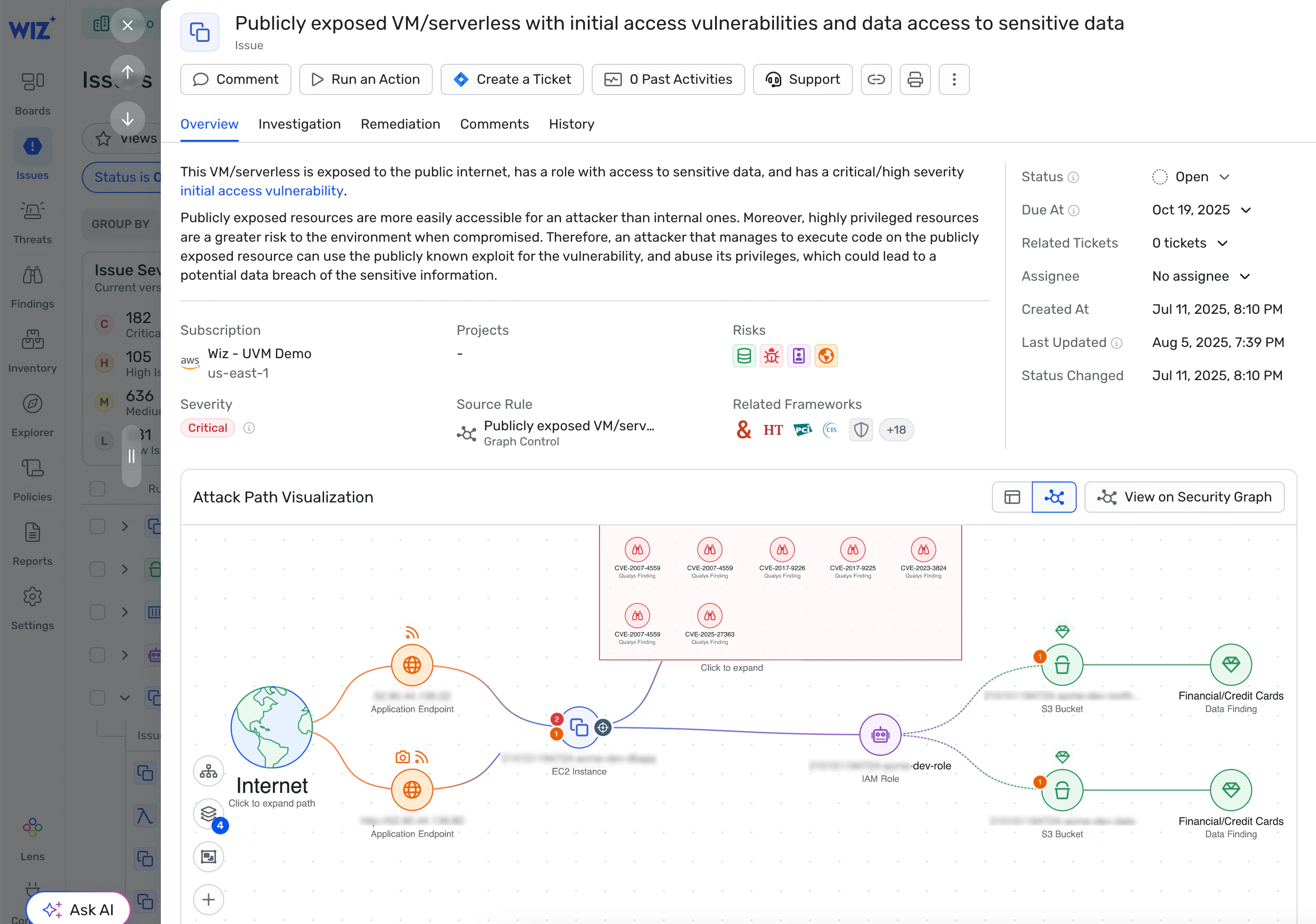
Ready to see how Wiz can complement your endpoint tools with unified visibility across your cloud? Request a demo to visualize attack paths, reduce noise, and secure your environment from code to runtime.
A single platform for everything cloud security
Learn why CISOs at the fastest growing companies choose Wiz to secure their cloud environments.
