


What is an AI IDE?
An AI IDE (AI integrated development environment) is a software development environment that embeds AI agents and LLMs directly into the editor to automate code generation, debugging, refactoring, and natural-language interaction with the codebase. This matters because developers can now routinely move from a natural-language prompt to a committed code change in minutes.
A traditional IDE, or integrated development environment, is a text editor bundled with a compiler, debugger, and project management tools. It gives you everything you need to write, test, and run code in one place.
AI IDEs layer LLM-powered capabilities on top of that foundation, turning a passive workspace into something closer to an active collaborator.
The shift is significant. Traditional IDEs required you to write every line manually and search documentation for syntax or API details. AI IDEs suggest, generate, and explain code in real time, acting more like a pair-programming partner than a tool you operate. Many also support multimodal inputs like natural language, screenshots, and voice, and they can reason across entire project contexts rather than just the single file you have open.
AI Security Starter Pack
Get the templates and playbooks to secure AI-driven development from the first line of code.

AI IDE vs. traditional IDE vs. AI coding assistant
The market uses "AI IDE" loosely, and that confusion creates real problems when teams try to evaluate tools for security, procurement, and compliance. There are three distinct categories worth understanding before you choose a tool or approve one for your engineering organization - AI IDEs, traditional IDEs, and AI coding assistants.
| Criteria | Standalone AI IDE | Traditional IDE with AI plugin | Standalone AI coding assistant |
|---|---|---|---|
| Examples | Cursor, Windsurf | VS Code + GitHub Copilot, JetBrains + JetBrains AI | ChatGPT, Claude |
| Where AI lives | Core architecture of the editor | Bolted on via extension or plugin | Separate application (browser, desktop) |
| Codebase context depth | Deep: indexes full repository | Varies by plugin integration depth | None: requires manual copy-paste |
| Agentic capability | Yes: can run commands, edit files, chain actions autonomously | Limited to growing; depends on plugin | No autonomous actions on your codebase |
| Security evaluation surface | Code context sent to LLM provider; agentic actions modify local files | Code context sent per plugin behavior | Only what you manually paste into the chat |
This distinction matters for security teams because standalone AI IDEs and plugins may send code context, including entire files or repository indexes, to third-party LLM providers. That creates a data handling and leakage risk that teams must evaluate before enterprise adoption.
How do AI IDEs work?
AI IDEs combine several AI-driven capabilities into a single environment. Each capability addresses a different phase of the development workflow, from writing AI generated code to catching bugs to generating cloud infrastructure configurations.
Under the hood, most AI IDEs route prompts to one or more large language models (LLMs), either cloud-hosted or local. To make suggestions project-aware, they use context-retrieval techniques, often called retrieval-augmented generation (RAG), that attach relevant code snippets, documentation, and open-file contents to each prompt. The implementation varies by tool: some AI IDEs index the full repository in a vector store for semantic search, while others rely on simpler signals such as open tabs, recent file history, imports, and nearby code.
Modern AI tools are also adopting the Model Context Protocol (MCP). MCP acts as a secure, standardized bridge that allows AI IDEs to connect directly to external tools and enterprise systems. Instead of just reading your local files, an MCP-enabled IDE can autonomously query a live database schema, fetch requirements from Jira tickets, or read error logs from Datadog to inform its code generation. This reduces AI hallucinations by grounding the model in the reality of your broader engineering ecosystem.
Inside MCP Security: A Field Guide
Explore the emerging risks of MCP-enabled AI tooling and how to secure these new connections.

Armed with this deep context, AI IDEs surface their power through four core capabilities:
AI-assisted code generation and completion
LLM-powered code suggestions range from full-line completion to multi-line block generation to natural-language-to-code, where you describe what you want in plain English and the IDE writes the implementation. The IDE sends surrounding code context (which may include open files, imported modules, function signatures, type definitions, and in some tools a full repository index) to the model so suggestions match your project's patterns and conventions.
When you prompt an IDE to "create an S3 bucket with server-side encryption," it can generate the corresponding Terraform or Python boto3 code in seconds. Treat this output like code from a junior developer: always inspect it for hardcoded credentials, overly permissive configurations, or vulnerable dependencies before hitting accept.
Real-time error detection and debugging
AI IDEs catch bugs before compilation or test execution by analyzing code as you write it, flagging type errors, logic issues, and security anti-patterns inline. Unlike a traditional single-file linter, the AI can reason across multiple project files to identify problems like mismatched function signatures or incorrect API usage.
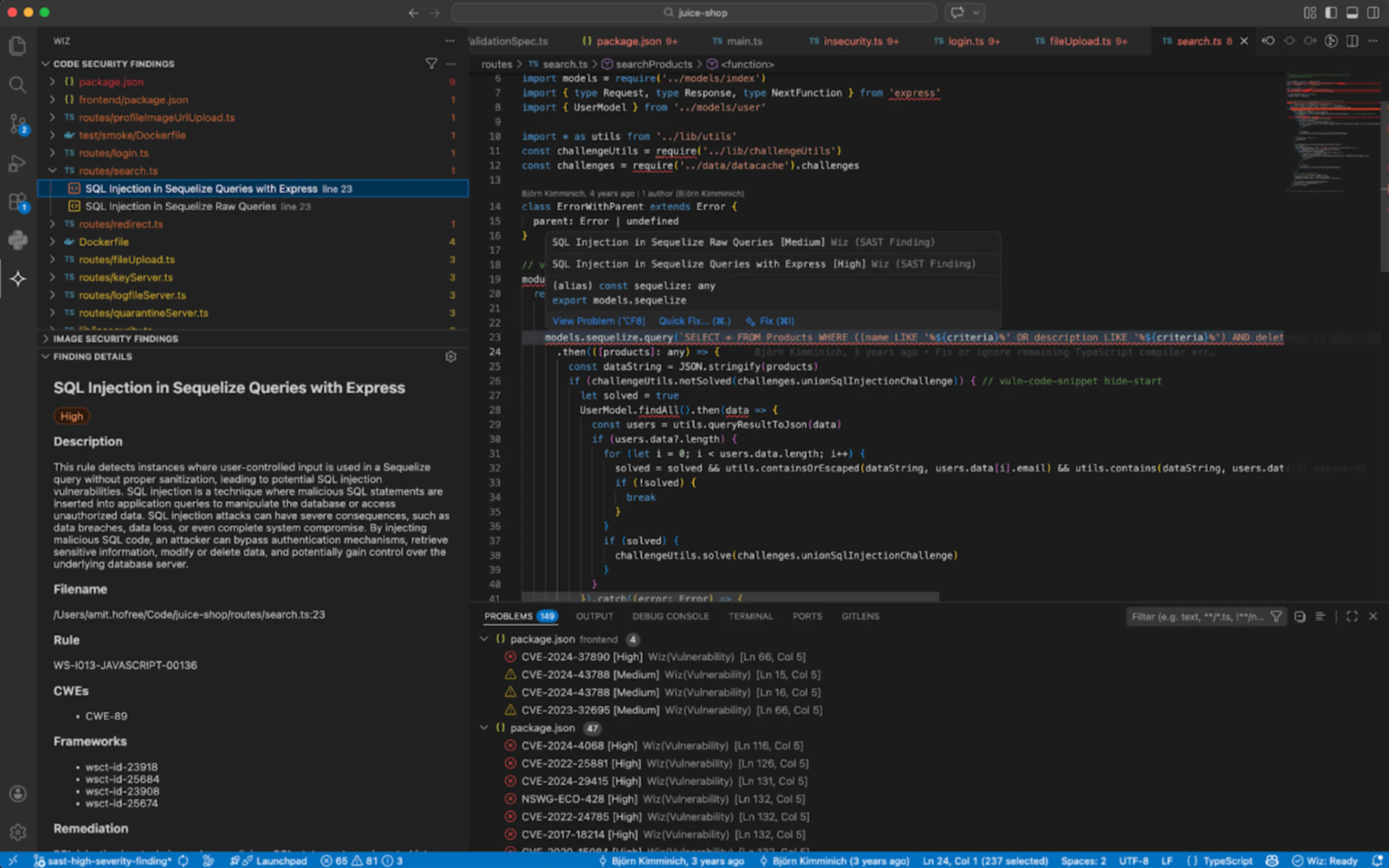
This shifts debugging from reactive (run code, see error, search for a fix) to proactive (the IDE explains the error and suggests a fix before you even run the code). The quality of these suggestions depends heavily on how much project context the IDE has access to, which is why standalone AI IDEs with deep codebase indexing tend to outperform simpler plugins here.
Infrastructure-as-code and cloud configuration generation
AI IDEs now generate Terraform, CloudFormation, Kubernetes manifests, and Dockerfiles from natural-language prompts, not just application code. This is where the security stakes rise sharply: a misconfigured Kubernetes manifest or an S3 bucket policy with public access ships just as fast as a Python function, and the blast radius is the entire cloud environment.
Consider a developer who asks the AI IDE to "create a Kubernetes deployment with a public-facing load balancer." The generated YAML omits NetworkPolicy controls and uses the default service account, creating an exposed workload with excessive privileges.
Workflow automation and agentic capabilities
Modern AI IDEs go beyond code suggestions to orchestrate multi-step tasks: running terminal commands, executing tests, managing git operations, creating pull requests, and chaining tool calls autonomously.
The security implication is straightforward. Agentic workflows can modify files, install packages, and run scripts without explicit approval for each step. That automation expands the attack surface if the AI suggests a malicious or vulnerable dependency, especially when 80% of repository workflows default to WRITE permissions, because an agent-triggered CI workflow can inherit broad repository access by default.
Benefits of AI IDEs
AI IDEs deliver measurable improvements across the development lifecycle when used with appropriate guardrails.
Faster development cycles: Developers spend less time on boilerplate and more time on business logic. Scaffolding a new cloud-native microservice that previously took hours can happen in minutes.
Improved code consistency: AI suggestions follow patterns already established in the codebase, reducing style drift and making code reviews faster.
Lower barrier to entry: Junior developers and non-specialists (e.g., data scientists writing infrastructure code) can produce working code more quickly, though review remains essential.
Enhanced team collaboration: AI-generated explanations of unfamiliar code sections help new team members onboard faster and reduce knowledge silos.
Accelerated cloud-native development: Developers can generate IaC templates, Dockerfiles, and CI/CD pipeline configurations from natural language, speeding up the path from idea to deployed service.
An AI IDE can generate a complete service skeleton (like a Dockerfile, an EKS Terraform module, and a GitHub Actions workflow) in minutes. But AI can also prioritize functionality over security. Double-check that generated Terraform doesn't grant broad IAM permissions and containers don't run as root before committing. Speed without automated guardrails creates risk at scale.
Popular AI IDEs and tools
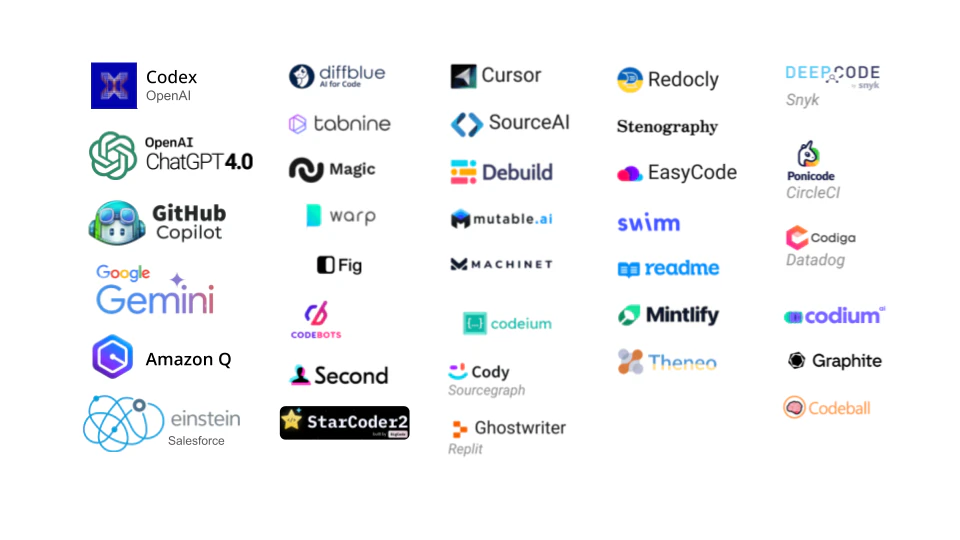
The AI IDE landscape is evolving rapidly, with new tools and capabilities appearing frequently. Here are six widely used options across different categories.
Cursor: A standalone AI-native editor forked from VS Code, known for deep codebase indexing and multi-model routing that lets developers switch between LLM providers.
GitHub Copilot (in VS Code): The most widely adopted AI coding assistant, available as a VS Code extension with expanding agentic features through Copilot Workspace.
Windsurf (by Codeium): A standalone AI IDE focused on "flow state" coding with inline AI chat and autonomous multi-file editing capabilities.
JetBrains AI: AI features integrated natively into IntelliJ, PyCharm, and other JetBrains IDEs, leveraging JetBrains' deep language understanding for context-aware suggestions.
Amazon Q Developer (formerly CodeWhisperer): AWS-integrated AI coding assistant optimized for AWS services, available in VS Code and JetBrains IDEs.
Kiro (by AWS): A newer agentic IDE designed for spec-driven development, where the AI generates requirements, design documents, and implementation plans before writing code.
The right choice depends on your team's existing editor preferences, cloud provider ecosystem, and security requirements. Evaluate how each tool handles code data and whether it supports your organization's compliance posture before rolling it out broadly.
Beyond the IDE: Terminal-Native Agents and Open Source
While visual IDEs dominate, the landscape is expanding into command-line tools and privacy-first open-source extensions:
Claude Code (Anthropic): A terminal-native AI agent. Instead of a visual editor, it lives directly in your command line, natively managing Git operations and introducing automated 'Routines' for proactive, background codebase maintenance for keyboard-first power users.
Cline (and Roo Code): Popular open-source extensions that bring autonomous, multi-file editing directly into vanilla VS Code, appealing to developers who want agentic power without migrating to a standalone IDE fork like Cursor.
PearAI / Void: Open-source AI IDE alternatives that prioritize complete data privacy. They allow teams to bring their own API keys or run local models, ensuring proprietary code never leaves the corporate network.
Security risks and challenges of AI IDEs
AI IDEs amplify developer productivity, but they also amplify the speed at which security risks reach production. Every benefit has a corresponding risk that security teams must account for.
Over-reliance on generated code: Developers trust AI suggestions the way they trust autocomplete, but AI-generated code can contain subtle logic flaws, insecure defaults, or deprecated API usage that passes a quick visual review. An AI-generated authentication function might use a weak hashing algorithm that a developer accepts without checking.
Secrets and credentials in AI suggestions: LLMs trained on public code repositories have seen countless examples of hardcoded API keys and connection strings, and Wiz found that 4 of the top 5 were AI-related. AI IDEs can reproduce these patterns, embedding placeholder credentials that look real enough to ship. GitGuardian found a 6.4% secret leakage rate in public repositories using GitHub Copilot. A generated database connection string with a default password can make it all the way to a public container image.
Vulnerable dependency recommendations: When an AI IDE suggests importing a third-party library, it may recommend an outdated version with known CVEs (Common Vulnerabilities and Exposures) or a lesser-known package with no security track record. According to Black Duck's 2025 OSSRA report, 86% of codebases contain vulnerable open source, a problem AI-generated dependency choices risk compounding.
AI-generated IaC errors are often small in syntax and large in impact. Common examples include:
Kubernetes: A deployment sets privileged: true, uses the default service account, or exposes a workload through a public LoadBalancer without a NetworkPolicy.
AWS IAM: A generated policy grants
"Action": "*"on"Resource": "*", turning a convenience shortcut into broad privilege.Network controls: A security group or firewall rule allows ingress from 0.0.0.0/0 on all ports instead of only the required port ranges.
Storage: A Terraform module creates an S3 bucket without aws_s3_bucket_public_access_block or omits encryption settings.
These examples matter because Terraform, CloudFormation, Docker, Kubernetes, IAM, and network policy all shape cloud exposure, not just application behavior. Infrastructure as code scanning becomes essential for catching these misconfigurations before deployment. These misconfigurations ship at the same speed as application code.
Beyond code quality, there are organizational risks. Most AI IDEs send code context to cloud-hosted LLMs for processing, which creates a data exfiltration channel that bypasses traditional DLP (data loss prevention) controls for organizations handling proprietary algorithms or regulated data. Industries subject to SOC 2, HIPAA, PCI DSS, or the EU AI Act must evaluate whether AI IDE usage introduces compliance gaps around data residency, code provenance, and auditability.
These risks do not mean teams should avoid AI IDEs. They mean security must be embedded into the same environments where developers work, not bolted on after the fact.
How to secure AI-generated code from IDE to cloud
Scanning at commit time alone is insufficient. By the time code reaches a pull request, the developer has already context-switched. And commit-time scanning cannot tell you whether a vulnerability is actually exploitable in the cloud environment where the code will run.
Securing AI-generated code requires an end-to-end code-to-cloud security approach across four stages:
Guardrails in the IDE: Embed security scanning directly in the developer's editor so issues surface as code is written. This catches secrets, IaC misconfigurations, and vulnerable dependencies before they leave the developer's machine.
Scanning in pull requests: Run automated security checks on every PR to catch issues that slip past IDE guardrails, especially in multi-developer workflows where AI-generated code from different sources converges.
Policy enforcement in CI/CD pipelines: Apply consistent security policies across build and deployment pipelines so that no artifact, whether a container image, IaC template, or application package, reaches production without passing defined checks.
Correlation with cloud runtime context: Connect code-level findings to the actual cloud deployment to determine real exploitability. A vulnerability in code is theoretical until you know whether the workload is internet-exposed, has access to sensitive data, or runs with elevated permissions, a critical distinction given that 26% of breaches exploit public-facing applications.
The key insight is connecting these stages. A hardcoded secret found in the IDE is a different priority than the same secret found in code that deploys to a publicly exposed container with access to a production database. A security graph that maps relationships between code repositories, CI/CD pipelines, container registries, cloud resources, identities, and data stores helps teams identify which code-level issues create exploitable attack paths in production, turning thousands of theoretical findings into a prioritized queue of real risk.
Genpact took this approach by empowering developers with direct access to security findings, enabling them to view their projects, misconfigurations, and severity scores and shift left by addressing risks earlier in the development cycle.
Wiz's approach to securing AI IDE workflows
Wiz Code runs as an IDE extension inside the same AI-powered development environments developers already use, including VS Code and JetBrains, providing real-time security feedback without requiring developers to leave their editor or break their flow, a model reflected at BMW, where 95% of Wiz users sit outside security.
Wiz Code offers plugins for AI-IDEs and coding agents. These plugins orchestrate security scans on AI-generated code before it’s committed to source control. For issues that already exist, Wiz plugins enable developers to use their agents to pull issues, full cloud and runtime context, and apply fixes based on Green Agent remediation recommendations.

What makes this different from a standalone scanner is how Wiz Code connects to the Wiz Security Graph, which maps relationships between code repositories, CI/CD pipelines, container images, cloud workloads, identities, and data. This connection turns isolated code findings into risks you can actually prioritize and act on.
When a developer writes or accepts AI-generated code, Wiz Code scans for secrets, sensitive data, and IaC misconfigurations in real time within the IDE.
For third-party libraries suggested by the AI, SCA checks for known vulnerabilities in both direct and transitive dependencies.
SAST then analyzes application code for security weaknesses, with an AI-powered triage agent that explains whether a finding is exploitable or likely a false positive.
As code moves through pull requests and CI/CD pipelines, the same unified policy engine enforces consistent security rules across every stage. Once deployed, Wiz traces the code to its running cloud workload and correlates code-level findings with runtime context:
Is the workload internet-exposed?
Does the container have access to sensitive data stores?
Does the identity behind the workload hold elevated permissions?
Because Wiz's cloud scanning is agentless, teams can enrich IDE and CI/CD findings with runtime context without deploying and maintaining agents across every workload, cluster, virtual machine, or containerized service. That low-friction model fits fast-moving environments where AI IDEs are already accelerating release velocity.
Wiz Code also surfaces version control system (VCS) misconfigurations and assesses compliance with supply chain security frameworks, securing the infrastructure used to build applications, not just the application code itself.
AI IDEs are accelerating how fast teams build, but security must keep pace from the first line of code to production runtime. Wiz Code embeds directly into AI-powered development environments to scan code as it is written, enforce consistent policies through pull requests and CI/CD, and correlate every finding with cloud runtime context so teams can focus on what actually matters. Get a demo to see how it works end to end. Ready to connect code-level findings to real cloud runtime context? Request a demo to explore how Wiz can secure your cloud environment.
Want to see it in action?
Watch how Wiz Code secures AI-generated code from IDE to cloud runtime.
