


What is container base image patching?
Container images consist of immutable layers, starting with the base image layer; additional libraries, tooling, and the actual application that your organization builds are added on top. Container base image patching involves swapping the base layer for a newer, hardened version to remediate vulnerabilities in the underlying OS and runtime libraries.. It’s a critical process: Security issues and mistakes that affect the base component will be propagated throughout all services.
In this article, we’ll take a closer look at each step, but here’s a bird’s-eye view of how you patch a container base image: First, you select a new immutable digest for your base and perform an image rebuild of your application. Next, you point the Dockerfile to a hardened/minimal base image by updating FROM <base>@sha256:<digest>. Then, the container build process retrieves the new base layer and builds a new container image that includes your application.
Take the 10-Minute Wiz Container Security Tour
Experience Wiz in action: Follow a live walkthrough as we identify exposed containers, visualize complex attack paths, and fix vulnerabilities directly in your code before they can be exploited.

Patching approaches: Rebuild vs. in‑place
There are two typical patching approaches for a container base image:
1. Rebuild & Replace (Standard): The primary method for container patching. A fresh artifact is built from a patched base digest and redeployed. This maintains immutability and ensures all future instances of the workload are secure.
2. Runtime Mitigation (Emergency Only): Sometimes called "in-place patching," this involves applying hotfixes directly to running instances (e.g., via apt-get install or a security agent) to reduce immediate risk. This is a temporary measure that creates configuration drift and is lost upon pod restart; it must be followed by a formal image rebuild within 24 hours.
You can use this decision matrix to choose between a rebuild or a temporary hotfix:
| Severity | Exposure | Data proximity | Privileges required | Action |
|---|---|---|---|---|
| Critical exploit in production | Public | Direct access to sensitive data | Cluster admin, host file mount access | Immediate temporary hotfix on running instances followed by rebuild of container image |
| High | Private but internet reachable | Indirect data access | Namespace admin, Linux capabilities (CAP_*) | Rebuild container image within 24–72 hours |
| Medium | Internal only | None | Least privilege | Batch into weekly rebuild |
| Low | Internal only | None | Least privilege | Defer to next base update |
Compliance & regulatory considerations
While container base image patching feels like a purely technical exercise, it directly supports your compliance posture: Every rebuild, signature, SBOM, and promotion of a patched image becomes evidence that you are controlling change in production and reducing risk.
To thoroughly investigate security incidents, security teams need more than just visual confirmation of evidence—they require a systematic verification process to guarantee the authenticity and reliability of every piece of data. This is where a robust security framework comes into play.
By incorporating industry-standard guidelines such as CIS Benchmarks for Docker & Kubernetes, NIST 800-190, PCI DSS, HIPAA, ISO 27001, and SOC 2, you can establish a solid foundation for safeguarding your operations. Better yet, the process of generating automated CIS Benchmark reports for Docker and Kubernetes systems will help prove posture.
Automation strategies
Manual processes don't scale, and you need to have this flow on autopilot: base update detection → image rebuild → image scanning → sign → attest → policy‑gated rollout. The solution? Automation. (Be sure to select scanners, admission controllers, and policy engines that align with your existing technology stack!)
Here’s what you need to know about automating each step:
CI/CD
Trigger rebuilds whenever base digest values are modified with the help of Renovate or Dependabot.
Generate SBOMs and perform CVE detection using scanners such as Wiz, Grype, or Trivy.
Use Cosign to sign artifacts before it pushes the SBOM file with attestations to the image repository.
Perform automatic digest updates in dependent services through pull request automation.
Container Security Best Practices [Cheat Sheet]
Go beyond image scanning with this advanced guide to automating container security, enforcing Zero Trust, and leveraging top open-source tools across any cloud-native environment.

Admission & GitOps
Require signedBy policies and approved base allowlists for enforcement.
Use vulnerability gates, which provide context for blocking critical vulnerabilities on internet-facing workloads and warn you about internal vulnerabilities.
Leverage canary/blue-green deployment methods with health probes to implement progressive delivery and limit blast radius.
The following CI job triggers image rebuild when the tracked base image changes and also runs image scanning, signs images, and publishes to your container registry:
name: Rebuild on base update
on:
  pull_request:
    branches: [ main ]
  schedule:
    - cron: "0 5 * * 1"  # weekly check
jobs:
  build:
    runs-on: ubuntu-latest
    steps:
      - uses: actions/checkout@v4
      - name: Detect base image updates
        uses: renovatebot/github-action@v40.1.10
        with:
          configurationFile: renovate.json
      - name: Build
        run: docker build --pull --no-cache -t ${{ secrets.REGISTRY }}/app:${{ github.sha }} .
      - name: SBOM + scan
        run: |
          syft packages dir:. -o spdx-json > sbom.spdx.json
          trivy image --exit-code 1 ${{ secrets.REGISTRY }}/app:${{ github.sha }}
      - name: Sign & push
        run: |
          cosign sign --key ${{ secrets.COSIGN_KEY }} ${{ secrets.REGISTRY }}/app:${{ github.sha }}
          docker push ${{ secrets.REGISTRY }}/app:${{ github.sha }}
The following cluster policy requires signatures for deployment and checks against an approved base allowlist to prevent drift and keep risky bases out of production:
apiVersion: kyverno.io/v1
kind: ClusterPolicy
metadata:
  name: enforce-signed-and-approved-base
spec:
  validationFailureAction: Enforce
  background: true
  rules:
  - name: require-cosign-signature
    match:
      resources:
        kinds: [Pod]
    verifyImages:
    - imageReferences:
      - "*"
      attestors:
      - entries:
        - keys:
            publicKeys: |
              -----BEGIN PUBLIC KEY-----
              ...
              -----END PUBLIC KEY-----
  - name: allow-approved-bases
    match:
      resources:
        kinds: [Pod]
    preconditions:
      all:
      - key: "{{ images.containers[].baseImage }}"
        operator: AnyIn
        value:
        - "cgr.dev/chainguard/python@sha256:..."
        - "gcr.io/distroless/base@sha256:..."
    validate:
      message: "Base image must be from the approved allowlist"
      pattern:
        spec:
          containers:
          - image: "*"
How to patch container base images: A hands‑on playbook
Inventory & prioritize
List images with their digest and tag and categorize them as internet-exposed, privileged, or data-adjacent to set the foundation for risk-based vulnerability management.
Choose a secure base
Use hardened, minimal, or distroless bases as they are the standard base for creating approved images. (WizOS offers near-zero-CVE bases.)
Build → scan → sign → attest
Create an SBOM and perform image scanning during CI execution to identify policy violations that need immediate resolution. After pushing images to the container registry, apply a digital signature and attach provenance metadata. This sequence ensures signatures bind to the correct image digest that exists in the registry. Use semantic version tags combined with commit SHAs (e.g., v1.2.3-abc123f) to make each security patch traceable over time while maintaining digest-based verification.
Deploy & measure
Enforce admission rules when deploying new features through canary/blue-green deployment methods. You’ll also want to utilize health probes to monitor system performance. Looking for a quantified baseline and a prioritized map? Request a risk assessment by Wiz.
Container Image Signing
Container image signing is a critical security process for establishing trust. Just as you'd expect a signature to verify the authenticity of a document, image signing does the same for container images—those neat packages that carry your code along with all the necessary parts to run it anywhere.
Leia mais
How Wiz helps patch container base images
You can implement a secure patching flow using a suite of open-source tools—and many teams do so successfully. Wiz builds on that foundation by providing a unified, automated approach to identifying and fixing vulnerabilities across your entire environment.
1. Start Secure with WizOS Hardened Bases
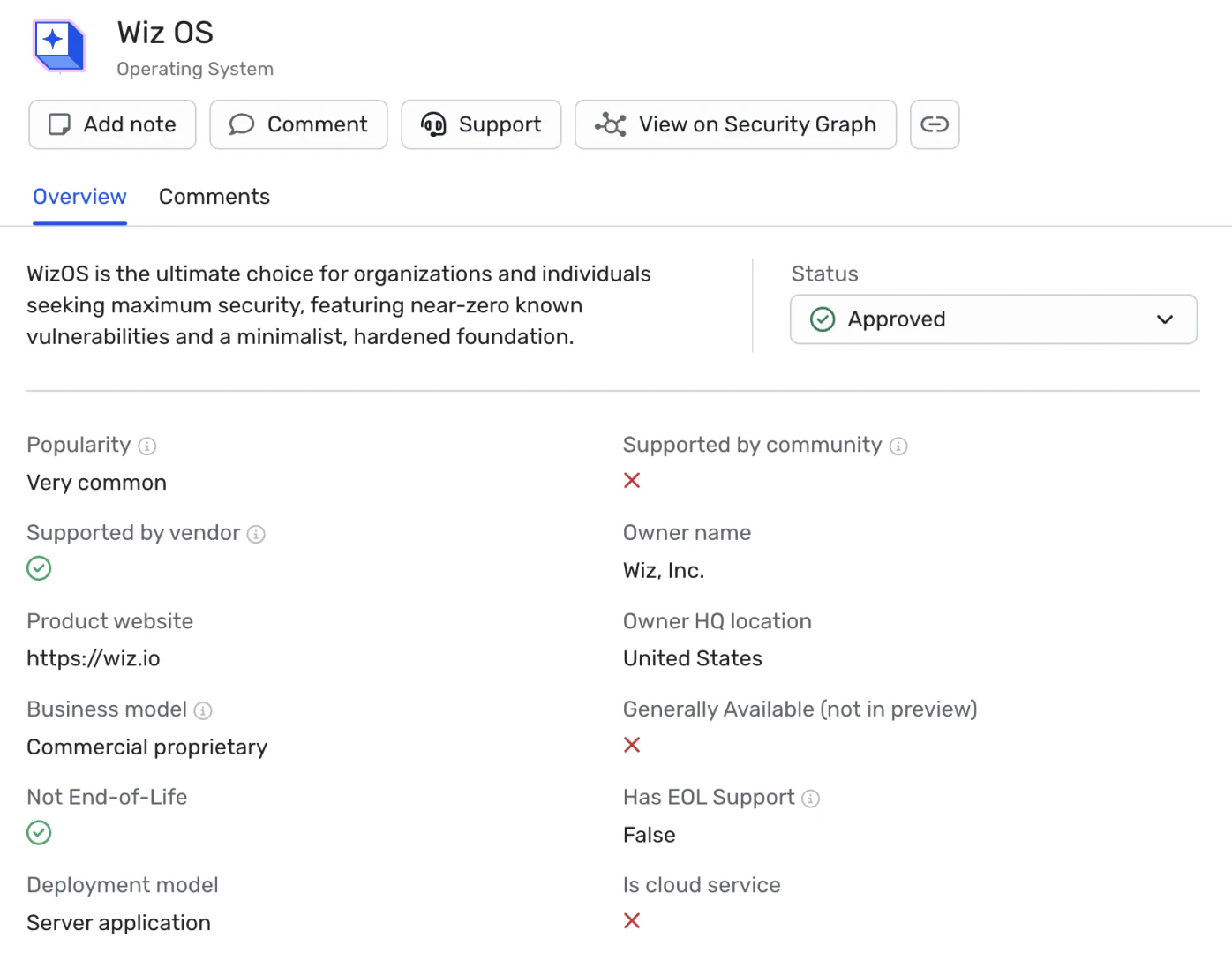
Instead of your team manually hardening and patching every layer, you can adopt WizOS—a catalog of secure, minimal base images maintained by Wiz.
Managed Patching: Wiz builds and maintains these images from source to ensure they stay clean. To "patch" your environment, you no longer have to manage the OS-level fixes; you simply update your Dockerfile to the latest WizOS version.
Strict Security SLAs: Wiz commits to remediating vulnerabilities in the WizOS catalog within defined windows (e.g., 7 days for Criticals and 14 days for Highs and Mediums), giving you a predictable schedule for your own rebuilds.
2. Continuous Visibility Across the Lifecycle
Security isn't a point-in-time check. Wiz continuously monitors your containers from the moment they are built until they are running in production:
CI/CD Scanning: Catch vulnerabilities in the build pipeline before they ever reach your registry.
Registry Monitoring: Wiz continuously rescans your images in storage (AWS ECR, Azure ACR, GCP Artifact Registry) to detect new "Day Zero" vulnerabilities that are discovered after the image was built.
Runtime Awareness: Wiz identifies exactly which containers are currently running in your clusters. This helps you prioritize patching for live workloads that are actually exposed, rather than wasting time on images sitting idle in a registry.
3. Streamlined Remediation and Traceability
When a vulnerability is found, Wiz doesn't just give you a list; it gives you the context needed to fix it fast:
Bidirectional Tracing: Wiz connects a vulnerable running container back to its source repository and the specific developer or pull request that introduced it.
Automated Policy Gates: Use the Wiz Admission Controller to ensure that only approved, recently-scanned golden images are allowed to deploy.
Drift Detection: If someone attempts an "in-place" manual patch on a running container, Wiz detects the configuration drift and alerts you to rebuild the image instead.
Ready to see how Wiz can provide 100% visibility into your container risk? Schedule a demo today.
Secure your container base images
Wiz provides full visibility and secure-by-default base images
