

What is Kubernetes Ingress?
Kubernetes Ingress is an API object that routes external HTTP/HTTPS traffic to multiple backend services, typically behind a shared external entry point, by mapping the HTTP Host header and URL path to specific internal services. This reduces the need to provision an individual cloud load balancer per service, lowering cost and operational overhead while consolidating traffic management.
While IP-based virtual hosting requires a unique IP address for each service, name-based virtual hosting—which Kubernetes Ingress enables—saves IP addresses and eliminates the need to provision a separate external load balancer per service. This was a highly demanded feature since Kubernetes’ early days, and it was rolled out about a year after Kubernetes’ initial release.
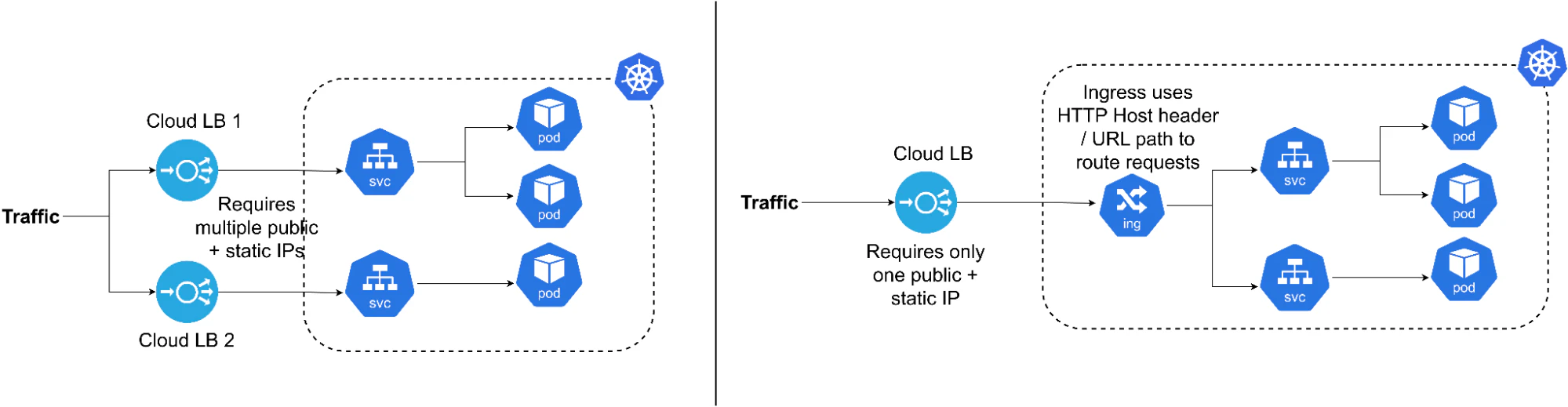
At its core, Kubernetes Ingress is designed to…
Provide an alternative to exposing each service via an IP-based load balancer
Offer an architecture that enterprise load balancers and proxies can integrate
In modern Kubernetes, the Gateway API has emerged as the forward-looking model for Kubernetes traffic routing. Ingress remains stable and broadly supported, but many newer capabilities—such as cross-namespace routing controls and role-based delegation—are being designed in Gateway API rather than added to Ingress.
Kubernetes Security Best Practices [Cheat Sheet]
This cheat sheet goes beyond the basics and covers security best practices for Kubernetes pods, components, and network security

Components in Kubernetes Ingress
The Ingress resource is a Kubernetes API object, just like Deployments, ReplicaSets, Pods, and Services. What makes it unique is that the actual behavior of this resource depends on an external ingress controller you install: Without a controller, an Ingress resource has no effect.
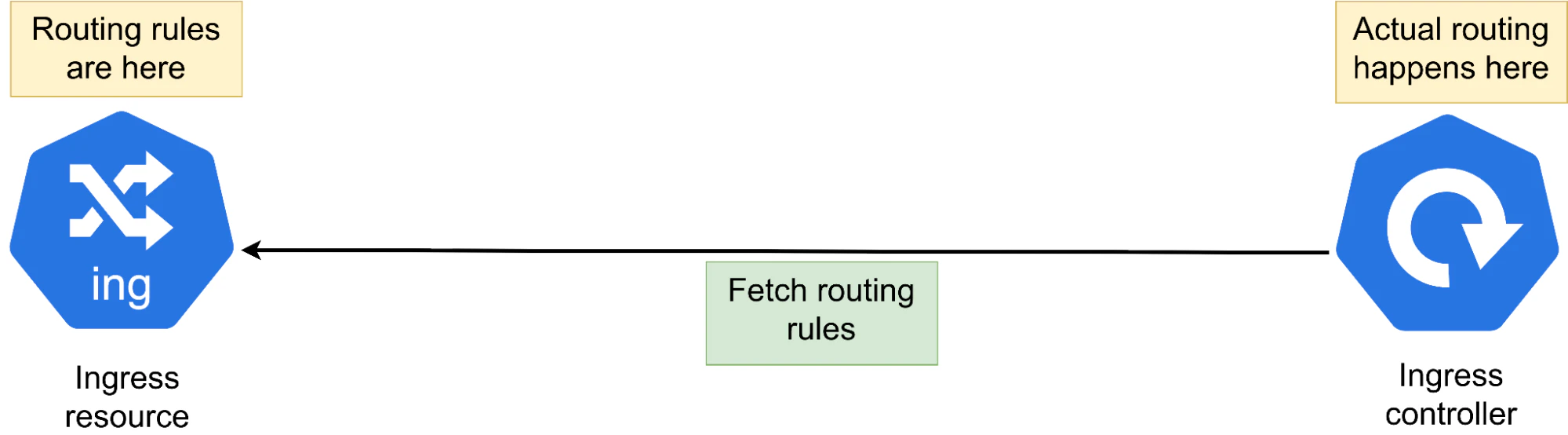
Kubernetes doesn’t have its own native layer-7 HTTP load balancer. That’s where the Ingress resource comes in. It’s designed as an abstraction that lets developers attach their preferred ingress controller to handle HTTP routing and traffic management.
As a result, major load balancing vendors such as F5, Traefik, HAProxy, Envoy, and Kong provide ingress controllers that add capabilities beyond basic routing, including weighted (ratio-based) traffic splitting, path-based routing, session affinity (sticky sessions), and IP allow/deny listing (whitelisting/blacklisting), among others.
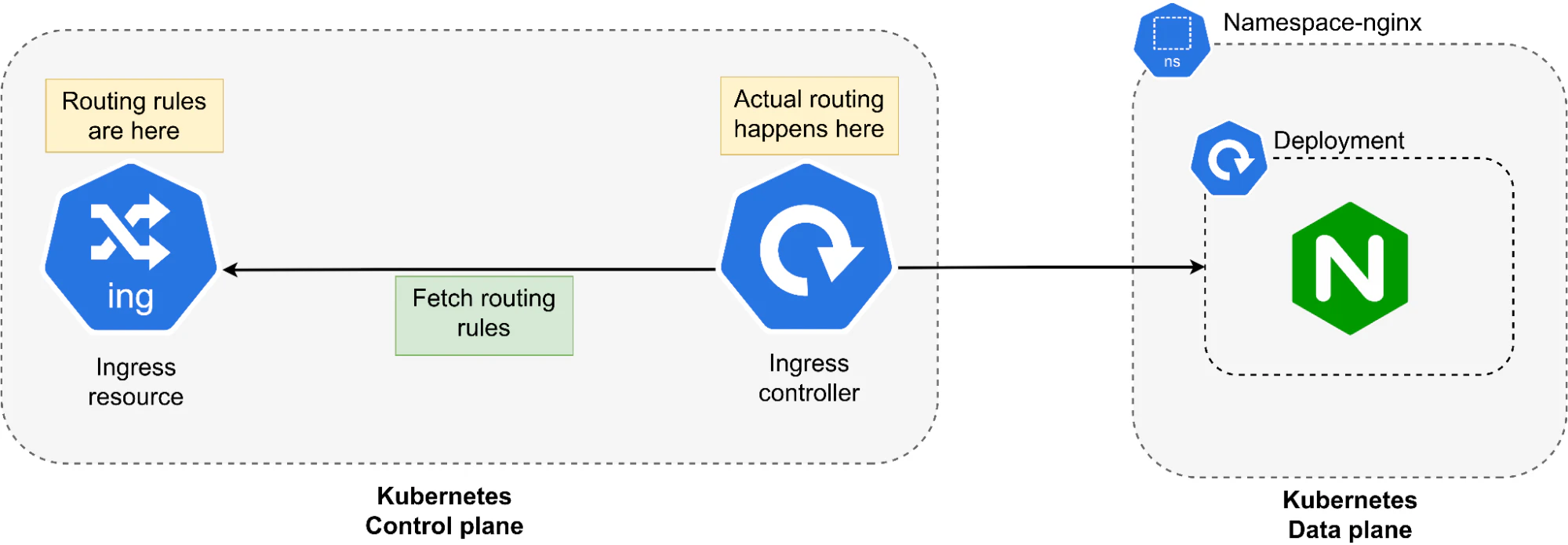
Ingress behavior can be broken down into a control plane workflow and a data plane workflow:
In the control plane: Routing behavior is expressed as rules in the Ingress resource. The ingress controller watches the Kubernetes API for these Ingress objects and reconciles the rules into the configuration for traffic handling.
In the data plane: The data plane is either an in-cluster Ingress proxy (e.g., NGINX or Traefik) or a cloud-managed load balancer (e.g., AWS ALB) that receives requests and forwards them to the service backends.
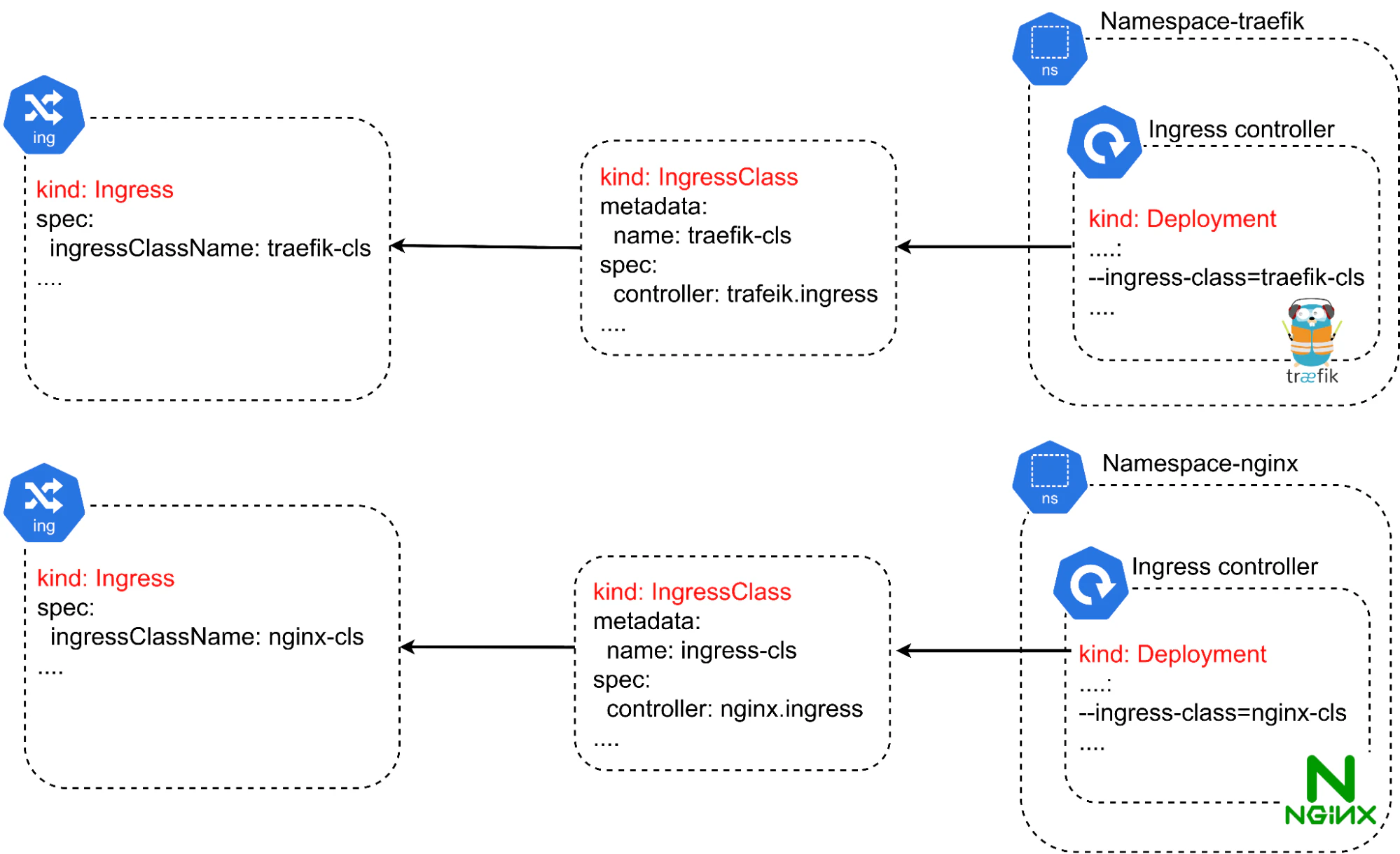
When multiple Kubernetes ingress controllers run in the same cluster, the IngressClass resource is used to select which controller should handle a given Ingress resource. This prevents multiple controllers from competing to configure the same routes.
Ingress vs. Gateway API vs. LoadBalancer
Ingress, the Gateway API, and the LoadBalancer service type all get traffic into Kubernetes, but they operate at different layers and levels of abstraction.
The LoadBalancer service is the simplest: It exposes a single service externally by asking the cloud provider to provision a load balancer and route traffic to that service. It’s great when you need a straightforward “make this service reachable from the internet” outcome. But it's not a full application-routing model: you often end up with one load balancer per Service, and more advanced HTTP routing—such as host/path-based rules, URL rewrites, weighted traffic splitting, and authentication integration—typically lives in an Ingress or Gateway API layer instead.
To address those issues, Ingress adds an application-layer routing API on top of services, mainly for HTTP/HTTPS. Ingress is mature and stable, but behavior can vary between controllers because many “extras” are implemented via annotations or controller-specific custom resource definitions (CRDs).
The Gateway API project aims to provide a newer, more capable API for managing routing in Kubernetes. It introduces distinct roles and resources:
GatewayClass describes the controller.
Gateway represents a managed entry point, and it routes objects by attaching routing rules in a more structured way.
Here, the key design goal is safer delegation: Platform teams can own Gateways, while application teams attach routes to them under explicit policies, including cross-namespace routing controls. In practice, this makes multi-team clusters, shared ingress platforms, and richer traffic policies easier to manage than annotation-heavy Ingress configurations.

When to choose Ingress vs Gateway API:
| Choose Ingress when... | Choose Gateway API when... |
|---|---|
| Your cluster runs a stable, well-understood ingress controller | You need cross-namespace route delegation with explicit policies |
| You need basic host/path routing without complex traffic policies | Platform teams and app teams require separate resource ownership |
| Your team has existing Ingress expertise and tooling | You need protocol support beyond HTTP/HTTPS (TCP, UDP, gRPC) |
| Controller-specific annotations meet your requirements | You want portable, standardized traffic policies across controllers |
| You're running Kubernetes versions before 1.24 | You're building a new platform and want long-term API alignment |
Kubernetes Ingress practical walkthrough
While there are many Kubernetes ingress controllers available, in this walkthrough, we’ll be using the NGINX Ingress Controller from F5. This controller is built to configure NGINX as a layer-7 (application-layer) load balancer and reverse proxy. The NGINX controller watches the Ingress resource and translates Ingress rules into the native NGINX configuration.
Watch 12-min demo
See how Wiz integrates container security into the wider cloud ecosystem to isolate critical risks and harden your entire environment from one central platform.

Installing the F5 NGINX Ingress Controller
You can install the NGINX Ingress Controller using the nginx-ingress Helm Chart, with a simple two-line invocation:
kubectl create namespace nginx-ingress
helm install <my-release> oci://ghcr.io/nginx/charts/nginx-ingress --version 2.4.4
This creates a namespace called nginx-ingress. Inside that namespace, it creates a deployment and an external-facing service of type: LoadBalancer. In the cloud, this service is assigned an EXTERNAL-IP by the provider, while in local environments (such as Minikube) the EXTERNAL-IP may remain pending unless you run minikube tunnel. Without a tunnel, you typically access it via the node IP and the allocated NodePorts.

Note that this setup requires Helm 3.19+ on the machine (or CI runner) you're using to run the Helm commands.
Another thing to keep in mind? When it comes to NGINX, there are two types of ingress controllers:
F5 NGINX Ingress Controller: The
nginx-ingress-controlleroriginally developed by NGINX (which was acquired by F5). This is still actively maintained.Community Ingress NGINX Controller: This is the Kubernetes community–developed controller (
ingress-nginx), introduced early in Ingress's lifecycle and still commonly used in production clusters. Many organizations are also evaluating the Kubernetes Gateway API for newer traffic-management and delegation workflows.
Configuring DNS
To make Ingress work correctly, configure DNS (hostnames) pointing to the load balancer’s EXTERNAL-IP. Multiple hostnames can map to the same EXTERNAL-IP, and the ingress controller will route each incoming request to the appropriate service based on the Host header.
In local environments such as Minikube, there’s no DNS provider. The solution is to emulate DNS by adding entries to the /etc/hosts file. For example:
10.105.247.109 cnapp.wiz.io securitygraph.wiz.ioCreating upstream services
Now that the controller is in place, you can create two backend services to play with:
kubectl create deployment cnapp \
  --image=hashicorp/http-echo:1.0.0 \
  -- /http-echo -text="cnapp backend: hello from cnapp" -listen=":5678"
kubectl expose deployment cnapp --name=cnapp --port=80 --target-port=5678
kubectl create deployment securitygraph \
  --image=hashicorp/http-echo:1.0.0 \
  -- /http-echo -text="securitygraph backend: hello from securitygraph" -listen=":5678"
kubectl expose deployment securitygraph --name=securitygraph --port=80 --target-port=5678
Create an Ingress resource with host-based routing
Next, you can practice host-based routing by creating an Ingress resource with two routing rules:
apiVersion: networking.k8s.io/v1
kind: Ingress
metadata:
  name: wiz-demo
spec:
  ingressClassName: nginx
  rules:
  - host: cnapp.wiz.io
    http:
      paths:
      - path: /
        pathType: Prefix
        backend:
          service:
            name: cnapp
            port:
              number: 80
  - host: securitygraph.wiz.io
    http:
      paths:
      - path: /
        pathType: Prefix
        backend:
          service:
            name: securitygraph
            port:
              number: 80
In the code snippets above, the ingress controller routes requests based on the hostname in the HTTP Host header:
Requests for
http://cnapp.wiz.ioare routed to thecnappservice on port80.Requests for
http://securitygraph.wiz.ioare routed to thesecuritygraphservice on port80.

Ingress controllers can apply richer traffic rules at the edge, before a request reaches a service. Common patterns (with examples) include:
Path-based routing: Route
cnapp.wiz.io/apito an API service andcnapp.wiz.io/uito a frontend service.Host + path combinations: Route
api.cnapp.wiz.io/v1andapi.cnapp.wiz.io/v2to different backends during a version migration.Redirects and URL rewrites: Enforce
HTTPtoHTTPSredirects, redirect/to/app, or rewrite/apito/if the backend expects a different path structure.TLS per hostname: Terminate
HTTPSat the Ingress layer, and use separate certificates forcnapp.wiz.ioandsecuritygraph.wiz.io.Traffic shaping for releases: Implement canary-style rollouts by gradually shifting traffic from
v1tov2.Edge security controls: Apply IP allow/deny lists, rate limiting, request size limits, and basic authentication to protect backends without changing application code.
Operational tuning: Configure timeouts, keep-alives, and upstream retry behavior to better handle slow clients or intermittent backend issues.
Kubernetes Ingress security risks and attack patterns
Like many Kubernetes primitives, Ingress is not secure by default. Securing Ingress is an engineering responsibility because it is internet-facing and sits directly on the request path to internal services and data. This makes Ingress a high-value target: a single misconfiguration or unpatched controller can create a direct path from the internet to internal workloads, identities, and data.
Risk often begins with overbroad exposure like wildcard hosts, default backends, or unintended path routing. This can make more services unnecessarily exposed.
This exposure becomes more serious when TLS is missing or weak, while unsafe controller-specific annotations can further introduce configuration injection or insecure request rewrites.
At the same time, weak authentication patterns, such as trusting spoofable headers or misconfigured external authentication, can undermine access controls, and the absence of rate limits makes credential stuffing and path probing far cheaper for attackers.
Even governance issues matter here, because weak RBAC around who can create or modify Ingress resources increases the likelihood that risky configurations will be introduced in the first place.
Most of these are design and configuration issues, so they can be reduced through best practices and policy controls. That said, even well-configured environments are exposed to controller-level vulnerabilities, making continuous monitoring and timely patching non-negotiable.
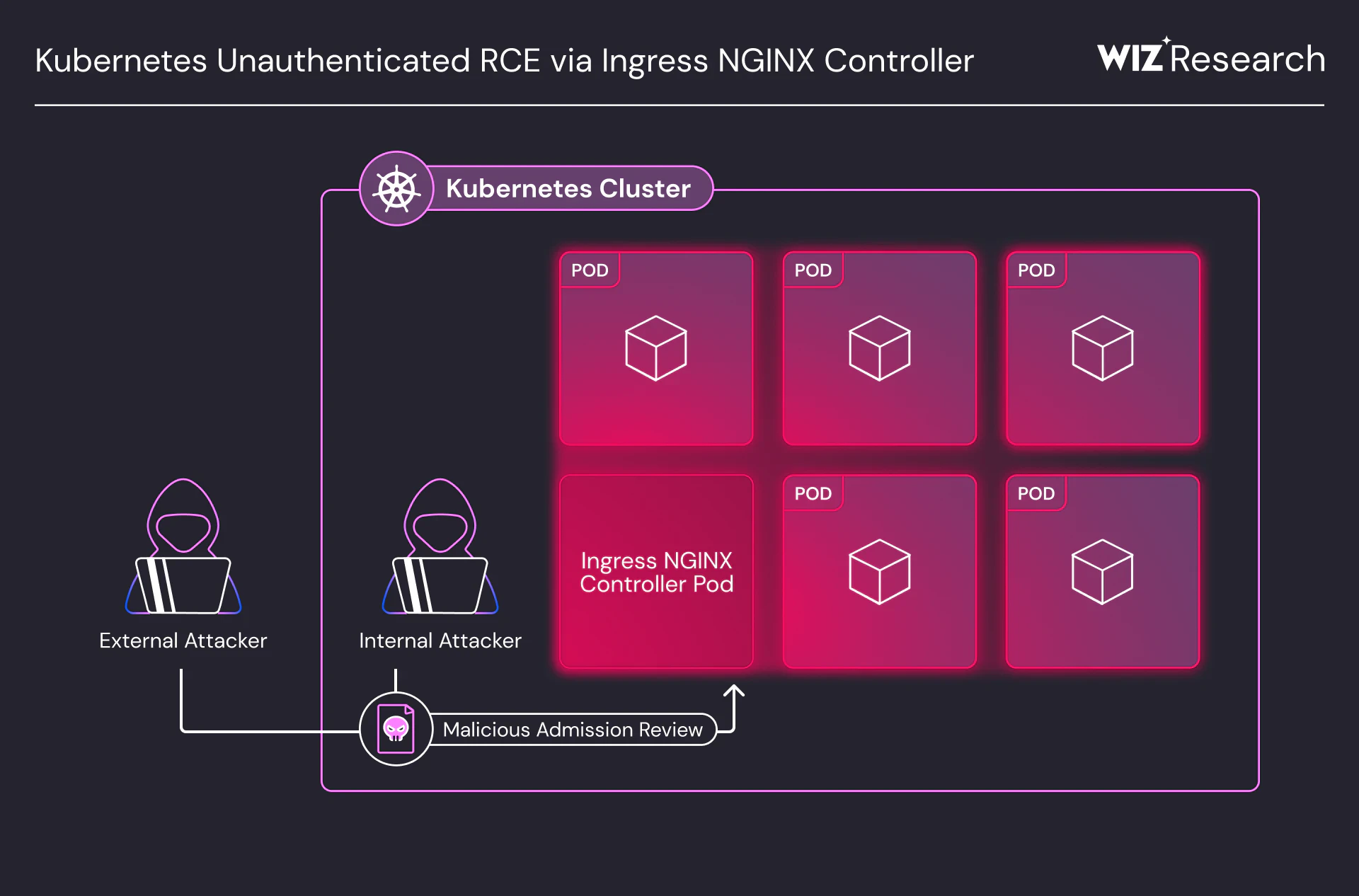
Here’s a real-world example that shows what’s at stake: In early 2025, Wiz Research disclosed a series of critical vulnerabilities (CVSS 9.8) in the community-managed Ingress NGINX Controller. The vulnerabilities resided in the controller’s validating admission webhook, where attackers could inject arbitrary NGINX configuration directives and achieve unauthenticated remote code execution. That attack path could expose cluster secrets or enable full cluster compromise when the admission endpoint was internet-accessible. Vulnerabilities like these show why point-in-time scanning is not enough: teams need continuous visibility that connects internet-exposed Ingress resources to the workloads, identities, and data those resources can reach.
Ingress security best practices
Best practices ensure an Ingress deployment doesn’t become an easy entry point into the cluster. While the exact controls vary based on the ingress controller you use, the underlying security strategies are consistent:
Enforce TLS termination and backend encryption: Require HTTPS on all external-facing Ingress rules and standardize TLS policy across controllers, including TLS 1.2+ minimums, strong cipher suites, and automated certificate rotation. For sensitive services, enforce mTLS between the Ingress proxy and backend pods to protect traffic inside the cluster.
Implement role-based access control (RBAC): Limit who can create or mutate Ingress objects and
IngressClassdefinitions, especially in shared clusters.Restrict source IPs and limit access: Use controller capabilities such as annotation-based IP allow lists, upstream load balancer policies, or firewall rules to reduce exposure to trusted networks.
Use web application firewalls (WAFs): Integrate a WAF at the edge (a cloud WAF, a gateway WAF, or controller-supported modules) for common L7 threats.
Implement rate limiting and request quotas: These tactics slow down noisy scanners and brute force / credential stuffing attack attempts.
Patch controllers: Ingress controllers are high-exposure components, so treat controller CVEs as a top priority and maintain clear patch SLAs.
Add policy-as-code guardrails in CI/CD: Block wildcard hosts unless they’re justified, enforce TLS, disallow risky annotations, and validate
ingressClassNameusage. A unified policy approach across code and runtime helps keep rules consistent.Monitor and log traffic: Collect controller logs, access logs, and latency metrics. Alert on path probing spikes, unusual 4xx patterns, and auth failures.
Guardrails help prevent risky Ingress patterns, but you still need ongoing verification that what's deployed matches intent—TLS posture, exposed hosts/paths, and controller versions—across every cluster. This level of continuous verification is difficult to maintain manually at scale, which is why teams rely on tools that connect policy enforcement with runtime visibility.
Wiz complements these point solutions by providing a unified, risk-prioritized view that connects Ingress exposure, vulnerabilities, misconfigurations, and identity paths so teams can harden and continuously verify their security posture at scale.
How Wiz secures Kubernetes Ingress configurations at scale
Wiz treats Kubernetes Ingress as an exposure boundary, not an isolated configuration object. By correlating Ingress rules, controller versions, cloud load balancers, backend workloads, identities, secrets, and data stores in the Security Graph, Wiz reveals complete attack paths, from internet exposure through the Ingress layer to the sensitive resources an attacker could ultimately reach. This helps teams prioritize the Ingress misconfigurations and controller vulnerabilities that create real, exploitable risk, rather than chasing every finding in isolation.
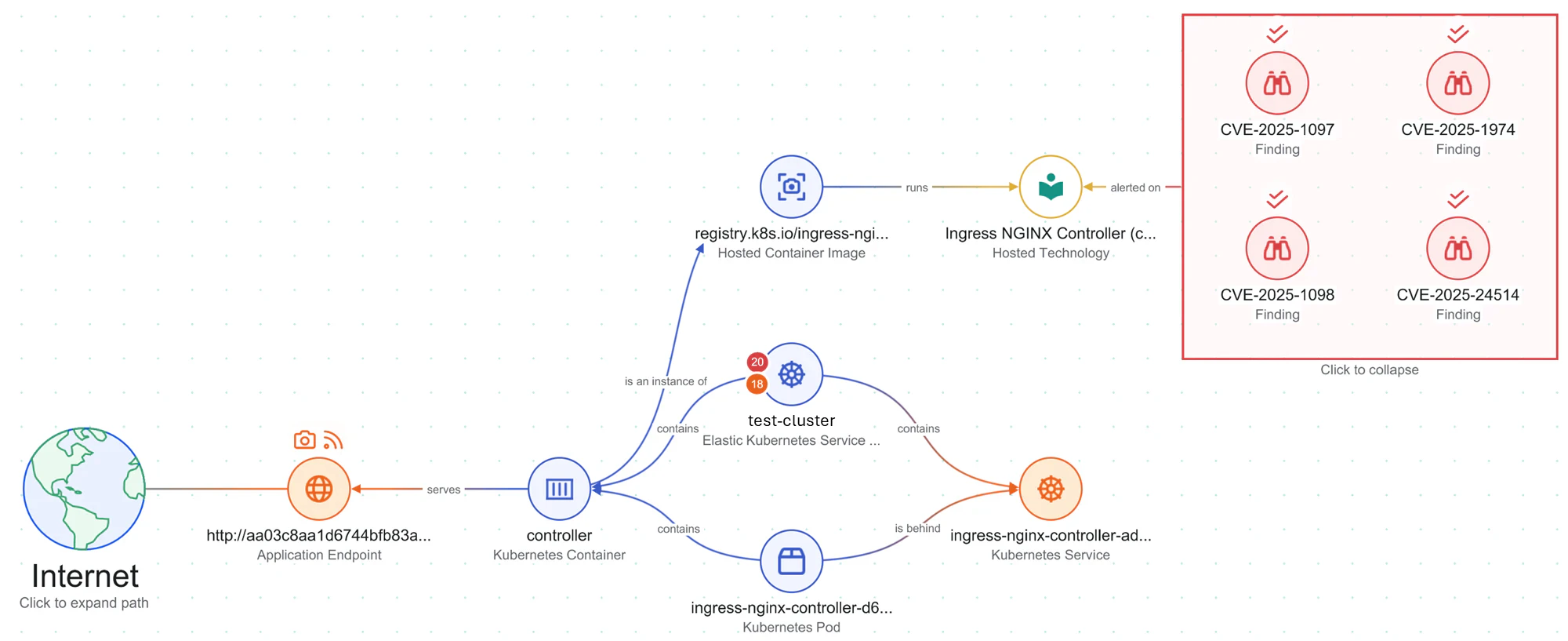
This same graph-based approach extends to AI/ML workloads, where Ingress serves as the vital gateway to sensitive models and GPU resources. By correlating internet-facing paths with these specific assets, Wiz helps teams safeguard against emerging AI-specific risks—like prompt injection or data poisoning—ensuring that intellectual property and model integrity remain secure even as the attack surface evolves.
Wiz begins by agentlessly discovering each Ingress resource and its external entry point, such as a load balancer or gateway, across clusters and clouds. From there, Wiz correlates that exposure with the controller, backend workloads, identities, secrets, and sensitive data in the Security Graph so teams can identify which internet-facing paths create real risk.
Based on that context, Wiz Code helps prevent risky Ingress patterns earlier in the development lifecycle by surfacing issues in pull requests and CI pipelines before they reach production.
Once deployed, Wiz continues to monitor operational hygiene, including certificate health and expiration, while Wiz Defend correlates controller logs, cloud load balancer or WAF events, and runtime signals into a unified timeline to help security teams investigate suspicious Layer 7 activity.
Ready to gain complete visibility into your Kubernetes ingress attack surface and eliminate configuration risks? Request a demo to see how Wiz maps real attack paths through your ingress layer.
Agentless Container Security
See how teams achieve comprehensive container security without slowing down development.
