

Understanding agentless vs agent-based scanning
Agentless scanning is API-based scanning. This means the tool connects to your cloud provider APIs and inspects resources from the outside, without installing anything on your servers or containers.
Agent-based scanning is host-based scanning. This means you deploy a monitoring agent on each VM, node, or host so it can watch what happens inside the system all the time.
You can think about them like this:
Agentless: Uses cloud provider APIs, pulls workload snapshots and configurations, and runs workload analysis outside the machine
Agent-based: Uses monitoring agents, runs inside the workload, and provides continuous monitoring of processes, files, and network activity
In modern cloud security, you usually use both. Agentless helps you get quick, complete visibility (agentless discovery) across many accounts and services, with almost no friction for your teams.
Agent-based security helps when you need very detailed, real-time data on a smaller set of important systems. This is common in agent-based monitoring tools like EDR (Endpoint Detection and Response) or deep workload protection platforms.
Agentless scanning really took off as cloud-native environments grew. Teams needed coverage across fast-changing infrastructure without the operational overhead of managing agents everywhere.
| Aspect | Agentless Scanning | Agent-Based Scanning |
|---|---|---|
| Data visibility | Configuration, vulnerabilities, cloud metadata | Runtime processes, file changes, network connections |
| Deployment time | Minutes (API integration) | Days to weeks (fleet-wide rollout) |
| Coverage scope | All cloud resources automatically | Only where agents are installed |
| Detection focus | Misconfigurations, vulnerabilities, attack paths | Live threats, behavioral anomalies, policy violations |
| Blocking capability | No (read-only) | Yes (can prevent/terminate processes) |
| Workload overhead | None (external processing) | CPU, memory, network on each host |
| Ephemeral resources | Automatic (API-discovered) | Requires fast agent bootstrap |
| Kubernetes fit | Registry + API scanning | DaemonSets or eBPF sensors |
| Cost drivers | API calls, snapshots, storage | Agent licensing, operations, SIEM ingestion |
| Compliance evidence | Cloud posture, audit trails | Endpoint logs, detailed forensics |
Cloud Security Leaders Handbook
The strategic guide to cloud security

How agentless and agent-based scanning work in cloud environments
Agentless scanning mechanisms
Agentless scanning connects to your cloud using API integration and read-only permissions. You give the tool an identity in your cloud, grant it access, and it starts asking the cloud provider APIs what exists.
Under the hood, a typical agentless cloud security tool will:
List resources by calling cloud APIs for virtual machines, containers, serverless functions, and more
Take disk snapshots for VMs and scan those volumes out-of-band; for containers, analyze images directly via container registries (Docker Hub, ECR, ACR, GCR) and orchestration platform metadata (Kubernetes API, ECS task definitions) without requiring disk-level access
Pull configuration details for networks, identities, storage, and other services for cloud-native scanning
The key point is that it never logs into the machine or runs code inside it. Everything is done by reading what the cloud control plane already knows.
A few important concepts show up here:
Disk snapshots: Copies of VM or node disks that can be mounted and scanned out-of-band
Read-only permissions: IAM roles or service principals that let the scanner see configurations but not change them
Workload analysis: Looking at installed packages, OS versions, and file contents from snapshots
With this model, agentless cloud security can scan:
Virtual machines, even if they're stopped
Container images in registries and container services
Serverless functions and their configurations
Network paths and flows via control-plane telemetry (such as AWS VPC Flow Logs, Azure NSG Flow Logs, or GCP VPC Flow Logs) for agentless network analysis—this analyzes metadata about connections rather than inspecting packets inline
What is API scanning?
API scanning is the automated process of analyzing APIs to detect security vulnerabilities, misconfigurations, and logic flaws.
Leer más

Agent-based scanning processes
Agent-based scanning starts with agent deployment. You add a small piece of software to each system you want to monitor, often using images, config management, or Kubernetes DaemonSets.
Once deployed, the agent runs alongside your application and handles:
Real-time monitoring of processes and commands (process monitoring)
Watching for file changes and tampering (file integrity monitoring)
Observing local network connections and ports
The agent streams this telemetry to a central management console. From there, you get detections, dashboards, and alerts for suspicious behavior.
A few core ideas matter here:
Agent deployment: How you roll out the agent to every host or node
Continuous monitoring: The always-on collection of activity data
Central management console: Where you manage policies, investigate alerts, and see your fleet
In the agent vs agentless security conversation, agents give you deep runtime detail and sometimes allow blocking actions on the host. But they come with the cost of having software installed and maintained on every system.
Hybrid deployment models
Most teams end up with a hybrid model. Organizations running multi-cloud or hybrid environments particularly benefit from agentless scanning's ability to provide unified visibility across AWS, Azure, GCP, and on-premises infrastructure from a single platform. You use agentless for reach and agents for depth.
A common pattern looks like this: Use agentless scanning to get organization-wide coverage, asset inventory, and configuration and vulnerability checks across all cloud accounts. Then deploy lightweight eBPF-based runtime sensors on a narrow set of critical workloads—production databases, payment systems, or regulated data stores—that require deep runtime inspection. These eBPF sensors consume minimal CPU and memory (often low single-digit overhead) compared to many traditional agents, which can add noticeable resource usage in performance-sensitive environments.
This is a classic defense-in-depth approach. You layer multiple security techniques so that one covers what the other misses.
Agentless Scanning Best Practices
Agentless scanning inspects cloud environments for security risks without installing software agents on workloads, using cloud provider APIs and snapshot analysis instead
Leer más
Security implications of each scanning approach
Coverage and blind spots
Agentless scanning is very strong on coverage. Because it queries the cloud APIs, it can see everything the cloud knows about, including VMs, containers, and serverless functions.
This includes ephemeral resources, which are short-lived systems that come and go as part of auto-scaling. Traditional agent-based tools often miss these, because there is not enough time to install and stabilize agents.
Agent-based scanning gives great visibility where agents exist, but it can leave coverage gaps:
Hosts where agents were never installed
New instances where agent deployment failed
Test or lab machines that fall outside standard build pipelines
These unmanaged assets and scanning blind spots can turn into pockets of shadow IT. You may think a system is protected, but in reality, no agent is running there.
So from an agentless vs agent based monitoring standpoint:
Agentless is best to make sure no resource is invisible
Agent-based is best to go deep on specific, well-managed systems
Detection capabilities
Agentless tools are strongest at configuration assessment and vulnerability assessment. They look at how things are built and configured, and compare that against best practices and known issues.
Common examples include:
Finding overly open security groups, public buckets, and risky IAM policies
Spotting packages and images with known vulnerabilities
Detecting identity and access risks like admin-level roles used by many people
Agentless tools don't see in-memory behavior or live process activity. They answer "what could be attacked" more than "what is being attacked right now."
Agent-based tools shine at runtime threat detection and behavioral analysis. They watch what is actually happening on the host:
Suspicious commands or process trees
Malware-like behavior such as crypto-mining or data exfiltration
Privilege escalation and lateral movement between systems
They also see configuration drift as it happens, not just as stored in the control plane. This makes them ideal when you need live attack vector coverage.
In practice, you usually want both views. You want to know where your design is weak and where attackers are active.
Compliance and audit requirements
Compliance and audit needs can push you toward one approach or the other. Some standards are satisfied by demonstrating regular configuration and workload scanning at the cloud level. For example, SOC 2 Type II requires evidence of vulnerability management and change monitoring, while ISO 27001 Annex A.12.6 addresses technical vulnerability management—both can be supported through agentless cloud-level scanning.
Agentless scanning satisfies many compliance requirements with centralized audit evidence. For SOC 2 Type II, it provides vulnerability management and change monitoring documentation. For ISO 27001 Annex A.12.6, it demonstrates technical vulnerability management processes. For HIPAA Security Rule §164.308(a)(8), it supports audit controls and evaluation. For PCI DSS Requirement 11.2, it fulfills vulnerability scanning obligations. Each scan produces timestamped records of what was scanned, what was found, and what was remediated—exactly what auditors need to see.
Other frameworks or internal policies expect more detailed endpoint-level logging. For example, you might need proof of every login and every sensitive file access on certain hosts.
In those cases, agent-based security supports continuous compliance monitoring. Agents can keep detailed event logs for a narrow set of highly regulated systems.
In many environments, the best answer is:
Agentless for broad compliance posture and audit trails
Agents for a few specific systems where deep endpoint records are required
The Foolproof Framework to Cloud Data Compliance
Our Guide to Data Governance and Compliance in the Cloud provides a straightforward, 7-step framework to help you strengthen your cloud governance approach with confidence.

Performance and operational considerations
Resource consumption
Agentless scanning has no in-guest runtime impact on your workloads. All scanning operations—API queries, snapshot creation, and analysis—occur outside the guest operating system in the cloud control plane or the security platform's own infrastructure.
All the heavy lifting happens in the security platform's own environment. Your cloud just processes API calls and snapshots, which is what it already does for its own services.
Agent-based tools always consume some local resources:
CPU for monitoring logic and event collection
Memory for running the agent and buffering data
Network bandwidth for sending telemetry
On a single machine this may be fine. Across hundreds or thousands, you feel the resource overhead.
This becomes more noticeable on latency-sensitive or resource-constrained workloads. In those cases, you have to be much more careful about where and how you run agents.
For agentless network monitoring, again the main resource cost is on the cloud side. You analyze logs and network metadata instead of sitting inline in the data path.
Deployment and maintenance
Agentless deployment is straightforward. You connect the platform to your cloud org or subscription, grant read-only access, and start scanning.
This gives you very high deployment velocity. You can onboard whole business units or cloud regions in minutes.
Agent-based deployment is more complex. You have to decide how to install the agent, test it, and keep it working on every host.
That brings in concepts like:
Agent lifecycle management
Maintenance overhead for updates and OS compatibility
A compatibility matrix between agent versions and operating systems
If something goes wrong, troubleshooting happens host by host. That can consume a lot of engineering time.
So from an operational burden standpoint:
Agentless = one integration per cloud, centrally managed
Agents = many installations and updates spread across your fleet
Scalability challenges
Cloud environments scale fast and change continuously—auto-scaling groups can spin up dozens of instances in minutes, containers are created and destroyed in seconds, and serverless functions execute ephemerally. Many organizations report that this dynamic nature makes cloud infrastructure more complex to secure than traditional on-premises data centers. Your security approach has to handle that without breaking.
Agentless scales naturally with this change. Every new account, region, or auto-scaled node is visible as soon as it exists in the cloud APIs.
This works well for:
Auto-scaling groups and fleets
Container platforms and registries
Serverless functions that appear and disappear often
Agent-based tools can keep up, but only if you invest heavily in automation. You need to guarantee that every new node gets an agent installed, configured, and kept up-to-date.
That is doable but more complex, especially across multiple clouds and platforms. It becomes harder when you deal with short-lived containers and serverless compute.
How to Implement CI/CD Security Scanning: Best Practices
CI/CD security scanning is the practice of adding automated security checks into your build and deployment pipelines. This means every meaningful code change is tested for risk before it can reach production.
Leer más

Choosing the right scanning approach for your environment
Assessment criteria
To decide what mix you need, you can walk through a few simple questions. This gives you a decision framework that fits your environment, not someone else's.
Key things to look at include:
Cloud architecture complexity: Are you multi-cloud, hybrid, or mainly on one provider?
Workload classification: Which workloads are critical, exposed, or hold sensitive data?
Security maturity model: Are you still building basic visibility, or running a mature SOC?
Team expertise: Do you have people and time to own agent rollout and tuning?
Security requirements: Do any regulations or internal rules demand endpoint-level data?
You can treat this like a small decision matrix in your head. If your biggest gap is "we don't know what we have," start with agentless scanning; if it's "we can't see what's happening on this box," deploy lightweight eBPF-based runtime sensors or traditional agents on those specific systems.
In the agent vs agentless security discussion, you're not choosing a side. You're choosing where each side adds the most value for your team.
When agentless-only works
Agentless scanning alone is sufficient when your primary needs are:
Discovery and inventory: Understanding what cloud resources exist across accounts and regions
Posture management: Identifying misconfigurations, overly permissive access, and compliance gaps
Attack path analysis: Mapping how an attacker could move laterally through your environment
Ephemeral fleet coverage: Securing auto-scaling groups, spot instances, and short-lived containers
Early-stage DevSecOps: Scanning IaC, container images, and CI/CD pipelines before deployment
When you need runtime sensors
Deploy runtime sensors or agents when you require:
Incident response on crown jewels: Detailed forensics on databases, payment systems, or sensitive data stores
High-assurance forensics: Process-level telemetry for post-breach investigation
Policy enforcement: Blocking malicious processes or preventing unauthorized file access
Insider threat detection: Monitoring privileged user activity and data exfiltration attempts
Regulatory requirements: Endpoint-level logging mandated by specific compliance frameworks
Use case recommendations
Certain use cases clearly favor one model over the other. You can use them as anchor points when building your plan.
| Use Case | Recommended Approach |
|---|---|
| Multi-cloud inventory | Agentless for complete visibility across providers |
| Container security | Hybrid approach with agentless scanning and lightweight runtime sensors |
| Compliance reporting | Agentless for posture and audits |
| Incident response | Agent or sensor for live forensics |
| Development environments | Agentless to avoid performance impact |
For multi-cloud inventory, agentless gives you a fast, unified view. You can then layer deeper controls on the small subset of workloads that truly need them.
For container security, use agentless scanning to analyze container images in registries (ECR, ACR, GCR, Docker Hub) and Kubernetes manifests before deployment. Scan Helm charts and infrastructure-as-code (Terraform, CloudFormation) to catch misconfigurations early. In production clusters, deploy lightweight eBPF-based sensors as Kubernetes DaemonSets for runtime threat detection—these consume minimal resources compared to traditional agents. Integrate admission controllers (OPA Gatekeeper, Kyverno) to block vulnerable images at deployment time. For serverless functions (Lambda, Azure Functions, Cloud Functions), scan deployment packages for vulnerable dependencies and enforce IAM least privilege through policy-as-code.
For incident response on high-value workloads, detailed host-level data can matter. That's where an agent or sensor that records system events gives your responders what they need.
Migration strategies
If you're moving from mostly agents to hybrid, or from no visibility to agentless first, do it in phases. This reduces risk and makes the change easier to manage.
A simple phased approach looks like this:
Phase 1 – Baseline with agentless: Connect your cloud orgs and build a true inventory.
Phase 2 – Shrink or focus agents: Keep agents only where they give clear extra value.
Phase 3 – Shift left: Move as many checks as possible to CI/CD and build-time.
Phase 4 – Align workflows: Make sure all findings, from both models, flow into clear owners and playbooks.
Along the way, you will likely:
Retire some legacy agents that add noise but little insight
Use agentless discovery to find systems that were never protected
Clarify which tool owns which part of the detection story
The goal is not "no agents" or "all agents." The goal is the smallest, cleanest set of tools that covers your risks without burning out your teams.
What is shift-left testing? A complete guide for cloud security teams
Shift-left security testing moves security testing earlier in the software development lifecycle, significantly reducing remediation costs and time compared to traditional approaches.
Leer más
Wiz's unified approach to cloud scanning
Wiz combines agentless scanning with optional runtime sensors in one platform. It starts with comprehensive agentless scanning across all your clouds using provider APIs and read-only access—no performance impact on your workloads.
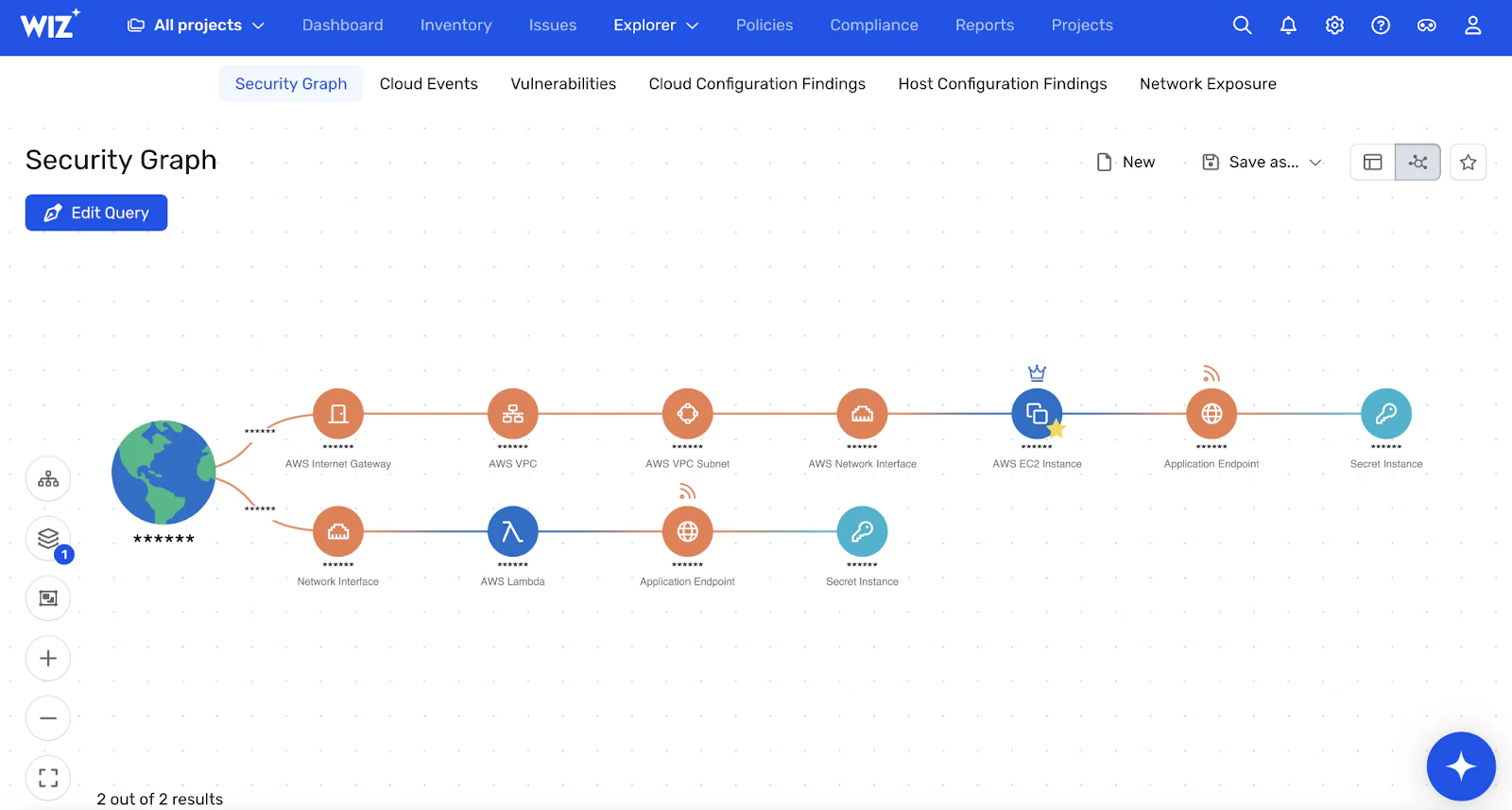
At the core is the Security Graph, a unified risk engine that connects vulnerabilities, misconfigurations, exposures, identities, and data. You see not just a CVE, but whether it's on a publicly exposed VM with admin rights. Not just an open bucket, but whether it contains sensitive data and who can reach it.
These toxic combinations turn low-level issues into real attack paths. The Security Graph makes them stand out so you can fix what matters first.
For critical workloads, Wiz Defend adds an optional lightweight eBPF sensor for runtime threat detection—without heavy agents across your entire environment. Runtime alerts are automatically enriched with full cloud and identity context from the Security Graph.
Wiz's agentless architecture naturally covers ephemeral resources like containers and serverless. The platform also provides bidirectional traceability from cloud to code, so you can trace a risky workload back to the infrastructure-as-code that created it and fix the root cause.
Request a demo to see agentless-first coverage, graph-based attack path prioritization, and optional runtime sensors working together in a single platform.
See Agentless Scanning in Action
Experience how agentless scanning delivers complete visibility across your cloud estate in minutes.
