
Understanding source code scanning in cloud-native environments
Source code scanning is automated analysis of your code, dependencies, and infrastructure definitions to find security issues before you deploy. This means a tool reads your code the way a careful reviewer would, but at high speed and at scale.
In cloud environments, this goes beyond checking for simple bugs. You also want the scanner to understand how that code runs inside containers, serverless functions, and microservices.
Secure Coding Best Practices [Cheat Sheet]
Want to build security into your code from the start? This cheat sheet provides quick reference patterns for preventing common vulnerabilities.

Here are the main types of code-focused scanning you’ll see:
SAST (Static Application Security Testing): Scans your own code without running it, looking for insecure patterns like SQL injection or unsafe deserialization.
SCA (Software Composition Analysis): Scans third‑party and open-source libraries, comparing them against known vulnerability databases.
IaC scanning: Scans Infrastructure-as-Code (IaC) such as Terraform, CloudFormation, and Kubernetes manifests for misconfigurations in your cloud setup.
Traditional static analysis tools only looked at source files in isolation—checking for SQL injection without knowing if the database was exposed. Modern approaches add cloud context and runtime awareness, connecting code findings to the services, IAM roles, network policies, and data stores they touch in production. For example, you can see that a vulnerable API endpoint is internet-facing, runs with admin permissions, and has a direct path to customer PII.
Over time, scanning has evolved in three big ways:
From “just application code” to application code + IaC + CI/CD pipelines + container images.
From “file-by-file” to understanding services and microservices that talk to each other.
From “generic rules” to DevSecOps workflows, where results feed into tickets, dashboards, and build gates.
Choosing the right scanning approach for your security stack
Your first choice is where and how scanners will run. Most teams end up mixing “agentless” services and lightweight plugins.
An in-pipeline approach runs scans through IDE plugins and CI jobs during development and builds—for example, a GitHub Actions workflow that executes SAST and SCA checks on every pull request. An agentless approach connects over APIs to your Git platforms (GitHub, GitLab) or cloud providers to scan repositories and artifacts remotely without installing software in your pipelines.
To pick the right mix, you can look at:
Language and framework coverage: Make sure tools cover the languages and frameworks you actually use, not just the ones on the brochure.
Integration capabilities: Check how well they plug into your Git platform, CI/CD, ticketing system, and chat.
Performance: Look at scan duration in real pipelines so you don’t slow merges to a crawl.
You also want to avoid building a separate stack of tools for every team. You also want to avoid building a separate stack of tools for every team. Tool sprawl is common—78% of organizations have duplicate SCA scanners across different teams—which creates inconsistent policies, scattered findings, and wasted licenses. That's where concepts like a unified risk engine and tool consolidation come in.
A unified risk engine means you:
Feed SAST, SCA, secrets scanning, and IaC scanning into one brain.
Apply policy as code once, instead of per tool.
Orchestrate scans (what runs where and when) through shared scanning orchestration logic.
In practice, a good pattern looks like this:
Use one or two core code scanning tools that can handle SAST, SCA, and secrets across most of your stack.
Use specialized tools only where you truly need them, and integrate their findings back into the same dashboards and workflows.
This gives you strong scanning coverage without scattering results across five consoles, three spreadsheets, and a dozen emails. It also makes it easier to maintain consistent source code review tools and secure code review tools standards across the company.
Implementing shift-left security without breaking developer workflows
Shift-left security means moving security checks closer to where code is written—into IDEs, pre-commit hooks, and pull request validations. You catch problems earlier in the lifecycle.
The safest way to do this is to meet developers where they already work:
In the IDE: IDE integration is a plugin or extension that runs static source code analysis while you type. It highlights risky patterns and explains how to fix them, like a “security spell-checker.”
In git hooks: Pre-commit scanning runs quick checks before code is committed. This is a good place for fast, cheap checks like “no hardcoded secrets” or “no new high-severity issues in this diff.”
In pull requests: Pull request validation runs deeper checks in CI when code is ready for review. This is where you run your heavier SAST and SCA jobs and block merges for serious issues.
To keep developer experience healthy, you should:
Start with warnings and visibility before moving to hard fails.
Make findings easy to understand: what’s wrong, why it matters, and how to fix it.
Use security champions in each team who can help interpret and tune rules.
An application code scanner is most useful when it fits naturally into that flow. You don’t want developers to fight with a separate portal just to see what went wrong.
Reducing false positives through contextual analysis
A false positive is a finding that looks scary on paper but can’t actually be exploited in your real environment. If you don’t tackle those, people stop trusting the tools.
Contextual analysis filters and ranks findings based on how your cloud actually works. This context-first, graph-based model connects code, pipeline configuration, cloud infrastructure, and runtime behavior—letting teams focus on toxic combinations and real attack paths instead of isolated findings. For example, a SQL injection vulnerability becomes critical when the graph shows it's in an internet-facing service with admin database permissions and a path to customer PII, but remains low priority when it's in an internal tool with read-only access.
A context-rich approach combines:
Code scanning results.
Cloud configuration (network rules, IAM, data stores).
Runtime signals (logs, traces, events).
This lets you perform:
Exploitability validation: Check if an attacker could realistically reach the vulnerable code path.
Attack path analysis: Map how an attacker could move from an entry point through multiple weaknesses to reach critical assets.
You can think in terms of toxic combinations:
A single low‑risk issue on a private service may not be urgent.
The same issue on an internet‑facing endpoint with broad permissions and a path to sensitive data is a top priority.
You tune your code vulnerability scanning tools so they:
Consider network exposure (public vs private).
Consider identity and permissions on the affected service.
Consider the presence of secrets or sensitive data behind that path.
Over time, use past triage history and machine learning models to improve risk-based prioritization and contextual risk scoring. Implement code-to-cloud traceability to route issues to the owning team automatically and generate guided remediation steps—including AI-powered pull requests with fixes—to shorten mean time to remediate (MTTR) and prevent regressions.
Securing containers and serverless applications at the source
Containers and serverless functions change where and how you scan. You’re no longer just shipping code; you’re shipping whole runtime environments.
For containers, you usually perform container image scanning. This means you inspect:
The base image, such as the OS or language runtime.
The layers where you add packages and your own code.
The configuration baked into the image.
You want to catch:
Base image vulnerabilities: Old packages with known issues.
Unnecessary tools that expand your attack surface.
Misconfigurations baked into Dockerfiles and images.
For serverless, you focus on function-as-a-service security. Here you scan:
Function code and its dependencies.
Environment variables and configuration.
Permissions attached to the function’s identity.
In both cases, you should:
Scan images and packages during build, before pushing them to any registry.
Re-scan existing images and functions when new vulnerabilities are published.
Apply policies to registries and functions so unsafe artifacts can’t be deployed.
In Kubernetes, use admission controllers as gatekeepers to block workloads if images don't meet policy or configs are unsafe. Pair admission control with policy-as-code to enforce signed images, minimal base images, and mandatory SBOMs across all clusters—creating consistent guardrails from development through production without tool sprawl.
This is where a good SAST scanner plugs into your container and serverless workflows, analyzing function code and container layers for security flaws before deployment. It helps answer “what is code security” in a world where code and infrastructure are tightly linked.
Managing third-party dependencies and supply chain risks
Most applications depend heavily on third‑party and open-source packages. If you don’t manage that risk, you inherit every dependency’s vulnerabilities.
Software Composition Analysis (SCA) is your main tool here. SCA does three core things:
Builds an inventory of direct and transitive dependencies.
Maps them to known vulnerabilities and licenses.
Highlights which ones are loaded and reachable at runtime.
You can strengthen this with:
Dependency scanning in CI: Fail builds when critical issues appear in important paths.
SBOMs (Software Bills of Materials): Machine‑readable lists of what’s inside each build so you can answer “where are we affected?” quickly.
Package vulnerability management: Processes for reviewing and updating packages, including auto-generated upgrade pull requests.
You should also define policies about which registries and packages are allowed. For example, prefer well-known, trusted registries and disallow pulling from random URLs in production code.
To guard against supply chain attacks, implement these controls:
Build integrity: Follow SLSA (Supply chain Levels for Software Artifacts) framework levels 2-3, which require version control, build service, and provenance generation. Use tools like Sigstore to generate signed attestations for every build.
Artifact verification: Sign container images and packages using Cosign or similar tools, then enforce signature verification at deployment through admission controllers (Kubernetes) or registry policies (AWS ECR, Azure ACR). Verify checksums and signatures during CI before artifacts enter your pipeline.
Dependency pinning: Pin exact versions (package@1.2.3) in production systems instead of ranges (^1.0.0). Use lock files (package-lock.json, Pipfile.lock, go.sum) and commit them to version control.
Provenance tracking: Generate and store provenance metadata showing which source commit, build system, and pipeline produced each artifact. Use this during incident response to trace compromised components.
Install-time monitoring: Scan for suspicious post-install scripts, unexpected network calls during package installation, or packages requesting excessive permissions. Tools like npm audit and pip-audit can detect some of these patterns.
Watch 5-min demo
Watch how Wiz Code unifies SAST, SCA, and IaC scanning, then connects every finding to real cloud context so your team fixes what's exploitable

Integrating runtime context into development security
Static scans tell you where issues might be by analyzing code without executing it. Dynamic testing (DAST) and interactive testing (IAST) tell you what happens when code runs under test conditions. Runtime context from production tells you what actually happens when services handle real traffic, which vulnerabilities are reachable, and which attack paths exist in your live environment.
To connect static findings with runtime reality, use runtime correlation—enriching scan results with production evidence:
Reachability validation: Cross-reference SAST findings with application logs to confirm whether vulnerable code paths receive real traffic. For example, if SAST flags an SQL injection risk in an admin endpoint, check access logs to see if that endpoint is actually called and from which sources.
Exploit path confirmation: Combine SCA vulnerability data with network flow logs and IAM audit trails. A vulnerable library in a private service with no internet exposure and read-only permissions is lower priority than the same vulnerability in a public API with write access to customer data.
Deployment tracing: Tag container images and deployments with source commit SHAs and pull request IDs. When a production incident occurs, trace back to the exact code change, developer, and review process that introduced the issue.
Continuous validation: As new CVEs are published, query runtime data to determine which vulnerable components are actually loaded in memory and reachable through your application's call graph, not just present in the filesystem.
This enables production validation of scanner findings. You can check whether:
A vulnerable function is ever called in real traffic.
A dependency with a CVE is actually loaded and used.
A misconfiguration is reachable from outside your private network.
You then build feedback loops back into development:
Use runtime insight to adjust severity and thresholds in scanners.
Share concrete examples of exploit attempts with developers.
Continually improve rules based on what attackers really try.
Over time, this continuous validation makes both code scanning and your teams more accurate. You spend less time arguing about “theoretical” issues and more time closing gaps that truly matter.
Scaling source code security across teams and repositories
A few repos are easy to manage by hand. Hundreds of repos and many teams are not.
To scale, you need clear policy governance and smart automation. Security defines the “what,” and engineering helps define the “how.”
A healthy model combines centralized policy with decentralized execution. Security defines global rules like 'no new critical vulnerabilities on internet-facing services,' while each team implements those rules in their pipelines using provided templates. A shared, graph-powered view helps security, DevOps, and developers see the same risk picture—connecting code findings to cloud resources and runtime behavior—enabling collaboration without tool sprawl or conflicting data.
You can also lean on scanning automation:
Standard CI templates that include scanning by default.
Auto-onboarding of new repositories into scanning workflows.
Regular jobs that report on coverage and gaps.
Ownership mapping and automated routing:
Map repositories to services and teams using consistent labels and tags. For example, tag each repository with team:payments, service:checkout-api, and criticality:high. When scanning finds issues, automatically route them to the owning team's backlog with appropriate SLAs based on severity and criticality.
Use CODEOWNERS files in repositories to identify who should review security findings for each component. Integrate this with your ticketing system (Jira, Linear, GitHub Issues) so findings create tickets assigned to the right people automatically.
False positive governance:
Create a feedback loop where developers can mark findings as false positives with justification. Security reviews these periodically to tune rules and reduce noise. Track false positive rates per rule and per team to identify where scanner configuration needs improvement.
Maintain a suppression list with expiration dates—temporary suppressions for accepted risks that require periodic review, not permanent ignores that accumulate technical debt.
As you coordinate across teams, keep the process simple:
Start with your highest-risk services first.
Roll scanning out in phases instead of a big-bang cutover.
Use dashboards to highlight which teams have fully onboarded and which still need support.
Scaling well is about culture as much as tools. If developers can see, understand, and fix issues without friction, your security program will grow with your engineering org instead of fighting it.
Measuring and improving your source code security program
You can’t manage what you don’t measure. For code scanning, you need both security and developer-focused metrics.
On the security side, useful measures include:
Coverage: How many critical repos and services have SAST, SCA, secrets, and IaC scanning enabled.
MTTR (Mean Time to Remediate): How long it takes to fix high-severity issues from detection to deploy.
Vulnerability aging: How long serious findings stay open, especially in exposed services.
You also want to watch developer experience:
How many teams actively use IDE plugins and respect PR checks.
How often scans are skipped or disabled due to speed or noise.
Feedback from developers on clarity and helpfulness of findings.
You can then run regular improvement cycles:
Review metrics and feedback.
Decide on a small set of changes (tune rules, speed up certain scans, add better guidance).
Roll those changes out and measure again.
For leadership, present trends rather than raw counts:
Fewer long-lived critical issues.
Faster remediation on important services.
Higher coverage across key codebases.
These metrics show your scanning program is not just finding problems, but actually reducing risk over time—fewer long-lived critical vulnerabilities, faster remediation on exposed services, and higher coverage across production workloads.
Advanced techniques for AI-generated code security
AI assistants and copilots can write code for you, but they don't always write safe code—they may repeat insecure patterns from training data, suggest outdated libraries with known vulnerabilities, or miss subtle authorization logic flaws. They can repeat insecure patterns from training data, suggest outdated libraries with known vulnerabilities, or miss subtle logic issues in authentication and authorization flows.
AI-generated code security is about treating AI output like any other untrusted input. You still run all your normal checks and you add a bit of extra scrutiny.
You can strengthen your posture by:
Tagging or tracking where AI-generated code is used, so you know where to look more closely.
Extending SAST rules to catch patterns AI often introduces, such as weak crypto or naive input validation.
Defining policies for where AI-generated code is allowed (and where it is not) in sensitive systems.
You can also use AI code validation models that understand your own style and standards:
Compare new code against known safe patterns from your codebase.
Flag unusual constructions in high-risk areas like auth, payments, or data access.
For important paths, keep a simple rule: no major AI-generated change should go live without human review. This keeps your generative AI security and copilot security grounded in your existing engineering practices.
Over time, you can also train your AI tooling on your secure patterns, so it suggests safer defaults by design rather than generic internet patterns.
Common pitfalls to avoid in source code scanning programs
Scanning without enforcement: Running scans but never blocking builds or deployments makes scanning optional. Start with visibility, then gradually add gates for critical findings in high-risk services.
Ignoring scan results in registries: Scanning images during build but not re-scanning them in registries when new CVEs are published means you miss newly discovered vulnerabilities in already-deployed images.
No SBOM generation: Without Software Bills of Materials, you can't quickly answer "where are we affected?" when a new vulnerability is announced. Generate and store SBOMs for every production deployment.
Scanning only main branches: Limiting scans to main/master branches means developers don't see issues until PR review. Scan feature branches and provide IDE feedback so developers catch issues while coding.
Tool sprawl without consolidation: Running five different scanners that each find 20% unique issues creates alert fatigue and scattered findings. Consolidate to 1-2 core tools with broad coverage, adding specialized tools only where truly needed.
No retest after fixes: Merging a fix without re-scanning means you can't confirm the vulnerability is actually resolved. Automate re-scanning after remediation PRs merge.
Treating all findings equally: Without risk-based prioritization using cloud context, teams waste time on low-risk findings while missing critical attack paths. Prioritize based on exploitability, exposure, and data access.

Source code scanning checklist for cloud security teams
Pre-deployment scanning:
IaC template validation: Scan Terraform, CloudFormation, and Kubernetes manifests for misconfigurations.
Container image analysis: Check base images and application layers for vulnerabilities.
Secrets detection: Identify hardcoded credentials and API keys in code.
Dependency scanning: Analyze third-party libraries for known vulnerabilities and license compliance risks, and generate Software Bills of Materials (SBOMs) for supply chain transparency and incident response.
Artifact integrity verification: Verify signatures and provenance for container images and packages; block unsigned or unverified artifacts at deployment using admission controllers and registry policies.
CI/CD pipeline integration:
Automated scanning gates: Block deployments with critical vulnerabilities, unsigned artifacts, or images from unverified sources—enforcing both security and supply chain integrity.
Pull request checks: Validate security before code merges.
Build-time scanning: Integrate scanning into build processes.
Policy enforcement: Apply consistent security policies across pipelines.
Runtime correlation:
Production validation: Verify which vulnerabilities are actually exploitable.
Attack path analysis: Understand how code issues create security risks.
Ownership mapping: Connect findings to responsible teams.
Remediation tracking: Monitor fix deployment and validation.
How Wiz transforms source code scanning for cloud environments
Wiz Code connects code security to cloud reality through a unified, agentless workflow. It combines SAST, SCA, secrets detection, and IaC scanning, then adds Atlas, Wiz's autonomous AI vulnerability researcher, to continuously investigate findings and validate exploitability at scale for source code security teams working in the cloud environment today and beyond production deployments worldwide safely now always together seamlessly effectively consistently reliably accurately precisely comprehensively responsibly thoughtfully carefully efficiently collaboratively proactively intelligently securely adaptively transparently holistically strategically contextually practically clearly.
Raw findings do not tell you what deserves attention. Wiz ranks issues using exposure, identity, and data access, while Atlas tests risky paths at scale so teams focus on flaws that have a real path to impact.
The Wiz Security Graph ties each finding to the cloud resources, runtime signals, source commit, and owner connected to it. A vulnerable package in a public API gets handled very differently than the same package in an internal job.
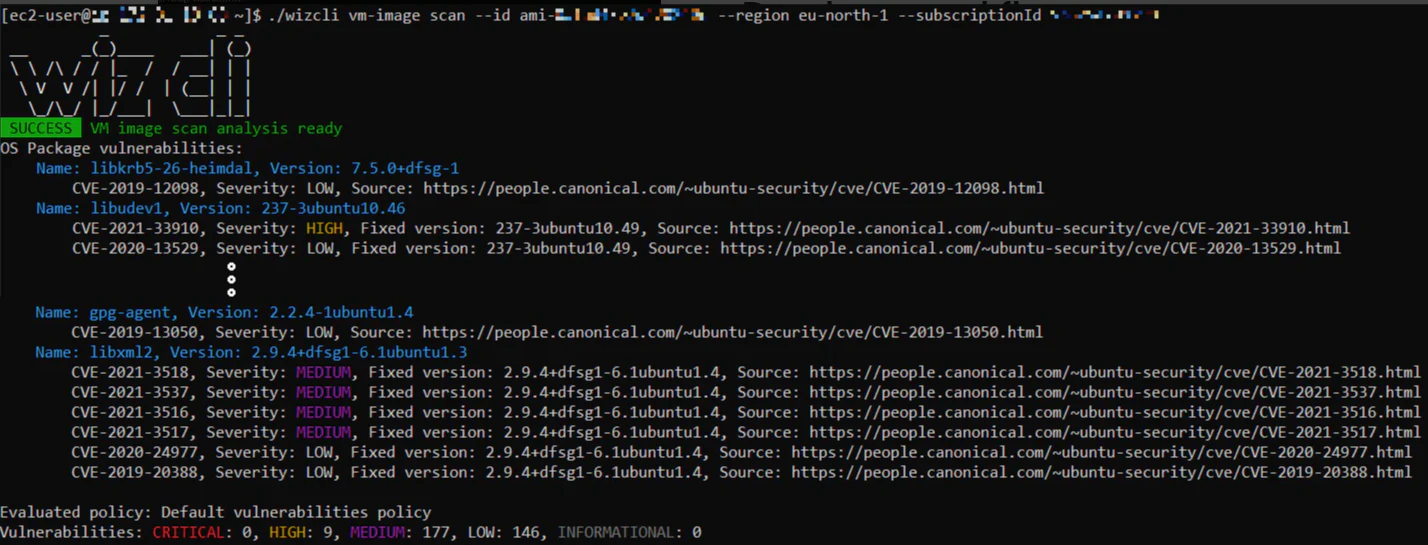
From there, one policy engine applies the same guardrails in the IDE, CI/CD, and deployment flow. Teams write a rule once, catch risky changes earlier, and stop unsafe releases later in the pipeline.
When Atlas and runtime evidence show a finding matters, AI-assisted remediation can open a pull request with a fix and explain the change. That shortens the path from detection to verified remediation.
Attack path analysis shows how code flaws, cloud misconfigurations, and excessive permissions combine into a reachable path to sensitive data. The result is a code-to-cloud loop: find the issue, prove the path, route it to the right owner, and fix it at the source.
Want to cut noise and fix what matters? See how a unified, context-first approach streamlines code-to-cloud risk management and helps teams ship secure software faster and get a demo today!
Secure your cloud from code to production
Learn why CISOs at the fastest growing companies trust Wiz to accelerate secure cloud development.
