



What is SAST?
Static application security testing (SAST) is a white-box testing method that scans source code, bytecode, or binaries for security flaws without running the program. That matters because your team can fix insecure code while it's still cheap to change, long before production.
Unlike methods that probe running applications from the outside, SAST examines code internally. It uses dataflow analysis and taint tracking to trace how untrusted input moves through your codebase toward sensitive operations. NIST's draft Secure Software Development Framework gives an example practice: using a static analysis tool to automatically check code for vulnerabilities and secure coding compliance.
While some SAST tools reference vulnerability databases for third-party code, their core strength is pattern-based detection of insecure coding practices in custom code.
Linters, SCA scanners, and IaC analyzers also operate on static code but serve different purposes. SAST often runs early in the SDLC, but modern workflows also scan existing codebases to catch regressions and legacy risks.
SAST also gives developers, AppSec and CloudSec teams a shared view of code risk, so fewer issues turn into late-stage rewrites.
Secure Coding Cheat Sheet
SAST helps find insecure code; secure coding practices help prevent it. Use this cheat sheet to bring those practices into your development workflow.

SAST vs. DAST: How they compare
SAST inspects code from the inside, while dynamic application security testing (DAST) probes a running application from the outside. Software composition analysis (SCA) adds a third angle by checking open-source dependencies for known vulnerabilities, which SAST isn't built to track.
The two approaches are complementary. Here's what each is best suited for:
SAST: Identifies issues during development
DAST: Detects vulnerabilities that only appear when the application is live
Combining SAST, DAST, and runtime protection with cloud context gives you layered coverage from early development through production.
YOUR TEAM CAN EXPLORE FOR A HYBRID APPROACH THAT COMBINES ELEMENTS OF BOTH SAST AND DAST.
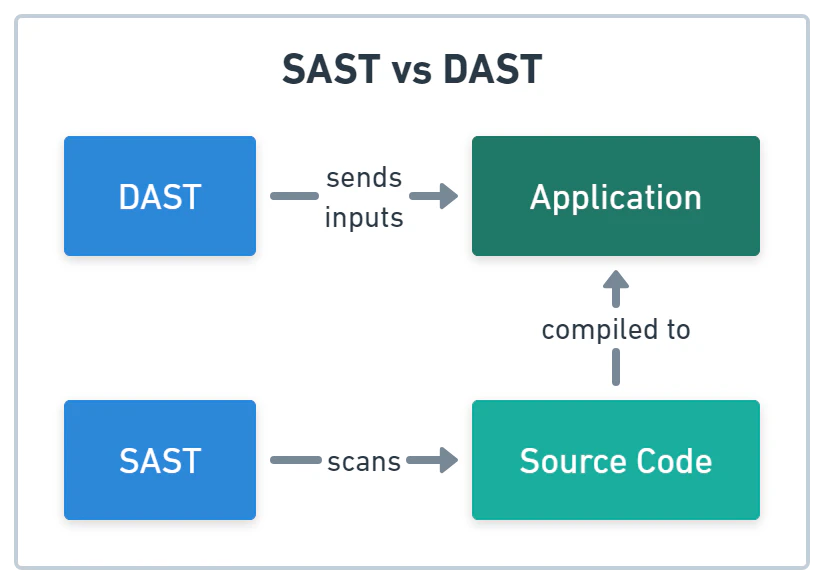
Below is a breakdown of the two methods:
| Method | Attributes |
|---|---|
| SAST: White-box analysis of static code |
|
| DAST: Black-box testing in a running environment |
|
How does SAST work?
Static application security testing works by turning your code into internal models and checking those models against security rules. The scanner never runs your application; it flags patterns in those models that match known vulnerabilities.
These tools detect risky patterns using local or cloud-based rulesets and vulnerability databases. A scanner might flag unsanitized inputs flowing into SQL queries, insecure function calls, or outdated cryptography based on language-specific rules.
Here's how SAST works in practice:
Initialization: Your team points the tool at code files, configuration files (like YAML and XML), scripts, and markup.
Code parsing: The tool parses code into internal representations, such as syntax trees and control flow graphs.
Pattern matching and rules application: The tool uses rulesets from vulnerability databases, like OWASP Top 10 and similar checks, to scan for secrets, outdated libraries, poor configuration settings, and more.
Contextual insights: The tool traces data flows to find vulnerabilities and exposed sensitive operations.
Detection and reporting: The tool reports severity ratings and remediation advice through IDE and CI/CD integrations.
Remediation and improvement: Your team reviews and fixes flagged vulnerabilities in the IDE or CI/CD reports. With a DevSecOps shift-left approach, your team keeps refining the SAST to cut false positives and catch new threats.
These steps rely on a few core capabilities:
Core SAST analysis techniques
Most scanners combine several techniques, and the mix decides how noisy a tool is.
| Technique | What it catches |
|---|---|
| Abstract syntax tree parsing | Insecure function calls and risky code patterns |
| Control flow analysis | Risky execution paths and unreachable checks |
| Data flow analysis | Values that move unsafely between variables and functions |
| Taint analysis | Untrusted input that reaches a sensitive operation |
| Sanitizer checks | Whether input was cleaned before it reached the sink |
Taint analysis follows a value from where it enters your code (the source) to the operation that could misuse it (the sink). Here's a before-and-after example from a Flask-style handler:
# Before: tainted input reaches the sink
user_id = request.args["id"]
query = "SELECT * FROM users WHERE id = '" + user_id + "'"
cursor.execute(query)  # flagged: SQL injection

# After: parameterized query
user_id = request.args["id"]
cursor.execute("SELECT * FROM users WHERE id = %s", (user_id,))  # clean
In practice, the scanner flags the first version because request input reaches cursor.execute with no sanitizer in between. The second version passes because the database driver binds the placeholder value as data, so it can't change the query's structure.
Developer integrations: IDEs, CLIs, and CI/CD
Most teams plug SAST into two developer workflows:
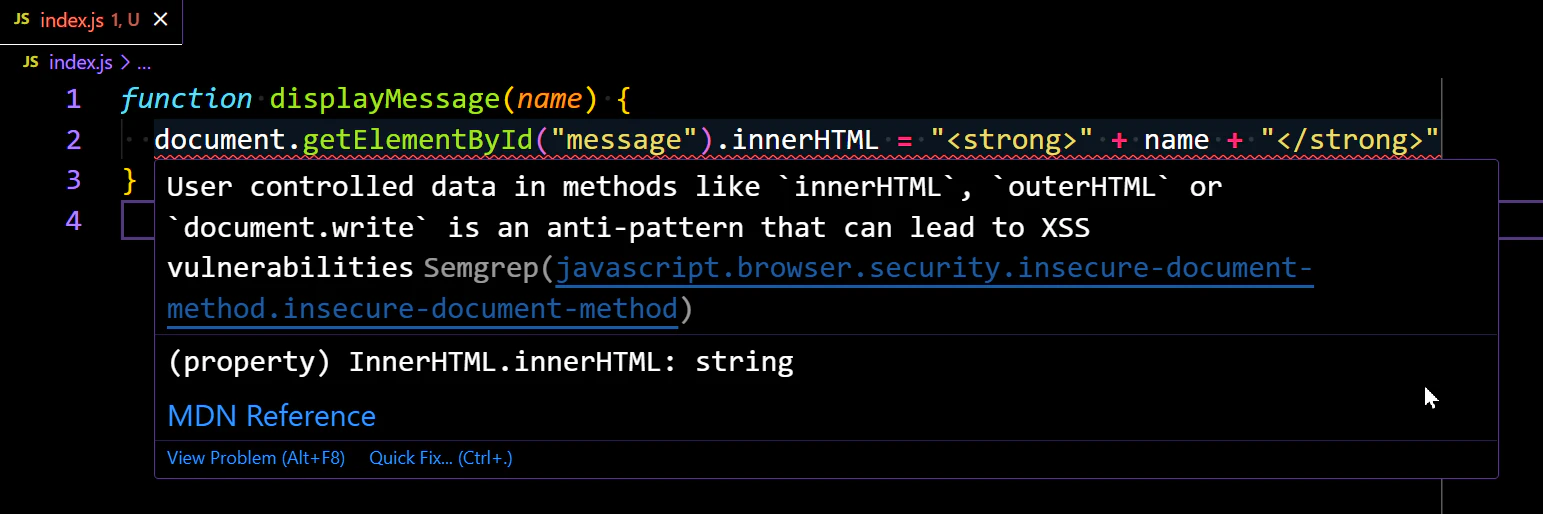
IDE extensions surface security issues in-line as developers write code, before they commit.
CLI tools connect to version control systems to run automatic scans on commits, pull requests, or builds.
Ideally, SAST catches problems before version control, but it still finds risks in existing code later in the pipeline.
In the pipeline, every commit, pull request, or build gets the same checks, no matter who wrote the code. That steady feedback loop tightens security without slowing delivery.
What challenges does SAST address?
Vulnerabilities are easier to fix before release than after deployment. SAST closes that gap by analyzing source code before applications run.
By integrating into the software development lifecycle (SDLC), SAST helps teams:
Identify code-level vulnerabilities early: SAST detects common coding flaws like SQL injection, cross-site scripting (XSS), and insecure API usage before production.
Help enforce secure coding standards: SAST automatically flags code that violates frameworks like OWASP Top 10 and CWE/SANS.
Reduce technical debt: Early detection stops insecure code from piling up and cuts future rework.
Support compliance requirements: The future-dated requirements in PCI DSS v4.0 became mandatory in March 2025, and ISO 27001's Annex A includes secure development controls. SAST gives you concrete evidence of that secure development work.
What are the benefits of SAST?
Done well, SAST becomes a scalable, developer-friendly part of your application security program.
Catch vulnerabilities early when they are easiest to fix: Fixing a flaw in a pull request is far simpler than chasing it down after deployment or an incident.
Give developers real-time, contextual feedback: IDE and version control integrations flag insecure code as it's written, so developers fix it in their workflow and build secure habits.
Enforce secure coding standards consistently: Every repo and contributor is held to the same internal policies and OWASP or CWE rules.
Scale security through automation: Pipeline scans give fast-moving teams continuous coverage without manual checks.
Strengthen compliance posture: SAST gives auditors code-level proof of secure development, though it can't demonstrate compliance alone.
What are the limitations of SAST?
False positives are one of the most common limitations of SAST. Because the scanner never sees runtime context, it flags theoretical vulnerabilities that may not be exploitable in your environment. Without tuning, that noise buries real issues and wears down trust in the tool.
Watch 5-min demo
SAST findings are easier to prioritize when you know where vulnerable code runs. Explore Wiz Code’s approach to connecting code security and cloud context in this five-minute recorded demo.

A 2026 Fudan University and Tencent study of one enterprise's in-house static analyzer found each false alarm took 10 to 20 minutes of manual inspection. Understanding these trade-offs helps teams plan for them:
Higher false positives: SAST lacks visibility into how code actually runs, so it flags patterns that match vulnerability signatures even when surrounding controls make exploitation unlikely. Left unmanaged, false positives can lead to alert fatigue.
NOT ALL FALSE POSITIVES ARE HARMLESS. SOME MAY POINT TO REAL ISSUES THAT NEED MORE CONTEXT TO EVALUATE PROPERLY. USE TRIAGE TO REVIEW FINDINGS IN THEIR FULL CONTEXT AND DETERMINE THEIR SEVERITY.
No visibility into runtime behavior: SAST tools can't see how applications behave in production, so they won't detect runtime-specific issues like race conditions, logic flaws, environment misconfigurations, or abuse of external services. This is why teams need to complement SAST with DAST tools or runtime protection.
Ongoing tuning and rule maintenance: Using SAST isn't a set-it-and-forget-it solution. Your team should review and refine rules over time to reduce noise, reflect codebase changes, and account for evolving attack patterns. Without ongoing attention, SAST tools risk becoming outdated or overly noisy.
Limited understanding of context and impact: The typical SAST can't distinguish between a vulnerable piece of code running in a locked-down internal service and one deployed to an internet-facing workload with access to sensitive data. Without cloud or runtime context, your SAST treats findings equally, even when the risk isn't.
To get the most out of SAST, teams need to integrate it thoughtfully, tune it regularly, and combine its insights with tools that offer deeper runtime and cloud visibility.
Click through the feature tour
See how Wiz AI SAST works
Best practices for running SAST effectively
Turning on a scanner is the easy part. SAST pays off when scans run inside everyday workflows, rules are tuned to cut noise, and developers know how to read the results.
Integrating SAST into the SDLC
Scanning every commit, build, and pre-release keeps security in the process from the start, catching issues before they compound into costly production fixes. CIS Secure by Design guidance cautions against treating AI-generated code as inherently secure; it needs the same review and testing as human-written code.
🛠️ Action step: Define and enforce security gates within the CI/CD pipeline to trigger scans on incremental scans or pull requests and automatically fail or block merges for critical issues. This prevents suspicious code from moving forward and gives developers immediate feedback.
Evaluating and triaging SAST results
Once SAST runs in your pipeline, set a clear triage process with defined roles so the most significant vulnerabilities get resolved first.
Cutting false alerts keeps minor issues from eating time your team needs for critical threats. Contextual triage removes that noise and keeps focus on the most impactful findings.
🛠️ Action step: Adopt a solution that offers contextual prioritization, so your team can focus on the most severe and relevant vulnerabilities first.
Developer training
Who handles vulnerabilities matters as much as which tool you use. Train developers and security staff to write secure code, read SAST reports, and fix issues quickly.
🛠️ Action step: Hold training sessions on how to use your SAST tool and run simulations to test for vulnerabilities in your code and security.
Ruleset customization
With tooling, triage, and training in place, tune your SAST to your tech stack. Write rules that catch patterns unique to your code, and disable noisy or irrelevant checks that bury severe findings.
🛠️ Action step: Consider starting with "monitor" mode rules to study the scanner's behavior, as well as helpful config files like GitLab's sast-ruleset.toml to reduce noisy rules.
What to look for in a SAST tool
A useful SAST tool and a noisy one differ in language coverage, rule accuracy, and workflow fit. Prioritize these capabilities:
Language and framework support: Confirm support for the languages and frameworks your team actually uses, such as Java, Python, C#, and JavaScript.
Vulnerability detection and rule coverage: Look for rules aligned with OWASP Top 10, CWE/SANS Top 25, and PCI DSS that flag injection, misconfiguration, and authentication flaws. Hardcoded secrets matter too: the 2025 State of Code Security Report found 61% of organizations have secrets exposed in public repositories.
Developer workflow integrations: Expect IDE plugins, CLI tools, version control integration, and CI/CD pipeline support.
Accurate reporting and guidance: Look for clear remediation steps and context-based ranking, such as whether vulnerable code is deployed or internet-facing. That keeps your team off a backlog of theoretical issues.
Scalability and performance: The tool should handle large codebases through incremental scanning, parallel and cloud-based processing, and baseline management, including across complex, multi-cloud environments.
What are the most popular open-source SAST tools?
For teams trialing SAST or working in open-source-heavy environments, these free tools cover common stacks well:
| Tools | Description |
|---|---|
| Semgrep | Semgrep is a rule-based open-source scanner built for scanning speed. It supports an impressive list of languages, including C#, Java, and JavaScript. Semgrep also has supply chain security features to provide notifications about vulnerabilities in your third-party dependencies. |
| SonarQube | SonarQube is a widely used static analyzer that covers code quality and security. It features a list of vulnerabilities with constant upgrades and integrates with CLIs, IDEs, and popular DevOps platforms like GitHub and GitLab. It offers a free community edition. |
| CodeQL | This tool is the GitHub open-source CodeQL that powers its Advanced Security service. You can also self-host the service if SaaS isn’t an option. |
| Brakeman | Brakeman is a SAST scanner for Ruby on Rails applications. It can be a valuable choice if you’re a Ruby shop. |
| Bandit | Similar to Brakeman for Ruby, Bandit is for Python. |
| Find Security Bugs | For Android or Java applications, Find Security Bugs is a solid choice. It also works with other JVM languages like Kotlin, Groovy, and Scala. |
How AI is changing SAST
AI coding assistants have changed the math on code review. When a developer can generate a full service in an afternoon, teams can end up reviewing each line less closely. That makes scanning every commit and pull request the baseline for any team shipping AI-assisted code.
Scanners are evolving too. Classic rules engines match known patterns, like user input concatenated into a SQL string, but they struggle with logic flaws such as broken access control and insecure direct object references (IDOR). In those cases the code looks clean, and the bug lives in what it forgets to check. Context-aware, AI-assisted analysis reasons about intended behavior, which is how newer AI-powered SAST engines flag those gaps.
Here's a common case: an AI-generated endpoint fetches an invoice by ID but never confirms the invoice belongs to the caller. No pattern rule fires, yet any logged-in user can read another customer's billing data. As findings like this pile up, ranking by real exposure matters more than raw severity, so teams fix internet-facing, data-adjacent issues first.
AI SAST: Smarter Static Application Security Testing
AI SAST is static application security testing enhanced with artificial intelligence to make code scanning more accurate, contextual, and actionable.
Read more

Secure application code from pull request to cloud runtime
A SQL injection finding means something different depending on where that code runs. In a public API with database access, it needs a fix today, while in an internal tool with no internet route, it can wait. Wiz Code pairs static application security testing with cloud context to tell those two apart.
Here's how the pieces work together:
Wiz SAST scans where developers work: Rules-based checks run in the IDE, pull requests, and CI/CD. An AI-powered triage agent explains findings and recommends fixes.
AI analysis catches what rules miss: Wiz AI SAST analyzes application behavior to find broken access control, IDOR, flawed input validation, and misapplied cryptography.
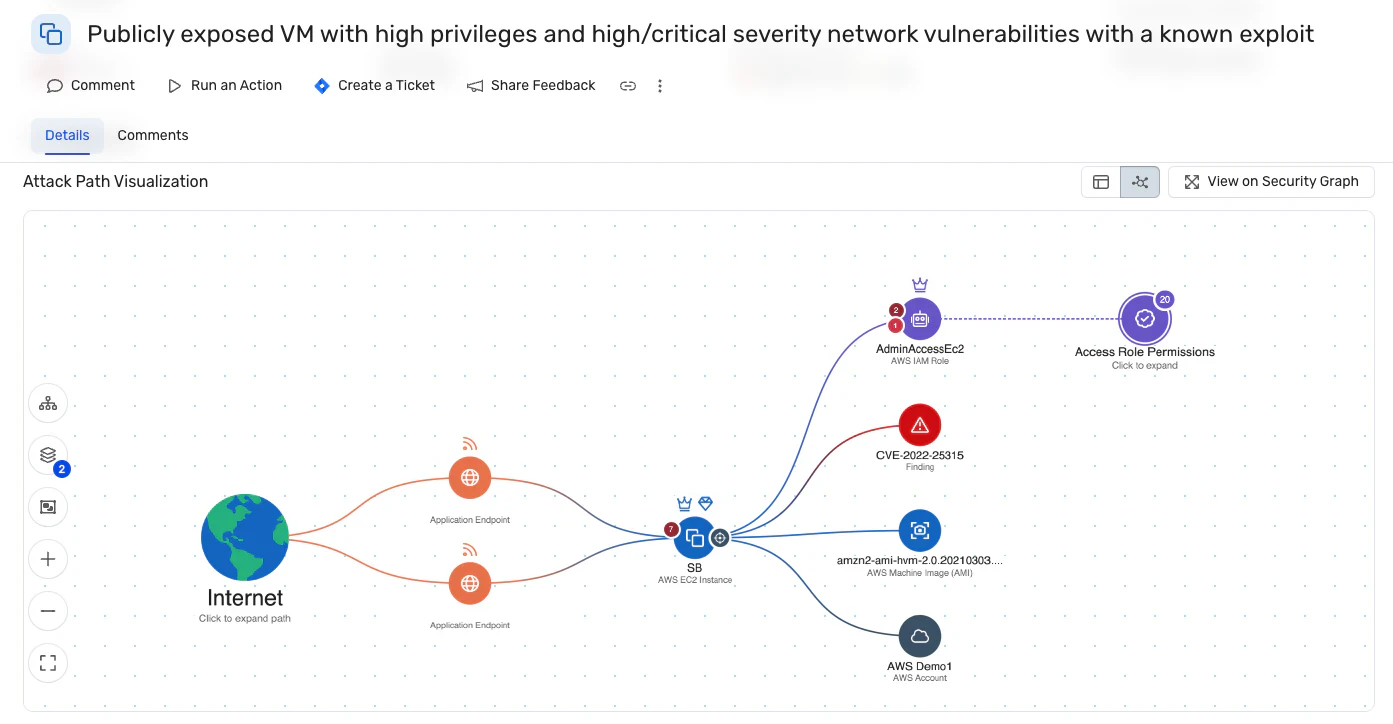
The Wiz Security Graph adds cloud context: It shows whether vulnerable code is deployed, internet-exposed, or near sensitive data, so teams fix exploitable issues first.
SAST gives you an early look at insecure code while it's still cheap to fix. A finding becomes a priority once you know where that code runs and what it can reach. Wiz Code connects the two, so developers and AppSec teams start with issues in deployed, exposed workloads.
Want to understand which SAST findings matter most in your environment? Explore how Wiz connects code vulnerabilities to cloud exposure and sensitive data. See Wiz in action
See SAST with Cloud Context
Explore how Wiz connects SAST findings to cloud exposure in a demo, so your team can focus remediation on vulnerable code in deployed, exposed workloads.
