



What is DAST?
Dynamic application security testing (DAST) is a black-box security testing method that identifies vulnerabilities in running web applications by simulating attacks from an external perspective. As a black-box technique, DAST probes your application from the outside with no visibility into source code, replicating the perspective of an external attacker. The scanner sends real HTTP requests to a live application, observes the responses, and flags behaviors that indicate exploitable weaknesses.
Where SAST works from the inside out, reading every line of source code, DAST works from the outside in. It sends real requests to a live application with no knowledge of what lies beneath, which is why the two approaches catch fundamentally different classes of vulnerability. Because DAST requires no access to source code, it works across any programming language or framework.
This approach catches security flaws that only surface when the application is fully assembled and processing real requests, including server misconfigurations, authentication bypasses, and component integration failures.
Application Security Best Practices [Cheat Sheet]
This 6-page guide goes beyond basics, it’s a deep dive into advanced, practical AppSec strategies for developers, security engineers, and DevOps teams.

How does DAST work?
DAST tools systematically probe your running application to find exploitable weaknesses before attackers do. The process maps your application's attack surface, sends malicious inputs to every entry point, and analyzes responses to identify vulnerabilities.
Integration typically occurs during the testing phase, after static analysis has completed code-level checks. This timing ensures DAST can evaluate the fully assembled application with all components running together.
The scanning process follows four phases:
Discovery
During attack surface mapping, the scanner crawls and spiders your application to enumerate all reachable endpoints, input fields, URL parameters, and authentication entry points. This includes login pages, password-reset flows, session management endpoints, API routes, and file upload fields.
Building this complete inventory is critical because any entry point the scanner misses will not be tested for vulnerabilities in subsequent phases. By locating authentication entry points early, the scanner can specifically test for flaws like session fixation or insecure token handling during the simulation phase.
Simulation
Once attack surface mapping has catalogued every input, the scanner probes each one with malicious payloads designed to trigger specific vulnerability classes. Each payload targets a known flaw pattern, and the scanner cycles through them systematically across every discovered entry point.
Attack simulations typically target:
SQL injection: Malformed database queries that could expose or manipulate data
Cross-site scripting (XSS): Script injection that could compromise user sessions
Cross-site request forgery (CSRF): Forged requests that trick authenticated users into unintended actions
Authentication flaws: Attempts to bypass login mechanisms or escalate privileges
Server misconfigurations: Probes for exposed admin interfaces, default credentials, or insecure TLS settings
The scanner observes how your application responds to each attack attempt to determine whether the vulnerability is present.
Analysis
The scanner examines application responses to distinguish successful exploits from normal behavior. When an SQL injection payload returns database error messages or unexpected data, the tool flags a confirmed vulnerability.
Analysis also considers response timing, HTTP status codes, and content changes to identify blind vulnerabilities where the application does not directly reveal the flaw. More sophisticated DAST tools correlate findings across multiple requests to reduce false positives and confirm exploitability.
Reporting
DAST tools generate reports that categorize vulnerabilities by severity, map each finding to the affected endpoint, and provide remediation guidance. Reports typically include the specific payload that triggered the vulnerability, making it easier for developers to reproduce and fix the issue.
Most tools integrate with ticketing systems like Jira or communication platforms like Slack, routing findings directly to the teams responsible for remediation. This closes the loop between detection and action, ensuring vulnerabilities do not sit unaddressed in a backlog.
SAST vs DAST: Key Differences and When to Use Each
In this Academy article, we'll dig into SAST and DAST security testing methods, exploring how they work and their core aspects
Read more

SAST vs. DAST
Static application security testing (SAST) and dynamic application security testing (DAST) find different types of vulnerabilities at different stages of development:
SAST analyzes source code before the application runs, catching issues like hardcoded secrets and insecure coding patterns.
DAST tests the running application from the outside, identifying runtime flaws that only appear when components interact.
While SAST scans source code early in development, before the application is ever deployed, DAST runs against a live environment and catches the runtime flaws, misconfigurations, and injection vulnerabilities that only appear when real HTTP traffic flows through the stack. In a well-structured SDLC, SAST runs at the code-commit stage to catch insecure patterns before deployment, while DAST runs in the staging environment to validate the assembled, running application.
DAST operates as black-box testing, sending malicious requests to an HTTP server without any knowledge of the underlying code. This makes DAST language-agnostic, working equally well whether your application is built in Java, Python, Go, or any other stack.
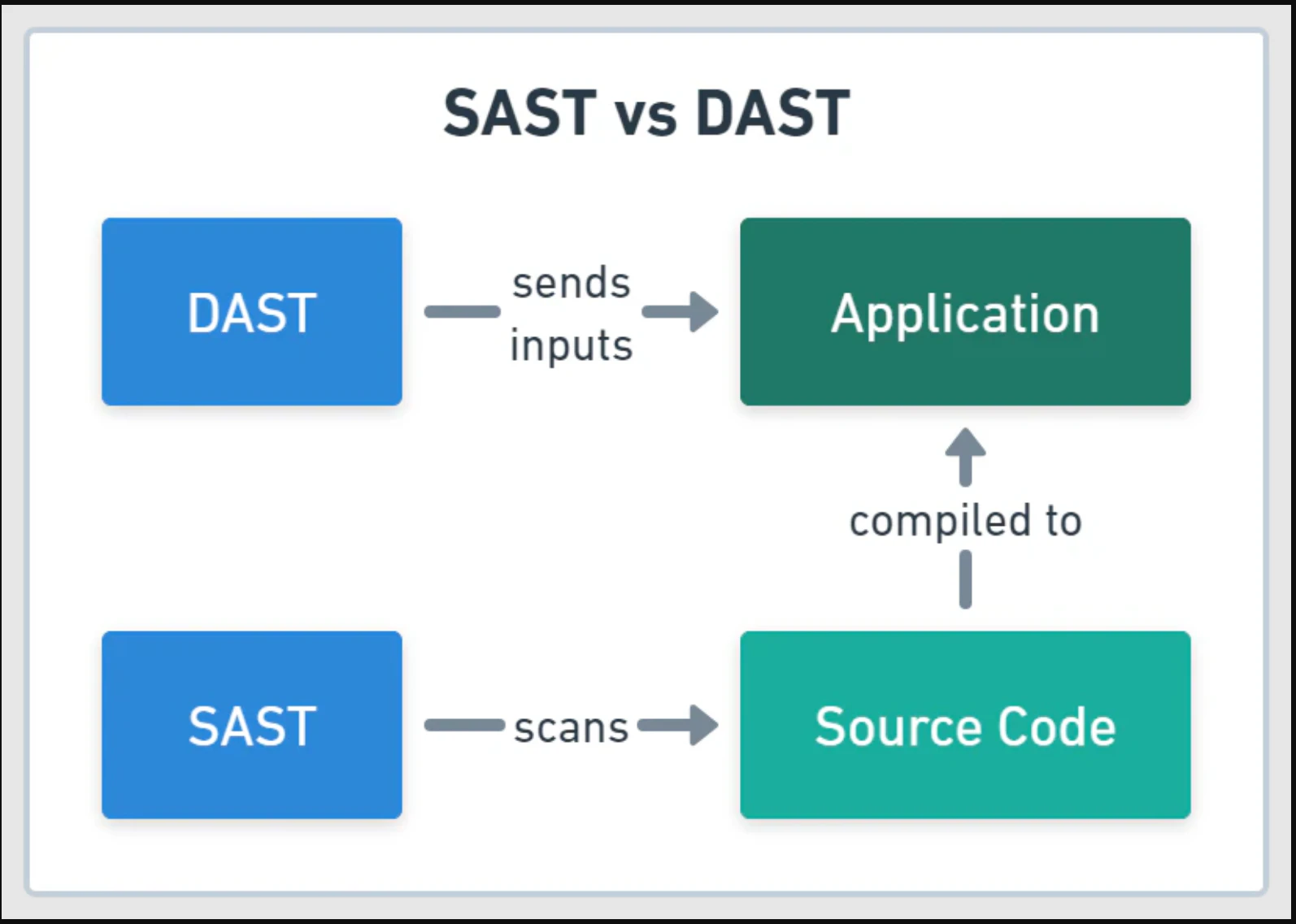
DAST detects runtime-specific vulnerabilities that static analysis cannot identify because they only manifest in running applications:
Server configuration issues: Misconfigured web servers, databases, and third-party services
Integration vulnerabilities: Problems arising from component interactions and data flows
Authentication and session flaws: Login bypasses, session hijacking, and access control failures
Network-level exposures: DDoS susceptibility, internal data leakage, and protocol weaknesses
These are the vulnerability classes that attackers actively exploit in production environments. A misconfigured authentication flow or exposed admin panel will not appear in your source code, but DAST will find it.
While DAST scanning takes longer than static analysis, this comprehensive testing approach identifies critical security gaps that code-level scanning misses entirely
On the other hand, SAST comes before DAST during development and CI/CD pipelines:
SAST analyzes the source code itself and can be executed very early in your DevSecOps pipelines.
The code is analyzed to find patterns that can be potential issues.
SAST can also be paired with fuzzing for more comprehensive results.
For teams wanting deeper coverage, interactive application security testing (IAST) combines elements of both by instrumenting the running application, though it requires agents in the runtime that add deployment complexity DAST avoids.
DAST use cases and implementation timing
Running DAST too early wastes time scanning incomplete applications. Running it too late means vulnerabilities reach production.
The following sections outline when to run DAST and which security objectives it serves best.
When to use DAST in the SDLC
DAST is best suited for later stages of the development process, once an application is fully built and running. Common implementation points include:
Staging and QA environments: Before deploying to production, run DAST scans in a staging environment that mirrors production. This allows you to find and fix vulnerabilities without impacting live users, as Tide discovered when it reduced its vulnerability discovery time and warned teams about OpenSSL vulnerabilities before the technical details were even announced.
Production environments: Regularly scheduled DAST scans on live applications help detect new vulnerabilities introduced by updates, configuration changes, or newly discovered threats. Wiz's Cloud Attack report found that exploitation of public-facing apps often leads to web shells and persistent access, with attacks appearing within days of PoC release.
For maximum coverage, schedule full DAST scans against a staging environment that mirrors production. For faster feedback loops, integrate a scoped DAST check into your CI/CD pipeline to catch critical regressions on every significant build.
Common DAST use cases
Web application and API security: DAST is highly effective at identifying common web vulnerabilities, including SQL injection, cross-site scripting (XSS), and broken authentication.
Compliance and auditing: PCI DSS Requirement 11.3 mandates penetration testing of externally facing application components at least annually and after any significant change. Scheduled DAST scans directly address this for organizations handling cardholder data, and many frameworks also require internal and external vulnerability scans at least once every three months.
DevSecOps provides the pipeline infrastructure and shared-responsibility culture that makes SDLC integration of DAST practical. In a DevSecOps pipeline, a DAST scan can trigger automatically on every merge to the main branch, with the build marked as failed if the scanner returns any critical-severity findings. This gives developers immediate, actionable feedback without waiting for a manual security review.
Effective SDLC integration places DAST at the staging gate, after build and unit testing but before production release. DevSecOps practices automate this placement, triggering scans on every candidate release and routing findings directly to the responsible development team.
In modern cloud-native environments, DAST is one part of a larger security strategy. A unified platform like Wiz provides the runtime visibility needed to contextualize DAST findings. By connecting a vulnerability to its cloud configuration, network exposure, and permissions, teams can prioritize the risks that truly matter and understand the full attack path.
Benefits of DAST
DAST provides real-world attack validation by testing applications exactly as malicious actors would, identifying exploitable vulnerabilities that pose genuine threats to your organization.
Key advantages of implementing DAST:
Runtime vulnerability detection: DAST identifies security flaws that only exist when applications are running and processing real requests. Session fixation, insecure token expiry, and broken access control only surface in a live application. They leave no trace in source code.
Language-agnostic testing: DAST tools don't have to understand the coding language you used to build your application. They can identify and exploit vulnerabilities regardless of the underlying stack, which simplifies testing workflows.
Third-party testing: You can test your dependencies for any issues via DAST tools. Since it doesn't need to understand the internal workings and can interface with your third-party tools to start an evaluation, it's easy to use DAST with them.
Real attack behavior: DAST's biggest strength lies in its attack nature. The simulations that DAST tools run closely match the actual behavior of attackers.
Limitations of DAST
DAST has real constraints that affect how you integrate it into your security program:
False positives: DAST can flag issues that are not actually exploitable, requiring manual verification. Applying runtime context and cloud exposure data to DAST results is one of the most effective ways to cut through this noise: a finding on an endpoint that is unreachable from the internet and handles no sensitive data can be deprioritized immediately, without manual investigation.
Scan duration: Comprehensive DAST scans take hours or days, not minutes. This makes DAST impractical for every commit and better suited for scheduled scans or release gates.
Late-stage detection: DAST requires a running application, so it cannot shift left the way SAST does. Vulnerabilities found by DAST are more expensive to fix because code has already been deployed.
No code-level insight: DAST identifies that a vulnerability exists but cannot pinpoint the exact line of code causing it. Developers need additional context to remediate findings efficiently.
Enriching DAST findings with runtime context and cloud exposure data, such as whether a vulnerable endpoint is publicly routable, what data it handles, and how it is deployed, lets teams immediately separate critical, internet-facing risks from lower-priority internal findings.
These limitations explain why DAST works best as part of a layered testing strategy rather than a standalone solution.
Watch 5-min demo
Watch how Wiz scans code, dependencies, and CI/CD pipelines to catch vulnerabilities, exposed secrets, and misconfigurations before they reach production.

Popular open-source DAST tools
There are many popular open-source tools you can leverage for DAST analysis. Here are a few that are in continuous development:
| Tool | Description |
|---|---|
| OWASP ZAP | ZAP, or Zed Attack Proxy, can be easily integrated into your CI/CD security pipeline to analyze the behavior of your application. ZAP has a major community backing it, can perform other security testing like SAST, and can carry out code reviews as well. |
| Nuclei | As a community-powered tool, Nuclei offers a vast template library that leverages automations for greater efficiency. You can also build your own templates using AI, which pulls from the existing library. |
| Nikto | Nikto serves as an open-source web server scanner and can perform a variety of comprehensive tests. It’s designed to work as quickly as possible and scans for risky files, programs, server components, and other related items. |
| Burp Suite | Burp Suite is used widely for security scanning and testing. Burp Suite is available as a community offering as well as a paid version, and with the paid version, you can get some extra automated scanning features. For better control and ease of use, Burp Suite offers a GUI, and it boasts a vast number of features and attacks that it can analyze and perform. |
Strengthen application security from code to cloud with Wiz Code
Finding vulnerabilities is only half the problem. The harder question is which ones actually matter. A DAST scan might flag hundreds of findings, but without knowing whether the affected endpoint is internet-facing, handles sensitive data, or sits behind a misconfigured IAM role, your team ends up triaging in the dark.
Wiz connects DAST results to the cloud context that determines real risk. Wiz offers native DAST capabilities through the AI-powered Wiz Red Agent (currently in Public Preview) and Wiz ASM, while continuing to support third-party DAST ingestion through UVM Connectors. The Red Agent goes beyond predefined rules, using AI to simulate real-world attacks against your web applications and APIs. Wiz ASM validates whether discovered vulnerabilities are actually reachable and exploitable from the internet, so you focus remediation where it counts.
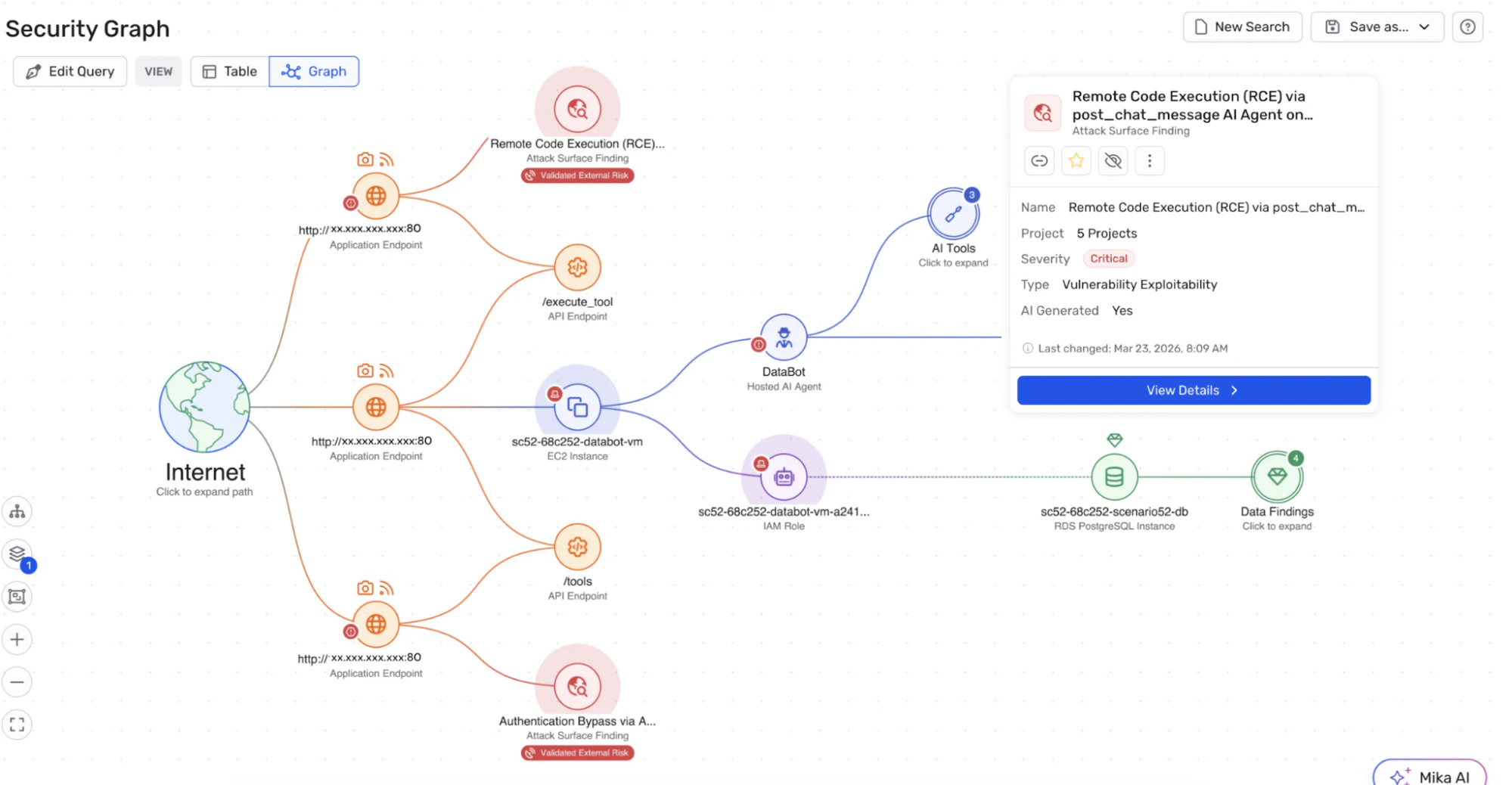
Because Wiz maps the full picture from code to cloud, DAST findings land with the context your team needs: what is exposed, what has access, and what is worth fixing first.
Want to see how it works? Get a demo to explore how Wiz secures your applications from code to cloud.
Catch code risks before you deploy
Learn how Wiz Code scans IaC, containers, and pipelines to stop misconfigurations and vulnerabilities before they hit your cloud.
