



What is CSRF?
Cross-site request forgery (CSRF) is a cybersecurity attack where a malicious website or attacker tricks your browser into making unwanted requests to an authenticated website. By exploiting the trust between web applications and authenticated users, apps automatically accept HTTP requests (POST, GET, PUT, and DELETE) without knowing whether the requests are legitimate or malicious.
For example, imagine you log in to your bank account and then visit another website with a CSRF vulnerability. The compromised website can leverage your active session cookie to disguise itself as you and perform malicious actions, such as transferring money from your account, without further authentication.
Get the Application Security Best Practices [Cheat Sheet]
This 6-page guide goes beyond basics — it’s a deep dive into advanced, practical AppSec strategies for developers, security engineers, and DevOps teams.

How CSRF works
CSRF exploits apps with flawed session management and weaknesses in the browser's security policies. Most web apps use session IDs or cookies stored in your browser to verify authentication, and when you log in to a website, your browser automatically sends these credentials with every request to that website. Attackers exploit this automatic trust.
Browsers typically implement security rules, such as the same-origin policy (SOP) and cross-origin resource sharing (CORS), to prevent malicious sites from interacting with others. SOP restricts scripts on one site from accessing resources on another, while CORS allows controlled access via additional HTTP headers.
However, CSRF attacks can easily bypass these protections. Since the malicious request originates from the user's browser and includes valid authentication credentials, the website has no way to distinguish between a legitimate request and an attack.
Here’s the general flow of a CSRF attack:
Attackers create malicious scripts or URLs to perform an unwanted action on a target site.
They trick an authenticated user into clicking the link or visiting a page that triggers the malicious script.
The user's browser sends the forged request, along with the user's valid session cookies, to the target website.
The target website processes the request as if it came from a legitimate user, enabling the attack.
For example, here's what an attacker's HTML form might look like if they want to transfer $3,000 from an authenticated user's bank account:
<form action="https://examplebank.com/onlinebanking/transfer" method="POST" style="display:none;">
  <input type="hidden" name="account" value="attacker" />
  <input type="hidden" name="amount" value="3000" />
  <input type= "submit"/>
</form>
<script>

  document.forms[0].submit();

</script>
All input fields are hidden, and the script runs in the background. Since the request comes from the user's browser, it contains the session cookies that the bank's website requires for verification.
Here's an example of the resulting HTTP request your browser sends:
POST /onlinebanking/transfer HTTP/1.1
Host: examplebank.com
Cookie: sessionid=valid_session_cookie
Content-Type: application/x-www-form-urlencoded
Content-Length: 28

account=hacker&amount=3000
Because the user's browser automatically sends the session cookie, the bank processes the transfer request without additional validation. In most CSRF attacks, attackers trick users through social engineering, phishing emails, or fake ads. Once successful, they can send various HTTP requests using different verbs, like GET, POST, PUT, or DELETE. Sometimes, the malicious code runs automatically as soon as the page loads, making CSRF attacks especially sneaky and difficult to detect.
CSRF in SPAs and APIs
Single-page applications (SPAs) load pages once and then use frameworks like React, Angular, or Vue to manage user interactions and communicate with the backend via APIs. Unlike traditional websites that reload pages and embed CSRF tokens to stop request forgery via server-side forms, SPAs typically receive these tokens during the initial page load and retain them in JavaScript variables or browser storage for later use.
While this approach simplifies frontend architecture, it also introduces security risks. Storing tokens in JavaScript-accessible storage makes them open to theft via cross-site scripting (XSS) vulnerabilities. If attackers can inject malicious scripts into the SPA, they can read the CSRF tokens and use them to forge asynchronous JavaScript and XML (AJAX) requests to impersonate the user.
Since SPAs often call multiple API endpoints during normal operation, attackers can exploit weak protections by tricking the browser into sending forged requests.
REST and GraphQL APIs are especially at risk when they rely solely on cookie-based authentication, as browsers automatically attach cookies with every request. Without additional safeguards, such as CSRF tokens or SameSite cookie settings, these APIs remain vulnerable to request forgery attacks.
CSRF defenses: What works and what fails
Defending against CSRF attacks can be tricky, and not all methods are equally effective. Some common approaches fail to provide the end-to-end protection your applications need, while a few proven defenses offer more complete coverage.
Here are some CSRF protection mechanisms that offer limited protection:
Blocking state-changing actions via GET
Some developers attempt to prevent CSRF by blocking sensitive actions through GET and only allowing methods like POST, PUT, or DELETE for state-changing actions. Since the server limits state-changing actions to other HTTP methods—such as POST—browsers shouldn't trigger them during normal browsing.
However, this protection fails because browsers automatically execute GET requests to load resources, like images, scripts, or stylesheets. Attackers can embed malicious URLs in these tags and trigger the victim’s browser to send forged GET requests without requiring user interaction.
Here's an example of a vulnerable web page that logs out the user via a GET request:
<!-- Logout via GET (vulnerable) -->

<a href="https://example.com/logout">Logout</a>
An attacker can exploit this behavior by hiding a malicious image tag:
<!-- Malicious CSRF image request -->

<img src="https://example.com/logout" style="display:none" />
Static URL tokens
Static URL tokens include a fixed token in URLs when performing sensitive actions. This means only users with the correct token can trigger the action.
This method often fails because attackers can easily expose or intercept these tokens from URLs. Browser-based attacks and data leaks can also allow attackers to steal or guess these tokens.
Here’s an example of a static URL token:
<!-- Sensitive action with static token in URL -->

<a href="https://example.com/delete?token=static12345">Delete item</a>
An attacker who obtains this URL can reuse the token to forge additional requests to other resources, bypassing CSRF protections.
Some CSRF defenses, such as CSRF-token authentication, SameSite cookies, and the double-submit cookie pattern, verify that requests are coming from legitimate users and trusted sources, making request forging significantly harder.
The following CSRF prevention methods provide effective protection from CSRF attacks:
Synchronizer tokens (CSRF tokens)
Using synchronizer tokens, or CSRF tokens, is the most trusted method for defending against CSRF. In this approach, the backend server creates a unique CSRF token for each user session and sends it to the browser. Any subsequent request that performs a state-changing operation—such as a bank transfer or online purchase—must include this token. The server checks the token on every request and rejects any that are missing or invalid.
The backend server that generates and inserts the CSRF token must ensure the token is unique per session, secret, and unpredictable. The token should be of sufficient length (at least 128 bits) to resist brute force attacks. Modern web frameworks like Django, Flask, and Laravel provide built-in CSRF protections that simplify token implementation.
A bank app that uses synchronizer tokens will create and embed the CSRF token in a hidden field when sending you the login page. When you log in with your credentials, the resulting HTTP POST request includes the token, which the bank's server uses to verify your browser.
Here’s an example form with an embedded CSRF token:
<form method="POST" action="/login">
  <input type="text" name="username" placeholder="Username" />
  <input type="password" name="password" placeholder="Password" />
  <input type="hidden" name="csrf_token" value="secure_token" />
  <button type="submit">Login</button>
</form>
When you submit this form, the resulting HTTP request automatically includes the CSRF token, allowing the server to verify it.
Here's an example of a simple server-side (Python) token verification:
def verify_csrf_token(request):
    token = request.form.get("csrf_token")
    session_token = session.get("csrf_token")

    if not token or not session_token or token != session_token:
return "CSRF validation failed", 403Always generate a new CSRF token for each session and rotate it periodically—this reduces the likelihood of token reuse if it's ever exposed.
SameSite cookies
SameSite cookies help prevent CSRF by controlling when your browser includes cookies with requests. This protection operates at the browser level, which means the browser determines whether to include cookies based on the SameSite attribute the server sends.
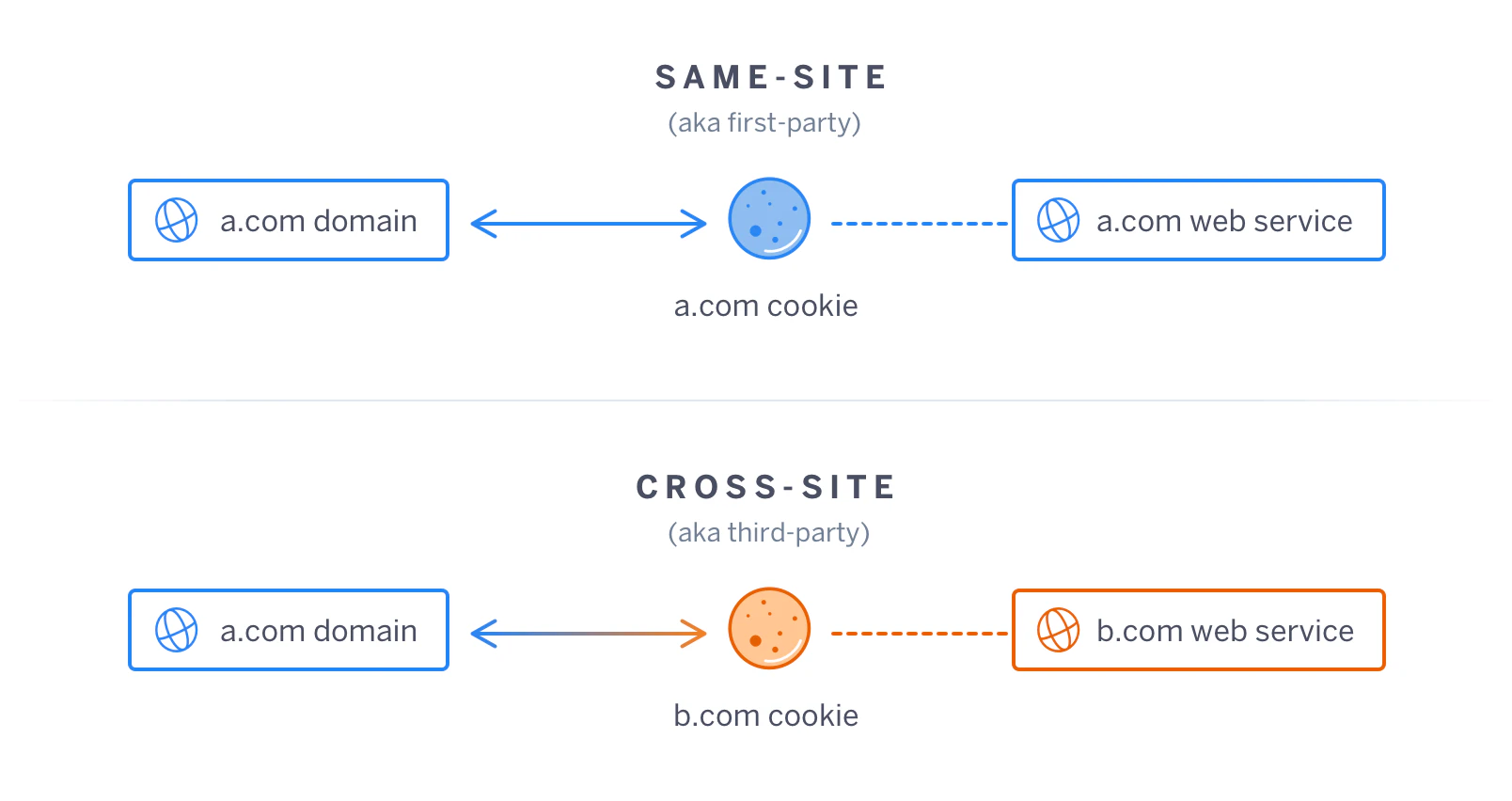
When a web server sets a cookie with SameSite=Strict or SameSite=Lax in its HTTP response header, it instructs the browser to send that cookie only when the request originates from the same site that issued it. With SameSite=Strict, the browser blocks the cookie even if the user clicks a link or loads a resource from another site.
The web server sets the SameSite attribute in the Set-Cookie header like this:
Set-Cookie: sessionid=your_session_id; SameSite=Strict; Secure; HttpOnlyIf you’re browsing the original site and make another request to it, the browser includes the sessionid=your_session_id cookie in the HTTP headers and sends it over a secure channel (HTTPS).
The request looks like this:
GET /dashboard HTTP/1.1
Host: example.com

Cookie: sessionid=abc123
If you visit a different site in a separate tab and then request https://example.com, the browser won’t include the cookie because of the SameSite=Strict setting.
The request header will look like this:
GET /dashboard HTTP/1.1
Host: example.com

(no Cookie header)
Because your browser doesn’t send the cookie, the server can’t authenticate the request and rejects the action.
Enforcing SameSite attributes offers effective protection due to the following factors:
The browser enforces SameSite rules by blocking cookies on cross-site requests.
Without cookies, the server can’t authenticate the request and rejects it.
SameSite cookies block many CSRF attacks automatically, without requiring additional tokens or server-side checks.
Use SameSite=Strict by default to block common CSRF vulnerabilities by preventing cookies from being attached on cross-site requests.
Double-submit cookie pattern
The double-submit cookie pattern is particularly effective for SPAs and APIs. It works by combining cookie-based authentication with an additional CSRF token.
When users visit a site, the web server sets two cookies and sends them to the browser. One cookie contains the user session, and the other includes a unique CSRF token. Here’s how the server sets these:
Set-Cookie: csrf_token=secure_token; Secure; SameSite=StrictFor each subsequent request, the client-side JavaScript sends the CSRF token as a custom header or request parameter to the backend server, as shown below:
fetch('/api/update', {

  method: 'POST',

  headers: {
    'Content-Type': 'application/json'
    'X-CSRF-Token': getCookie('csrf_token')
  },

  body: JSON.stringify({ data: 'value' })
});
The server then verifies the token and authenticates requests that pass the proper validation.
Since browsers restrict cross-origin JavaScript from reading cookies from other domains, attackers can’t access the CSRF token cookie. This method ensures users can't perform state-changing requests without both a valid session cookie and a matching CSRF token.
Always set your CSRF token cookie with the Secure and SameSite=Strict flags, and pass the token in a custom header (such as X-CSRF-Token). This reduces accidental exposure and makes it harder for attackers to reuse tokens.
Cloud Threats Retrospective 2026
Get data-driven insights into modern threat actor behavior and how defenders can respond.

What happens in a CSRF attack?
CSRF attacks exploit flaws in the trust relationship between your browser and the backend application server. Here are some examples that illustrate how CSRF uses attacker-controlled forms and the resulting HTTP requests:
Bank transfer
An attacker sends a phishing URL via email with a subject line that draws the user's attention. The email instructs the user to “secure” their bank account through a forged URL or hidden web form:
https://secure-login.example.bank.com/verify?user=youWhen the user clicks the link, the browser sends the following request:
GET https://examplebank.com/onlinebanking/transfer?account=attacker&amount=3000 Cookie: sessionid=admin_session_idBecause the request contains the authentication cookie, the bank's server processes the transfer.
ETL pipelines
An attacker embeds a harmful link on a webpage under a compelling title:
<a href="https://etladmin.com/change-settings?pipeline=123&config=harmful">ETL Pipeline Optimization Steps</a>When the ETL admin clicks the link, the browser sends this forged request:
GET https://etladmin.com/change-settings?pipeline=123&config=malicious Cookie: sessionid=admin_session_idClicking the link alters pipeline settings, giving attackers future access.
Self-submitting web forms
A user opens a webpage containing a hidden, self-submitting form:
<form action="https://example.com/delete-account" method="POST" id="hiddenForm">
  <input type="hidden" name="account" value="username" />
</form>
<script>

  document.getElementById('hiddenForm').submit();

</script>
When the page loads, the hidden form submits automatically, and the victim’s browser sends this HTTP request:
POST https://example.com/delete-account
Cookie: sessionid=logged_in_session
Content-Type: application/x-www-form-urlencoded

account=username
This malicious request deletes the user's account without their knowledge. Since the web form is invisible and the browser sends valid session cookies, the server can’t distinguish the forged request from a legitimate one.
Common CSRF vulnerabilities and how to detect them
Common CSRF vulnerabilities typically stem from missing or weak CSRF token implementations and browser misconfigurations. Older websites and SPAs that rely heavily on AJAX requests are especially vulnerable due to their broad attack surface.
Here are some common CSRF vulnerabilities to watch for:
State-changing requests via unsafe HTTP methods: If your app allows state-changing actions via GET or other unsafe HTTP methods, attackers can trigger those actions through forged requests.
Missing or flawed CSRF token implementation: Apps that use shared token pools instead of per-session tokens, skip token verification, or fail to implement tokens altogether are exposed to CSRF risk. For instance, CVE-2024-12280, which impacts the WP Customer Area WordPress plugin, did not enforce CSRF validation on its log-deletion endpoint, allowing attackers to craft requests that deleted event logs without authorization.
CORS misconfigurations: Overly permissive CORS policies can allow attackers to send malicious cross-origin requests and bypass intended protections. In CVE-2024-10906, a Uvicorn app allowed Access-Control-Allow-Origin: *, exposing all API endpoints to potential CSRF attacks.
Token exposure via cookies: Storing CSRF tokens in cookies causes browsers to send them automatically, making them reusable by attackers if stolen. In CVE-2022-37783, poor coding practices exposed password hashes in tokens and HTML pages of Craft CMS. Attackers could use those hashes for password cracking and potentially access user data.
Insecure coding practices also increase the attack surface of CSRF. For example, developers sometimes assume HTTPS alone prevents CSRF, but HTTPS only encrypts traffic—it doesn’t stop browsers from automatically sending cookies. Similarly, storing tokens in cookies or relying on POST requests without token validation creates direct paths for CSRF exploitation.
Best CSRF detection mechanisms
Use the following practices to identify CSRF vulnerabilities early:
Run automated security testing tools to detect missing or weak CSRF protections and identify gaps in session management and token verification.
Manually inspect state-changing HTTP requests to confirm that CSRF tokens are present, unique, and correctly validated.
Test API endpoints and AJAX requests to ensure they reject requests that lack valid tokens or required headers.
Implement code scanning tools to flag insecure patterns or potential CSRF vectors during development.
Integrate policy-as-code features from tools like Wiz Code to create and enforce automated, custom CSRF detection rules across your infrastructure.
CSRF mitigation and prevention
Preventing CSRF requires multiple layers of protection to ensure that the server processes only legitimate, intentional requests from authenticated users. Below are some common mitigation patterns you can use to mitigate CSRF:
Synchronizer tokens (CSRF tokens)
Synchronizer, or CSRF tokens, are one of the most widely recommended defenses against CSRF attacks. The idea is simple: For every form submission or state-changing request, the server generates a unique, unpredictable token tied to the user’s session. Because attackers can’t guess or reuse this token, forged requests fail validation.
Here’s a simple implementation using Python Flask. First, embed a CSRF token in your form as a hidden input:
<form method="POST" action="/update-profile">
  <input type="hidden" name="csrf_token" value="{{ csrf_token }}" />
  <input type="text" name="email" placeholder="Email" />
  <button type="submit">Update</button>
</form>
On the server side, validate that the submitted token matches the one stored in the user’s session:
token = request.form.get('csrf_token')
if not token or token != session['csrf_token']:
    abort(403)  # Forbidden
When the user submits the form, the server compares the submitted token to the session token. If the token is missing or invalid, the server rejects the request with a 403 Forbidden status.
🛠️ Action step: Add CSRF token generation and validation to all sensitive forms. If your framework has a built-in CSRF feature, enable it. Otherwise, follow the pattern above: Generate a per-session token, inject it into forms, and validate it server-side on every request that changes state.
SameSite cookies
CSRF exploits the fact that browsers automatically attach cookies to every request, including cross-origin resources. The SameSite cookie attribute reduces this risk by controlling when browsers send cookies. Setting SameSite=Strict ensures browsers only send cookies for requests originating from the same site, making it significantly harder for attackers to trigger authenticated actions.
Configure cookies with the SameSite, Secure, and HttpOnly flags like this:
Set-Cookie: sessionid=user_session_id; SameSite=Strict; Secure; HttpOnlyThis setting ensures the user's browser never sends cookies for cross-site requests, transfers cookies only over secure networks, and prevents JavaScript from accessing the cookies.
🛠️Action step: Enforce SameSite=Strict for all session cookies. If this breaks functionality, use SameSite=Lax as a fallback. Use developer tools or security scanners to confirm that browsers are sending cookies correctly.
Referer header validation
Referer headers indicate the URL of the page that initiated the request. Validating this header ensures state-changing requests come only from legitimate domains.
Here's an example using Python Flask:
referer = request.headers.get('Referer')
if not referer or not referer.startswith('https://yourdomain.com'):
    abort(403)  # Suspected CSRF attack
This code blocks requests that don’t originate from your site, with the server flagging them as potentially malicious.
🛠️Action step: Implement referer header validation as a secondary safeguard, and test it thoroughly to avoid blocking legitimate requests. Use this defense alongside CSRF tokens and SameSite cookies for a layered defense.
Built-in CSRF defenses from frameworks
Modern web frameworks offer built-in CSRF protection through libraries that simplify token generation and verification. These features save time, reduce misconfigurations, and provide tested CSRF defenses out of the box. Instead of manually creating and validating tokens, you can enable your web framework’s CSRF protection to automatically secure state-changing requests..
For example, in Flask, you can enable CSRF protection with the flask-wtf extension:
from flask import Flask, render_template
from flask_wtf import CSRFProtect

app = Flask(__name__)
app.secret_key = 'secret_key'
csrf = CSRFProtect(app)

@app.route('/form', methods=['GET', 'POST'])
def form():
    return render_template('form.html')
In your HTML form, include the CSRF token Flask generates:
<form method="POST">
  {{ csrf_token() }}
  <!-- your form fields here -->
</form>
With this in configuration, Flask automatically generates and validates CSRF tokens for incoming requests, rejecting any form submissions that lack a valid token.
🛠️Action step: If your web framework provides native CSRF protection, enable it for all state-changing HTTP requests.
Simplify your CSRF protection with Wiz
Protecting web applications from CSRF requires more than just adding tokens or updating libraries—you need a comprehensive approach. Attackers rarely rely on a single flaw. Instead, they chain weaknesses across codebases, CI/CD pipelines, and runtime environments to bypass token-based defenses and launch successful CSRF attacks.
Relying solely on manual reviews or siloed monitoring tools can leave critical vulnerabilities unnoticed. Wiz helps by providing complete visibility across your code, release pipelines, and runtime cloud resources, allowing you to identify CSRF risks early and with context. By unifying vulnerability management and layered defense strategies in a single platform, Wiz strengthens your security posture while reducing blind spots.
CSRF risks are particularly challenging during development. Wiz offers end-to-end protection through features like:
Continuous code scanning: Scan your code repositories and CI/CD pipelines using Wiz Code to detect common security weaknesses, including CSRF vulnerabilities.
Precise vulnerability tracing: Pinpoint vulnerabilities to specific lines of code and implement actionable fixes to operationalize vulnerability remediation.
Integrated AppSec analysis: Combine Wiz with leading AppSec tools, such as Checkmarx, to merge static and runtime analysis for more comprehensive CSRF detection.
Automated secure session enforcement: Enforce secure session and token management practices automatically to reduce CSRF exploitation.
Ready to take your web app's security to the next level? Book a demo today to see how Wiz can help you strengthen your defenses against CSRF. Or, for immediate, hands-on insights into your current exposure and tips on how to address them, explore our Application Vulnerability Risk Assessment.
Don't let malicious code compromise your cloud
Learn why CISOs at the fastest growing companies trust Wiz to protect their cloud environments.
