

Securing Azure means navigating a complex web of IAM roles, network security groups, PaaS configurations, and constantly evolving services.
As your cloud footprint grows, so does risk. Misconfigurations, overprivileged identities, exposed workloads, and shadow AI services can quietly expand the attack surface across subscriptions and regions.
Staying secure in Azure demands more than just enabling built-in controls. It requires continuous visibility, contextual risk prioritization, and a strategy that scales with cloud speed.
Azure Security Best Practices [Cheat Sheet]
This cheat sheet explores detailed aspects of Azure best practices, from role-based access control (RBAC) to cloud security posture management, that you can adapt to secure your Azure subscriptions.

What are the foundations of Azure security and shared responsibility?
Security in Azure isn’t something to tack on later. Build it in from the start by applying Azure security controls at every stage of development, from the first code commit to deployment. Use infrastructure as code to integrate security directly into your Azure environment, including software supply chain protections.
A key part of securing Azure is understanding your responsibilities under the shared responsibility model. While Azure provides built-in security controls, it’s up to your team to secure workloads based on the deployment model you use. Here are some examples:
IaaS: You manage OS security, network security, application security, and identity protection.
PaaS: Azure handles infrastructure security while you focus on securing applications and data.
The main control planes that form the backbone of Azure security include these pillars:
Identity and access management (IAM): Controls who can access your resources and what they can do
Network security: Defines how traffic flows between resources and the internet
Data protection: Encrypts and safeguards sensitive information at rest and in transit
Logging and monitoring: Tracks activities and detects anomalies in real time
Governance and compliance: Enforces policies and maintains regulatory alignment
Azure landing zones, management groups, and frameworks like the Azure Security Benchmark and Cloud Adoption Framework establish the organizational structure and policy foundation you need before deploying workloads.
Beyond deployment models, security requires active management of access controls, layered defenses, intrusion detection, data protection, and compliance. Aligning these areas with Azure best practices prevents vulnerabilities before they become threats.
What are the most important Azure security best practices?
To help you secure your deployments, we’ve created a checklist offering a systematic approach for your team. We recommend prioritizing identity, logging, and network security first, then hardening data protections and operational processes.
The following practices include specific, actionable steps to implement right away:
1. Define your Azure security posture with Azure Policy and Defender for Cloud
New attack patterns emerge constantly in the cloud, making it mandatory to maintain your Azure security posture. Azure provides purpose-built tools like Azure Policy and Microsoft Defender for Cloud to do this systematically. With Azure Blueprints retiring in July 2026, governance workflows are shifting toward Azure Policy and Deployment Stacks to ensure long-term compliance.
Azure Policy defines and enforces security rules across your entire environment at scale. Use built-in policy definitions to block non-compliant resource configurations before they deploy, and assign policy initiatives to management groups so that guardrails apply consistently across subscriptions. For teams managing infrastructure as code, Deployment Stacks pair naturally with Azure Policy to enforce compliant resource configurations during deployments.
Defender for Cloud builds on that foundation by providing continuous visibility into your posture through the Microsoft Cloud Security Benchmark (MCSB). The secure score feature aggregates security findings across your subscriptions into a single score to assess risk at a glance and prioritize remediation. Defender CSPM's paid tier extends this further with attack path analysis, risk prioritization, and AI security posture management for teams requiring deeper coverage.
To keep your posture from drifting over time, put this process in place:
Use Azure Policy's [deny] and [deploy if not exists] effects to prevent misconfigured resources from reaching production.
Set up Azure Monitor alerts to notify your team when resource configurations deviate from your security baseline.
Create a weekly review cadence where teams prioritize and address top Defender for Cloud recommendations, focusing on findings with the highest impact on your secure score.
Document your remediation workflow so everyone knows who owns which type of security issues.
Wiz extends this process across your entire multicloud environment, correlating findings from Azure, AWS, GCP, and beyond into a single prioritized risk view. Your team can stop context-switching and begin focusing on your full exposure.
2. Integrate Azure’s native cloud security controls
Start with quick wins by leveraging built-in security controls to build a comprehensive security strategy for Azure. These controls provide an immediate first line of defense against attacks, strengthening your security from the start.
Azure includes built-in security controls adjustable to fit your needs. Some of the most effective options include:
Microsoft Defender for Cloud for threat detection
Azure Firewall for network security
Microsoft Entra ID for IAM
Fine-tuning these controls strengthens your defenses and secures your environment. Together, they establish a baseline security posture and protect against common attack vectors, including network infiltration and known vulnerability exploitation.
Extending your existing firewall capabilities to Azure during the initial adoption phase to simplify your processes. For example, if you have portable licenses, move your on-premises network devices to Azure as virtual appliances, then gradually migrate to cloud-native or specialized solutions as needed.
Map your application requirements to available security capabilities in Azure to fulfill your part in the shared responsibility model. Follow these steps:
Enable Microsoft Defender for Cloud across all subscriptions and configure email notifications.
Review and tune Azure Firewall rules quarterly to remove unnecessary access.
Audit Entra ID permissions monthly to ensure no privilege creep has occurred.
3. Harden Entra ID with conditional access and RBAC
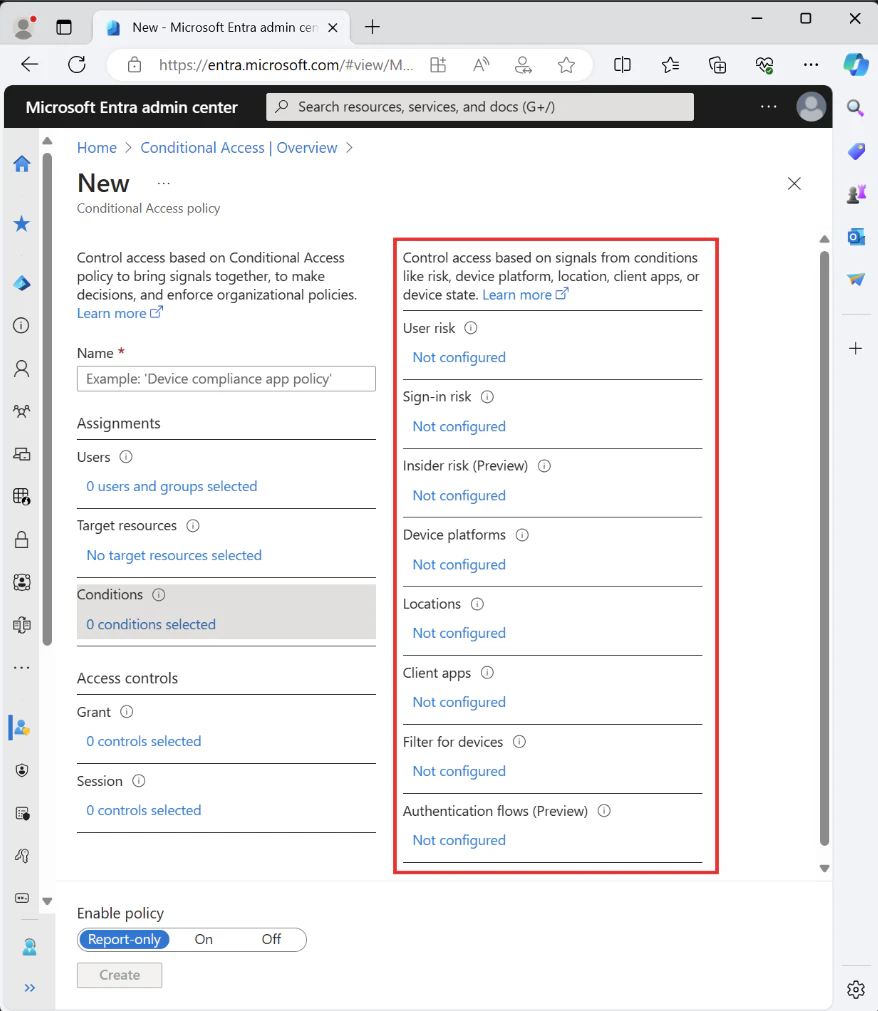
IAM solutions form the foundation of cloud security. Without them, attackers can steal admin credentials and gain full control of your environment.
Use Microsoft Entra ID with role-based access control (RBAC) to grant granular access to Azure resources and stick to the principle of least privilege and a zero-trust approach when assigning access permissions. These security models restrict activities to specific resources, preventing broader lateral movement even if a user’s credentials are compromised.
You can also leverage multi-factor authentication (MFA) to add an additional security layer. Strengthen protection further by implementing just-in-time (JIT) or context-aware access control. Assign administrative access for specific tasks during designated time frames, ensuring that privileges automatically expire once the work is complete.
Consider implementing these solutions:
Conduct an access review to identify and remove accounts with standing administrative privileges.
Enforce MFA for all users with access to Azure resources, without exception.
Implement privileged identity management (PIM) for all roles with write permissions to production environments.
4. Enable JIT VM access
Leaving virtual machines (VMs) open to inbound traffic increases the risk of unauthorized access, as attackers constantly scan for exposed ports to exploit. JIT VM access reduces this risk by restricting access to a limited time based on approved requests. Instead of keeping ports open 24/7, JIT locks them down by default and grants temporary access only when necessary.
PIM also enables JIT by requiring users to request access under specific conditions, including time limits and allowed IP addresses. Admins then review and approve only necessary requests to enforce stricter control over VM access. This approach limits persistent exposure to threats like brute-force attacks and unauthorized remote access.
Implementing JIT in Microsoft Defender for Cloud strengthens your security and ensures that users access resources only when needed. Log and audit every request to more easily track and investigate access patterns. Follow these steps:
Enable JIT VM access on all internet-facing VMs.
Set a maximum session duration of four hours or fewer based on your operational requirements.
Create an approval workflow that requires manager sign-off for production VM access.
Azure Vulnerability Management Best Practices [Cheat Sheet]
If your organization runs critical workloads on Azure and you’re looking for a clear, practical starting point for vulnerability management – this cheat sheet is for you.

5. Manage keys via Azure Key Vault and Managed HSMs
Encryption is a baseline expectation in Azure, but real security depends on how you manage the keys protecting your data. Weak or poorly managed keys render even the strongest encryption ineffective, making Azure Key Vault and Managed HSMs critical tools in your security arsenal.
Azure Key Vault centralizes the storage and management of cryptographic keys, secrets, and certificates. Store keys in Key Vault and reference them at runtime instead of embedding them in application code or configuration files, keeping secrets out of your codebase entirely. For workloads that require the highest level of assurance, Managed HSMs provide FIPS 140-3 Level 3 validated, single-tenant HSM pools that give you full control over your key material.
Effective key management also means building operational discipline around rotation and access. Adopt these practices to strengthen your posture:
Rotate customer-managed keys on a regular schedule (every 90 days is a common baseline) and document each rotation cycle.
Use Key Vault access policies or Azure RBAC to enforce least-privilege access, ensuring only authorized identities can retrieve or manage keys.
Enable purge protection in Key Vault to guard against accidental or malicious deletion. Note that soft-delete is on by default for all new Key Vaults, but purge protection requires manual activation.
Configure alerts for any attempts to disable encryption or access keys that fall outside expected patterns.
Wiz continuously monitors your Azure environment for key management misconfigurations, such as Key Vault instances missing access controls or resources using platform-managed keys where customer-managed keys are required. This allows you to catch and fix gaps before they become risks.
What is Azure container security scanning?
Azure Container Security Scanning finds vulnerabilities and misconfigurations in container images and workloads in Azure Container Registry and AKS.
Leer más6. Segment traffic with Azure NSGs and ASGs
Securing your network is as important as protecting your data. Without proper controls, attackers can move laterally through your cloud environment and target exposed resources.
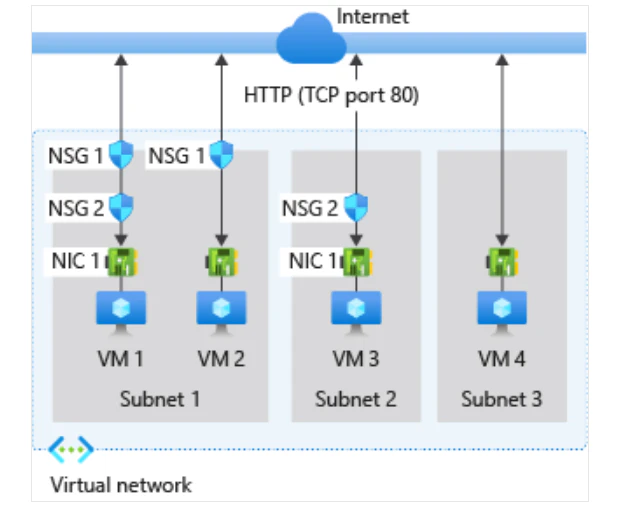
Network security groups (NSGs) and application security groups (ASGs) provide these essential controls. NSGs act like firewalls, allowing or blocking traffic based on defined rules. ASGs manage security at the application level by enforcing communication policies between applications. Together, they ensure only authorized communication occurs, preventing unauthorized access while maintaining efficient operations.
NSGs let you control inbound and outbound traffic to VMs, subnets, and other cloud resources. Apply security rules at scale instead of manually configuring each VM to reduce human error and improve efficiency. ASGs go a step further, simplifying management by grouping VMs with similar functions, allowing you to apply consistent security policies across large cloud environments where managing individual resources becomes challenging.
You can create strong boundaries around your applications and data centers using these security groups to limit exposure to potential threats. Pairing them with identity-based access controls, like Microsoft Entra ID, adds another layer of security, ensuring that only authorized users and services have access to critical systems.
Here are other actions you can take to implement these security groups:
Review NSG rules and remove any overly permissive “allow all” entries.
Group resources by function using ASGs to simplify rule management.
Implement a change control process that requires peer review for NSG modifications.
7. Hunt threats with Microsoft Sentinel and Log Analytics
Security is an ongoing process, not a one-time setup. Without regular audits, vulnerabilities can slip through, leaving your Azure environment exposed.
Auditing helps you catch misconfigurations, unauthorized access, and potential threats before they escalate. The key is to focus on the right areas: user access, network activity, and data protection.
Regular audits are vital for DevOps organizations, where security gaps frequently appear in CI/CD pipelines, container configurations, and code repositories. Automating audits and enabling real-time monitoring can help you detect threats early and prevent breaches.
Review who has access to critical resources to ensure only necessary permissions remain. To do this, use Azure’s monitoring tools to track access and remove unnecessary privileges, especially for high-risk accounts. You should also regularly rotate credentials in Azure Key Vaults and enforce strict security measures to prevent exposure.
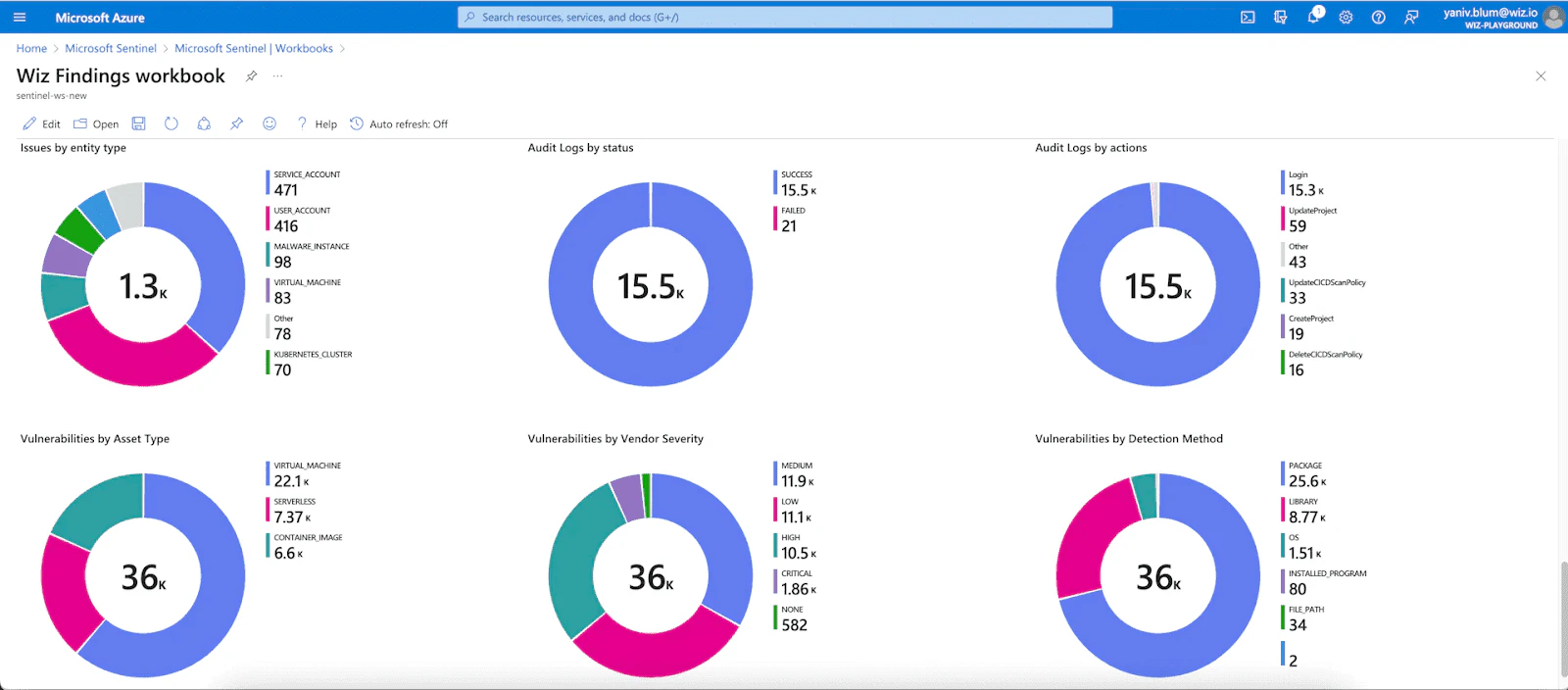
When reviewing your Azure network, check firewall rules and NSGs to ensure only approved traffic flows through. A single misconfigured rule can create an entry point for attackers, putting your entire environment at risk.
Use monitoring tools such as Azure Monitor, Log Analytics, and Microsoft Sentinel to perform security audits and real-time threat detection. These solutions track user activity, identify anomalies, and provide insights into potential vulnerabilities.
Implement the following steps for further protection:
Schedule monthly automated security scans that check for common misconfigurations.
Review access logs for unusual patterns, such as logins from unexpected geographic locations.
Maintain a security audit log that tracks all identified issues and their resolution status.

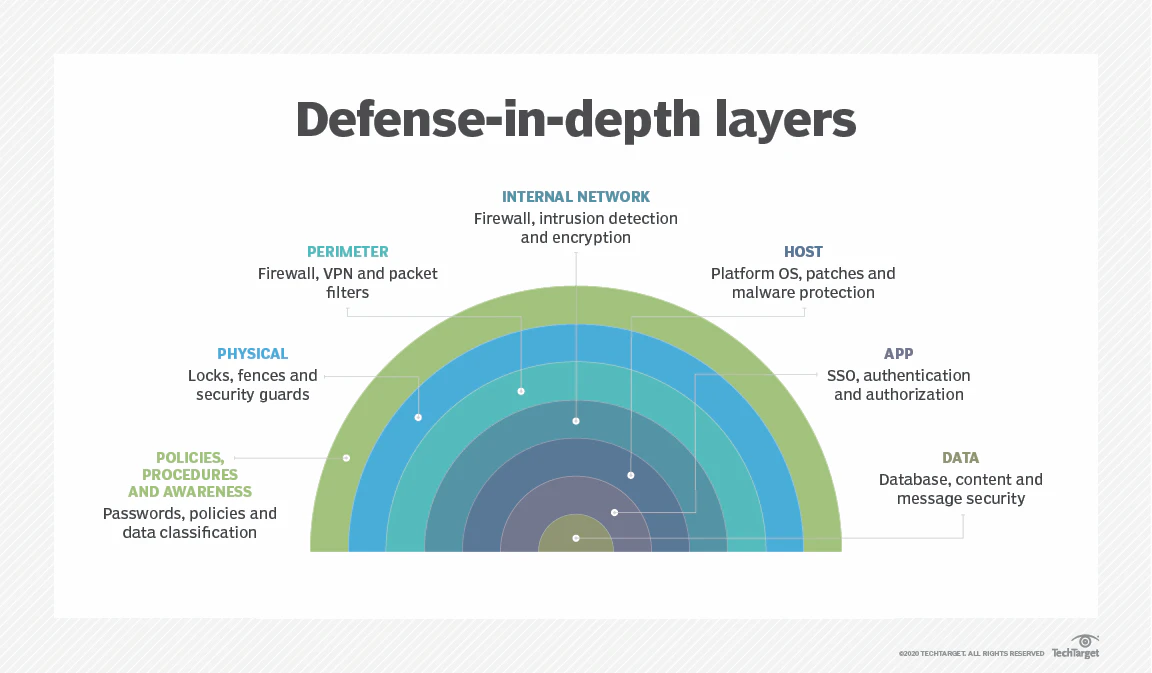
8. Deploy a defense-in-depth security model
Defense-in-depth security implements comprehensive controls across the application, operating system, network, and access control layers of your architecture.
A defense-in-depth security approach eliminates single points of failure, ensuring that if one security measure fails, the next layer blocks the attack vector.
Strengthen different layers of your Azure environment by following these guidelines:
Network security: Combine multiple services, such as Azure Firewall, network security groups, and distributed denial-of-service (DDoS) protection.
Data layer: Secure data at rest and in transit using encryption and certificates.
Application layer: Implement code review and testing processes at the code layer, and incorporate other considerations such as API management and web application firewalls.
Threat detection and prevention: Use services like Microsoft Defender for Cloud, Microsoft Defender for Identity, and Microsoft Sentinel to proactively detect and block threats.
Follow your incident response processes immediately if you discover a breach. Once you remediate the threat, use Azure Backup, Azure Site Recovery, and Azure Archive Storage to restore applications to service.
Here are further practices you can adopt:
Map your current security controls to each layer of the defense-in-depth model to identify gaps.
Test your incident response plan with a tabletop exercise every six months.
Configure Azure Backup for all critical workloads with a retention policy that meets your recovery objectives.
9. Align teams with the Azure Cloud Adoption Framework
Unlike on-premises environments, Azure operates on a shared responsibility model. Microsoft secures the underlying infrastructure, and you manage identity, data, and application security. Because accountability shifts based on whether you're running IaaS, PaaS, or SaaS workloads, every team interacting with Azure resources must understand where their responsibilities begin.
The Azure Cloud Adoption Framework (CAF) Secure Methodology provides a structured way to build that alignment. It embeds security across every phase of cloud adoption, from landing zone design to ongoing operations, treating it as a continuous discipline. Teams can use CAF to map Zero Trust principles to specific roles, whether enforcing least-privilege access, hardening configurations, or integrating security checks into CI/CD pipelines.
Microsoft Learn offers role-aligned training paths and certifications tied directly to Azure, allowing you to build targeted skills beyond generic security awareness. Create an Azure sandbox environment to enable teams to experiment with configurations and controls without risking production workloads.
Put this into practice using these methods:
Run a skills gap assessment using the CAF RAMP model (Ready, Administer, Monitor, and Protect) to identify where teams need development.
Assign Azure-specific role certifications, such as Azure Administrator or Azure Security Engineer, to team members responsible for cloud operations.
Create runbooks documenting common Azure misconfiguration scenarios, using Microsoft Defender for Cloud recommendations as a baseline.
Designate security champions within each team to advocate for CAF Secure Methodology practices and flag configuration drift before it compounds.
Azure DevOps Best Practices Cheat Sheet
Learn why Azure DevOps pipelines are high-value targets and what attackers are actually after.

What Azure security challenges should you prepare for?
Attackers constantly hunt for weaknesses despite strong security measures. Misconfigurations or overlooked gaps put your cloud environment at risk, but understanding these threats helps you stay a step ahead and build a more secure system.
Here are some major Azure security challenges and best practices to address them:
Misconfigurations: A single wrong security policy can expose sensitive data or leave critical resources unprotected. Stay on top of your configurations to maintain visibility.
Address with: posture management, regular audits, defense-in-depth
Unauthorized access: Weak IAM controls make it easy for attackers to break in. Tighten access by enforcing MFA, managing roles through Microsoft Entra ID, and regularly reviewing permissions.
Address with: IAM, JIT access
Data exposure: Weak encryption, open storage accounts, or loose access policies create gateways to exposure. Encrypt data at rest and in transit, limit access, and monitor storage security settings.
Address with: encryption, network security
Insider threats: Excessive access causes mistaken or intentional harm. Combat this by keeping permissions strictly role-based. Use a well-monitored system with real-time alerts to spot unusual behavior early.
Address with: IAM, regular audits
Insecure APIs: Weak authentication or poor security makes connected APIs vulnerable. Secure APIs with proper authentication, enforce rate limiting, and run regular security testing.
Address with: native controls, network security, defense-in-depth
Compliance and regulatory risks: Each industry maintains unique security and compliance requirements. Use Azure Policy and auditing logs to implement security best practices aligned with regulations.
Address with: posture management, regular audits
Advanced persistent threats: Skilled attackers use stealthy techniques to infiltrate networks. Detect and respond to threats faster with Microsoft Sentinel and security monitoring tools.
Address with: training, native controls, defense-in-depth
DDoS attacks: These attacks overwhelm resources, causing downtime and service disruptions. Protect workloads with Azure’s DDoS protection services to automatically detect and mitigate attacks.
Address with: native controls, network security, defense-in-depth
Real-world example: 38TB of data accidentally exposed
In 2023, Wiz Research discovered that Microsoft’s AI research team accidentally exposed 38 terabytes of private data while sharing open-source training data on GitHub. An overly permissive Azure Shared Access Signature token granted access to an entire storage account without limiting access to specific files. Leaked data included disk backups containing passwords, secret keys, and over 30,000 internal Microsoft Teams messages from 359 employees.
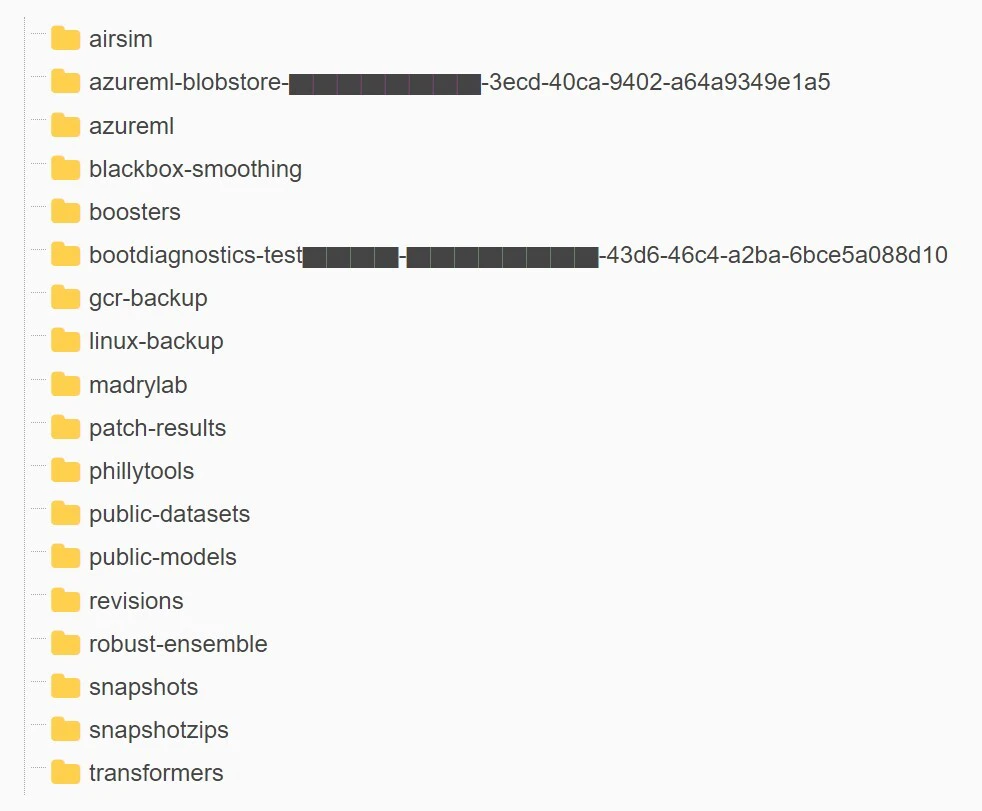
The misconfigured token granted full control while omitting read-only protections, allowing attackers to delete or overwrite files, or even inject malicious code into AI models downloaded by other researchers. This incident demonstrates how a single misconfiguration in Azure Storage sharing exposes massive amounts of sensitive data, making proper access controls and regular audits essential.
How Wiz helps you implement Azure security best practices
We’ve covered nine best practices to help you strengthen your cloud security—but staying ahead of threats also requires the right tools. With the right partner, securing your Azure workloads is straightforward.
Wiz simplifies Azure security by delivering complete visibility into your cloud environment. Our agentless, 100% API-based approach scans every workload (including VMs, containers, serverless, and PaaS) in minutes. This means no installation headaches or performance slowdowns.
Wiz transforms these nine security best practices into an automated, scalable security strategy, offering:
Complete visibility across your Azure estate: Our platform continuously scans your entire Azure environment, giving you a real-time view of every resource, configuration, and potential vulnerability. Automated identification of misconfigurations and security gaps supports posture management and regular audits.
Risk-based prioritization: All vulnerabilities aren’t created equal. Wiz combines context about your workloads, data sensitivity, network exposure, and active threats to highlight which risks require immediate attention. Triaging risks helps you focus your efforts where they have the greatest impact, directly supporting defense-in-depth practices.
Identity and access insights: We map your entire identity landscape, surfacing which users and service principals access specific resources. Identifying over-privileged accounts and unused permissions facilitates implementing IAM and JIT access.
Automated compliance mapping: Wiz continuously assesses your environment against frameworks such as CIS Azure Foundations Benchmark, PCI DSS, and HIPAA. Generating evidence of compliance and highlighting policy violations simplifies regular audits.
Network path analysis: The Wiz Security Graph visualizes how resources connect and communicate, simplifying network security by identifying overly permissive NSG rules and unnecessary public exposure.
Built-in remediation guidance: Every finding includes specific, actionable remediation steps for your team. Eliminating guesswork accelerates implementation across all nine best practices.
Because Wiz integrates with Azure through read-only APIs, you can maintain full control while obtaining comprehensive security coverage. Many organizations see their first security improvements within hours of connection.
Ready to get started? Get our free Azure security assessment today to uncover misconfigurations, validate your Azure security best practices, and prioritize the fixes that will reduce risk fastest.
Agentless full stack coverage of your Azure workloads in minutes
Learn why CISOs at the fastest growing organization choose Wiz to get complete visibility into their entire Azure environment.

FAQ about Azure security best practices
Below are some common questions about Azure security: