

What is cloud automation?
Cloud automation provisions and manages cloud infrastructure using code and workflows, replacing manual console management.
You define infrastructure in code and deploy it through pipelines to automate repetitive tasks. That can include creating networks, assigning IAM roles, deploying apps, rotating secrets, applying policies, and remediating findings.
Most cloud automation setups share a few common traits:
Infrastructure as code (IaC): resources defined in tools like Terraform, CloudFormation, or Pulumi.
Repeatable deployments: the same templates provision dev, staging, and production consistently.
Event-driven workflows: a commit, ticket change, or policy signal triggers an automated action.
CI/CD integration manages build, test, approval, and deployment logic within a standard delivery path.
For platform, infrastructure, and security teams, cloud automation is the primary operating model, which means security has to live inside the automated path, not alongside it. It's also the control plane where a single templating mistake or compromised pipeline can replicate risk across every environment that consumes it.
The Cloud Security Workflow Handbook
Get the 5-step framework for modern cloud security maturity.

Why cloud automation matters
Cloud environments have outgrown the pace of manual management. Teams launch new accounts, clusters, workloads, and managed services constantly, and cloud assets are increasingly ephemeral, spinning up and down to match dynamic application needs. Manual console operations can't keep up, and when they try to, they introduce inconsistency and human error at exactly the scale where both become expensive.
Cloud automation offers benefits for multiple teams, including:
For platform and DevOps teams, it's what makes deployment velocity sustainable, since the same templates that provision dev also provision staging and production with fewer surprises between them.
For infrastructure and operations teams, it's how consistency gets enforced across hundreds of accounts, regions, and services without a person checking each one.
For finance and FinOps teams, it's how resources get provisioned and decommissioned on demand rather than lingering as zombie spend.
For security teams, it's the control plane where baselines either get built into every deployment or get missed at scale.
The shared benefit across all of these is that repeatable, code-defined infrastructure replaces one-off manual changes. Reviewed templates committed through pull requests are consistently more reliable than console changes made under pressure. Secure defaults embedded in shared modules, such as scoped IAM, private storage, required encryption, and logging enabled, propagate to every environment that consumes them. Drift becomes detectable because there's a declared state to compare against. And operational knowledge stops living in individual engineers' heads and starts living in version control, where it can be reviewed, audited, and improved over time.
That same scale cuts both ways, which is why automation matters to security teams specifically. A single insecure base module doesn't create one vulnerable resource. It creates hundreds across every environment that consumes it. Automation is the fastest path to a hardened, consistent cloud estate, and also the fastest path to replicated misconfigurations if the path itself isn't secured. That's the tension the rest of this guide addresses: how to get the benefits of automated cloud infrastructure without letting the automation path become the risk.
Cloud automation vs. cloud orchestration
These terms get used interchangeably, but they aren’t the same thing:
Cloud automation is the automatic execution of a task. Think creating a VPC, rotating a secret, tagging a resource, or applying a policy.
Cloud orchestration is the coordination of multiple automated tasks into a workflow with sequencing, dependencies, approvals, branching logic, and rollbacks.
Core components of cloud automation
Most cloud automation programs are built from the same core parts:
1. Infrastructure as code
IaC is the backbone. It defines cloud resources in code so teams can review, version, test, and deploy infrastructure consistently. Networks, instances, buckets, clusters, roles, and policies all become part of a reproducible blueprint.
Secure base modules empower every downstream deployment. By hardening these templates, you establish a foundation of security that scales with your infrastructure.
2. CI/CD pipelines
Pipelines take code from commit to deployment. They run tests, enforce approval gates, package artifacts, and execute the actions that turn templates into real infrastructure and workloads. Pipelines function as critical infrastructure in the cloud deployment path.
3. Configuration management
Configuration management maintains environment alignment with security baselines after initial provisioning. Systems still need ongoing configuration, package updates, policy enforcement, and operational tuning after deployment. Configuration management keeps environments aligned with the intended baseline.
4. Event-driven automation
A lot of cloud automation is reactive. A new account gets created, and baseline controls are applied. A secret reaches rotation age, and a workflow replaces it. A resource drifts out of policy, and remediation opens a ticket or quarantines the asset.
5. State management
Automation needs a reliable picture of what exists and what has changed. State files and metadata stores keep track of deployed infrastructure. That state is sensitive. Protecting state files prevents unauthorized visibility into deployed infrastructure.
In advanced environments, state security also depends on backend design. Terraform remote state in S3, Azure Blob Storage, or GCS should use versioning, encryption at rest, and state locking (via DynamoDB or S3-native conditional writes for AWS), with access tightly scoped to workload identities.
Teams also need to isolate the plan and apply runners, because a compromised runner with access to state plus deploy credentials can alter infrastructure drift detection, inject unauthorized changes, or expose sensitive resource metadata across accounts and regions.
The table below summarizes the core components that make cloud automation work in practice. It also highlights the main security concern tied to each layer, so you can see where to focus your controls:
| Component | What it does | Main security concern |
|---|---|---|
| Infrastructure as code | Defines desired infrastructure state in code | Misconfigurations and insecure reusable modules |
| CI/CD pipelines | Builds, tests, approves, and deploys changes | Pipeline compromise and excessive permissions |
| Configuration management | Maintains systems after provisioning | Drift and unauthorized changes |
| Event-driven automation | Triggers actions from signals or events | Unsafe auto-remediation and over-broad triggers |
| State management | Tracks deployed resources and changes | Exposure or tampering of sensitive state |
Recorded Demo: How Wiz Detects & Fixes Risks in Real-Time
See exactly how Wiz handles a live threat. This 12-minute walkthrough shows you how our Security Graph correlates runtime alerts with cloud context to identify the root cause, find the resource owner, and provide one-click remediation.

What are the security implications and risks of cloud automation?
Cloud automation helps teams apply the same security standard across every environment, which is one of its biggest advantages. That same scale also means a weak template, an overprivileged identity, or an exposed secret can spread quickly, so security teams need to understand the most common issues to watch for.
A few common security challenges show up again and again:
1. Non-human identity sprawl
Automation runs on service accounts, roles, workload identities, OIDC trust relationships, and machine credentials. Over time, these identities multiply and often keep broad privileges because nobody wants to break the pipeline. Protecting non-human identities is critical, as these credentials often hold the permissions to manage cloud resources at scale.
2. CI/CD pipeline compromise
Pipelines are high-value targets. If an attacker can poison a build runner, steal a deployment token, or modify pipeline logic, they may not need a separate production foothold.
3. Configuration drift
Manual hotfixes or inconsistent account configurations create differences between your declared state and your running environment. Eventually, the real environment no longer matches the declared one, and your security assumptions go stale.
4. Secret exposure
Secrets still end up in repos, pipeline variables, logs, shell history, and state files. The more automation you build, the more places secrets can leak if you do not design storage, rotation, and access carefully.
5. Scale-amplified mistakes
Automation provides consistency across your environment. Ensuring your base templates are secure allows you to deploy verified, high-integrity infrastructure every time.
Common use cases in cloud-native environments
Automated infrastructure provisioning: Teams use standard templates to create accounts, clusters, networks, and shared services without rebuilding the same foundation each time.
Automated remediation: Automation can close a public bucket or quarantine a drifted resource, but over-broad auto-remediation can also take down production. Scope remediation actions by environment, blast radius, and reversibility.
Automated secrets rotation: Rotation on schedule or in response to risk signals (exposure detection, anomalous use) reduces the window of credential abuse. The catch: rotation workflows themselves run on highly privileged identities, so they're a high-value target.
Continuous compliance monitoring: Automation can continuously check environments against policy baselines, rather than relying on point-in-time audits that go stale immediately.
Adoption challenges and best practices
Teams should deploy security controls alongside automation workflows from the get-go.
Start by running security checks early on. Scan IaC, CI/CD definitions, dependencies, and secrets before deployment logic runs.
Treat CI/CD as critical infrastructure. Lock down runners, protect branch rules, isolate deployment environments, and keep a tight grip on who can modify pipeline logic.
Apply least privilege to automation identities. Service accounts and pipeline roles should have only the permissions they need, scoped as tightly as possible. Use short-lived credentials when you can.
Protect state and secret stores. Encrypt them, restrict access, and monitor for unexpected changes.
Monitor for configuration drift and runtime abuse. Secure automation isn’t just about what should have been deployed; it’s about what’s actually running now.
Make ownership shared and explicit. Platform engineering, developers, and security all shape the automation path.
How Wiz secures cloud automation across the entire lifecycle
Wiz streamlines cloud automation security by connecting code, pipelines, cloud resources, identities, and runtime activity in a single platform. That unified view matters because automation issues rarely stay within a single layer. A pipeline misconfiguration can affect deployed resources, and an over-privileged identity can turn a small code issue into a larger exposure.
This unified and end-to-end approach gives security teams a clearer picture of how an issue in one part of the automation chain can affect the rest of the environment. It also allows them to prioritize the findings that are truly reachable and owned by the right team.
In practice, that means teams can trace an IaC misconfiguration to the exact runtime asset it created, map the non-human identity associated with the workload, and determine whether that path exposes internet-facing services, lateral movement opportunities, or access to sensitive data stores.
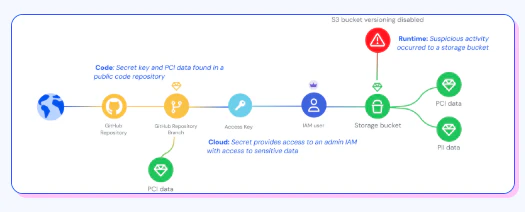
Ready to secure your cloud automation? Request a demo to see how Wiz provides unified security from code to runtime.
See your cloud security architecture in action
Wiz maps your entire cloud environment and surfaces the attack paths that put your organization at risk.
