

With adoption on the rise, more companies are looking to control Lamba spend. After all, even small inefficiencies become costly: A single poorly tuned workload can add hundreds to your monthly bill. The upside? Well-structured workloads can unlock the same scale in savings, which is why it’s critical to understand Lambda’s pricing levers.
In this article, we’ll break down the ins and outs of cost management in AWS Lambda. We’ll explore the complexities hidden behind the simple pay-as-you-go model and highlight the overlooked elements that can quietly inflate your bill so that you can optimize with confidence.
2025 Gartner® Market Guide for CNAPP
Security teams are consolidating tools, aligning workflows, and prioritizing platforms that offer end-to-end context. The 2025 Gartner® Market Guide for Cloud-Native Application Protection Platforms (CNAPP) explores this shift and outlines what security leaders should consider as the market matures.

AWS Lambda pricing tiers
As we’ve seen, AWS Lambda’s pricing is designed to be simple and pay-as-you-go. You’re charged based on three main factors:
The number of requests your functions handle
The computing time they consume
The processor architecture
But it’s worth highlighting the AWS Lambda “always free” tier before we dive into the paid model—in some cases, it can provide everything your project requires.
The AWS Lambda “always free” tier
AWS’s “always free” offerings apply to both new and existing accounts, indefinitely. For Lambda, here’s what you get free each month:
1 million requests
400,000 GB-seconds of compute time powered by x86 and Graviton2 processors
100 GiB/month of response streaming and 6 MB free on every streamed response
These limits reset every month for as long as you use Lambda, and if your application runs only a modest number of functions, you might never need a paid plan.
For example, a serverless API endpoint with 256 MB of memory, 1,000,000 requests per month, and an average billed time of 200 ms per invocation (cold start + code invocation) would use less than 400,000 GB-seconds of compute time per month and can remain within the free tier:
Compute time = 0.256 (GB) x 0.2 (s) x 1,000,000 = 51,200 (GB-s)
That said, additional services may add usage-based costs. Some of them also have free-tier offerings, which can help keep costs low as the project scales.
Request-based pricing
Once you pass the free-tier limit, AWS Lambda request pricing typically ranges from $0.20 to $0.28 per additional million requests (as of October 6, 2025), depending on the region. If the app processes 3 million requests in a month in a North American region:
The first million is free (free tier)
The remaining 2 million are billed at $0.20 per million, which equals $0.40 in request charges
For many small-scale or event-driven applications, request charges are minimal, and it’s compute time that might drive costs.
On-demand compute-based pricing
AWS uses a GB-seconds model to calculate compute time:
Compute Time (GB-seconds) = Allocated Memory (GB) × Total Execution Time (Seconds)
Allocated memory is a fixed setting you choose (128 MB–10,240 MB) that directly impacts both speed and cost.
The total execution time includes both the INIT phase (cold start) and the active run of the code, and this full duration is what gets billed. Since that duration is multiplied by the number of requests, even small inefficiencies can scale into significant costs.
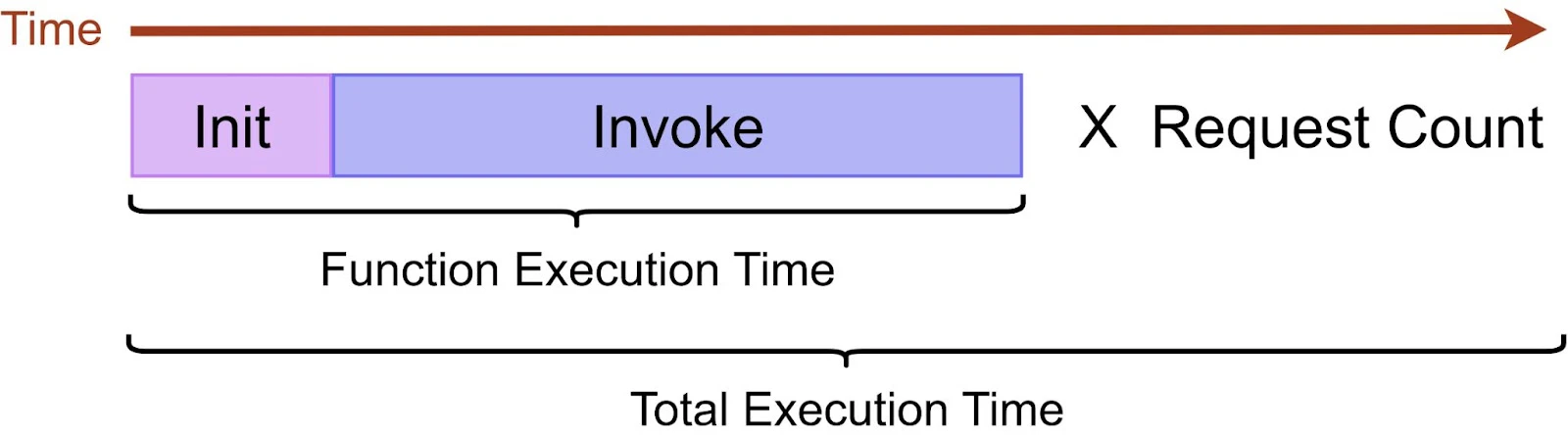
Compute-based pricing varies by region, total GB-seconds used, and system architecture. Per-GB-second rates are fixed per region and architecture. There is no tiered discounting for on-demand compute duration; pricing for Provisioned Concurrency uses separate (often lower) per-GB-second rates.
To see how compute-based pricing works in practice, let’s use the Lambda Pricing Calculator to look at a sample workload running in North America on x86 architecture:
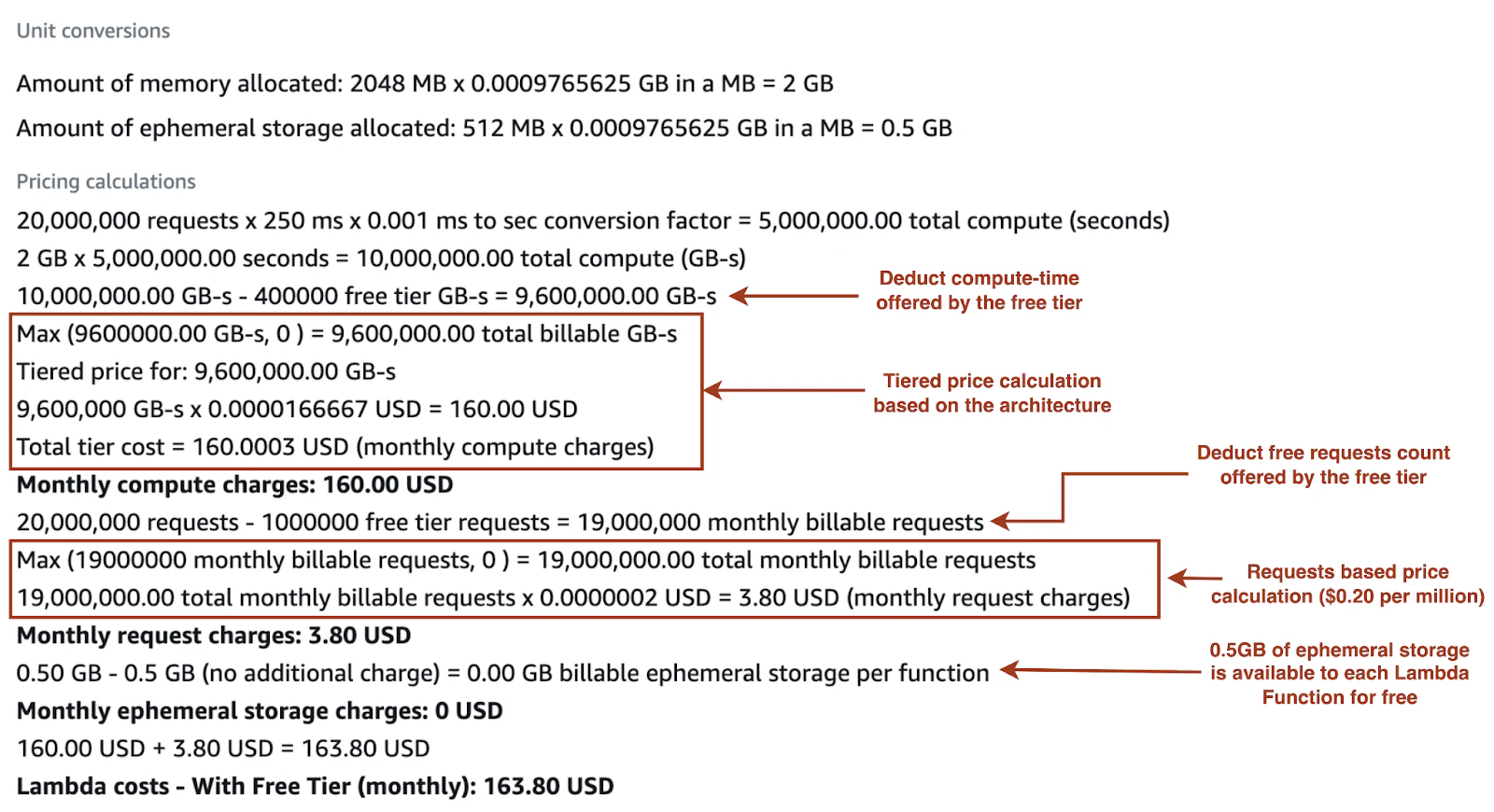
Architecture-based pricing
AWS Lambda supports two processor architectures: x86_64 (Intel/AMD) and Arm64 powered by AWS Graviton2. While both deliver the same functionality, their pricing and performance can differ:
x86_64: Standard baseline GB-second pricing rate; performance varies by workload and runtime
Arm64 (Graviton2): Priced lower per GB-second than x86_64 in many regions; AWS reports up to 34% better price/performance and up to 19% better performance vs. x86 for some workloads
Watch 4-min demo
Want to see what's really behind your Lambda bill? See how Wiz Cloud Cost uses infrastructure context to trace spend back to its source.

AWS Lambda core pricing drivers
Beyond the three primary cost drivers (request charges, compute duration, and architecture), several other factors can affect your Lambda bill.
1. Provisioned Concurrency
Provisioned Concurrency keeps Lambda functions pre-initialized so they can respond in milliseconds, reducing cold start latency for performance-critical applications. You choose how much concurrency to reserve, and AWS keeps that number of environments ready at all times.
In Provisioned Concurrency, charges involve:
Configured concurrency × allocated memory × time enabled(rounded up to the nearest 5 minutes)Provisioned Concurrency execution duration uses separate per‑GB‑second rates (often lower than on‑demand); confirm current regional rates on AWS
If traffic exceeds the configured concurrency, excess executions are billed at normal on-demand rates. The free tier does not apply to Provisioned Concurrency.

2. CloudWatch Logs
When a Lambda function generates output, it can be sent to Amazon CloudWatch Logs if logging permissions are enabled. Until recently, log ingestion was billed at a flat rate, but AWS now uses tiered pricing; the higher the log volume sent, the lower the per-GB rate becomes.
In CloudWatch Logs, charges apply for:
Ingestion: Starts at $0.50/GB, decreasing to $0.05/GB at high volumes
Storage: Per GB-month for retained logs
Querying: CloudWatch Logs Insights is billed per GB scanned
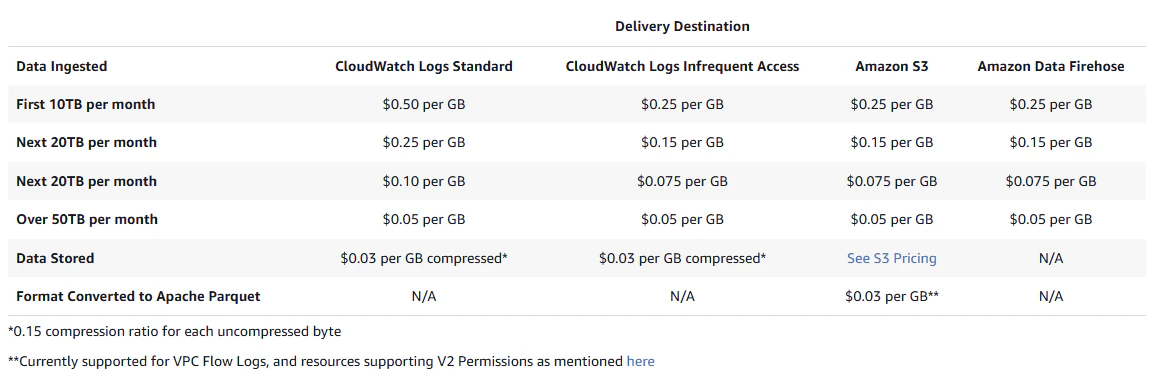
The Lambda free tier doesn’t cover logs. CloudWatch Logs includes a free tier (e.g., 5 GB/month of ingestion and 5 GB/month of archived storage). These logs can also be routed to services like Amazon S3 or Data Firehose for flexibility or lower storage costs.
3. Data transfer
Ingress is free. Egress to the internet or another region follows EC2 data-transfer rates (includes a free tier; regional rates vary).

4. Mandatory VPC placement overhead
When a Lambda function runs inside an Amazon VPC, AWS automatically creates elastic network interfaces (ENIs) in the subnets to connect to other resources. The ENIs themselves are free, but outbound internet access from a VPC requires a NAT gateway, which adds costs. Additional charges may also apply for VPC peering or VPC endpoints if used:
NAT gateway: Charged per hour (e.g., $0.045/hour in US East - N. Virginia), plus per GB of data processed
VPC peering: No hourly fee. Within the same region, data processed by the peering connection is billed per GB in each direction (rate varies; see https://aws.amazon.com/vpc/pricing/). Cross‑region transfers follow EC2 data‑transfer rates.
VPC endpoints: These offer private access to AWS services. Interface endpoints are billed hourly + per GB, while gateway endpoints (S3/DynamoDB) have no extra charge.

5. Configuration errors and recursive invocations
Excessive memory allocation or overly aggressive retry policies can drive up costs without improving performance.
Recursive invocation is another pitfall, where a function triggers itself (e.g., writing to an Amazon SQS queue that calls the same function). This can quickly inflate invocations. AWS now detects most loops after about 16 iterations, but even short ones can still generate costs before being stopped.
Qu’est-ce que la gestion des coûts cloud ?
La gestion des coûts cloud, également appelée gestion des dépenses cloud, désigne le processus de suivi, de contrôle et d’optimisation des dépenses cloud dans l’ensemble des environnements cloud d’une organisation.
En savoir plus

AWS Lambda cost-optimization strategies
Managing Lambda costs isn’t just about keeping usage low. It’s about making smart decisions in how functions are configured, monitored, and scaled.
1. Right-sizing
Memory allocation in Lambda directly controls both the RAM and the number of vCPUs assigned to a function. More memory means more compute power, which can shorten execution time for memory or CPU-bound workloads.
In some cases, increasing memory actually lowers total cost, since the function completes faster and uses fewer billed milliseconds. The goal is to balance the two, which is where the AWS Lambda Power Tuning tool helps. By running test payloads across different memory configurations, it maps out the trade-offs between duration, cost, and performance.
For example, a function running at 512 MB might finish in half the time compared to 256 MB, making it cheaper overall despite the higher memory allocation:
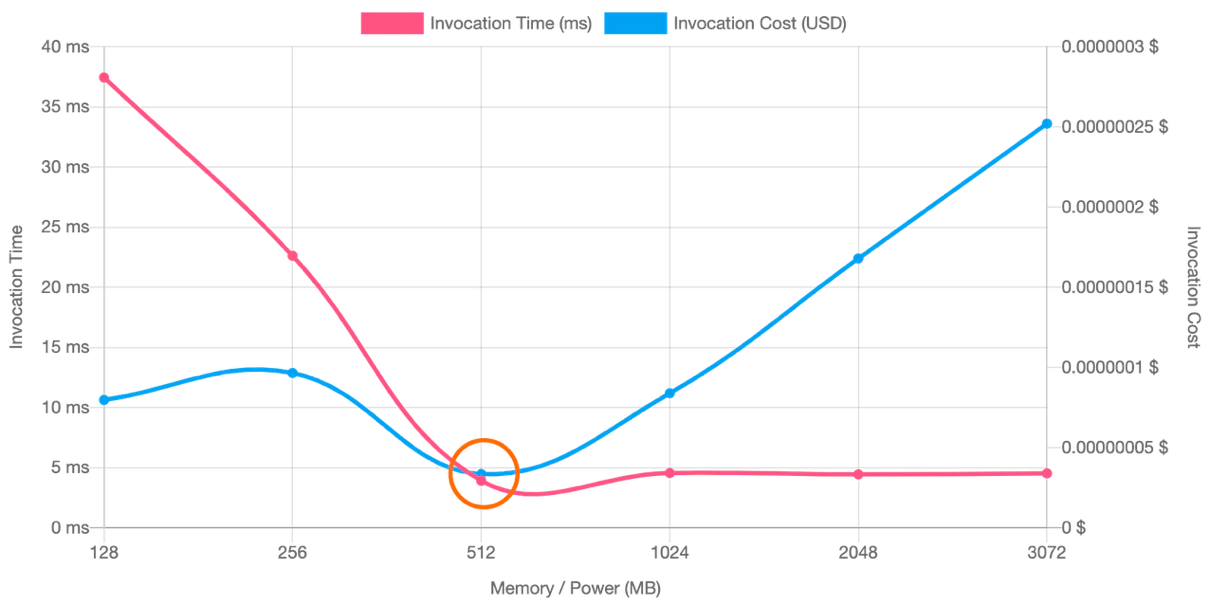
AWS Compute Optimizer can analyze historical usage data and recommend optimal memory configurations for Lambda. This can be useful when manual tuning experiments aren’t practical for every function.
2. Graviton adoption
AWS Graviton2 processors (Arm64) offer up to 19% better performance at 20% lower cost compared to x86, making them one of the simplest ways to optimize Lambda costs.
In practice, switching to Graviton2 can shorten function duration as well as lower per-GB-second pricing, so you save twice: faster runs and lower unit costs. Many workloads require only a configuration change to run on Graviton2, though some functions may need repackaging if they use x86-specific binaries or dependencies.
3. Performance efficiency
The longer a function runs, the higher the cost and the greater the latency for end users. To increase performance efficiency, you can:
Minimize package size so functions download and initialize faster.
Reduce dependency complexity by using lighter frameworks.
Reuse resources by setting up SDK clients, DB connections, and local /tmp caches outside the handler.
Follow language-specific best practices for performance.
4. Architectural patterns for cost efficiency
Selecting the right architectural pattern ensures that costs apply only to real work, not wasted cycles, while also improving scalability and reliability.
Event-driven workflows: Use triggers from S3, DynamoDB Streams, or EventBridge so functions execute only in response to real activity. This eliminates the need for constant polling, which can waste invocations.
Step Functions orchestration: Break complex tasks into smaller steps. Step Functions manages waiting, retries, and sequencing, so Lambdas aren’t billed while idle.
Fan-out/fan-in: Distribute work in parallel using SNS + SQS or Kinesis, then aggregate results efficiently by batching multiple records per invocation, using queue-driven backpressure to auto-scale only when needed, and reducing idle time in the reducer. This improves throughput while preventing bottlenecks and excess invocations.
Prevent before deploy: Add guardrails in CI/CD to block functions with excessive logging, missing retries/DLQs, or public egress paths. You’ll avoid both risk and surprise bills.
5. Cost monitoring and management tools
Manually tracking Lambda costs isn’t realistic as workloads grow. Instead, you’ll want to rely on AWS, in-house, or third-party tools for cost visibility, automation, and governance.
AWS offers services including Cost Explorer, Budgets, and Compute Optimizer, but they lack security context. A better bet? Wiz can correlate spend with configuration and security signals to spot anomalies, surface risky misconfigurations, and pinpoint fixes that cut both risk and cost.
6. Compute Savings Plans apply to Lambda
Compute Savings Plans can cover Lambda request and duration charges. If you have steady Lambda usage, committing to a $/hour spend can materially lower effective rates. Model scenarios in the AWS Pricing Calculator and track utilization in Cost Explorer.
7. Ephemeral storage beyond the default
Lambda supports up to 10 GB of /tmp ephemeral storage. Allocations above the default have separate pricing based on GB‑seconds used. Confirm current rates at AWS and include this in cost estimates for storage‑heavy functions.
AWS Budgets vs. Cost Explorer: Why you need both
This article will help you understand the benefits of using both tools together, along with a solution like Wiz to fill the cross-cloud visibility gap and optimize both costs and security.
En savoir plus

How Wiz helps manage and optimize AWS Lambda spend
AWS Lambda pricing seems straightforward until hidden costs from interconnected services stack up. Wiz Cloud Cost helps organizations understand and manage Lambda spend by connecting cost data directly into the Wiz Graph, giving you complete visibility into Lambda function costs in the full context of your infrastructure.
With Cost Explorer, Optimization Opportunities, and Cost Monitors, teams can drill into what is driving Lambda spend, identify savings opportunities, and catch anomalous spend early. Wiz helps your team prioritize optimization opportunities based on estimated savings and take action with clear remediation guidance. Request a demo today to see how Wiz can help you identify the highest priority savings opportunities in your cloud.
See for yourself...
Learn what makes Wiz the platform to enable your cloud security operation
