

Azure security tools are specialized services that protect cloud workloads, data, and infrastructure from evolving threats, which is becoming a critical need since experts expect the volume of sensitive organizational data in the cloud to increase from 51% to 68% within two years. These tools work together to create layered defense across identity management, network protection, compliance monitoring, and threat detection.
However, most organizations struggle with tool sprawl and fragmented security visibility. Azure’s native security services address this challenge by providing integrated protection that scales with your cloud environment.
The key to effective Azure security lies in understanding which tools address specific risks and how they complement each other within your broader security strategy.
Azure Security Best Practices [Cheat Sheet]
Explore detailed aspects of Azure best practices, from role-based access control (RBAC) to cloud security posture management, that you can adapt to secure your Azure subscriptions.

Top tools for Azure security
Comprehensive Azure security requires tools across five critical categories: identity and access management (IAM), data protection, network security, compliance management, and threat detection. Luckily, Azure provides native solutions for each category.
Organizations typically start with these built-in services, then add third-party tools to fill specific gaps or integrate with existing security workflows. But the most effective approach combines Azure’s integrated services with specialized tools that provide deeper context and correlation across your entire security stack.
The table below categorizes common Azure security tools and outlines how organizations typically apply them within broader security strategies:
| Category | Tools | Use Cases |
|---|---|---|
| IAM |
|
|
| Data protection |
|
|
| Network and application security |
|
|
| Compliance and governance |
|
|
| Threat detection and response (TDR) |
|
|
Azure tools for identity and access control
IAM controls who can access Azure resources and what actions they can perform. Effective IAM also prevents unauthorized access while enabling legitimate users to work efficiently across cloud services.
Azure’s IAM tools enforce least-privilege access, detect suspicious activity, and streamline user management across complex cloud environments. These capabilities form the security foundation for everything else running in Azure.
Here are two tools you can use for IAM:
1. Microsoft Entra ID
Microsoft Entra ID centralizes IAM in Azure so every access request follows a unified security framework. It also enforces security policies, reduces overly permissive roles, and sends automated alerts when access permissions exceed least-privilege standards.
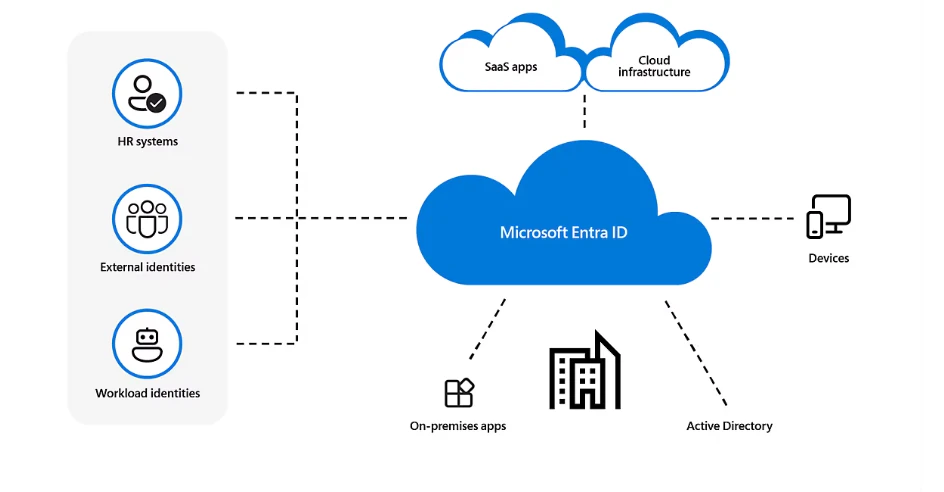
Key features:
Fine-grained access control: Entra ID enforces RBAC, which allows organizations to assign built-in or custom roles that limit permissions based on job responsibilities.
Identity protection: It also detects suspicious activity using machine learning and automatically adjusts security controls with conditional access policies to block potential threats.
Multi-factor authentication: This tool strengthens account security with options like Microsoft Authenticator, Windows Hello for Business, and FIDO security keys. These prevent unauthorized access, even if credentials are compromised.
2. Microsoft Entra Privileged Identity Management
Misused or compromised privileged accounts pose one of the highest security risks. To help with this, Microsoft Entra Privileged Identity Management (PIM) allows organizations to manage, monitor, and control access to critical resources.
Key features:
Approval workflows: Administrators can enforce approval requirements before granting elevated access to ensure authorization for critical actions.
Access reviews: Regularly scheduled access reviews enforce the principle of least privilege by identifying and revoking unnecessary permissions.
Audit logs and alerts: PIM monitors privileged access requests and alerts administrators to unusual activity, which helps them respond to potential security threats.
Both Microsoft Entra ID and PIM work together to enforce strong identity and access policies, minimize security risks, and ensure that users have the right level of access when they need it.
Azure security tools for data protection
Data protection in Azure safeguards sensitive information from unauthorized access, exposure, and compliance violations. This includes protecting encryption keys, secrets, certificates, and regulated data across all Azure services.
The following two Azure data protection tools provide centralized secret management, automated data discovery and classification, and policy enforcement to prevent data leaks before they occur:
1. Azure Key Vault
Sensitive data is one of the most valuable assets in any system, which makes it a prime target for cyber threats. In fact, 61% of organizations keep secrets in public repositories, which then leads to their exposure. This widespread issue makes secure storage critical.
Instead of leaving secrets vulnerable in application code or configuration files, you can use Azure Key Vault to gain a secure, centralized way to manage encryption keys, passwords, certificates, and other critical data.
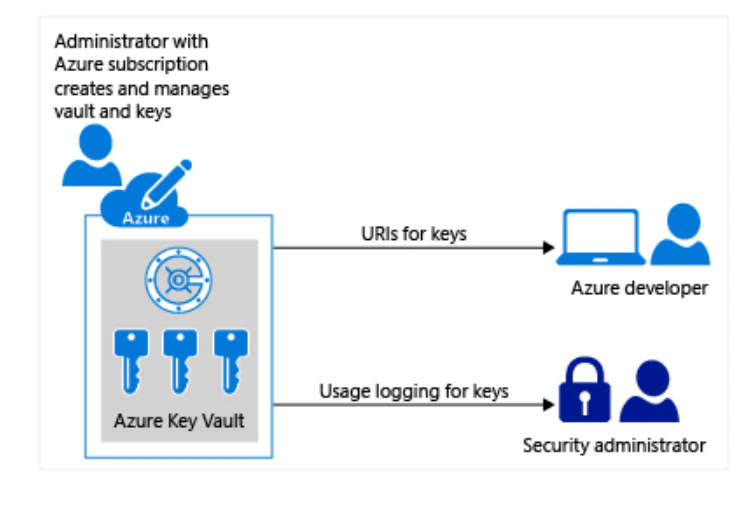
But beyond secure storage, Key Vault also plays a crucial role in modern development workflows. That’s because it integrates with CI/CD pipelines so security is part of the software development process rather than an afterthought.
Key features:
Centralized secret management: Applications can securely retrieve secrets without hardcoding them by referencing Key Vault’s secure URIs.
Secure access controls: RBAC via Microsoft Entra ID guarantees that only authorized users and services can access stored secrets, and access policies further limit permissions.
Governance and monitoring: Built-in auditing tracks key usage, while automated key rotation ensures that encryption remains strong without manual intervention.
2. Microsoft Purview
Managing data security should go beyond encryption to include knowing what data you have, where it lives, and how it moves. That’s where Microsoft Purview helps—it gives organizations the visibility and control they need to classify, track, and protect sensitive data across their cloud environment.
Key features:
Data catalog: Purview creates a unified inventory of data assets across Azure, on-premises, and multi-cloud environments, which makes it easier to manage and discover information.
Data classification: This tool also identifies sensitive information like personal data or financial records so organizations can apply appropriate protection policies.
Data security: It prevents unauthorized exposure by enforcing data loss prevention, insider risk management, and privileged access controls.


Network and application security tools for Azure
Network and application security controls traffic flow between Azure resources and protects against external attacks. These controls also prevent unauthorized access, block malicious traffic, and ensure that legitimate communications remain secure.
In particular, these two Azure network security tools filter traffic at multiple levels, defend against DDoS attacks, and provide granular control over how applications communicate within your environment:
1. Network security groups
Misconfigured or overly permissive network paths can turn Azure resources into easy entry points for attackers, so controlling inbound and outbound traffic at the network level is essential to enforcing least-privilege access. In Azure, network security groups (NSGs) deliver that control by acting as a stateful firewall that filters traffic to and from virtual networks, subnets, and virtual machines (VMs) based on security rules.
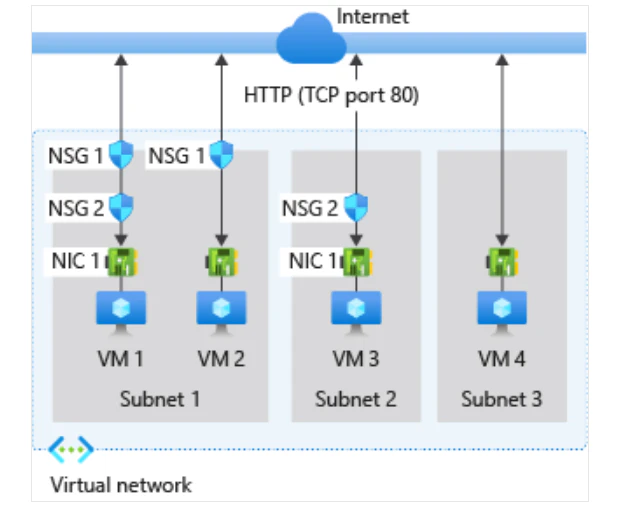
Key features:
Security rules: NSGs use five-tuple rules—source, source port, destination, destination port, and protocol—to define inbound and outbound traffic policies. This approach ensures precise filtering and stronger security.
Rule prioritization: Azure processes NSG rules based on priority values so the most critical security policies take effect first.
Augmented security rules: Instead of manually defining IP addresses, you can simplify security management by using service tags and application security groups (ASGs). Service tags represent Azure services, while ASGs group VMs with similar security needs to make policy management more scalable and efficient.
2. Azure DDoS Protection
Azure DDoS Protection prevents large-scale attacks that attempt to flood your applications with traffic to provide continuous availability for legitimate users. It offers two tiers of protection: DDoS Network Protection, which automatically mitigates threats across all resources within a protected virtual network, and DDoS IP Protection, which secures specific public IP addresses with added benefits like cost protection, discounts, and access to DDoS rapid response support.
This tool also continuously monitors traffic, detects threats in real time, and automatically mitigates attacks to keep applications secure.
Key features:
Two protection tiers: Network protection secures entire virtual networks, while IP Protection focuses on individual public IPs with additional cost benefits and rapid response support.
Multi-layered defense: This tool works across layers three and four and integrates with Azure Web Application Firewall to protect against layer seven attacks.
Advanced insights: It also provides attack analytics, real-time alerts, and detailed reports for proactive security management.
Azure Vulnerability Management Best Practices [Cheat Sheet]
If your organization runs critical workloads on Azure and you’re looking for a clear, practical starting point for vulnerability management, this cheat sheet is for you.

Azure security tools for compliance management
Compliance management ensures that Azure environments meet regulatory requirements and organizational security standards. This process involves enforcing consistent policies, monitoring configuration drift, and providing audit-ready documentation.
Azure’s compliance tools automatically assess resources against security frameworks, remediate non-compliant configurations, and generate reports that demonstrate adherence to standards like SOC 2 and ISO 27001. For example, third-party assessment organization 3PAO has attested that Azure cloud services conform to the NIST CSF risk management practices.
Here are Azure’s two compliance management tools and what they offer:
1. Azure Policy
Azure Policy enforces governance rules to ensure that organizations create, configure, and manage resources according to security and compliance standards. It also enforces security rules, control costs, and configure resources via predefined and custom policies. For example, you could strengthen security and prevent unauthorized access with a policy that enforces SSH key authentication for Linux virtual machines.
Key features:
Initiatives: Azure Policy groups multiple policies into initiatives to simplify the enforcement of broad security objectives. This structure also allows organizations to manage compliance more efficiently and apply consistent security policies at scale.
RBAC permissions: It also uses Azure RBAC to control who can manage policy and compliance settings.
Remediation tasks: The tool automatically identifies and corrects non-compliant resources to ensure continuous enforcement of security and compliance standards across Azure environments.
2. Microsoft Defender for Cloud
Microsoft Defender for Cloud is a cloud native application protection platform (CNAPP) that secures Azure, hybrid, and multi-cloud environments. It also integrates DevSecOps practices, cloud security posture management (CSPM), and cloud workload protection into a single platform.
Key features:
Secure score: It evaluates an organization’s security posture and generates actionable recommendations to enhance compliance and reduce vulnerabilities.
Attack path analysis: Microsoft Defender leverages graph-based algorithms to analyze network traffic, detect potential vulnerabilities, and help organizations proactively mitigate security threats.
CSPM capabilities: This tool also continuously monitors the security state of cloud workloads, offers integrated compliance recommendations, and supports third-party integrations to improve visibility and threat detection.
Azure threat detection tools
TDR identifies active security threats and enables rapid containment before they cause damage. This includes detecting malicious activity, analyzing attack patterns, and automating response actions.
These two Azure threat detection tools monitor cloud events in real-time, correlate suspicious activities across services, and provide security teams with actionable intelligence to stop attacks quickly:
1. Microsoft Sentinel
Microsoft Sentinel is a scalable, cloud native SIEM and SOAR solution that simplifies security operations by providing intelligent security analytics, threat intelligence, and automated responses to protect your organization from evolving cyber threats.
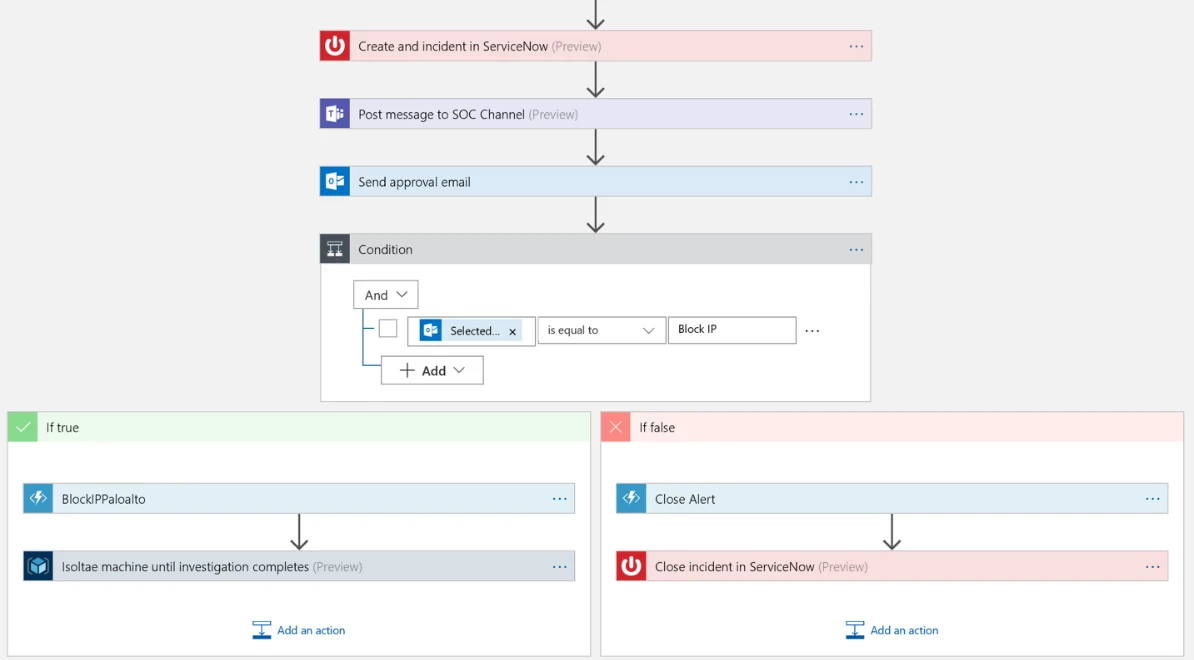
Key features:
Threat detection: Microsoft Sentinel continuously monitors security logs from Azure, third-party services, and on-premises environments to identify anomalies and potential attacks.
Incident response: It uses automated playbooks to contain threats and reduce response time for a swift, effective defense. Sentinel’s incident response capabilities also quickly analyze and mitigate security threats before they escalate.
Threat hunting: This tool leverages the MITRE ATT&CK framework and machine learning to proactively uncover hidden security risks, which allows security teams to take action before a breach occurs.
2. Microsoft Defender for Cloud
Besides compliance management, Microsoft Defender for Cloud is also useful for TDR because it strengthens security across Azure and multi-cloud environments by identifying vulnerabilities and providing actionable insights.
Key features:
Multi-cloud support: The tool scans virtual machines across Azure, AWS, and Google Cloud to detect security risks and maintain a consistent security posture.
OS vulnerability assessment: Defender also assesses Windows and Linux workloads in cloud and hybrid environments and provides mobile (Android and iOS) coverage via Microsoft Defender for Endpoint and Defender Vulnerability Management.
Actionable recommendations: It also generates reports with common vulnerabilities and exposures references and step-by-step remediation guidance to help organizations address security issues efficiently.
Enhancing Azure security with third-party tools
Azure’s built-in security tools provide a strong foundation, but third-party security tools can extend these native capabilities by providing unified visibility across multi-cloud environments, correlating risks that span different services, and integrating with existing security workflows. Organizations typically add these third-party solutions when they need deeper context across cloud platforms, want to consolidate security operations, or require specialized capabilities that complement Azure’s built-in protections.
In particular, a CNAPP like Wiz’s can add value by unifying context across identities, workloads, configurations, and data. We provide several capabilities in Azure environments that help teams extend native protections, such as these:
Security graph: The Wiz Security Graph maps relationships across resources, identities, network paths, and configurations to help teams understand how issues connect across Azure services and highlight risk clusters that may not be visible when analyzing findings in isolation.
Attack path analysis: By correlating misconfigurations, exposed identities, vulnerable workloads, and data access paths, Wiz identifies combinations of risks that attackers could use together during an attack. This helps teams focus on issues that have both exploitability and impact, rather than treating all findings as equal.
Cloud threat intelligence: Wiz includes coverage for emerging cloud threat patterns across major cloud providers, including Azure. This can help organizations quickly identify resources associated with new vulnerabilities or attack techniques and prioritize investigation.
Securing your Azure environment with the right tools
Choosing the right mix of Azure security tools is about matching your organization’s needs with the right capabilities, such as identity, data, network, and compliance. You can also integrate third-party platforms to unify visibility and streamline your response across clouds.
Ready to see how a unified approach can help you secure your cloud environment? Request a demo today to explore how Wiz can strengthen and secure your cloud environment.
FAQs
Other security tool roundups that you might be interested in: