What is an SBOM?
A software bill of materials (SBOM) provides a detailed inventory of every software component in an application. It does so by identifying open-source and commercial third-party dependencies and listing metadata, like component names, descriptions, versions, and licenses.
Modern systems—especially those that support the supply chain ecosystem—combine elements from multiple sources, making them susceptible to supply chain attacks that exploit vulnerabilities. By documenting each component, SBOMs simplify vulnerability management and give security teams clear insight into potential risks.
Unlike traditional inventory lists, SBOMs track nested dependencies and provenance to support trust and compliance throughout your software delivery life cycle (SDLC). This is because SBOMs improve visibility into third-party patch status and license usage, and they also help teams preserve code integrity and prevent the introduction of malicious code. This transparency lets organizations detect risks earlier, accelerate remediation, and build resilience against evolving threats.

What is SBOM's role in software supply chain security?
As supply chain attacks grow more sophisticated, SBOMs have become foundational to software transparency and risk management. They provide organizations with clear visibility into every component, particularly open-source and third-party dependencies, enabling faster identification, impact analysis, and response when vulnerabilities emerge.
Government mandates, including the 2021 Executive Order on improving the nation’s cybersecurity, require SBOMs for vendors who work with federal agencies. This has accelerated industry-wide adoption and made SBOMs a key standard in secure software development, though they aren’t universally enforced across all sectors.
The following incidents highlight the importance of SBOMs:
Log4j vulnerability (CVE-2021-44228): In 2021, this widely used Java library created a security nightmare for organizations worldwide. Without SBOMs, many companies were left scrambling and had to piece together which components were at risk. However, companies with SBOMs were able to pinpoint affected components fast, dodging massive fallout.
SolarWinds attack: In 2020, attackers compromised the SolarWinds Orion software, impacting up to 18,000 customers globally, including top-tier companies and government agencies. An SBOM could’ve cut through the chaos, helping victims trace the malware quickly and respond effectively.
CI/CD Security Best Practices [Cheat Sheet]
Learn about infrastructure security, code security, access, and monitoring with actionable items, code snippets, and screenshots.
Get the Cheat Sheet
Why SBOMs are important
SBOMs provide a detailed list of all components in a software application, enabling organizations to identify and effectively manage security risks. They also improve transparency and facilitate easier tracking and updating of software dependencies, among other benefits.
Here are some key reasons why SBOMs benefit your cloud security:
1. Transparency and visibility
Think of SBOMs as your software’s blueprint. They give developers a clear view of all third-party software components, like open-source libraries, in their applications. This transparency helps teams weigh the risks before adding a library and stay on top of vulnerabilities after deployment.
2. Regulatory compliance
As regulatory pressure grows around software transparency and security, SBOMs have emerged as a powerful tool to support compliance efforts.
While standards like PCI DSS and HIPAA do not explicitly require SBOMs, they emphasize the importance of visibility, secure development practices, and risk management—areas where SBOMs can offer significant value.
By providing a clear inventory of software components, SBOMs help teams streamline audits, reduce the risk of licensing violations, and strengthen overall governance.
3. Incident response and forensics
When something goes wrong, an SBOM can be a lifesaver since it pinpoints exactly which component is vulnerable. Teams can zero in on the problem area, prioritize their incident response, and assess the incident’s broader impact.
What should an SBOM include?
An SBOM should include details about all open-source and proprietary software components in a product, including their names, versions, and licenses. It should also specify the relationships between components and their dependencies.
These are some other key elements you should include in an SBOM:
Component identifiers: Include metadata like the supplier name, component name, origin, description, maintainer, artifact ID, version number, timestamp, and unique references (such as Git commit IDs or SHA-1 hashes) for each component.
Dependencies: Clearly document the relationships between components and their dependencies to provide a complete view of the software’s internal structure.
Vulnerability data: SBOMs identify components by name, version, supplier, and hashes or package URLs. You can use this information to cross-reference identifiers against vulnerability databases, such as the NVD or CVE list. While SBOMs enable vulnerability management, they don’t include vulnerability listings or directly list CVE data.
Licensing information: Specify the license type for each component (such as MIT, Apache, or BSD) to ensure compliance with legal and open-source usage requirements.
External references: Include relevant URLs or documentation for each component to offer context on functionality, usage, and maintenance.
Wiz’s agentless scanning for SBOM allows you to gain complete visibility of your applications’ components, including packages, open-source libraries, and nested dependencies, without blind spots or deploying an agent.
Common SBOM formats
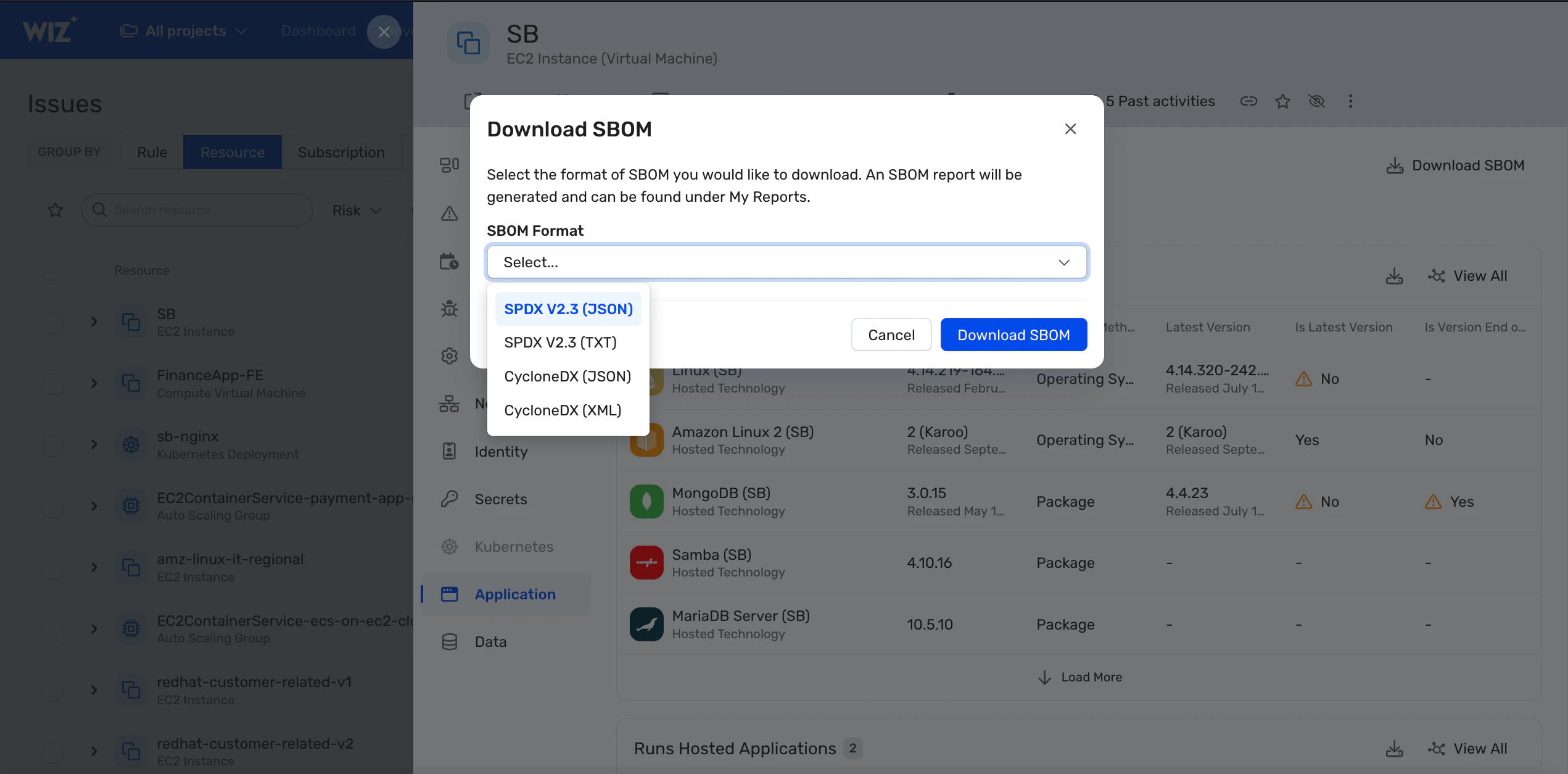
You can generate SBOMs manually or automatically. Here’s how each method works:
The manual method involves listing all software components and their respective versions, licenses, and dependencies in spreadsheets. This method is only suitable for small-scale deployments and is highly prone to human error.
The automatic method involves integrating SBOM tools into your continuous integration/continuous deployment (CI/CD) pipeline.
After generation, there are two major structures for SBOMs: CycloneDX and Software Package Data Exchange (SPDX). Below is a brief description of each:
| Format | Description |
|---|---|
| SPDX | SPDX standardizes how teams represent SBOM data by defining components, their licenses, and how they relate to applications. It supports both human-readable and machine-parsable formats, like JSON, XML, and YAML. With SPDX, organizations improve transparency across the software supply chain and streamline license compliance. |
| CycloneDX | CycloneDX lists internal and external components, services, and their interdependencies. It outputs structured XML, JSON, or protobuf formats and supports optional metadata, including custom fields, vulnerability information, and patch details. Developers often choose it for its extensibility and flexibility. |
To give you a better understanding of the SBOM formats, consider this example of the CycloneDX inventory in JSON format:
{
"bomFormat": "CycloneDX",
"specVersion": "1.4",
"serialNumber": "urn:uuid:3e673487-395b-41h8-a30f-a58468a69b79",
"version": 1,
"components": [
{
"type": "library",
"name": "nacl-library",
"version": "1.0.0"
}
]
}
In addition to the two formats covered above, organizations can also use Software Identification (SWID) tags, which are usually installed during deployment. SWID tags provide SBOM information such as software component release dates and licenses. Regulatory bodies and the US government consider SWID tags, CycloneDX, and SPDX as acceptable SBOM formats.
SBOM implementation: A step-by-step guide
Creating an SBOM might sound daunting, but breaking it into manageable steps can make the process easier. Here’s how to get started:
Step 1: Choose the right SBOM standard
The foundation of SBOM adoption starts with selecting a standard format that works across your teams and partners. Widely recognized specifications, like SPDX and CycloneDX, ensure that you can easily share, parse, and integrate SBOMs into cloud security workflows.
Regardless of which standard you choose, it’s essential to make sure it scales with your environment, integrates smoothly with CI/CD pipelines, and supports automation so your SBOMs remain accurate and usable at enterprise scale.
Step 2: Automate SBOM generation
Manually building SBOMs doesn’t work in fast-moving cloud environments. To keep pace with rapid software releases, you should fully automate SBOM generation as part of your build and deployment processes.
Embedding SBOM creation into CI/CD pipelines also verifies that every build includes an up-to-date inventory of components. An inventory removes friction for developers, reduces the risk of human error, and ensures that security and compliance teams always have current data to work with.
Step 3: Track and update software components
Modern software is never static—it constantly evolves through updates, patches, and dependency changes. Maintaining an accurate SBOM is what provides the visibility to track those shifts.
Pairing SBOMs with real-time vulnerability intelligence allows teams to map known CVEs, like Log4j (CVE-2021-44228), to impacted components and accelerate remediation. Keeping SBOMs up to date turns them into dynamic assets that enhance incident response and reduce supply chain risk.
Step 4: Review and monitor compliance
Compliance expectations for SBOMs are rising, especially for organizations in regulated industries or those doing business with U.S. federal agencies.
Executive Order 14028 and related federal guidance require vendors supplying software to federal agencies to include SBOMs as part of vendor risk management. To stay ahead, organizations should embed compliance checks into their workflows, auditing SBOMs for license obligations, validating component security, and maintaining signed, version‑controlled records. This not only ensures audit readiness but also strengthens trust with regulators, customers, and partners.
Treat SBOMs as part of your broader cloud operating model by using continuous generation, validation, and monitoring. These methods ensure that SBOMs evolve with your applications, supporting transparency, compliance, and resilience across the software supply chain.
Real-life story: How Schibsted upgraded its security with advanced SBOM capabilities
With more than 60 brands and 1,200 developers, Schibsted needed to unify its cloud security without slowing innovation.
By adopting Wiz, the company gained agentless SBOM visibility into open-source and third-party dependencies across its environment, all while keeping developer workflows intact. This capability proved valuable when a Bug Bounty Program revealed a potential backdoor in a code library.
Schibsted used Wiz’s SBOM feature to quickly assess its exposure and remediate the issue before it could escalate. The team has since eliminated critical risks across its cloud estate and continues to rely on Wiz to maintain visibility, reduce vulnerabilities, and support ongoing compliance needs.
4 advanced implementation strategies
To be effective, SBOMs must move beyond static documents and integrate into the build, deployment, and runtime processes.
Here are four strategies you can use to operationalize SBOMs across your cloud-native workflows for continuous visibility, automated compliance, and rapid response to risk:
1. Integrating SBOMs into CI/CD pipelines
Teams can bring transparency to the software supply chain by generating SBOMs at build time. Automating SBOM creation for containers, microservices, and AI workloads ensures that each build includes an accurate, up-to-date component inventory.
Through integrations with CI/CD pipelines, SBOM checks serve as quality gates that block noncompliant code from reaching production and help maintain trust in every deployment.
🛠️ Action step: Configure your CI/CD tool (such as GitHub Actions, GitLab CI, or Jenkins) to automatically invoke SBOM generation tools like Syft or Trivy during each build phase.
2. Enforcing SBOM compliance through policy-as-code
Maintaining SBOM hygiene at scale requires more than just one-time validation. By defining SBOM standards as policy-as-code, your team can consistently enforce rules around approved package sources, acceptable licenses, and vulnerability thresholds. These policies ensure that compliance becomes part of the development lifecycle and automatically halts deployments that fail to meet security or licensing requirements.
🛠️ Action step: Implement SBOM policy rules using tools like Open Policy Agent or Conftest to validate against criteria like source trust and license types. You can then embed them as checks in your deployment workflow.
3. Enabling continuous monitoring and drift detection
Although teams typically create SBOMs during the build process, many now extend their use into production.
As workloads run, environments can drift, introducing untracked components or unauthorized changes. Security tools monitor for these discrepancies by comparing the current system state to the original SBOM. When they detect drift, they trigger alerts or initiate workflows to regenerate and revalidate the SBOM.
While SBOM standards don’t require this, proactive teams use runtime monitoring to keep declared inventories aligned with what’s actually running.
🛠️ Action step: Deploy a runtime scanner with a solution like Wiz, which continuously compares current workloads to the last known SBOM and flags discrepancies in real time.
4. Verifying SBOM integrity and traceability
To maintain trust in SBOM data, it’s essential to secure it with mechanisms like digital signatures and checksums. Logging each version and tracking changes over time using diffs also creates a verifiable audit trail. These strategies not only support regulatory compliance but also enable full traceability across software updates, from initial build-through to runtime operation.
🛠️ Action step: Use a secure artifact repository to sign SBOMs at build time and store versioned SBOMs with commit metadata for traceable audit history.
Wiz's approach to SBOM security
Wiz Code enhances your SBOM and Kubernetes bill of materials (KBOM) security by providing comprehensive visibility into the components and dependencies within your software. With real-time scanning and automated security checks, Wiz Code also ensures that you identify vulnerabilities within third-party libraries and open-source software for early mitigation.
Here are some advantages of agentless SBOM security.
Flexibility and simplicity: Reduce overhead by eliminating dedicated agents, which consume resources and require ongoing maintenance. Use agentless scanning for SBOMs to lower costs and avoid compatibility issues with different operating systems.
Gain instant and complete visibility: Avoid the hassle of installing agents on each subsystem. Generate a complete inventory of your application components—open-source libraries, packages, and nested dependencies—within minutes and without blind spots.
Search across your SBOMs: Quickly locate specific OS and open-source packages across cloud environments. This is especially valuable for identifying exposure to high-profile vulnerabilities, such as those found in XZ Utils.
Always up to date: Agentless approaches automate SBOM generation, ensuring your component inventories remain current without requiring manual updates.
Try Wiz’s free demo today to see how agentless SBOM generation and real-time vulnerability mapping can help you reduce blind spots, cut manual overhead, and secure every build from code to cloud.