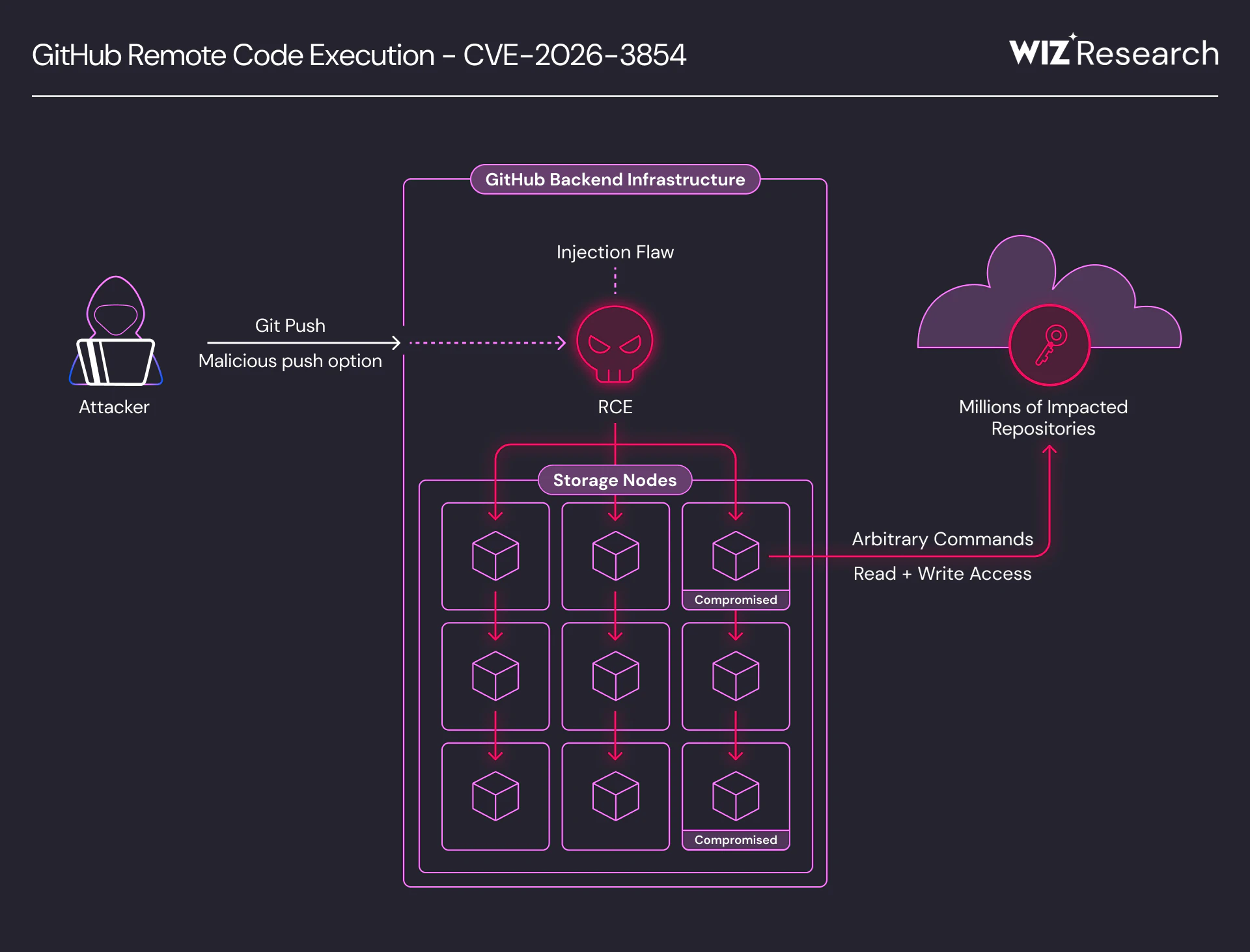
Wiz Research uncovered a critical vulnerability (CVE-2026-3854) in GitHub's internal git infrastructure that could have affected both GitHub.com and GitHub Enterprise Server. By exploiting an injection flaw in GitHub's internal protocol, any authenticated user could execute arbitrary commands on GitHub's backend servers with a single git push command - using nothing but a standard git client.
Notably, this is one of the first critical vulnerabilities discovered in closed-source binaries using AI, highlighting a shift in how these flaws are identified. Despite the complexity of the underlying system, the vulnerability is remarkably easy to exploit. On GitHub.com, this vulnerability allowed remote code execution on shared storage nodes. We confirmed that millions of public and private repositories belonging to other users and organizations were accessible on the affected nodes. On GitHub Enterprise Server, the same vulnerability grants full server compromise, including access to all hosted repositories and internal secrets.
GitHub mitigated this issue on GitHub.com within 6 hours of our report, released patches for all supported versions of GitHub Enterprise Server, and published the CVE at the time of release. GitHub Enterprise Server customers should upgrade immediately - at the time of this writing, our data indicates that 88% of instances are still vulnerable. Detailed remediation steps and further technical details are available in GitHub’s security blog post.
GitHub greatly appreciates the collaboration, professionalism, and partnership that Wiz has shown throughout this process. A finding of this caliber and severity is rare, earning one of the highest rewards available in our Bug Bounty program, and serves as a reminder that the most impactful security research comes from skilled researchers who know how to ask the right questions. As the landscape evolves, these close partnerships with talented hunters and researchers are more important than ever.
Alexis Wales, GitHub CISO
This post breaks down the vulnerability, walks through the exploitation chain, and provides recommendations for GHES administrators to protect their environments.
Required Actions and Mitigations
GitHub.com: GitHub has mitigated this issue. No action is required for GitHub.com users.
GitHub Enterprise Server: Immediate action required.
Upgrade to GHES version 3.19.3 or later - this release patches
CVE-2026-3854
Affected Versions
| Component | Vulnerable Versions | Fixed Version |
|---|---|---|
| GitHub Enterprise Server | <= 3.19.1 | 3.14.24, 3.15.19, 3.16.15, 3.17.12, 3.18.6 and 3.19.3 |
Find Vulnerable GHES Instances with Wiz
Wiz customers can identify vulnerable GitHub Enterprise Server instances in their environments using this pre-built query in the Wiz Threat Center. The query identifies all GHES instances running a version vulnerable to this issue.

Why We Researched GitHub's Git Infrastructure
GitHub is the world's largest code hosting platform, home to hundreds of millions of repositories spanning open source projects, enterprise codebases, and critical infrastructure. Its internal git infrastructure-the pipeline that processes every git push-is one of the most security-sensitive systems on the internet. When a user pushes code, it passes through multiple internal services, each written in a different programming language. This multi-service architecture creates opportunities for inconsistencies in how each component parses and trusts shared data.
We've looked into GitHub Enterprise Server (GHES) in the past to hunt for these exact types of vulnerabilities. However, extracting and auditing the sheer volume of compiled blackbox binaries that run this pipeline historically required an impractical amount of time and manual effort.
But this is Round 2, and the landscape has shifted. By leveraging AI-augmented tooling-particularly automated reverse engineering using IDA MCP-we were able to do what was previously too costly. Using AI, we rapidly analyzed GitHub's compiled binaries, reconstructed internal protocols, and systematically identified where user input could influence server behavior across the entire pipeline. Thanks to this new capability, we found a fundamental flaw in how that input flows through GitHub's multi-service architecture.
Technical Deep-Dive
Understanding the Architecture
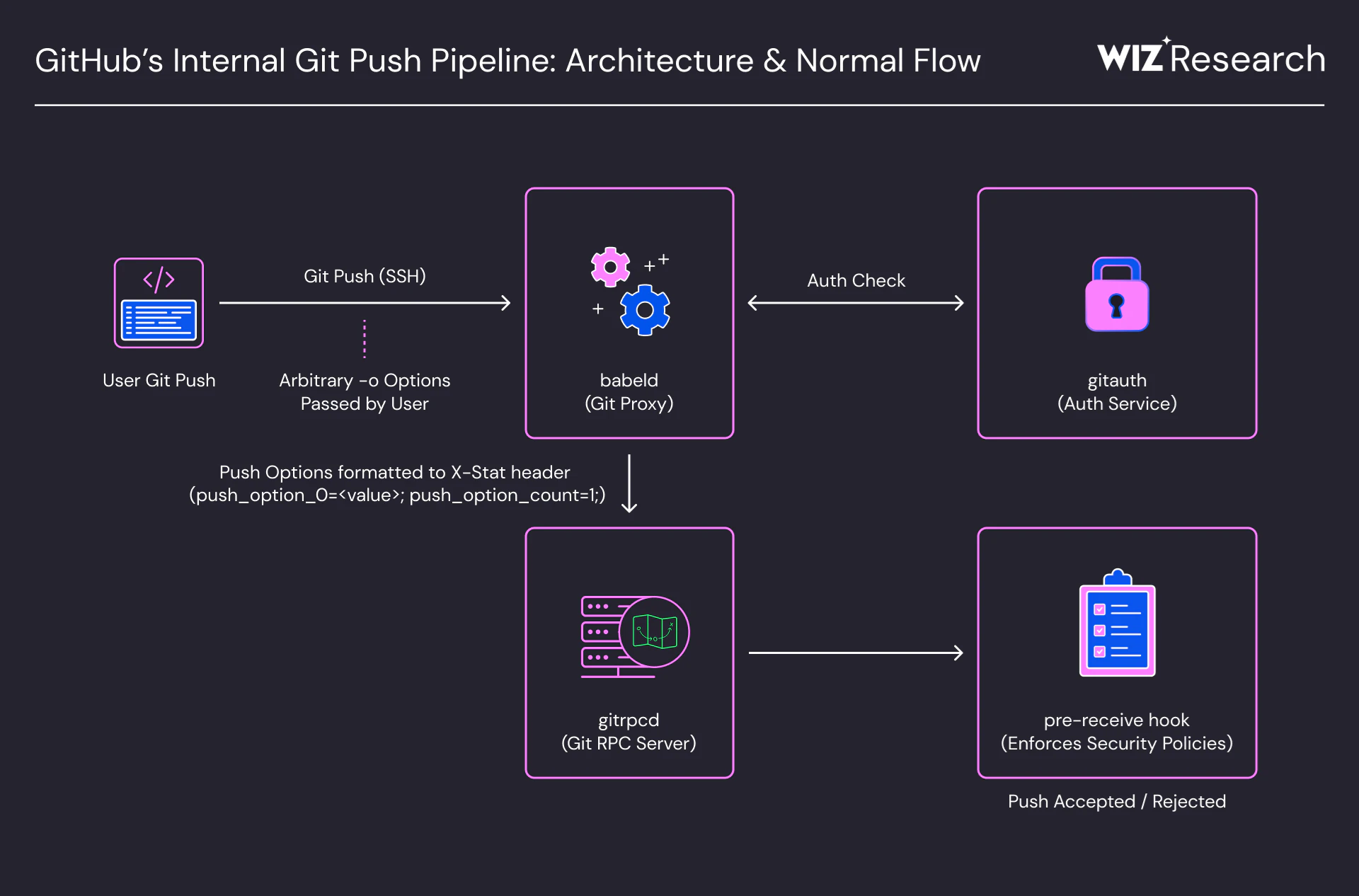
When a user runs git push against GitHub via SSH, the request flows through several key components:
babeld- A git proxy and the entry point for all git operations. It receives the user's SSH connection and forwards authentication togitauth.gitauth- An internal authentication service. It verifies the user's credentials, checks whether they have push access to the target repository, and returns the security policies that apply to the session - file size limits, branch naming rules, and more.babeldtakes this response and constructs an internal header containing all of this security metadata.gitrpcd- An internal RPC server. It receives the request frombabeld, parses theX-Statheader, and sets up the environment for downstream processes. Critically,gitrpcdperforms no authentication of its own - it trustsbabeldcompletely and treats every field in the X-Stat header as authoritative.The pre-receive hook - A compiled Go binary that enforces security policies before a push is accepted. It checks file size limits, branch naming rules, LFS integrity, and runs any admin-defined custom hooks.
The critical link between these components is the X-Stat header. It carries security-critical fields as semicolon-delimited key=value pairs. Internal services parse this header by splitting on ; and populating a map. A key detail: the map uses last-write-wins semantics. If a key appears twice, the later value silently overrides the earlier one.
When babeld forwards a push request, one of the internal requests includes push options in the X-Stat header. Git push options are arbitrary strings that users can pass with git push -o. They are a standard git protocol feature, intended for server-side hints. babeld encodes them as numbered fields - push_option_0, push_option_1, and so on - alongside a push_option_count.
The Vulnerability: X-Stat Field Injection
So what happens when user-controlled input reaches the X-Stat header without proper sanitization?
babeld copies git push option values directly into the X-Stat header - without sanitizing semicolons. Since ; is the X-Stat field delimiter, any semicolon in a push option value breaks out of its designated field and creates new, attacker-controlled fields.
Consider a push option value that contains a semicolon followed by a security field name. babeld embeds it verbatim, producing a header like:
X-Stat: ...; large_blob_rejection_enabled=bool:true; ...;
  push_option_0=x;large_blob_rejection_enabled=bool:false;
  push_option_count=1; ...
When splitting on ;, this header parses as:
push_option_0                = x
large_blob_rejection_enabled = bool:false   ← INJECTED (overrides earlier bool:true)
push_option_count            = 1
The attacker's value wins because it appears later in the header - last-write-wins.
We confirmed this both through binary analysis and on the wire - a packet capture on a live GHES instance showed injected fields appearing alongside and overriding their legitimate counterparts in the X-Stat header.
By combining reverse engineering of the pre-receive binary with wire-level analysis, we mapped out injectable X-Stat fields. The following are particularly security-relevant:
| Field | Purpose |
|---|---|
| rails_env | Controls hook execution path (sandbox vs. direct exec) |
| custom_hooks_dir | Base directory for custom hook script lookup |
| repo_pre_receive_hooks | JSON definitions of pre-receive hooks to execute |
| large_blob_rejection_enabled | Enforces file size limits |
| reject_sha_like_refs | Blocks SHA-like branch names |
| user_operator_mode | Enables internal debug output |
The first three are the ones that matter most - together, they lead to remote code execution.
Escalation to RCE
Overriding security flags like large_blob_rejection_enabled is interesting, but the real question is: can we turn field injection into code execution?
The answer lies in three fields from the table above: rails_env, custom_hooks_dir, and repo_pre_receive_hooks. To understand why, we need to look at how the pre-receive hook binary handles custom hooks.
GHES supports admin-defined custom pre-receive hooks - scripts that run before a push is accepted. By reverse engineering the pre-receive binary, we discovered it has two execution paths, controlled entirely by the rails_env field from the X-Stat header: a production value that runs hooks inside a sandbox, and any other value that runs hooks directly - no sandbox, no isolation - as the git service user with full filesystem access.
The only thing separating these two paths is the value of rails_env. And we can inject it.
The escalation to RCE chains three injections together:
Step 1 - Bypass the sandbox. Inject a non-production rails_env value to switch from the sandboxed production path to the unsandboxed path.
Step 2 - Redirect the hook directory. Inject custom_hooks_dir to control the base directory where the binary looks up hook scripts.
Step 3 - Inject a hook definition with path traversal. Inject repo_pre_receive_hooks with a crafted hook entry whose script field contains a path traversal sequence. The binary's path resolution joins the attacker- controlled base directory with the traversal payload, resolving to an arbitrary binary on the filesystem.
The non-production path then executes the resolved path directly - no arguments, no sandbox - as the git service user:
git push -o '<injected fields>' origin masterEnumerating objects: 3, done.
Counting objects: 100% (3/3), done.
Writing objects: 100% (3/3), 250 bytes | 250.00 KiB/s, done.
Total 3 (delta 0), reused 0 (delta 0), pack-reused 0
remote: uid=500(git) gid=500(git) groups=500(git) ← RCE as the git service user
To github.com:user/repo.git
abc1234..def5678 master -> masterWith unsandboxed code execution as the git user, we had full control over the GHES instance, including filesystem read/write access and visibility into internal service configuration.
From GHES to GitHub.com
We had RCE on GitHub Enterprise Server. The next question was obvious - does this work on GitHub.com?
We ran the same exploitation chain against a repository on GitHub.com. The push completed successfully, but the custom hooks never executed. No remote: output, no code execution - nothing.
To understand what was happening, we injected user_operator_mode=bool:true to enable debug output on both platforms. Comparing the output side by side, we noticed that GitHub.com was missing certain hook execution steps that appeared on GHES - the custom hooks code path was simply not being reached.
We went back to the binary and dug deeper. Through further reverse engineering, we identified a boolean flag in the X-Stat header that controls whether the server operates in enterprise mode. On GHES, this flag defaults to true - so the custom hooks path is always active. On GitHub.com, it defaults to false, meaning custom hooks are never reached under normal conditions.
Since this flag was also carried in the X-Stat header, it was injectable through the same mechanism. One more injected field, and the full exploitation chain worked on GitHub.com. This time, we executed hostname instead of id:
Enumerating objects: 3, done.
Counting objects: 100% (3/3), done.
Writing objects: 100% (3/3), 250 bytes | 250.00 KiB/s, done.
Total 3 (delta 0), reused 0 (delta 0), pack-reused 0
remote: Operator mode enabled.
remote: starting PreReceiveBlobCheck(100.00, 50.00) hook...
remote: finished PreReceiveBlobCheck(100.00, 50.00) hook in 0s
remote: starting PreReceiveRedirectCheck hook...
remote: finished PreReceiveRedirectCheck hook in 0s
remote: starting PreReceiveRefsCheck hook...
remote: finished PreReceiveRefsCheck hook in 0s
remote: starting PreReceiveRefLengthCheck hook...
remote: finished PreReceiveRefLengthCheck hook in 0s
remote: starting PreReceiveForcePushCheck hook...
remote: finished PreReceiveForcePushCheck hook in 0s
remote: starting PreReceiveLFSIntegrity hook...
remote: finished PreReceiveLFSIntegrity hook in 0s
remote: starting PreReceiveCustomHooksCheck hook...
remote: ██████████████████████████.github.net            ← inside GitHub.com infrastructure
remote: finished PreReceiveCustomHooksCheck hook in 2ms
To github.com:user/repo.git
   abc1234..def5678  main -> main
RCE on GitHub.com - confirmed.
Cross-Tenant Impact
RCE on GitHub Enterprise Server is a critical vulnerability. On GitHub.com, the same flaw had broader implications due to the shared infrastructure serving multiple users and organizations.
GitHub.com is a multi-tenant platform. Repositories belonging to millions of different organizations and users are stored on shared backend infrastructure. When we achieved code execution on GitHub.com, we landed on a shared storage node running as the git user.
The git user exists for a reason: it serves all repository operations across the node. By design, it has broad filesystem access to every repository hosted on that node. Compromising this user meant we could read any repository on the node, regardless of which organization or user owned it. We enumerated repository index entries accessible from two compromised nodes and found millions of entries across each, belonging to other users and organizations.
To be clear: we did not access the contents of other tenants' repositories. We validated the cross-tenant exposure using only our own test accounts, confirming that the git user's filesystem permissions would allow reading any repository on the node.
Conclusion
A single git push command was enough to exploit a flaw in GitHub's internal protocol and achieve code execution on backend infrastructure. The vulnerability chain highlights a pattern that extends well beyond GitHub. When multiple services written in different languages pass data through a shared internal protocol, the assumptions each service makes about that data become a critical attack surface. In this case, one service assumed push option values were safe to embed verbatim. Another assumed every field in the X-Stat header was set by a trusted source. The pre-receive hook assumed an environment variable could only be production in production. Each assumption was reasonable in isolation - and dangerous in combination.
The presence of a non-production code path in a production binary, the lack of path traversal validation on hook scripts, and the use of a delimiter-based protocol without input sanitization are patterns that appear across many codebases. We encourage teams building multi-service architectures to audit how user-controlled input flows through internal protocols - especially where security-critical configuration is derived from shared data formats.
This research was made possible by AI-augmented reverse engineering tooling, particularly IDA MCP, which allowed us to rapidly analyze compiled binaries and reconstruct internal protocols at a speed that would not have been feasible manually. As these tools continue to mature, we expect them to play an increasingly important role in uncovering vulnerability classes that require deep cross-component analysis.
Responsible Disclosure Timeline
2026-03-04 - Wiz Research discovers the X-Stat push option injection vulnerability.
2026-03-04 - RCE confirmed on GHES 3.19.1.
2026-03-04 - Wiz Research reports the vulnerability to GitHub.
2026-03-04 - GitHub acknowledges receipt.
2026-03-04 - GitHub deploys fix on GitHub.com.
2026-03-10 - CVE-2026-3854 assigned with CVSS 8.7.
2026-03-10 - GHES patch released.
2026-04-28 - Public disclosure.
Stay in touch!
Hi there! We are Sagi Tzadik (@sagitz_), Nir Ohfeld (@nirohfeld), Ronen Shustin (@ronenshh), Hillai Ben-Sasson (@hillai), Yuval Avrahami (@yuvalavra), and Noam Malron (@noamsec) from the Wiz Research Team (@wiz_io). We are a group of veteran white-hat hackers with a single goal: to make the cloud a safer place for everyone. We primarily focus on finding new attack vectors in the cloud and uncovering isolation issues in cloud vendors and service providers. We would love to hear from you! Feel free to contact us on X (Twitter) or via email: research@wiz.io.