What is secure code scanning?
Secure code scanning is the practice of automatically analyzing source code to identify security vulnerabilities before they reach production. This includes detecting flaws like SQL injection, hardcoded secrets, insecure dependencies, and misconfigurations across your own code, third-party libraries, container images, and infrastructure templates. The goal is to catch exploitable weaknesses early, when they're cheapest to fix and before attackers can leverage them.
When integrated into CI/CD pipelines, code scanning acts as an automated checkpoint that flags risky code before it merges, reducing the number of vulnerabilities that reach production and lowering the cost of later fixes.
Watch 5-min Wiz Code demo
See how Wiz Code surfaces SAST, SCA, IaC, and secrets findings alongside real runtime exposure.

What vulnerabilities can code scanning detect?
Code scanning tools identify vulnerabilities across multiple categories, from injection flaws and authentication weaknesses to exposed secrets and insecure dependencies. There are several common vulnerability types, with specific detection mechanisms that scanners use to find them:
| Vulnerability | Detection Mechanism |
|---|---|
| SQL injection | Search for input sanitization failures and other software design issues that allow users to input SQL queries directly into input fields without proper sanitization |
| Cross-site request forgery | Identify improper input validation or insecure system tokens that empower hackers to exploit a target system's trust for a returning user |
| Remote code execution (RCE) | Look for misconfigurations or improper validation mechanisms that allow attackers to execute arbitrary code remotely |
| Buffer overflows | Detect misconfigurations that allow input data beyond what a buffer can normally hold to be sent to it |
| Hardcoded secrets | Scan for high-entropy or known patterns that indicate the presence of secrets like API tokens or admin passwords in code |
In the Ollama RCE vulnerability of June 2024, the Wiz Research team discovered an exploitable remote code execution vulnerability (CVE-2024-37032) in Ollama, a popular open-source project for running AI models. This vulnerability allowed attackers to send carefully crafted HTTP requests to Ollama's exposed API server.
Though the security issue has since been resolved, developers of AI projects and all internet-facing software can learn an essential lesson from this attack: code scanning is critical to correct misconfigurations and security risks like RCE vulnerabilities.
Why is code scanning important?
Every codebase contains vulnerabilities. The question is whether you find them before attackers do. AI coding tools have dramatically increased how much code organizations ship, while frontier AI models like Anthropic's Claude Mythos have shown they can autonomously discover zero-day vulnerabilities and generate working exploits in hours. The volume of code grows on one side; the speed of exploitation grows on the other. Code scanning closes that gap by shifting discovery earlier in the development lifecycle, when fixes are faster, cheaper, and less disruptive than post-breach remediation.
Rapid software release cycles leave bugs and security flaws
Faster release cycles leave less time for manual security review, which means more vulnerabilities slip into production. Code scanning solves this by running automatically on every commit or pull request, catching issues in real time without slowing developers down.
The earlier you scan, the cheaper the fix. A vulnerability caught in the IDE costs minutes to resolve. The same flaw discovered in production can cost weeks of incident response and remediation effort.
Breaches have become more common
According to Forrester research, 2025 saw over 10.6 billion exposed records, nearly 30,000 per day. However, scanning catches code-level vulnerabilities like injection flaws or exposed credentials before deployment, reducing the attack surface that leads to breaches in the first place.
Data breaches are costly
The fallout from data breaches can be far-reaching, including non-compliance penalties, lawsuits, reputational damage, and the loss of customer trust. The average breach now costs organizations $4.4 million USD globally, and for larger organizations, the real-world cost is often a multiple of that figure once legal fees, settlements, and mandated security spending are factored in.
Approaches to code scanning
Different scanning techniques catch different vulnerability types, and no single approach covers everything. Understanding when to use each one helps you build a layered scanning strategy that closes gaps.
| Technique/tool | Description |
|---|---|
| Static application security testing (SAST) | Static analysis tools scan source code at rest to identify common security risks, such as outdated software packages, access control issues, unsanitized external inputs, and buffer overflows. |
| Dynamic application security testing (DAST) | Dynamic analysis simulates attacks to detect runtime vulnerabilities like remote code execution (RCE), race conditions, and cross-site request forgery (CSRF). |
| Software composition analysis (SCA) | SCA tools assess source code, binary files, container images, package managers, and more for dependencies and associated known vulnerabilities by comparing the dependencies against vulnerability databases, such as the National Vulnerability Database (NVD). |
| Interactive application security testing (IAST) | IAST combines elements of SAST and DAST capabilities. |
| Secrets scanning | Secret scanning tools analyze public repositories, container images, DevOps pipelines, and more for hard-coded credentials to prevent unauthorized access to sensitive cloud infrastructure. |
Code scanning's challenges
Every scanning technique has blind spots. For example:
The result is false positives that waste time and false negatives that let real vulnerabilities through.
Layering multiple techniques helps, but the real solution is adding context. A vulnerability in code that's never deployed, or deployed behind a firewall with no sensitive data access, is far less urgent than the same flaw in an internet-exposed service handling customer PII. Scanners that correlate findings with runtime exposure help teams focus on what actually matters.
How AI is changing code scanning
AI-powered tools, including Atlas in Wiz Code, are starting to show up in two places in code scanning: understanding what a finding means and helping you fix it. Atlas adds exploit-validated AI code scanning, which means it investigates whether a finding can be turned into a working exploit. AI is also starting to help with secure code generation and vulnerability identification, so teams spend less time reading and rewriting.
Here are the practical ways teams are using AI today:
Faster triage: AI can explain why a finding matters, summarize the data flow, and help you spot likely false positives so you do not burn cycles on noise.
More usable fixes: AI can propose safer patterns and draft pull request changes, especially for input validation, escaping, auth checks, and safer library usage.
Cleaner ownership handoffs: AI can rewrite scanner output into a short ticket that a developer can act on without becoming a security expert first.
But as a quick reality check, AI cannot guess your runtime exposure, your IAM permissions, or your network paths. If your workflow does not connect findings to what is deployed and reachable, you still end up fixing the wrong things first.
7 essential code scanning best practices
1. Create a source code protection policy
Define who can access your repositories and pipelines, how code should be encrypted at rest and in transit, and when scans should run. A documented policy prevents ad hoc decisions that create coverage gaps.
2. Choose tools that fit your stack and workflow
When evaluating scanners, prioritize:
Language and framework coverage: The tool should support every language in your stack without requiring separate configurations.
CI/CD integration: Scans should run automatically on commits and pull requests without manual triggers.
Prioritization and context: Look for tools that rank findings by exploitability, not just severity scores.
Actionable remediation guidance: Reports should tell developers exactly what to fix, not just what's wrong.
Up-to-date vulnerability intelligence: The scanner's database should reflect newly disclosed CVEs within days instead of months.
CI/CD Pipeline Security Best Practices [Cheat Sheet]
In this 13 page cheat sheet we'll cover best practices in the following areas of the CI/CD pipeline: Infrastructure security, code security, secrets management, access and authentication, monitoring and response

3. Test for code security flaws early
Adopt a shift-left, secure-by-design approach that unites DevSecOps teams and, in the long run, saves money, time, and effort you'd have spent on complicated secure code reviews if security were incorporated at a later stage.
4. Run automated and scheduled scans
Both types of scans are useful in different scenarios. While automated scans provide instantaneous feedback on code issues throughout the SDLC, scheduled scans provide in-depth point-in-time analysis that can be useful for tracking your code security program's evolution over time.
5. Address risks in a timely manner
Forbes research shows that security teams leave at least 23% of cloud alerts uninvestigated and unresolved. Unfortunately, unresolved risks open up your systems to attacks. To avoid being an easy target, apply fixes and update software promptly. Also, choose tools that prioritize risks and minimize alert fatigue, so teams won't have to manually validate results.
6. Finetune tool configuration
Optimize tool configuration so it serves your unique needs. This includes:
Incorporating business context
Adjusting sensitivity settings
Adding exceptions, whitelists, and blacklists where necessary
Defining rules and signatures
Combine these strategies with multiple code scanning tools and techniques to yield comprehensive and accurate results with little to no false positives.
7. Increase secure coding awareness
Develop awareness through employee training, accountability, and research on evolving vulnerability trends. Help developers understand that writing clean code from the ground up is in their best interest: there'll be fewer security vulnerabilities to deal with post-production with shift-left security.
Wiz for code security
Most code scanners find vulnerabilities but can't tell you which ones matter, a visibility gap that helps explain why only 10% of companies are considered leading organizations in cyber resilience. Wiz Code connects scanning findings to cloud runtime context, showing whether a vulnerable code path is actually deployed, exposed to the internet, and connected to sensitive data.
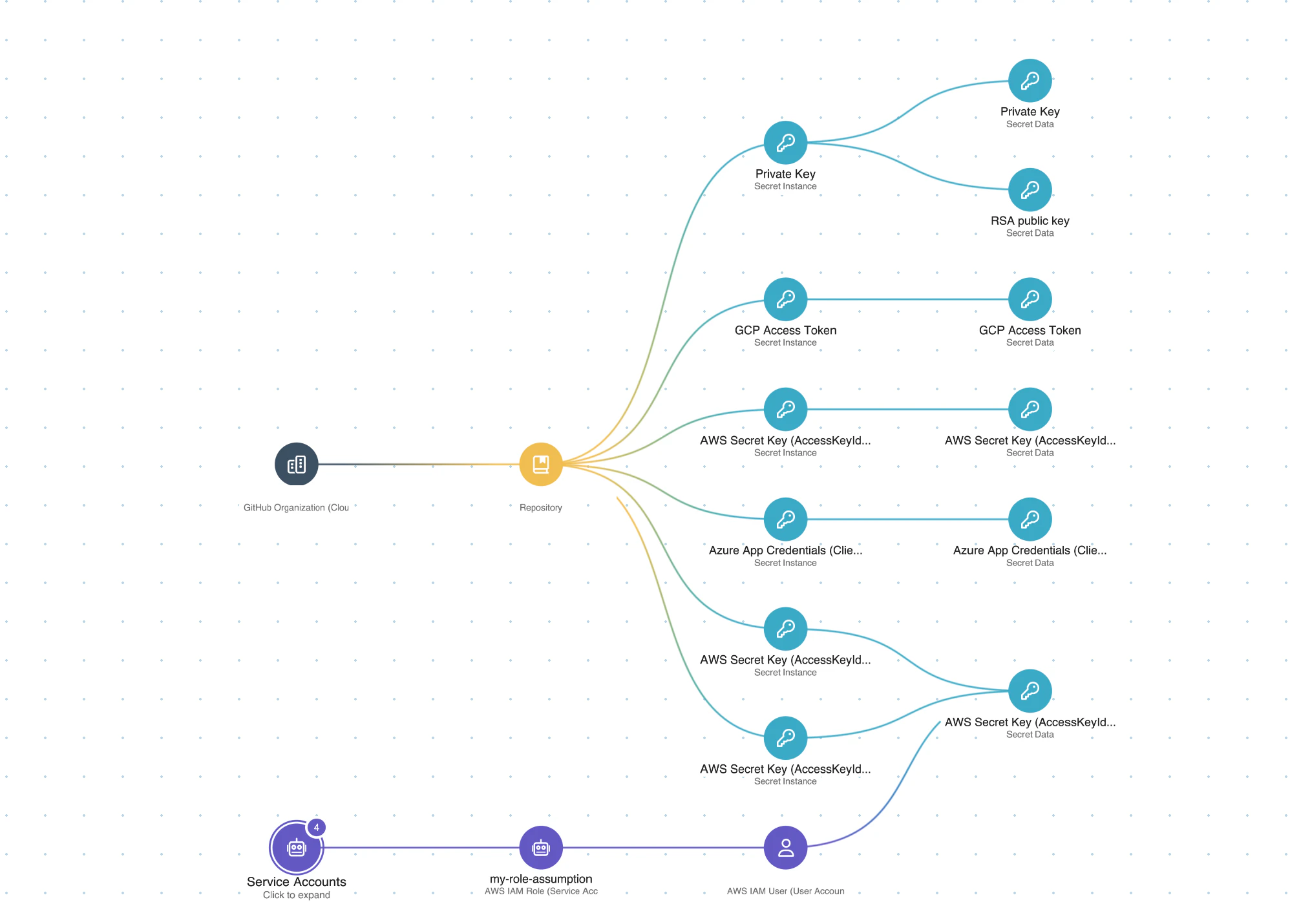
This code-to-cloud traceability changes how teams prioritize. Instead of triaging thousands of findings by CVSS score alone, you see which vulnerabilities create real attack paths in your production environment. The result is fewer alerts, faster remediation, and security that keeps pace with development velocity.
Wiz Code scans application code, IaC templates, container images, and secrets directly in CI/CD pipelines. Atlas, now part of Wiz Code, adds exploit-validated AI code scanning and deeper investigation, while the same graph links each finding back to the cloud resources and identities that make it matter.
Ready to see how code-to-cloud context changes prioritization? Schedule a demo to see Wiz Code in action.
Secure your cloud from code to production
Learn why CISOs at the fastest growing companies trust Wiz to accelerate secure cloud development.