
What is vulnerability scanning?
Vulnerability scanning is an automated process that identifies security weaknesses in code, applications, infrastructure, and cloud environments before attackers can exploit them. It detects known vulnerabilities, missing patches, misconfigurations, and exposed components across your entire technology stack.
But scanning needs to move fast, thanks to cloud environments changing threat realities. Workloads spin up and down constantly, infrastructure is defined in code, and applications span containers, serverless functions, and managed services, so a cloud vulnerability scan that's accurate at 9 a.m. can miss new exposure by noon.
Vulnerability Management Buyer's Guide
This guide helps your security and dev teams finally start speaking the same language while giving you everything you need to objectively choose or replace your VM solution.

Modern developments in vulnerability scanning
AI has reshaped vulnerability scanning from both sides.
Scanning and remediation tools now use AI to triage findings and suggest fixes faster than manual review allows, but attackers use the same speed advantage to weaponize newly disclosed vulnerabilities within hours of public release.
At the same time, AI-generated code introduces its own risk: the sheer volume of AI-assisted commits makes manual review impractical, and AI coding assistants can pull in unfamiliar open source dependencies that create supply chain blind spots nobody on the team has reviewed.
Real-world example: In April 2026, a Vercel employee connected a third-party AI tool, Context.ai, to their corporate Google Workspace account, and attackers later compromised Context.ai's credentials through an infostealer infection on an employee device. The hackers used that connection to take over the Vercel employee's Google account and gain access to some of Vercel's internal systems. A traditional CVE scanner wouldn't have caught this; there was no unpatched software to flag. Detecting it requires scanning that extends beyond known vulnerabilities to third-party OAuth connections, overprivileged identity permissions, and the access paths those integrations create into your environment.
What vulnerabilities does a scan uncover?
Vulnerability scanning and penetration testing answer different questions.
The specific vulnerabilities a scan uncovers depend on which type of scan you run, and the most effective programs combine several types to cover these common areas of weakness.
Network: Open ports, weak passwords, misconfigured firewalls, and unauthorized devices or connections.
System: Missing patches, outdated software, misconfigurations, and vulnerable operating systems.
Application: Security flaws including cross-site scripting (XSS) and SQL injection, plus misconfigured settings.
Cloud-specific: Misconfigured cloud services, overprivileged identity and access management (IAM) roles, exposed object storage such as Amazon S3 buckets or Azure Blob containers, and improper authentication.
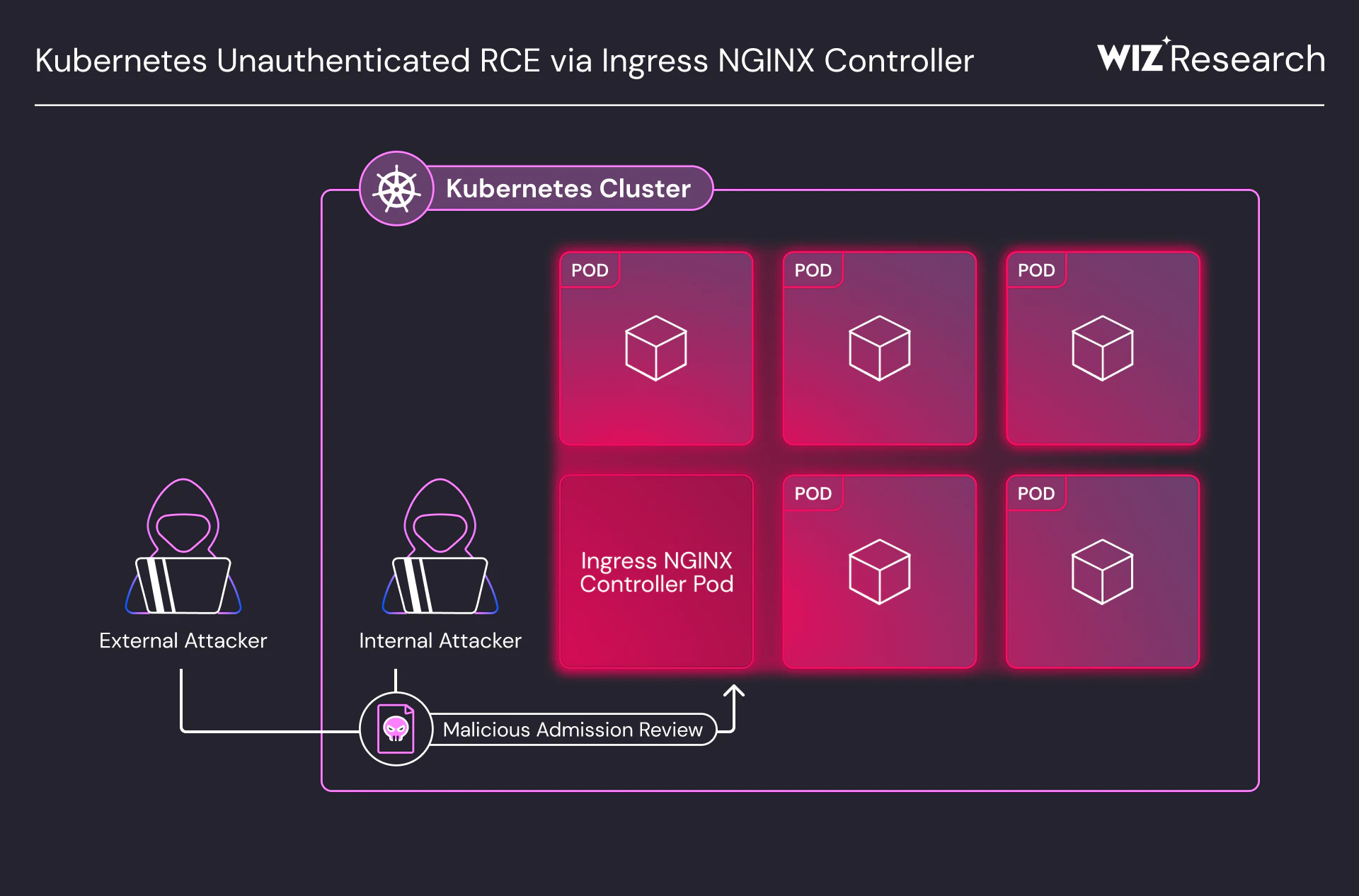
Wiz, for example, caught a vulnerability in Ingress NGINX with system, network, and cloud-specific implications, alongside an application-specific Ivanti Endpoint Manager Mobile (EPMM) remote code execution (RCE) vulnerability. These are two examples out of thousands of findings that span multiple categories at once, which is part of why context matters more than the raw count of issues found.
Types of vulnerability scanning and common use cases
Vulnerability scanning relies on two core techniques.
Active scanning sends simulated attacks, queries, or requests to targets to identify weaknesses like buffer overflows, unencrypted data, and broken authentication.
Passive scanning analyzes network traffic without actively probing, detecting vulnerabilities attackers could use to spread malware or exfiltrate data.
Beyond technique, scans also differ based on what they target and how much access they're granted. The most common use cases include the following.
Network vulnerability scanning examines the network for open ports, unpatched software, and weak network protocols.
Web application vulnerability scanning looks for security flaws like SQL injection, XSS, and other vulnerabilities unique to web applications.
Container and cloud-native scanning covers your environment across three layers: image scanning checks container images for known vulnerabilities before deployment, registry scanning monitors stored images for newly disclosed CVEs, even after they've been pushed, and runtime scanning evaluates containers and virtual machines as they actually execute. Together, these layers close the gap between what a development team builds and what's actually running in production, which is the area where legacy network scanners tend to have the largest blind spots.
Database vulnerability scanning concentrates on identifying weaknesses within databases, such as misconfigurations, weak authentication, and overly permissive permissions.
Host vulnerability scanning examines individual servers or workstations to identify weaknesses at the operating system level or within installed software.
Infrastructure as code (IaC) scanning analyzes templates like Terraform or CloudFormation before deployment, catching misconfigurations such as overly permissive security groups or unencrypted storage while they're still cheap to fix.
API scanning identifies exposed endpoints, broken authentication patterns, and excessive data exposure in APIs, which have become a frequent target as applications increasingly communicate through them.
Scans also vary by access level and vantage point. Authenticated scans use valid credentials to log in and assess a system from the inside, surfacing issues like weak internal configurations that an outside view would miss, while unauthenticated scans probe a system the way an attacker without credentials would. Similarly, internal scans assess your network from inside the perimeter, and external scans assess what's visible to anyone on the internet.
Most mature programs run all four combinations, since each reveals a different slice of your actual exposure.
AWS Vulnerability Management Cheat Sheet
Secure your AWS environment with this definitive guide to cloud defense. From agentless visibility to automated patching, get the essential blueprint for hardening your workloads and neutralizing risks before they scale.

Vulnerability scanning vs. penetration testing
Vulnerability scanning and penetration testing serve different purposes. Scanning is automated and continuous, providing broad coverage across your environment as it changes. Penetration testing is manual and time-bound, simulating real-world attacks to validate whether specific weaknesses can actually be exploited.
The two approaches complement each other. Scanning maintains ongoing awareness of potential weaknesses, while pen testing provides deeper validation of how attackers might chain issues together in realistic scenarios.
| Activity | Best at | Typical output |
|---|---|---|
| Vulnerability scanning | Broad coverage and fast detection of known issues | A list of findings to fix or validate |
| Penetration testing | Proving real attack paths and business impact | Exploit evidence and prioritized remediation steps |
How vulnerability scanning works
Vulnerability scanning works by identifying weaknesses across code and runtime environments, then narrowing those findings to the vulnerabilities that could realistically be exploited. In modern environments, the goal isn't to produce a long list of issues, but to understand which weaknesses actually increase risk.
Here’s a snapshot of how scanning for vulnerabilities works.
Identifying what is present and in use
Accurate scanning requires knowing what actually exists in your environment. This means maintaining visibility into source code and dependencies during build, container images and workloads at deployment, and cloud resources in production. Without this foundation, vulnerability data becomes misleading, since a scanner can only report on what it sees, and incomplete asset inventory means incomplete findings.
Detecting known vulnerabilities across the stack
Once assets are identified, scanners evaluate them for known vulnerabilities across application code, open source libraries, operating systems, container images, and cloud services. Most scanners work by identifying what's installed or exposed, then matching it against vulnerability intelligence sources like the National Vulnerability Database and CVE.org, which catalog product names, impact metrics, severity ratings, and recommended mitigations.
At this stage, scanning is intentionally broad. The goal is to surface potential weaknesses wherever they exist, knowing that not all findings will represent meaningful risk on their own.
Evaluating exploitability through context
This is where modern scanning diverges from traditional approaches. A vulnerability's importance depends on whether it can actually be exploited, not just whether it exists. Exploitability depends on several factors.
Is the vulnerable asset actually running in production, or does it sit in an unused image?
Is the asset reachable from the internet, or is it isolated behind internal controls?
What access does the asset have to other systems through its permissions and identities?
Is sensitive data nearby or directly accessible from the vulnerable asset?
Could an adversary realistically chain this weakness together with other findings to form a working attack path?
Severity scores like CVSS describe how bad a vulnerability could be in theory, but they don't account for whether it's likely to be targeted. The Exploit Prediction Scoring System (EPSS), maintained by the Forum of Incident Response and Security Teams, addresses this gap by estimating the probability that a given CVE will be exploited in the next 30 days, giving you another signal alongside CVSS when context-based prioritization isn't fully available. Scanning that lacks this context produces noise, not insight.
Updating findings as environments and threats change
Both environments and vulnerability intelligence change continuously. New vulnerabilities are disclosed, code is updated, and workloads are redeployed. Effective scanning revisits exploitability as these conditions evolve. A vulnerability that was previously low risk may become exploitable due to a configuration change, while others may become irrelevant once assets are removed or updated.
Validating remediation and reducing repeat exposure
After vulnerabilities are addressed, rescanning helps confirm that fixes were effective. Over time, this feedback loop helps you understand where vulnerabilities tend to reappear and where preventive controls can reduce repeat exposure. In this way, vulnerability scanning supports not just detection, but a clearer understanding of how exploitable risk enters and exits the environment.
Watch 12-min demo
See how Wiz eliminates scanning blind spots and alert fatigue by connecting vulnerabilities to real cloud context.

Common vulnerability scanning challenges
A vulnerability scanning program can fall short for several reasons, and the table below outlines the most common ones.
| Challenge | Description |
|---|---|
| Resource sharing | Vulnerability scanning requires significant network bandwidth and computing resources. Production environments are also resource-intensive, and when both processes compete for the same infrastructure, scan efficiency suffers. |
| False positives | Scanners may flag non-existent vulnerabilities, wasting time on issues that don't actually exist. Misconfigurations in scan policies often cause these false alarms. |
| Alert fatigue | Thousands of alerts make it overwhelming to track and address each one. Teams start ignoring findings, and critical vulnerabilities get lost in the noise. |
| Siloed tooling | Using separate scanners across environments creates data silos and fragmented views of risk, and teams struggle to correlate findings across their stack. |
| Lack of context | Most scanners don't account for asset criticality, business processes, or system dependencies, so they report CVEs without explaining which ones actually increase risk. |
| Blind spots | Traditional tools often miss cloud infrastructure, containers, serverless functions, and other modern workloads, leaving gaps in coverage. |
| Ongoing maintenance efforts | Agent-based scanning solutions require installing agents on target systems, and managing their installation, updates, and maintenance across environments can become time-consuming. |
| Software development delays | Traditional scanning practices require extensive scans and manual verification, which can delay application development and ultimately hurt an organization's bottom line. |
| Supply chain integrity | Organizations need to verify the integrity of their scanning tools, not just their scan results. In March 2026, attackers compromised the open source Trivy scanner, injecting credential-stealing code into official releases and GitHub Actions used by thousands of CI/CD pipelines, which shows how a compromised security tool can become an attack vector itself. |
| CVSS-only prioritization | Relying on severity scores without exploitability context produces a backlog that doesn't reflect actual risk. EPSS adoption is growing as a complement to CVSS for exactly this reason. |
Key features to look for in a vulnerability scanning tool
Modern vulnerability scanning tools must do more than enumerate CVEs. In cloud-native environments, effective scanning depends on coverage, context, and the ability to reduce risk without slowing you down. Here are some key features to consider.
1. Agentless coverage across code and cloud
Effective scanning requires visibility across both code and runtime without relying on agents. Agentless approaches reduce operational overhead and eliminate blind spots from missed installations or offline workloads, scanning source code during development and continuing through container images, virtual machines, and cloud services in production.
2. Contextual, risk-based prioritization
Severity scores alone don't reflect real risk. The most effective tools prioritize vulnerabilities based on exploitability, incorporating context such as external exposure, identity permissions, and proximity to sensitive data so you can focus on actionable risk.
3. External attack surface visibility
Vulnerability scanning should account for how attackers see your environment, not just how it looks internally. Dynamic scanning of internet-facing assets helps identify exposed services and misconfigurations that are reachable from outside the organization.
4. Unified visibility across signals
Vulnerabilities don't exist in isolation, and their risk depends on how they intersect with identities, configurations, and exposure. Tools that operate within a unified security view make it easier to correlate findings across domains instead of stitching together multiple consoles.
5. Actionable, automated remediation guidance
Finding vulnerabilities only helps if you can fix them efficiently. Automation and AI-assisted recommendations can suggest fixes, validate impact, and integrate remediation into existing workflows so you move faster without compromising security.
6. Software bill of materials (SBOM) generation
An SBOM gives you a complete inventory of the open source components, libraries, and dependencies in your software, which becomes essential when a new vulnerability is disclosed and you need to know instantly where it exists across your environment.
7. EPSS-informed prioritization
Tools that surface EPSS scores alongside CVSS gives you an additional, frequently updated signal for which vulnerabilities are most likely to be exploited soon, helping prioritize a backlog that CVSS alone can't fully sort.
We built Wiz to cover this full picture in one platform. Our agentless approach scans code through cloud without installing software on every workload, and we correlate vulnerabilities with exposure, identity permissions, and attack paths, so you can see which findings actually matter.
Vulnerability scanning best practices
Here are best practices for a vulnerability scanning program that reduces real risk.
| Best practices | Why it matters |
|---|---|
| Scan continuously, not periodically | Cloud workloads change by the hour, so a scan from last week tells you little about today's risk. Without continuous scanning, new exposure can sit unnoticed for days before anyone catches it. |
| Prioritize by exploitability, not severity score alone | A critical CVSS score doesn't mean a vulnerability is reachable or dangerous in your environment. Teams that triage by severity alone end up with backlogs full of theoretical risk while real attack paths go unaddressed. |
| Integrate scanning into CI/CD pipelines | Catching vulnerabilities during build and test is far cheaper than catching them in production. When scanning happens only after deployment, fixes require redeployments, rollbacks, and coordination across teams that could have been avoided. |
| Maintain an accurate asset inventory | A scanner can only assess what it knows about, so gaps in inventory become gaps in coverage. Without an accurate inventory, shadow IT and forgotten resources become the assets attackers find first. |
| Validate remediations with rescanning | A fix that looks complete in a ticket isn't confirmed until a rescan proves the vulnerability is gone. Skipping this step means teams sometimes close issues that were never actually resolved. |
| Establish severity-driven SLAs | Without clear timelines tied to risk level, remediation can drag on indefinitely for issues that matter, and happen too slowly for issues that don't. Severity-driven SLAs give teams a shared standard for what "urgent" actually means. |
A CNAPP like Wiz supports each of these practices natively, from continuous agentless scanning to exploitability-based prioritization that helps your team meet these SLAs with the findings that matter most.
How Wiz approaches vulnerability scanning
We provide vulnerability scanning as part of our broader exposure management platform, helping you identify vulnerabilities across code, images, and runtime cloud environments, then prioritize them based on real-world exploitability.
The Wiz platform takes a multi-layered approach, providing deep visibility across cloud, on-premises, and containerized environments without the operational friction of traditional agents.
Agentless workload scanning connects via cloud APIs to create encrypted snapshots of storage volumes, enabling deep operating system and application-level analysis, including SBOM generation, with zero impact on production workload performance.
Vulnerability runtime validation uses the eBPF-based Wiz Sensor for Linux and Kubernetes environments to monitor which packages are actively loaded into memory, so you can distinguish between active vulnerabilities currently executing and dormant ones that exist on disk but aren't in use.
Attack surface management probes internet-facing resources to validate external exposure and identify verified attack paths, helping you understand how attackers see your environment from the outside.
What sets us apart is how we connect vulnerability scanning to exposure management. Rather than producing a simple list of CVEs, we correlate vulnerabilities with network exposure, identity permissions, and secrets on the Wiz Security Graph. This surfaces toxic combinations, such as a vulnerable workload that's also internet-exposed and has administrative access to sensitive data, and identifies which issues represent genuine attack paths rather than theoretical risk.
This same context-aware approach extends to AI workloads, helping you understand how vulnerabilities in AI pipelines, model-serving infrastructure, and connected data stores factor into your overall exploitable risk.
Book a demo to see how context and vulnerability management all work together for more effective security.
Move from vulnerability lists to exploitable risk
Wiz correlates vulnerabilities with exposure, identities, and data access so your team fixes what actually matters.
