

Common Docker security tools at a glance
Wiz – Docker security tool within a unified CNAPP, providing container visibility, posture management, runtime risk correlation, and offering hardened base images with near-zero CVEs
Trivy – Open-source scanner for images, filesystems, and IaC with broad vulnerability database coverage
Snyk Container – Developer-first image scanning with IDE and Git integrations plus upgrade path recommendations
Aqua Security – Full-lifecycle platform spanning image scanning, registry controls, and runtime protection
Sysdig Secure – eBPF-based runtime detection with deep Kubernetes visibility and threat investigation
Falco – Open-source runtime threat detection engine with community-contributed rule library
Harbor – Open-source registry with built-in scanning, signing, and replication for air-gapped environments
Red Hat Advanced Cluster Security – Kubernetes-native security with strong OpenShift integration and policy enforcement
Prisma Cloud – Multi-cloud CNAPP with container posture, registry scanning, and compliance frameworks
Container Security Cheat Sheet
Keep container security best practices at your fingertips as you evaluate tools across the lifecycle.

What are Docker security tools and why do they matter?
Docker security tools are solutions that protect containerized applications from build time through production. They scan for vulnerabilities, monitor runtime behavior, and enforce security policies to keep your applications safe.
In a virtual machine world, each app often lived on a long‑running server, patched and hardened over time. With Docker, you ship applications as container images and run them as short‑lived containers that can be created and destroyed in seconds. This speed and density are great for DevOps, but it means a single bad image or misconfigured container can be replicated across hundreds of nodes in minutes. This is concerning given that one 2024 analysis of public container registries reported an average of 604 known vulnerabilities per image, though actual counts vary by base image choice, update cadence, and scanning tool methodology.
Common container‑specific risks include:
Vulnerable base images and dependencies: Many Dockerfiles start from a public image that already contains known CVEs, plus layers of third‑party libraries that inherit even more risk. (See our guide to container image fundamentals).
Insecure runtime behavior: Containers may run as root, mount sensitive host paths, or expose unnecessary capabilities, which can enable container escape or privilege escalation. (Learn more about runtime security).
Overly permissive permissions: Containers or Kubernetes service accounts often get broad IAM permissions, violating the principle of least privilege and increasing blast radius.
Misconfigured orchestration and cloud infrastructure: Weak Kubernetes policies, open security groups, or public registries can expose otherwise “secure” images to the internet.
Containers are also ephemeral. They come and go quickly, are scheduled across clusters, and may run in multiple clouds. Manual checks and quarterly audits cannot keep up. Docker security tools matter because they provide continuous, automated protection for these containerized applications, with as little friction as possible for developers.
Core capabilities to evaluate in Docker security tools
When evaluating Docker security tools, it’s useful to look at how different tools approach container risk across the lifecycle, from image build through runtime and governance. Some tools focus deeply on a specific stage, while others provide broader coverage by connecting signals across multiple stages of the container and cloud environment.
Organizations vary widely in how they build and run containers. Architecture, cloud footprint, development velocity, and team structure all influence which capabilities matter most. As a result, Docker security tools are often evaluated based on how well their approach aligns with an organization’s operating model, rather than on individual features in isolation.
The criteria below represent common areas teams consider when assessing Docker security tools and platforms.
Key evaluation criteria
Lifecycle coverage Which stages of the container lifecycle does the tool address, such as build, registry, deployment, runtime, and posture? Some tools specialize in one phase, while others provide integrated coverage across multiple stages.
Context awareness How does the tool evaluate container findings in the context of cloud configuration, network exposure, and identity permissions? Context helps teams understand how container issues translate into real-world risk.
CI/CD integration depth How naturally does the tool fit into existing Git workflows, CI pipelines, and developer tooling? Deeper integration often supports earlier detection and more consistent remediation.
Runtime detection signals What runtime behaviors does the tool observe, such as system calls, file access, or network activity? Different tools emphasize different signals depending on their detection model.
Policy enforcement and controls Does the tool support guardrails at build or deployment time, ongoing policy evaluation, or both? Enforcement needs often depend on organizational maturity and compliance requirements.
Multi-cloud and fleet scale Can the tool support large container fleets across AWS, Azure, GCP, and hybrid environments? Scalability and centralized visibility become more important as environments grow.
Operational footprint and ownership What deployment model does the tool use, and how much ongoing effort is required to operate it? Teams often weigh depth of coverage against operational simplicity.
Docker security tools differ not only in what they cover, but in how they connect signals across containers, orchestration layers, and cloud environments. Understanding these differences helps teams choose tools or platforms that best support their Docker security strategy.
Image and base image scanning
Image scanning identifies known vulnerabilities and misconfigurations in container images and base images before deployment. These tools analyze operating system packages, language-level dependencies, and Dockerfile instructions, mapping them to known CVEs and configuration issues. Addressing risk at this stage helps reduce inherited vulnerabilities early in the lifecycle.
Runtime visibility and threat detection
Runtime security focuses on container behavior after deployment. Instead of examining image contents alone, these tools monitor activity such as process execution, file access, and network connections. Runtime visibility helps teams detect misuse, unexpected behavior, or attempted exploitation in production.
Cloud and orchestration context
Containers typically run under orchestration platforms like Kubernetes and rely on cloud infrastructure services. As a result, container risk depends on factors such as network exposure, identity permissions, and resource relationships. Tools that model these relationships help teams understand how container issues interact with their broader environment.
Policy enforcement and governance
Policy and governance capabilities translate security standards into enforceable rules. These controls may validate configurations at build or deploy time and continuously evaluate environments against organizational or regulatory requirements. Enforcement approaches vary based on risk tolerance and operational needs.
Developer workflow integration
Many Docker security tools integrate into developer workflows, including source control, CI/CD pipelines, and IDEs. This integration helps surface issues earlier and supports more consistent remediation, with adoption shaped by team maturity and development practices.
Scalability across multi-cloud and large fleets
As container environments scale, teams need tooling that supports centralized visibility, efficient deployment models, and meaningful prioritization. Scalability ensures Docker security remains manageable as container usage expands across clusters and clouds.
Docker security across the container lifecycle
A simple way to think about Docker security is to follow the container lifecycle. Each phase introduces different risks and calls for different types of controls.
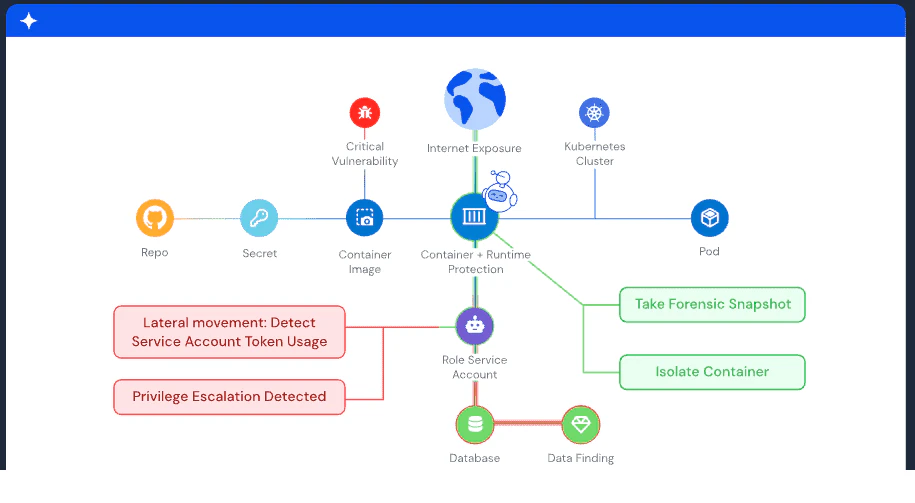
You can roughly break the lifecycle into four stages: build time, registry and deployment, runtime, and posture and governance.
Build‑time security
Build time covers everything from writing Dockerfiles and application code to building images in CI. Vulnerabilities are introduced here when you start from an outdated base image, install unnecessary tools, or pull in vulnerable dependencies. Securing this phase means using trusted base images and scanning images as they are built. (See our guides on shift-left security and DevSecOps best practices).
Registry and deployment security
Once built, images are pushed to a container registry. That registry becomes a critical control point. Risks include unauthenticated registries and lack of image signing. Best practices now also require SBOM (Software Bill of Materials) generation for each image, build provenance attestations following SLSA (Supply chain Levels for Software Artifacts) framework, and VEX (Vulnerability Exploitability eXchange) documents to communicate which CVEs are actually exploitable in your specific build context.
Runtime security
Runtime is where containers actually execute on hosts or nodes. Even a well‑scanned image can be abused at this stage if an attacker finds a logic flaw or misconfiguration. Runtime findings gain meaning when enriched with cloud identity permissions, network exposure paths, and data sensitivity labels. This allows teams to focus on exploitable behavior (for example, a container spawning a reverse shell that also has IAM permissions to exfiltrate data) rather than every anomalous syscall.
Posture and governance
Posture and governance sit above the other stages. Instead of looking at one container at a time, they look at the whole environment. Unified policy engines that span code, registry, cloud configuration, and runtime reduce policy drift across environments and enforce consistent standards, for example, ensuring the same 'no privileged containers' rule applies in CI/CD gates, Kubernetes admission controllers, and runtime detection alerts.
Because most organizations use multiple point tools at different stages, visibility often gets fragmented. This is why CNAPP platforms and similar approaches have emerged: to correlate findings from build, cloud, and runtime into a single context and priority list.
Watch 12-min demo
See how Wiz correlates container findings across build, cloud, and runtime into a single prioritized view.

Docker security tools across the container lifecycle
Looking at Docker security through the container lifecycle helps clarify how different tools and approaches address risk at different stages. Some tools focus deeply on a specific phase, such as image scanning or runtime detection, while others provide broader coverage by connecting signals across multiple stages of the lifecycle.
Many Docker security tools span more than one category, and organizations often evaluate them based on how well their approach aligns with their architecture, operating model, and risk priorities. The categories below reflect common ways teams think about Docker security coverage, rather than rigid boundaries between tools.
In the sections that follow, we’ll walk through four major areas: build-time security, registry and deployment security, runtime security, and posture and governance. Each area plays a role in a complete Docker security strategy.
Build-time Docker security tools (image scanning and prevention)
Build-time tools focus on identifying and reducing risk before container images are deployed. They help teams address inherited vulnerabilities, insecure configurations, and exposed secrets early in the lifecycle, when remediation is typically faster and less disruptive.
Wiz Code: Wiz Code brings container image scanning, vulnerability detection, secret scanning, dependency analysis, and infrastructure-as-code analysis into development workflows. Findings from images, dependencies, secrets, IaC, and application code are evaluated using a shared policy framework and correlated with how containers are deployed in production
Code-to-cloud correlation: Links running containers back to the source repository, Dockerfile, and CI pipeline that produced them, helping teams identify ownership and root cause.
CI/CD integration: Scans images, IaC, and dependencies on every build and supports policy-based controls during CI.
Context-aware prioritization: Uses production exposure and deployment context to help teams distinguish between test-only issues and risks affecting running workloads.
Snyk Container: Snyk Container scans container images and Kubernetes workloads for vulnerable packages and base images, and provides guidance on dependency upgrades. Its integrations with Git platforms and IDEs help developers address issues within familiar tools.
Anchore: Anchore emphasizes policy-driven container image scanning. Teams define rules around vulnerabilities, licenses, and configurations, which are enforced in CI pipelines or at the registry level. The open-source engine can be self-hosted, with enterprise offerings adding reporting and governance features.
Aqua Security (image scanning components): Aqua’s platform includes image scanning across CI/CD pipelines and registries. It identifies operating system, language, and malware-related issues and connects image risk to broader runtime and policy capabilities within the Aqua platform.
Trivy: Trivy scans container images, file systems, Git repositories, and cloud resources for vulnerabilities and misconfigurations. Its simple CLI-based workflow makes it easy to integrate into pipelines, particularly for teams early in their container security journey.
Together, build-time tools help reduce inherited risk from base images and dependencies and support more consistent container hardening practices before deployment.
Registry and deployment security tools
Registry and deployment tools focus on controlling how images move into runtime environments. They help teams understand which images are in use, enforce standards at deploy time, and reduce the risk of unapproved or vulnerable images reaching production.
Wiz: Wiz provides visibility into which container images are deployed across cloud and Kubernetes environments and how those workloads are exposed and configured.
Agentless discovery: Automatically inventories images, clusters, and workloads by connecting to cloud APIs and orchestrators.
Registry-to-runtime visibility: Links registry data with running workloads to show which images are actually in use.
Security Graph context: Connects images to Kubernetes objects, cloud resources, and identities to illustrate how image risk translates into deployment exposure.
Red Hat Advanced Cluster Security (ACS): ACS is a Kubernetes-native security solution, particularly strong in OpenShift environments. It enforces security policies at deploy time and integrates tightly with Red Hat’s platform and tooling.
Harbor: Harbor is an open-source container registry with built-in security features, including access controls, vulnerability scanning, image signing, and replication. It supports environments that require local registry ownership and strong promotion controls.
Prisma Cloud (registry controls): Prisma Cloud scans images across multiple registries and enforces deployment policies based on vulnerability and configuration thresholds, integrating registry controls into a broader cloud security view.
Registry and deployment tools help teams ensure that only approved, policy-compliant images progress into production environments.
Runtime Docker security tools (threat detection and response)
Runtime tools focus on container behavior after deployment. They help teams detect suspicious activity, misuse, or attempted exploitation that may not be visible through build-time scanning alone.
Wiz Defend: Wiz Defend combines cloud-native runtime signals with optional lightweight eBPF-based telemetry to detect suspicious behavior in containerized environments.
Context-rich detections: Correlates runtime activity with cloud configuration, identities, and known risks.
Coverage flexibility: Uses cloud-native telemetry where agents cannot be deployed, with optional sensors for deeper visibility.
Behavior-focused alerts: Highlights activity such as lateral movement, privilege escalation, or unexpected outbound connections.
Sysdig Secure: Sysdig Secure uses eBPF to observe system-level activity in containers and Kubernetes environments. It provides detailed runtime visibility tied to Kubernetes constructs such as pods and namespaces.
Aqua Security (runtime protection): Aqua extends its platform into runtime protection by establishing expected behavior profiles and alerting on deviations. It can apply rules to alert on or respond to suspicious container activity.
Falco: Falco is an open-source runtime detection engine built around syscall-level rules. A large community contributes detection rules and integrations, making it a flexible option for teams building custom runtime security workflows.
Runtime security tools are most effective when enriched with cloud configuration and identity context, which helps teams assess the potential impact of detected activity.
Docker security posture and governance tools
Posture and governance tools provide a continuous, environment-wide view of container security. Rather than focusing on individual containers, they help teams understand patterns, enforce standards, and maintain compliance across clusters and clouds.
Wiz: Wiz provides posture management across containers, Kubernetes, cloud configuration, and identities using a unified Security Graph.
Correlated risk visibility: Connects vulnerabilities, misconfigurations, network exposure, secrets, and IAM data.
Attack path analysis: Surfaces combinations of issues that create exploitable conditions.
Continuous compliance: Evaluates environments against container and Kubernetes benchmarks and supports audit reporting.
Prisma Cloud: Prisma Cloud offers posture management across cloud infrastructure and containers, collecting configuration and vulnerability data into a centralized view with policy enforcement options.
Lacework: Lacework focuses on behavioral analysis and anomaly detection across cloud-native environments, helping teams identify deviations from expected workload behavior.
Check Point CloudGuard: CloudGuard extends network security and posture management into containerized environments, particularly for organizations already using Check Point tooling.
These tools help teams maintain consistent Docker security standards and focus remediation efforts on configurations and patterns that meaningfully affect risk.
Secure-by-default container foundations
Secure-by-default container foundations aim to reduce risk before application code is introduced. Instead of each team maintaining its own base images, organizations standardize on hardened images treated as shared infrastructure.
WizOS: WizOS provides a family of hardened Linux-based container images with signed builds, SBOMs, and provenance attestations.
Near-zero CVEs: Maintained with defined remediation SLAs and automated rebuilds.
Reduced vulnerability noise: Minimal packages help limit inherited risk.
Compliance support: Designed to align with FIPS and STIG hardening requirements.
Red Hat Universal Base Images (UBI): Red Hat UBI provides enterprise-supported base images with Red Hat’s patching and support model, commonly used in OpenShift environments.
Chainguard Images: Chainguard focuses on minimal and often distroless images, emphasizing signed builds and strong supply chain practices.
Using secure-by-default base images reduces downstream remediation effort and helps organizations treat container hardening as a shared infrastructure concern.
Common Docker security pitfalls to avoid
Even with the right tools, these anti-patterns undermine container security:
Ignoring base image drift: Teams pick a base image once and never update it, accumulating hundreds of CVEs over months. Set calendar reminders to rebuild images quarterly or automate rebuilds when base images update.
Relying solely on image scanning: Scanning finds known CVEs but misses runtime threats like cryptomining, container escape, or lateral movement. Combine image scanning with runtime detection.
Overprivileged service accounts: Kubernetes service accounts and AWS IAM roles for service accounts (IRSA) often get admin permissions "just in case." Apply least privilege: grant only the specific API permissions each workload needs.
Default admission policies: Running Kubernetes without Pod Security Standards or a policy engine (OPA, Kyverno) allows privileged containers, host path mounts, and other risky configurations. Enforce baseline policies cluster-wide.
Unverified image sources: Pulling images from Docker Hub or other public registries without signature verification lets attackers inject malicious images via typosquatting or compromised accounts. Require signed images from trusted registries.
Alert fatigue from unfixed findings: Scanning every image but never fixing vulnerabilities trains teams to ignore alerts. Prioritize based on exploitability, exposure, and blast radius, then enforce fix SLAs for critical paths.
Avoiding these pitfalls amplifies the value of your Docker security tools and reduces the window for attackers. Want to see how unified container security eliminates these blind spots in practice? Get a demo to explore how Wiz connects image, runtime, and cloud context into a single prioritized view.
See how Wiz secures Docker across the full lifecycle
From image scanning and runtime detection to posture management and attack path analysis, Wiz unifies container security in a single platform.
