


What is Amazon EKS?
Amazon Elastic Kubernetes Service (EKS) is a managed Kubernetes service from AWS that operates the control plane—including the Kubernetes API server and etcd—within an AWS-managed virtual private cloud (VPC). AWS automatically scales, patches, and updates these components, allowing customers to interact with the control plane via Kubernetes and AWS APIs without the overhead of provisioning or managing the infrastructure themselves.
The shared responsibility model shapes the security posture of EKS:
AWS secures the underlying infrastructure and control plane.
Customers secure the upper layers by hardening nodes, protecting workloads, and configuring network, identity, and policy controls.
While AWS delivers automation and resiliency, teams manage configuration, compliance, and runtime risks to ensure secure, scalable deployments.
EKS Security Best Practices [Cheat Sheet]
This 14-page cheat sheet is packed with actionable advice that you can put can in place immediately. You'll learn how to improve the security posture of your EKS environment, from initial setup to ongoing monitoring and compliance.

What are the key components of EKS security?
Securing EKS requires a layered approach spanning five key areas. The following components follow NIST and Center for Internet Security (CIS) best practices, specifically the CIS Kubernetes Benchmark for EKS:
1. Cluster security
In Amazon EKS, security is a shared responsibility between AWS and the customer. Cluster security covers both the AWS-managed control plane and the customer-managed worker nodes. While AWS ensures control plane availability and resilience, customers must configure secure access and update worker nodes regularly. Using Amazon EKS-optimized AMIs and applying the CIS Kubernetes Benchmark for EKS helps harden nodes against misconfigurations and vulnerabilities. Enabling audit logging and restricting API server access further reduces risk.
💡Pro tip: Use the latest Amazon EKS-optimized AMIs for pre-configured security enhancements and update them regularly to apply the latest patches. You can update your node group to the latest AMI with this command:
# Updating EKS Cluster to use the latest AMI
eksctl upgrade cluster --name=your-cluster --approve
2. Network security and policies
Kubernetes network security relies on controlling communication between pods, services, and external networks. Teams often start by implementing network policies to define specific ingress and egress rules. To build on that foundation and enforce security at the service-to-service level, many organizations adopt service meshes like AWS App Mesh or Istio to enable mutual TLS (mTLS), observability, and fine-grained traffic control.
💡Pro tip: A strong baseline policy begins with a default-deny posture, blocking all traffic unless explicitly allowed. You can define this with the following configuration:
# Default deny-all network policy
apiVersion: networking.k8s.io/v1
kind: NetworkPolicy
metadata:
  name: default-deny-all
spec:
  podSelector: {}
  policyTypes:
  - Ingress
  - Egress
3. Identity and access management
EKS integrates AWS IAM with Kubernetes role-based access control (RBAC) to enforce least-privilege access across both cloud and cluster layers. IAM Roles for Service Accounts (IRSA) let pods assume IAM roles securely, eliminating the need for hardcoded credentials. Within Kubernetes, RBAC policies define user and service access at the namespace or cluster level.
💡Pro tip: To enforce access limits within Kubernetes, use RBAC to define fine-grained roles and bindings. For example, the configuration below grants a specific user read-only access to pods in the default namespace:
# RBAC Role and RoleBinding example
apiVersion: rbac.authorization.k8s.io/v1
kind: Role
metadata:
  namespace: default
  name: pod-reader
rules:
- apiGroups: [""]
  resources: ["pods"]
  verbs: ["get", "watch", "list"]

---
apiVersion: rbac.authorization.k8s.io/v1
kind: RoleBinding
metadata:
  name: read-pods
  namespace: default
subjects:
- kind: User
  name: reader-user
  apiGroup: rbac.authorization.k8s.io
roleRef:
  kind: Role
  name: pod-reader
  apiGroup: rbac.authorization.k8s.io
4. Data encryption
Protecting data in EKS means securing it both at rest and in transit. AWS Key Management Service (KMS) encrypts persistent volumes and secrets to prevent unauthorized access to stored data. For data in transit, enforcing TLS across all service communications reduces interception risks. Service meshes like Istio or AWS App Mesh further strengthen this layer by enabling consistent mTLS enforcement across workloads and providing encryption and authentication.
💡Pro tip: To use KMS encryption with EKS, start by creating a dedicated KMS key. You can do this with the following AWS Command Line Interface (CLI) command:
# Creating a KMS key for EKS
aws kms create-key --description "EKS encryption key"
Container Security Best Practices [Cheat Sheet]
This cheat sheet goes beyond the no-brainer container security best practices and explores advanced techniques that you can put into action ASAP.

5. Logging and monitoring
Continuous monitoring and logging are essential for early detection and effective incident response. Monitoring tools like AWS CloudWatch collect logs and metrics across clusters, while Kubernetes audit logs track API activity and user actions. Additionally, solutions like Wiz provide agentless visibility into runtime risks by detecting misconfigurations, vulnerabilities, exposed secrets, and insecure identities without requiring agents on nodes or containers.
💡Pro tip: To enable audit logging in EKS, use this AWS CLI command to configure your cluster logging settings:
# Enabling Audit Logging in EKS
aws eks update-cluster-config \
  --region us-west-2 \
  --name your-cluster \
  --logging '{"clusterLogging":[{"types":["api","audit"],"enabled":true}]}
What are common security threats to EKS?
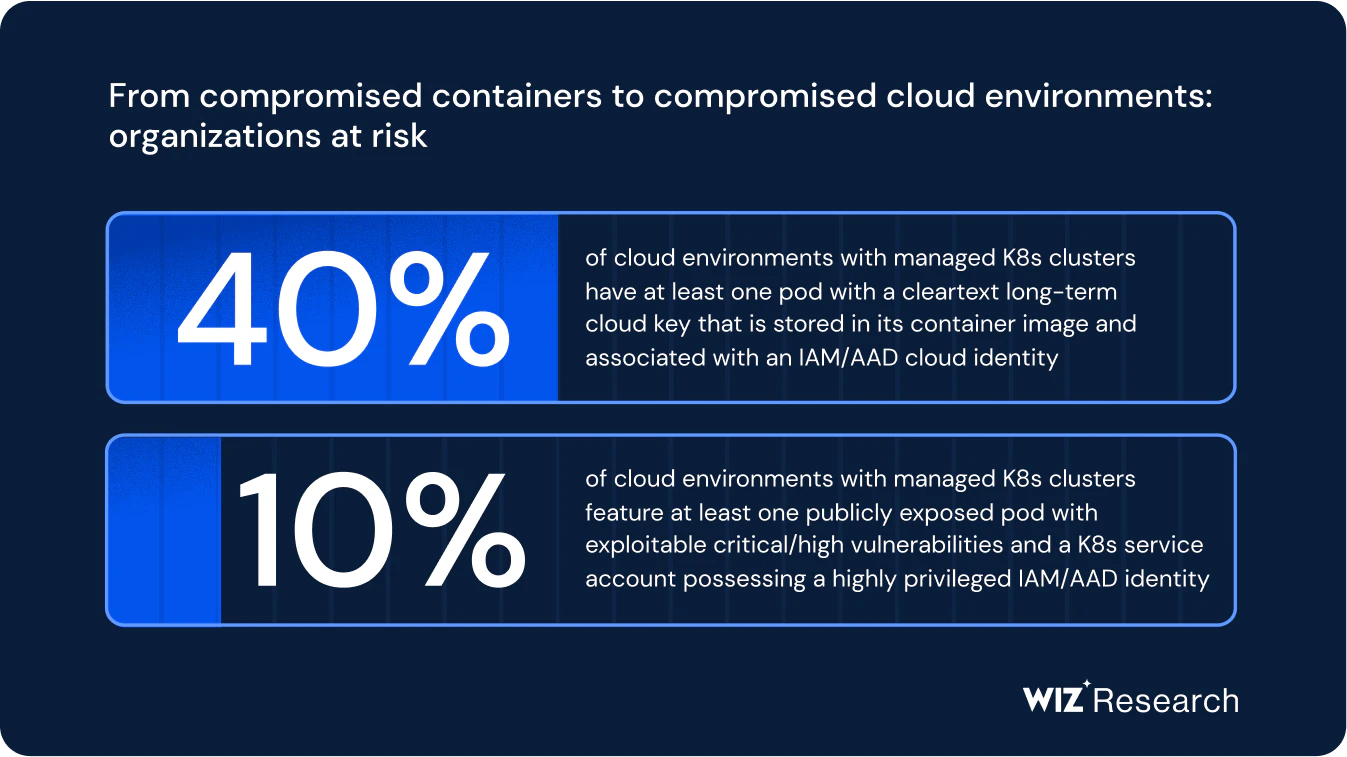
The threat landscape for Amazon EKS continues to evolve, with external and internal risks requiring constant attention. While AWS secures the control plane, customers must defend against threats to worker nodes, workloads, network traffic, and identity configurations.
Several threat categories commonly affect EKS environments:
Exploitable vulnerabilities in Kubernetes components: Attackers exploit vulnerabilities like CVE-2023-3676 (a Kubernetes privilege escalation flaw) and CVE-2023-3089 (a CRI-O container breakout) to gain unauthorized privileges or escape the container runtime to the host node.
Insecure IAM configurations: Overly permissive IAM roles—particularly those associated with Kubernetes service accounts—facilitate privilege escalation and lateral movement. Misconfigured IRSA policies or insufficient RBAC restrictions grant workloads unnecessary access to sensitive AWS resources.
Exposed services and API endpoints: Publicly exposed Kubernetes API servers, misconfigured ingress controllers, or unsecured load balancers provide attackers access to internal services or cluster control.
Weak secrets management: Storing secrets in plaintext within environment variables, ConfigMaps, or unsecured volumes exposes sensitive data to unauthorized users. Failing to rotate or audit these secrets compounds the risk of exposure.
Lack of network segmentation: Without enforced network policies, a single compromised pod allows attackers to move laterally across the cluster. This risk is highest in clusters with flat network topologies that lack default-deny policies.
Internal risks are also significant because misconfigurations often arise from human error or drift over time. For example, a developer may unintentionally grant a pod elevated privileges, or a previously secure workload may drift from its intended configuration during version upgrades or redeployments. These problems intensify in multi-cluster and hybrid environments where inconsistent RBAC rules, varying Kubernetes versions, or diverging IAM policies create security gaps and complicate governance.
Continuous scanning and configuration drift detection are vital for identifying and responding to these changes. Agentless platforms like Wiz provide real-time visibility into posture changes, helping teams detect risks before they become active threats. By understanding these threat patterns, teams can build a defensive strategy tailored to the complexities of EKS and the broader cloud context.
Example: Over‑privileged containers exposed AWS credentials in EKS
In June 2025, researchers discovered that misconfigured EKS containers using EKS Pod Identity exposed AWS credentials through unencrypted HTTP endpoints.
Containers using hostNetwork: true allowed attackers to capture plaintext credentials via packet‑sniffing. Additionally, containers with elevated network permissions (e.g., CAP_NET_ADMIN) could disable the legitimate credential endpoint and run a spoofed service to intercept requests.
Because AWS doesn’t bind retrieved credentials to a specific node, attackers could reuse them to assume elevated IAM roles and access AWS resources across the environment. AWS classified this behavior as a customer-side configuration issue under the shared responsibility model.
This incident illustrates how privilege-escalation risks can arise from configuration choices rather than platform flaws. It underscores the importance of enforcing least‑privilege settings, avoiding host-network mode, and limiting container capabilities.
EKS security best practices and advanced security techniques
Securing Amazon EKS requires more than following baseline recommendations. Successful organizations implement a layered strategy that combines foundational security controls with advanced techniques for both EKS and broader multi-cloud environments.
The following EKS security practices enhance protection across the stack—from identity to workload and runtime—and ensure consistency in hybrid and multi-cluster deployments:
Enforce least-privilege access with IRSA: Use IRSA to map Kubernetes service accounts to dedicated IAM roles with scoped permissions. Limiting access minimizes the blast radius and prevents over-privileged containers from accessing sensitive AWS APIs.
Encrypt data at rest and in transit using AWS KMS and TLS: Leverage AWS KMS to encrypt secrets, logs, and persistent volumes. Enforce TLS for internal service communication using ingress controllers or service meshes to protect against interception and tampering.
Establish continuous monitoring and vulnerability scanning: Integrate tools like Trivy to scan container images during CI/CD. Use platforms like Wiz for agentless, real-time visibility into misconfigurations, toxic identity combinations, exposed secrets, and active runtime risks. These tools correlate data to prioritize critical threats and reduce alert fatigue.
Implement zero trust networking with service meshes: Service meshes like Istio or AWS App Mesh enable microsegmentation and enforce mTLS across service-to-service traffic. This ensures encrypted communication and allows teams to define fine-grained traffic policies and access controls.
Align configurations with industry compliance frameworks: Map infrastructure and workload settings to standards such as SOC 2, ISO 27001, NIST 800-190, and PCI DSS. Many organizations automate this process using policy as code solutions or security platforms with built-in compliance mapping.
Detect anomalous behavior and runtime threats: Use tools that analyze behavior in real time to identify container drift, lateral movement, or privilege misuse. Runtime security complements pre-deployment scanning and is essential in dynamic environments where static configuration checks fall short.
Automate backup and recovery planning: Use tools like Velero to schedule backups of namespaces, resources, and persistent volumes to enable recovery options during outages or ransomware incidents. Pair these backups with disaster recovery playbooks to minimize downtime.
Teams apply these best practices beyond AWS EKS to similar managed services, including Azure Kubernetes Service (AKS) and Google Kubernetes Engine (GKE).
Case study: Over-privileged pod enabled IAM role compromise in EKS
In 2024, Wiz researchers uncovered an attack on a Kubernetes workload running in a production AWS environment. The attacker exploited a known remote code execution vulnerability in an open-source application to gain initial entry. Overly permissive pod privileges and misconfigured security groups enabled the attacker to escalate privileges and abuse the underlying EC2 instance’s IAM role.
The incident stemmed from default network exposure and unrestricted Linux capabilities within the pod. These gaps bypassed segmentation controls and permitted credential misuse. Wiz Research detected the attack through contextual behavior analysis, underscoring the necessity of least-privilege access, hardened pod configurations, and continuous monitoring of cloud activity for signs of misuse.
Managing Kubernetes security across multi-cluster and multi-cloud environments
Organizations operating Kubernetes at scale across cloud providers face increasing complexity in enforcing security, maintaining visibility, and aligning policies. Managing multiple clusters introduces variation in configuration, runtime behavior, and identity integration. Without a centralized model, governance collapses.
Clusters may run in Amazon EKS, AKS, or GKE, each with different defaults and control surfaces. When identity rules, encryption methods, and network segmentation vary, gaps form that attackers can exploit. Without consistent enforcement, even compliant configurations in one environment leave others exposed.
Security leaders must account for provider-specific behavior while standardizing their security posture across environments. The table below highlights critical differences across cloud-native Kubernetes offerings:
| Security capability | EKS (AWS) | AKS (Azure) | GKE (Google Cloud) |
|---|---|---|---|
| IAM model | IAM roles for service accounts | Azure Active Directory with Azure RBAC | IAM with workload identity |
| Encryption at rest | AWS Key Management Service with Customer Master Key (CMK) | Azure Key Vault | Customer-managed encryption keys and defaults |
| Network controls | Calico, security groups, and AWS App Mesh | Azure CNI with Kubernetes network policies | VPC-native networking with Cilium |
| Cluster update strategy | Manual updates via API or eksctl | CLI or Azure Portal–managed upgrades | Optional auto-upgrades through release channels |
Multi-cluster security introduces new forms of drift, including version mismatches, inconsistent policy definitions, and diverging compliance postures. When updates occur on different schedules or IAM roles expand over time, security becomes harder to verify. Configuration drift also occurs when teams manually patch or override settings outside of automated processes.
Security platforms like Wiz support consistent, scalable security across clusters and clouds. Wiz ingests signals across environments and maps them into a unified risk graph. Centralized controls enable organizations to enforce policy, view compliance across environments, and detect runtime risks without deploying agents. By consolidating these signals, security becomes a shared, operational function rather than a fragmented task across environments.
Future-proof your EKS security with Wiz
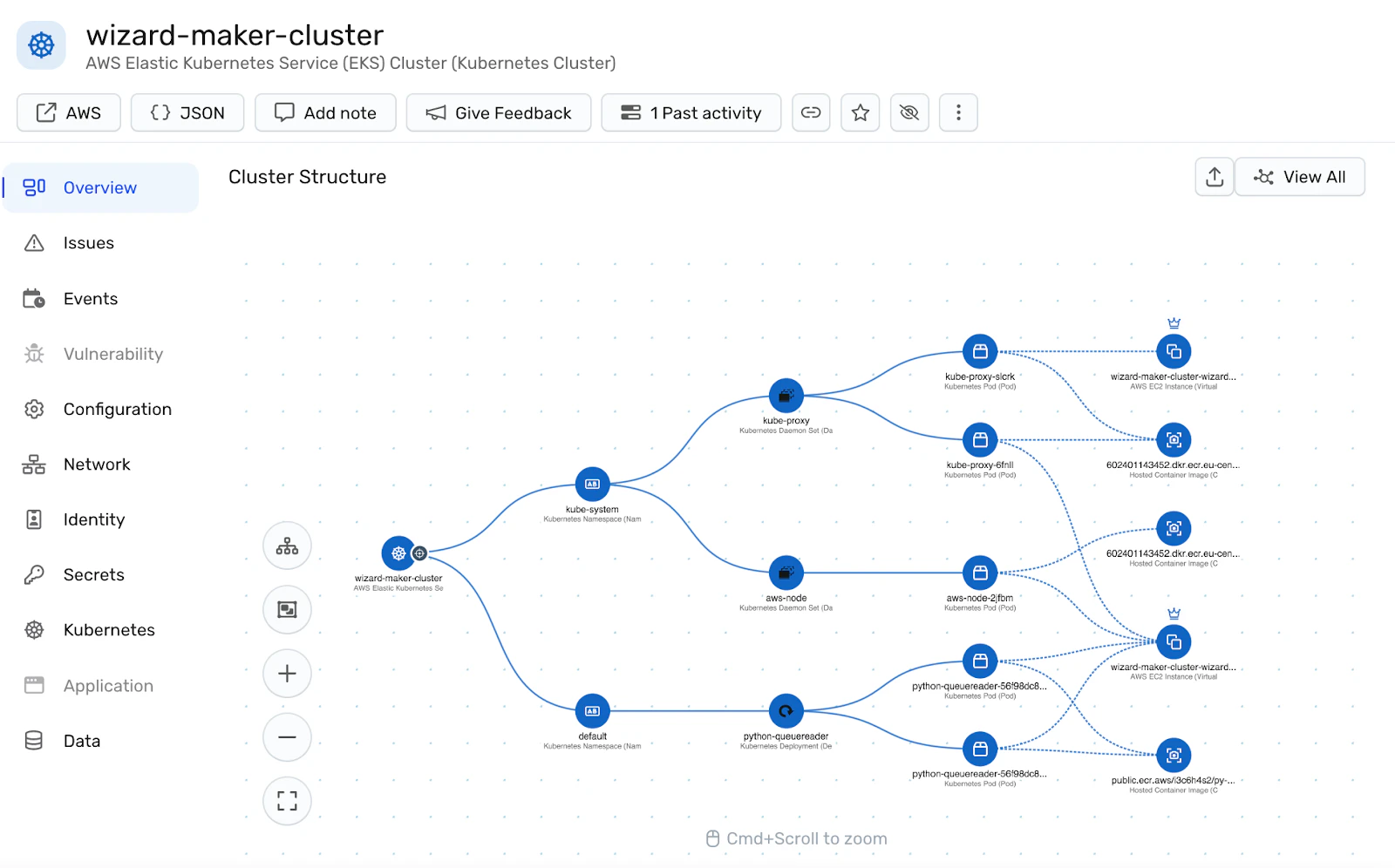
Amazon EKS continues to evolve rapidly as AWS releases new features, configuration models, and service integrations. To keep pace, organizations must continuously align their security posture with these changes across technical and operational layers. Teams treating security as a one-time setup risk falling behind on critical patches, accumulating misconfigurations, and exposing new attack paths.
As a CNAPP, Wiz provides the following container security capabilities to support a forward-looking EKS security strategy:
Run regular posture audits
Frequent audits validate environments against known misconfigurations, privilege misuse, and compliance gaps. Wiz delivers a scalable method to assess vulnerabilities, exposed secrets, network exposure, and toxic identity combinations across EKS clusters. These insights appear within minutes and reflect real-time cloud states, eliminating your reliance on outdated scans or static snapshots.
Enforce policies with OPA and Gatekeeper
Defining policies is only the starting point. Effective enforcement must happen in real-time and remain resilient to drift. Gatekeeper, which integrates with the Kubernetes admission controller, enables this by enforcing custom policies during runtime. Wiz integrates policy as code frameworks with continuous cloud validation to extend these controls beyond Kubernetes, ensuring policies remain enforced during deployment and in production. Establishing uniform security standards across clusters strengthens auditability and compliance tracking.
Track EKS version changes
AWS frequently updates EKS to align with upstream Kubernetes versions, often introducing API deprecations, shifting defaults, and new features that occasionally lead to unexpected behavior. To stay ahead, teams maintain continuous visibility into the release cycle—including EKS-specific enhancements and region availability—to anticipate changes before they impact production clusters.
Security tooling that integrates with both Kubernetes and AWS APIs drives this visibility. These tools provide teams with early alerts to upcoming changes, enabling workload testing, policy adjustments, and configuration validation before rollout.
Wiz streamlines this process by delivering continuous monitoring, real-time context, and compliance tracking across environments. Its agentless architecture accelerates visibility, reduces friction, and empowers security teams to respond quickly as EKS evolves.
Ready to get instant, agentless visibility into your AWS and EKS environments? Start a free AWS Security Assessment today to uncover misconfigurations and hidden risks before attackers do.
Secure your EKS environment
Workload scanning, active runtime protection, and streamlined AWS EKS Audit Logs with Wiz

Other security best practices you might be interested in:
FAQ
Below are common questions about EKS.