



What are application security tools, and why are they important?
Application security (AppSec) tools serve as the control layer between code, infrastructure, and runtime risks, identifying exploitable flaws throughout your software development lifecycle (SDLC). These tools help identify attack paths, allowing developers to fix issues before attackers can exploit them.
In modern, service-oriented stacks, the role of AppSec tools is less about detection volume and more about signal fidelity and context correlation. Organizations use them to assess exploitability, trace vulnerabilities across microservices, and feed prioritized insights into CI/CD or runtime policies pipelines. The best AppSec tools also allow for scalable, data-driven vulnerability reduction through efficient reporting.
The top OSS application security tools by category
Open-source software (OSS) AppSec tools cover a wide range of security needs, from scanning code and detecting exposed secrets to testing application behavior, analyzing software dependencies, and monitoring runtime environments. Each OSS tool category supports a different stage of the security lifecycle.
The list below curates top open-source AppSec tools and organizes them by use case.
Top OSS SCA tools
Software composition analysis (SCA) tools detect known vulnerabilities and compliance issues in your software's open-source components. Here are our top picks:
1. OWASP Dependency-Check
OWASP Dependency-Check identifies known vulnerabilities in third-party libraries by mapping dependencies to their common platform enumeration identifiers and cross-referencing them against vulnerability databases, such as the National Vulnerability Database.
However, because this tool relies on publicly disclosed CVE data, it can’t detect vulnerabilities that haven’t been disclosed or assigned an identifier. As a result, the tool will likely miss zero-days or emerging flaws in dependencies until vendors update their products and publish details of their vulnerabilities.
| Benefits | Use cases |
|---|---|
|
|
2. Retire.js
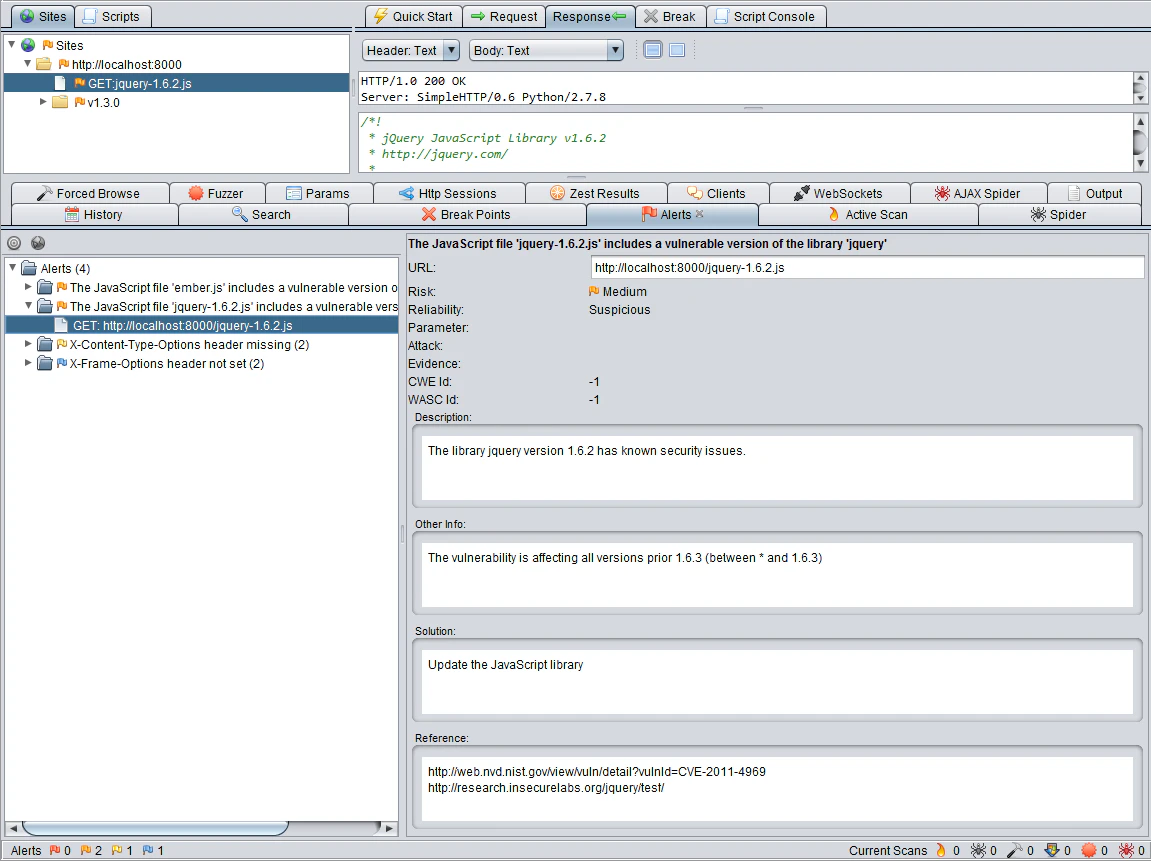
Retire.js detects outdated and vulnerable JavaScript libraries in software and recommends up-to-date or more secure alternatives for immediate remediation.
While efficient at detecting known vulnerabilities, it relies on a private signature repository and file- and URL-matching logic. Due to this reliance, Retire.js may miss vulnerable JS code in custom libraries or inline scripts.
| Benefits | Use cases |
|---|---|
|
|
3. ScanCode
ScanCode is an open-source SCA tool that identifies and inventories open-source components, including their licenses, copyrights, and dependencies. It also provides visibility into the software supply chain, helping your team proactively manage OSS compliance and security risks.
However, because of its primary focus on static scanning of known code artifacts, ScanCode may fail to detect dynamically loaded modules, runtime-only dependencies, or heavily obfuscated components.
| Benefits | Use cases |
|---|---|
|
|
Top secret scanning tools
Secret scanning tools scan code repositories to identify exposed secrets like API keys, tokens, and passwords across codebases, commit histories, and config files. Here are the top open-source AppSec tools for detecting and preventing secret exposure:
1. GitHub Secret Scanning
GitHub Secret Scanning automatically scans GitHub code repositories and commit histories for known secret types. It also uses pattern recognition to identify exposed secrets and alerts repository admins when it detects leaked secrets.
While it’s highly effective in GitHub-hosted environments, secret scanning can occasionally generate false positives or miss secrets that don't match its supported pattern sets.
| Benefits | Use cases |
|---|---|
|
|
2. GitGuardian
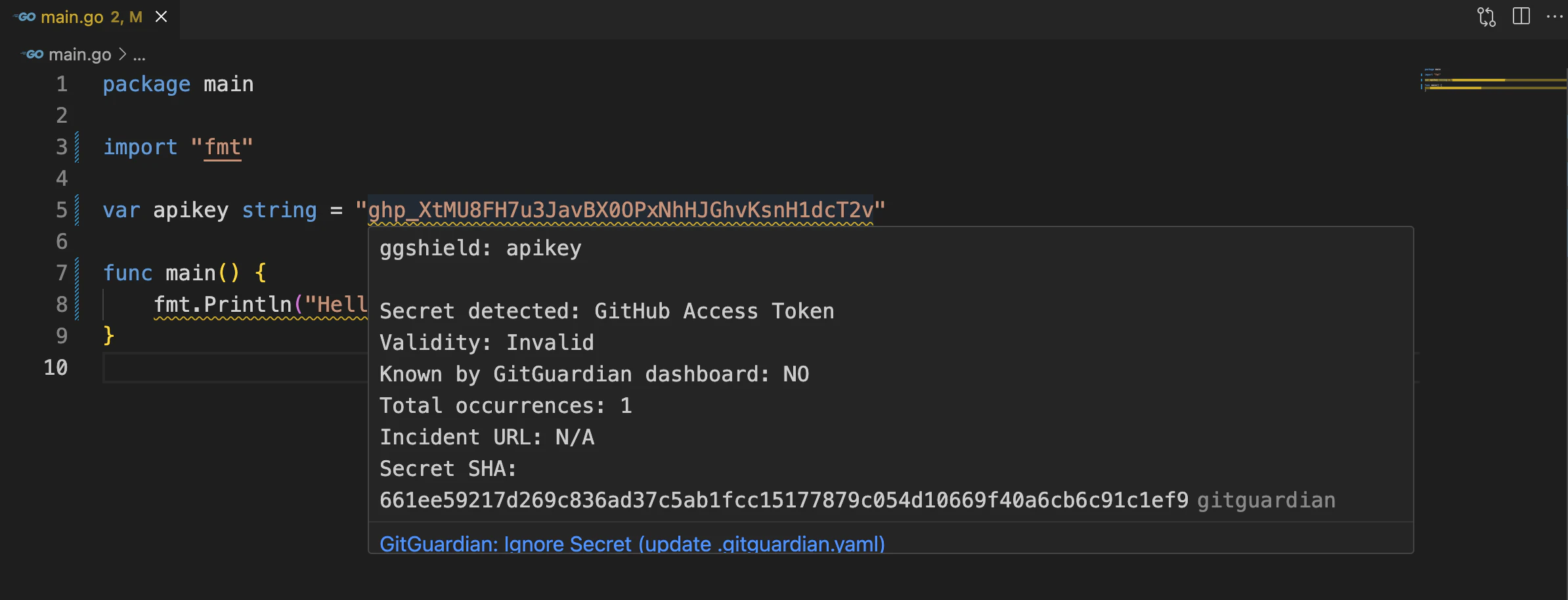
GitGuardian scans public and private repositories for exposed secrets. It helps development and security teams protect sensitive data by integrating seamlessly with major version control systems and CI/CD pipelines.
However, because GitGuardian omits certain file types and binaries, like .jpg, .tar.*, and other excluded paths, it may miss secrets or artifacts hidden in those files.
| Benefits | Use cases |
|---|---|
|
|
3. TruffleHog
TruffleHog runs high-entropy scans on code repositories to detect exposed secrets. It’s also particularly useful for auditing legacy repositories.
However, because it employs an entropy-based approach, TruffleHog may occasionally miss low-entropy secrets or produce false positives and noise in some environments.
| Benefits | Use cases |
|---|---|
|
|
Top SAST tools
Static application security testing (SAST) tools analyze source code, bytecode, and binaries to uncover security flaws such as injection vulnerabilities, insecure APIs, and unsafe coding patterns before deployment. These tools also help teams catch vulnerabilities early in the SDLC by integrating directly into integrated development environments (IDEs) or CI/CD pipelines for continuous code analysis. Here are the top four OSS SAST tools:
1. SonarQube
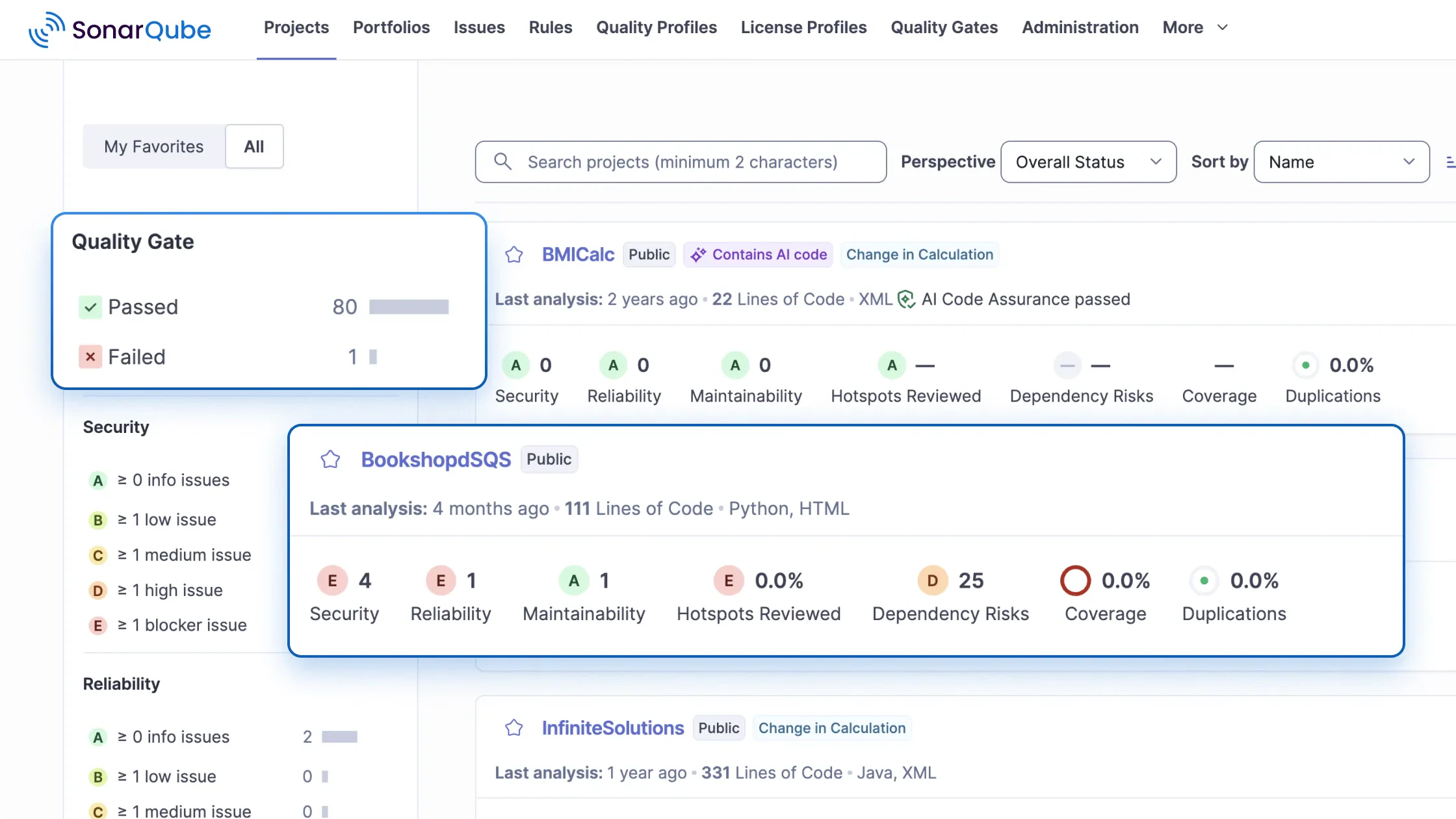
SonarQube performs code security and quality assurance checks on application source code by enforcing secure coding standards on every merge or pull request. It does this by scanning coding patterns against an extensive ruleset that covers the OWASP Top 10, CWE, and SANS standards. With broad language coverage and deep CI/CD integration, it provides DevSecOps teams with actionable, real-time feedback to prevent vulnerabilities before they reach production.
Note that the Community Edition can only analyze the main branch, which means you must upgrade to the paid tier to analyze feature or maintenance branches.
| Benefits | Use cases |
|---|---|
|
|
2. Bearer
Bearer CLI provides tools for assessing software source code, analyzing data flows, and managing API risks. It also enables real-time vulnerability scanning and generates compliance reports.
However, this tool supports only a limited number of programming languages, which may delay its adoption across diverse tech stacks.
| Benefits | Use cases |
|---|---|
|
|
3. Brakeman
Brakeman is a static scanner for Ruby on Rails apps. It runs at all stages of the SDLC, scanning web pages and discovering potential security risks before they go live.
However, the tool is limited to Ruby on Rails and can’t detect vulnerabilities at runtime.
| Benefits | Use cases |
|---|---|
|
|
4. Semgrep
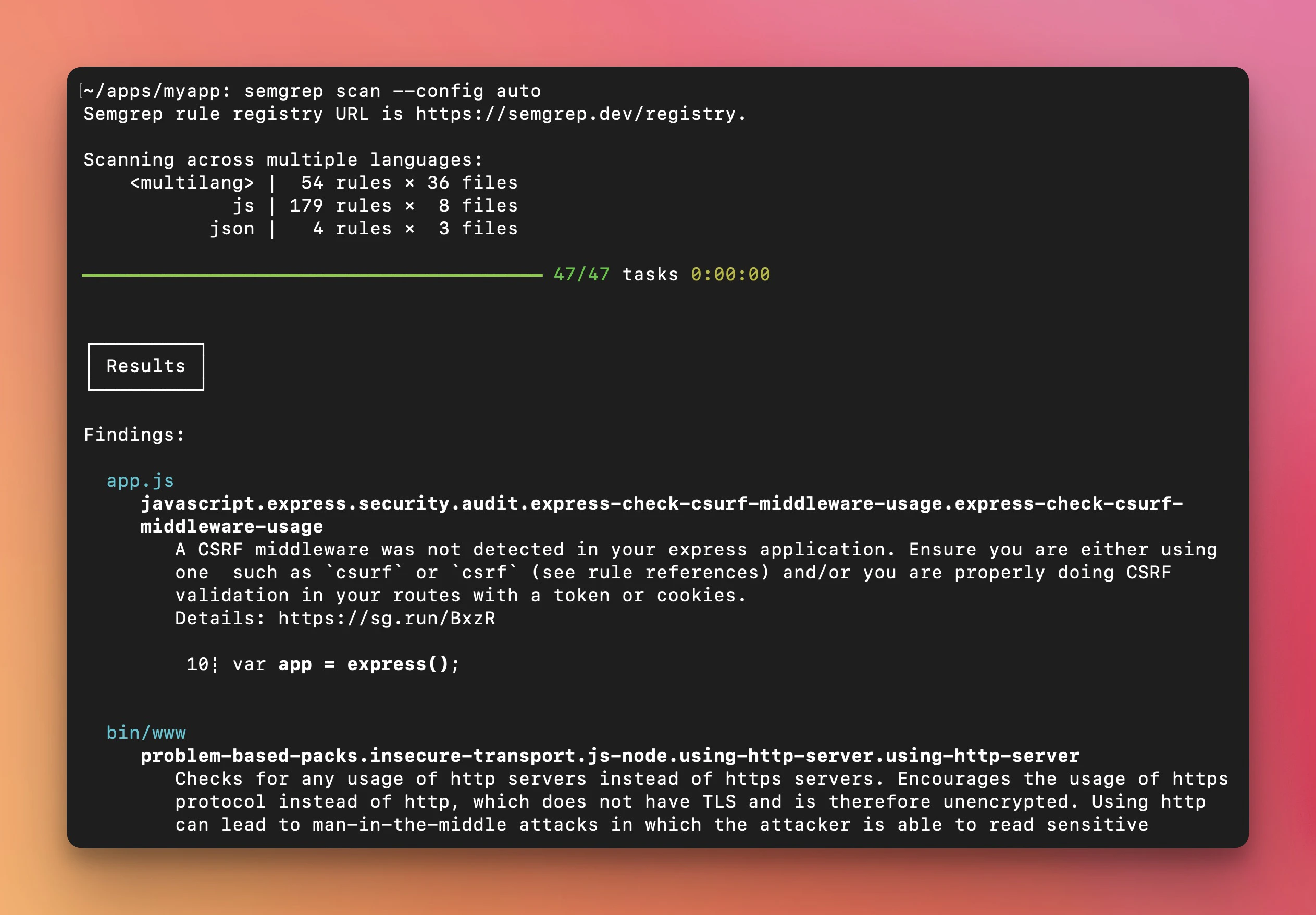
Semgrep is a fast, lightweight, and highly customizable SAST tool for modern DevSecOps workflows. It uses rule-based pattern matching for rapid and precise scanning. With its flexible rule engine and extensive community-driven ruleset, Semgrep helps teams identify code-level vulnerabilities and enforce secure coding practices in real time.
Its Community Edition lacks cross‑file or inter‑function taint/flow analysis. As a result, it may miss vulnerabilities that span multiple files or modules.
| Benefits | Use cases |
|---|---|
|
|
Top DAST tools
Dynamic application security testing (DAST) tools simulate real-world attacks by interacting with running applications to identify vulnerabilities in authentication, input validation, and runtime configurations. Below are some of the leading DAST solutions teams can use to test and harden web applications:
1. Wapiti
Wapiti is a web application crawler that injects payloads into software to detect file disclosure issues, XPath injections, subdomain takeovers, and other common AppSec vulnerabilities.
However, it struggles with heavy JavaScript-based SPAs, so large or modern sites may require tuning and manual validation to avoid noise.
| Benefits | Use cases |
|---|---|
|
|
2. ZAP
Zed Attack Proxy (ZAP) uses crawlers, dictionary lists, and passive scanning to identify security flaws in applications and APIs, including injection vulnerabilities, authentication issues, and misconfigurations.
This versatile, free DAST tool can be GUI-heavy and may require additional tuning for complex architectures. It can also generate false positives without careful configuration.
| Benefits | Use cases |
|---|---|
|
|

3. Nikto
Nikto scans web servers for common vulnerabilities, including dangerous files, outdated server software, Common Gateway Interface (CGI) vulnerabilities, and misconfigurations. It also performs black-box testing without accessing source code, making it suitable for legacy or monolithic web applications where runtime security of server configurations is critical.
However, because it focuses primarily on server-side checks and signature-based detection, Nikto may produce false positives or miss low-entropy secrets or dynamic logic flaws. Also, LiteSpeed compatibility is limited.
| Benefits | Use cases |
|---|---|
|
|
Catch code risks before you deploy
Learn how Wiz Code scans IaC, containers, and pipelines to stop misconfigurations and vulnerabilities before they hit your cloud.

Top penetration testing tools
Penetration testing tools look for vulnerabilities in software apps, networks, and IT systems. These tools also enable security teams to simulate threat actors' actions, identifying deep-seated issues that can expose attack paths in production. Here are the three most popular tools in this category:
1. sqlmap
sqlmap exploits SQL injection vulnerabilities in web apps by executing arbitrary SQL commands. It also tests for vulnerabilities by attempting to gain unauthorized system access, extract sensitive data, take over databases, and perform other malicious actions.
However, sqlmap can become noisy and trigger WAFs or IDSs. You'll also need experienced operators and careful scoping to avoid database damage.
| Benefits | Use cases |
|---|---|
|
|
2. Metasploit
Metasploit is a powerful penetration testing solution that provides a suite of tools, including scanners, payloads, exploits, and evasion modules. It enables extensive manual testing to effectively complement automated AppSec tools that rely on rule-based detection.
While Metasploit provides a unified penetration testing experience, it presents a steep learning curve for new users. Moreover, it can sometimes crash target systems with incorrect payloads and can create false positives.
| Benefits | Use cases |
|---|---|
|
|

3. w3af
The Web Application Attack and Audit Framework (w3af) audits and exploits common web app vulnerabilities, including OS command injection, cross-site request forgery, cross-site scripting, and SQL injection.
However, it can be resource-intensive for large-scale workloads and may struggle to crawl and test browser‑heavy applications like SPAs.
| Benefits | Use cases |
|---|---|
|
|
The State of Code Security Report [2025]
Open-source security tools are essential, but misconfigured repositories and exposed secrets remain some of the biggest threats. The State of Code Security Report 2025 found that secrets exposure in public repos affects 61% of organizations.
Download report
Core features of a good OSS AppSec tool
Choosing an AppSec tool requires a clear evaluation framework that goes beyond checking boxes—it should make clear how effectively the tool will help your team identify, prioritize, and remediate vulnerabilities. Understanding the core capabilities that make a tool practical and reliable is essential, as these features directly impact security outcomes, developer adoption, and long-term maintainability.
Below are some key features to prioritize when assessing OSS AppSec tools:
Contextual risk scoring and exploitability
The best AppSec tools prioritize vulnerabilities based on real-world risk and exploitability, rather than relying solely on beyond static CVE scores. For example, while an OSS scanner might flag a generic “public API” issue, a more capable AppSec platform can trace the risk to an overprivileged IAM role or an exposed secret, revealing hidden risks like potential lateral movement. By providing contextual risk analysis, these tools help your team focus remediation efforts on the flaws that matter most, instead of chasing low-impact or irrelevant alerts.
Runtime awareness and traceability
Beyond static or dependency scanning, practical AppSec tools offer runtime visibility and traceability. They clearly show how vulnerabilities manifest at runtime. This helps developers understand the attack paths, data flows, and configurations that make a flaw exploitable, enabling them to turn raw alerts into actionable insights.
Scalability and performance on large codebases
AppSec tools should maintain high performance across large codebases or complex dependency trees because slow scanning or reporting can bottleneck development workflows and delay vulnerability remediation. You should prioritize tools that offer fast scanning, efficient reporting, and minimal impact on build pipelines.
Up-to-date vulnerability and compliance coverage
Because outdated information can create critical security gaps and lead to noncompliance, AppSec tools require continuous updates to their vulnerability databases and compliance mappings. To address this, choose tools that stay up to date with CVEs and regulatory standards. This practice ensures your team detects emerging risks promptly and aligns remediation efforts with business and compliance goals.
How to choose the right OSS AppSec tools for your stack
Selecting the right open-source AppSec tools requires evaluating their feature sets, interoperability with your development workflow and software architecture, and alignment with your organizational goals.
Here are some key considerations for evaluating OSS AppSec tools based on the above requirements:
Project scale and complexity: Large or distributed codebases require tools that scale efficiently and maintain performance. Small projects, however, may prioritize ease of use and rapid setup.
Language and framework support: The tool should cover all programming languages, frameworks, and dependency types in your stack to avoid blind spots.
Pipeline integration: Seamless integration into CI/CD pipelines, IDEs, and SCM systems enables shift-left security, providing developers with real-time feedback without slowing down releases.
False-positive rates and accuracy: Tools with low-noise, context-aware risk scoring enable teams to focus on exploitable vulnerabilities, thereby improving overall accuracy.
Maintenance burden and community activity: You should also evaluate whether the tool receives regular updates, has active contributors, and offers accessible documentation to minimize the need for manual rule management, plugin installation, and updates to vulnerability data.
Open-source tools address different layers of application security, but they don't solve every security challenge. Enterprises can achieve the best results when they combine these tools with unified platforms that provide integrated SAST, DAST, SCA, secret scanning, contextual analysis, and risk prioritization in a single pane. Integrating OSS AppSec tools into an end-to-end system like Wiz enables organizations to detect security issues and maintain regulatory standards efficiently.
Incorporating OSS AppSec tools into a larger security strategy
While open-source AppSec tools help identify common exposures—like insecure code, outdated dependencies, exposed secrets, and misconfigurations—they typically cover only specific phases of the security lifecycle. This fragmented coverage can create security gaps, particularly in runtime monitoring, context correlation, and risk assessment.
To address these limitations and consolidate your organization's security posture, consider integrating OSS tools with a unified platform like Wiz.
How Wiz enhances OSS AppSec tools
Wiz helps teams get the most out of their Open Source Software (OSS) AppSec tools by pulling their isolated insights into a single, unified platform. While OSS tools are excellent for spotting specific vulnerabilities in code, Wiz adds the critical "cloud context" needed to understand if those vulnerabilities are actually dangerous in production.
Here is how Wiz makes the difference:
Continuous discovery: Wiz automatically inventories applications, services, and runtime components across environments. Unlike OSS tools that require pre-defined scans or static configurations, our platform dynamically discovers workloads and dependencies to ensure that even ephemeral or shadow applications are under coverage.
Runtime visibility: It correlates runtime behavior with potential security issues. This runtime awareness helps teams identify exploitable flaws that static scanners may miss, such as misconfigured endpoints, excessive permissions, or untested code paths.
Context-aware risk assessment: Our platform integrates findings from SAST, DAST, SCA, secret scanning, and pen-testing workflows, correlating them with runtime data to reduce false positives. It also prioritizes issues based on exploitability, impact, and application context.
Automated alerting and custom policy enforcement: Wiz provides built-in alerts and integrates with CI/CD, ticketing, and SOAR platforms to automate remediation workflows. Teams can also define custom policies within the platform to enforce organization-specific standards across all their applications.
By integrating OSS AppSec tools with Wiz, your organization can fill critical coverage gaps, gain real-time visibility, and prioritize remediation based on actual risk. This end-to-end approach gives security and development teams the insights they need to act quickly without limiting innovation.
Want to learn more about how Wiz unifies application security phases in one end-to-end platform? Book a demo today to see Wiz in action, uncover hidden risks, streamline remediation, and strengthen your cloud defenses.
Catch code risks before you deploy
Learn how Wiz Code scans IaC, containers, and pipelines to stop misconfigurations and vulnerabilities before they hit your cloud.
FAQ
Related Tool Roundups