

What is AWS cloud security?
Amazon Web Services (AWS) cloud security is the set of security practices, tools, and shared responsibilities that protect workloads, applications, and data hosted on AWS.
At its core, AWS uses a shared responsibility model:
AWS secures the cloud, including physical infrastructure, networking, and managed services.
Customers secure what’s in the cloud, such as data, configurations, access controls, and applications.
This model is critical because AWS grows by nearly 40 new services and 1,600 new actions each year, with API calls increasing about 20% annually. More services and more actions mean more potential misconfigurations, more permissions to manage, and more opportunities for attackers if controls aren’t in place.
In today’s cloud native environments—with microservices, containers, and serverless architectures—the attack surface shifts constantly. Missteps like an over-permissioned IAM role or an unencrypted data store can quickly escalate into high-impact risks.
For example, an unsecured Amazon Simple Storage Service (S3) bucket led to the April 2025 leak of over 21 million screenshots, potentially exposing sensitive information. Strong AWS cloud security not only prevents incidents like this but also helps teams innovate without slowing down.
See Wiz Cloud in Action
In your 10 minute interactive guided tour, you will:
Get instant access to the Wiz platform walkthrough
Experience how Wiz prioritizes critical risks
See the remediation steps involved with specific examples
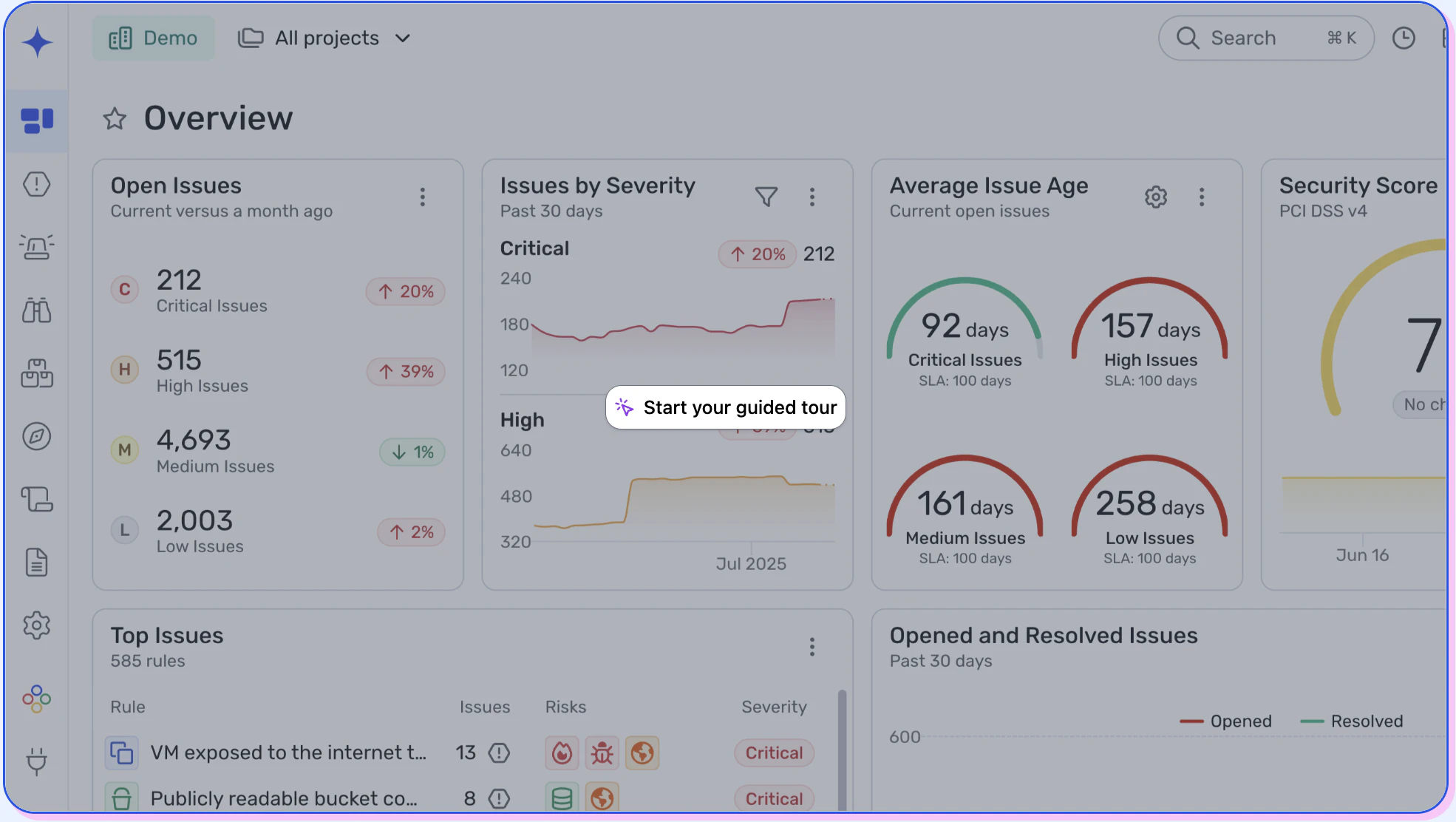
Which components of AWS architecture need to be secured?
AWS offers a wide range of services, but only some are foundational to cloud architectures. These components require special attention when forming security strategies:
Elastic Compute Cloud (EC2): EC2 provides virtual servers in the cloud and runs applications on them.
Risk: Unpatched operating systems, weak SSH keys, or open ports can allow attackers remote access to workloads.
Virtual Private Cloud (VPC): VPC creates a logically isolated section of the AWS Cloud, allowing secure deployment of resources within a defined network.
Risk: Misconfigured security groups or overly broad CIDR blocks can expose internal workloads to the public internet.
S3: S3 stores objects in the cloud and supports use cases such as backups, data lakes, and static web content.
Risk: Public bucket permissions and unencrypted data are still among the most common causes of AWS data leaks.
Relational Database Service (RDS): RDS manages relational databases and supports engines like MySQL, PostgreSQL, and SQL Server to ensure scalability and automated backups.
Risk: Databases left with default credentials or open network access can leak sensitive customer or application data.
Lambda: Lambda executes code without requiring users to set up or manage servers and adapts dynamically to workload demands.
Risk: Over-permissioned IAM roles or unvalidated input in serverless functions can be exploited for privilege escalation.
Amazon Machine Image (AMI): An AMI provides a pre-configured virtual appliance, including the operating system, application server, and applications needed to launch an instance.
Risk: Using outdated or unverified AMIs can introduce vulnerabilities or hidden malware at deployment.
Without robust security, each of these components could provide a potential entry point for malicious actors.
AWS Security Best Practices [Cheat Sheet]
This cheat sheet goes beyond the essential AWS security best practices and offers actionable step-by-step implementations, relevant code snippets, and industry- leading recommendations to fortify your AWS security posture.

What AWS cloud security best practices should you implement?
Implementing AWS cloud security has its challenges, but the following best practices can help you protect your environment effectively. Here’s what to prioritize and how to put each into practice:
1. Enforce the principle of least privilege
The principle of least privilege (PoLP) ensures every user, system, and application in AWS operates with only the permissions needed and nothing more. Limiting access reduces the chance of attackers exploiting overbroad roles.
How to apply it:
Use role-based access controls (RBAC) to assign permissions by job function.
Apply IAM policies using AWS IAM Access Analyzer to validate permissions and remove rights that aren’t in use.
Regularly audit roles and temporary credentials to catch privilege creep.
Automate guardrails with IaC templates for consistent permissions across accounts.
Wiz advantage: Wiz maps identities, permissions, and cloud resources in its Security Graph, revealing toxic combinations—like admin accounts connected to internet-facing workloads—and prioritizing them for remediation.
2. Scan IaC before deploying
Infrastructure as Code (IaC) defines your environment, but insecure templates can replicate risk at scale. Scanning before deployment prevents misconfigurations from reaching production.
How to apply it:
Integrate IaC scanning into CI/CD pipelines via tools like Terraform or CloudFormation.
Enforce policies for encryption, logging, and access control at the template level.
Block risky builds automatically instead of fixing them post-deployment.
Wiz advantage: Wiz analyzes templates pre-deployment and correlates findings with runtime risks so teams can address the exposures that matter most.
3. Implement end-to-end encryption
Encryption protects data confidentiality at rest, in transit, and in use. Even if attackers gain access, encrypted data remains unreadable.
How to apply it:
Enable default encryption with AWS KMS for S3, EBS, and RDS.
Enforce TLS for service and API communication.
Rotate and restrict AWS access keys through IAM policies.
Wiz advantage: Wiz continuously scans for unencrypted data paths and highlights where missing encryption exposes sensitive assets or creates attack paths.
4. Simplify threat detection with centralized logging and monitoring
Centralizing logs provides a single source of truth for spotting AWS security risks as early as possible.
How to apply it:
Enable CloudTrail and CloudWatch to capture and store API and service logs.
Aggregate findings with Security Hub and AWS Organizations for unified visibility.
Automate alerts for unusual activity like privilege escalation or unauthorized API calls.
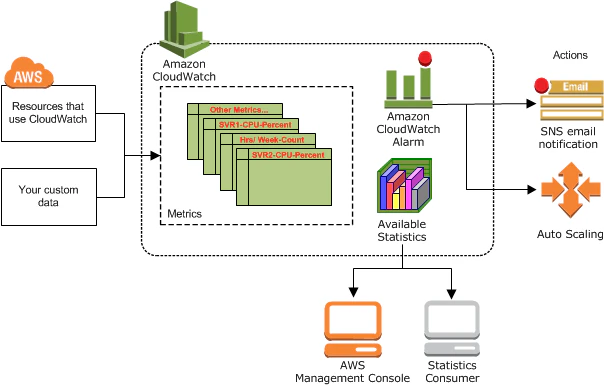
Wiz advantage: Wiz integrates with CloudTrail and GuardDuty to correlate log data with configurations, permissions, and vulnerabilities—turning noise into actionable risk maps.
5. Automate compliance checks
Manual cloud compliance reviews can’t keep pace with AWS’s speed. Automated checks maintain alignment with frameworks such as PCI DSS, HIPAA, and GDPR.
How to apply it:
Use AWS Config and Security Hub to continuously evaluate resources against compliance rules.
Automate reports and dashboards to track compliance posture in real time.
Wiz advantage: Wiz maps AWS resources to 100+ frameworks, flags violations, and generates audit-ready evidence—eliminating the manual prep that slows audits.
6. Harden serverless and containers
Serverless functions and containers accelerate development but expand the attack surface if misconfigured.
How to apply it:
Scan container images for vulnerabilities before pushing to registries.
Apply least privilege policies to Lambda and ECS tasks.
Monitor runtime drift and anomalies to detect active threats.
Wiz advantage: Wiz provides agentless, continuous scanning at both build and runtime, linking vulnerabilities to real attack paths.
AWS Security Foundations For Dummies
Everything you need to know to protect your AWS environment

7. Manage third-party risk
Third-party tools and integrations often connect directly to AWS. If unmanaged, they can become breach entry points.
How to apply it:
Audit vendor IAM roles and API keys regularly.
Apply zero-trust principles and grant access only as needed.
Continuously monitor integrations for unauthorized activity.
Wiz advantage: Wiz detects excessive vendor permissions and external integrations that create potential breach vectors.
8. Limit public exposure
Publicly accessible AWS resources—like S3 buckets or EC2 instances—dramatically increase your attack surface.
How to apply it:
Restrict access via VPCs, security groups, and ACLs.
Block public S3 access by default and enable access logs.
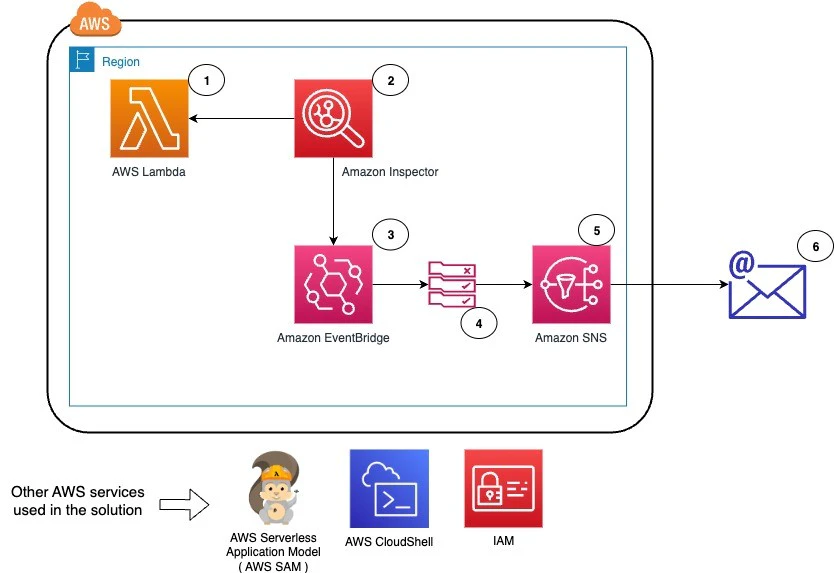
Continuously scan for internet-facing endpoints with tools like AWS Inspector.
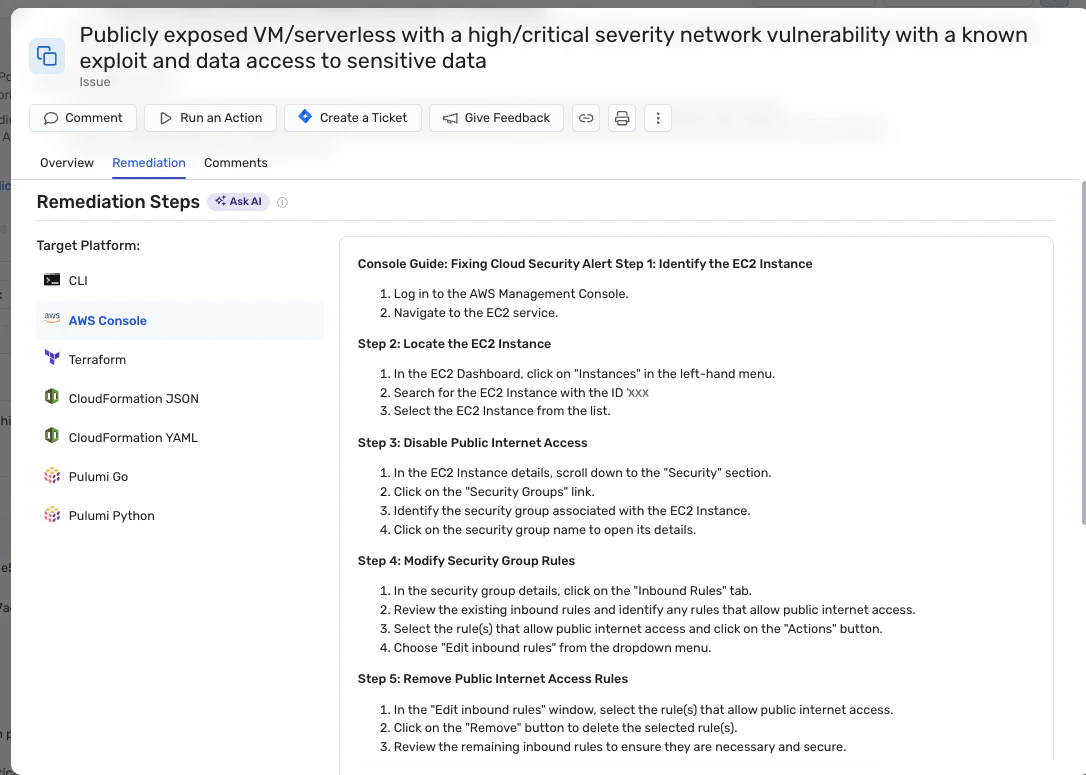
Wiz advantage: Wiz automatically detects and prioritizes public exposure risks, linking them to sensitive data paths for rapid mitigation.
9. Perform backup and disaster recovery planning
Backups and disaster recovery (DR) protect against data loss from breaches, outages, or human error.
How to apply it:
Use AWS Backup to schedule automated snapshots of critical workloads.
Test restore procedures to validate recovery objectives.
Encrypt and isolate backups from production systems.
Wiz advantage: Wiz identifies unprotected or unencrypted workloads and visualizes how DR gaps could impact critical systems.
What are the main challenges of implementing AWS security?
Even with AWS’s built-in security services, many organizations still struggle to implement defenses effectively. The most common challenges include:
Configuration drift: As environments scale, AWS resource settings often drift from secure baselines. AWS Config and CloudFormation drift detection can identify when IAM policies, security groups, or encryption settings no longer match compliance templates. Continuous monitoring through Wiz or Config helps catch these deviations early and prevent high-risk misconfigurations from persisting.
Overexposed resources: Publicly accessible S3 buckets, EC2 instances, or API Gateway endpoints remain a top AWS risk. Use IAM Access Analyzer and AWS Security Hub to detect open access and combine that with Wiz’s continuous scans to map internet exposure and prioritize the riskiest assets before attackers find them.
Incomplete logging and monitoring: Missing or misconfigured CloudTrail or VPC Flow Logs can leave blind spots in activity tracking. Centralizing logs with CloudWatch and Security Hub, then correlating them with Wiz’s Security Graph, provides complete visibility into who accessed what, when, and how—critical for early threat detection.
Serverless and container gaps: AWS-native workloads like Lambda, ECS, and EKS often fall outside traditional security checks. Missing runtime monitoring or outdated base images can lead to privilege escalation or supply chain risks. Integrate Amazon Inspector and Wiz runtime visibility to surface vulnerable functions and container images automatically.
Incident response weaknesses: Delayed response usually stems from siloed data and manual playbooks. AWS GuardDuty findings, combined with Security Hub automation and Step Functions, can trigger standardized response actions. Layering Wiz’s attack-path context helps teams triage and remediate quickly when alerts fire.
Compliance and audit gaps: AWS offers Audit Manager, Config Conformance Packs, and Security Hub standards for PCI DSS, HIPAA, and CIS benchmarks—but these don’t always cover real-world drift. Wiz automates continuous compliance mapping across AWS accounts, highlights violations, and generates audit-ready evidence to close gaps proactively.
Even small gaps can escalate into critical attack paths, so regular AWS security health assessments are crucial. While running these assessments consistently is key to building a stronger AWS security posture, it can be hard to know where to start.
How to assess your AWS security health
Identifying challenges is only the first step. To maintain a strong AWS security posture, teams need a consistent way to measure progress, detect drift, and validate that controls actually work. A structured assessment framework turns cloud security from a reactive checklist into a continuous improvement cycle.
Here’s how to evaluate your AWS security health over time and ensure your environment stays aligned with both business and compliance goals:
1. Establish your security baseline
Start by defining what “secure” looks like in your environment. Use AWS Config, AWS Well-Architected Tool, and Conformance Packs to codify security and compliance requirements as measurable baselines.
🛠️ Action step: Run a full baseline scan quarterly and after every major infrastructure change. Tools like Wiz can map your AWS configurations to CIS, PCI DSS, or NIST controls and highlight deviations from your defined standard.
2. Detect configuration drift and exposure
Even well-secured environments degrade as new services spin up and permissions change. Continuous monitoring through AWS Config and Security Hub helps detect drift, while Wiz correlates these findings with internet exposure and sensitive data paths to prioritize what matters most.
🛠️ Action step: Set up automated drift detection alerts for IAM roles, security groups, and encryption policies to catch high-risk deviations early.
3. Correlate and contextualize activity
Logs tell you what’s happening in AWS, but only context reveals why. Use AWS CloudTrail and VPC Flow Logs to capture account activity and enrich that data with GuardDuty findings and Wiz’s Security Graph to trace behaviors back to specific identities, workloads, or attack paths.
🛠️ Action step: Centralize all activity data in CloudWatch Logs Insights or Security Hub, then schedule a weekly review of high-risk patterns, such as privilege escalation or data exfiltration attempts.
4. Evaluate control performance
AWS services like GuardDuty, Inspector, and Security Hub are only effective if they’re fully deployed, configured, and correlated. Regular control validation ensures alerts are meaningful and coverage is complete.
🛠️ Action step: Conduct biannual “control health checks” comparing your tool outputs against Wiz’s risk graph to identify blind spots and underperforming detections.
5. Validate least privilege and account boundaries
Cross-account permissions, shared roles, and unused credentials create invisible risk. Tools like IAM Access Analyzer and Wiz identity mapping reveal where permissions exceed business needs or cross security boundaries.
🛠️ Action step: Generate and review least-privilege reports monthly. Remove unused roles and tighten policies to ensure separation between production, development, and testing environments.
6. Prioritize and act on findings
Assessments are only valuable if they drive remediation. Use AWS Inspector to surface vulnerabilities, Security Hub to consolidate findings, and Wiz to correlate them with exploitable attack paths. This layered approach ensures you focus on issues that can actually lead to compromise.
🛠️ Action step: Implement a triage workflow: critical exposures fixed within 24 hours, medium-risk issues within a sprint, and low-risk drift tracked through dashboards.
Enhance your AWS cloud security with Wiz
Wiz helps organizations identify and remediate critical risks in their AWS environments. Our cloud native security solution integrates with over 50 AWS services to provide complete visibility into your cloud estate and uses machine learning to detect risks that traditional AWS security tools often miss.
Wiz works with AWS by providing:
Visibility and context: Wiz integrates with AWS services to collect logs and other resource data, then applies machine learning to identify risk patterns. For example, Wiz can integrate with AWS CloudTrail to collect logs from your AWS resources and use machine learning to identify patterns that indicate suspicious activity.
Remediation recommendations: Once Wiz detects a risk, it provides remediation recommendations, such as "change the password for this user" or "enable two-factor authentication for this resource."
Remediation automation: Wiz can automate fixes for some risks, reducing the time and effort necessary to keep your AWS environments secure.
To see how Wiz can help you detect and address issues, schedule a free, 1-on-1 AWS security assessment with our team today. It’s the fastest way to find out how secure your current AWS environment is and start implementing fixes.
Agentless Full Stack coverage of your AWS Workloads in minutes
Learn why CISOs at the fastest growing companies choose Wiz to help secure their AWS environments.

Other security best practices you might be interested in: