

Amazon Web Services (AWS) offers a wide range of security tools and features, and organizations often explore how these capabilities fit into their broader cloud security strategy. With many services available, teams may evaluate where to begin, how each tool applies to their environment, and which additional layers of visibility or context they may need.
This article provides an overview of commonly used AWS security services along with examples of third-party integrations that some organizations adopt to support monitoring, detection, compliance, and operational workflows. The goal is to help readers understand how these tools work, where they are typically applied, and how they can contribute to an organization’s overall cloud security posture.
Eliminate Blind Spots in AWS
Learn why CISOs at the fastest growing companies choose Wiz to help secure their AWS environments.

The need for AWS security tools today
Organizations operating in AWS often begin by using the native security services available within the platform. These tools support identity and access management, data protection, network and application controls, compliance monitoring, and threat detection, and they form an important foundation for securing workloads and resources across an AWS environment.
AWS’s security offerings are commonly grouped into the following categories:
Identity and access management (IAM)
Data protection
Network and application protection
Compliance management
Threat detection
In the sections that follow, this article outlines key AWS services within each category and describes how they are typically used. It also highlights areas where organizations may choose to complement AWS’s native capabilities with additional tools based on their architecture, operational needs, or security objectives.
3 stellar AWS compliance management tools
AWS provides tools like AWS CloudTrail and AWS Config to help you stay compliant by tracking resource changes and auditing configurations. These resources strengthen governance and align with regulatory expectations.
1. AWS CloudTrail
AWS CloudTrail gives you visibility into user and resource activity across your AWS environment. By logging all changes and updates, CloudTrail helps you maintain a secure and compliant AWS setup while supporting operational and risk auditing.
CloudTrail offers several key features:
Comprehensive API activity logging: Get detailed logging for all API calls across your AWS environment and a complete audit trail for security analysis and operational troubleshooting.
import boto3
from datetime import datetime

cloudtrail = boto3.client('cloudtrail')

response = cloudtrail.lookup_events(
    LookupAttributes=[
        {
            'AttributeKey': 'EventName',
            'AttributeValue': 'ConsoleLogin'
        }
    ],
    StartTime=datetime(2025, 2, 1),
    EndTime=datetime(2025, 2, 21)
)
Network activity events for VPC Endpoints: Leverage CloudTrail for network activity events to gain enhanced visibility into API activity that traverses VPC endpoints.
aws cloudtrail create-trail --name my-trail --s3-bucket-name my-bucket \
--include-global-service-events --is-multi-region-trail \
--enable-log-file-validation \
--event-selectors '[
  {
    "ReadWriteType": "All",
    "IncludeManagementEvents": true,
    "DataResources": [
      {
        "Type": "AWS::S3::Object",
        "Values": ["arn:aws:s3:::my-bucket"]
      }
    ],
    "ExcludeManagementEventSources": [
      "kms.amazonaws.com",
      "rdsdata.amazonaws.com"
    ]
  }
]'
Real-time monitoring: Integrate CloudTrail with Amazon CloudWatch Events to enable real-time monitoring and automated responses for specific API activities.
{
  "source": ["aws.cloudtrail"],
  "detail-type": ["AWS API Call via CloudTrail"],
  "detail": {
    "eventSource": "s3.amazonaws.com",
    "eventName": ["PutObject", "DeleteObject"]
  }
}
Insights: Proactively identify unusual API activity patterns—such as excessive resource provisioning, elevated error rates, or anomalous user behavior—for rapid investigation and remediation of potential security or operational issues.
# Python code snippet to get insights events
insights = cloudtrail.lookup_events(InsightSelectors=[{'InsightType': 'ApiCallRateInsight'}])
for insight in insights['Events']:
    print(insight['EventName'], insight['InsightDetails'])
2. AWS Config
AWS Config provides organizations with a clear view of their AWS resources, configurations, and dependencies. It also tracks changes and lets you evaluate configurations against your desired setup, which can help you keep your AWS environment secure and compliant.
Key features include:
Resource inventory: Audit and review configurations across your environment and use AWS Config to track resources across multiple accounts with AWS Organizations integration. Custom tagging can also help you categorize resources granularly.
# Python code snippet to list discovered resources
import boto3

config = boto3.client('config')
resources = config.list_discovered_resources(resourceType='AWS::EC2::Instance')
for resource in resources['resourceIdentifiers']:
    print(resource['resourceId'])
Advanced configuration history: Compare configurations across time periods and detect anomalous changes with machine learning to maintain a clear audit trail.
Configuration change notifications: Set up granular SNS notifications with custom filtering to receive real-time alerts on critical configuration changes. Integrations with popular DevOps tools like Slack or PagerDuty can give your team immediate notifications as well.
Compliance auditing: Implement custom compliance checks against your internal policies and external regulatory standards. AWS Config Rules can also automate continuous compliance monitoring and generate detailed reports for auditors.
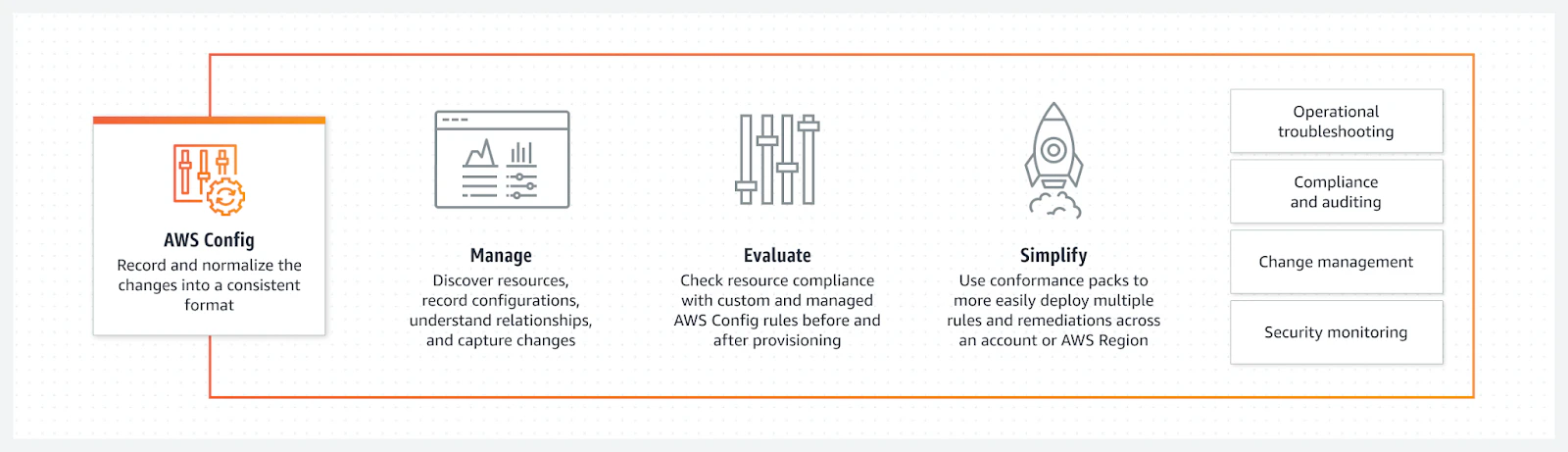
The following illustration shows how AWS Config integrates with other cloud services:
3. AWS Security Hub
AWS Security Hub streamlines security and compliance management across your AWS ecosystem. Consolidating findings from AWS services and third-party tools provides you with a unified view, which can help you focus on critical security alerts and maintain a strong security posture.
AWS Security Hub’s features include:
Automated security checks: Leverage Security Hub’s integration with AWS Config to automate security best practice checks. You can then create custom security checks using AWS Lambda to address your organization’s specific security requirements.
Integrated AWS services: Connect Security Hub with various AWS services and third-party tools to create a comprehensive view of your security posture and compliance findings. Then, use the AWS Security Finding Format to normalize and analyze security data from multiple sources.
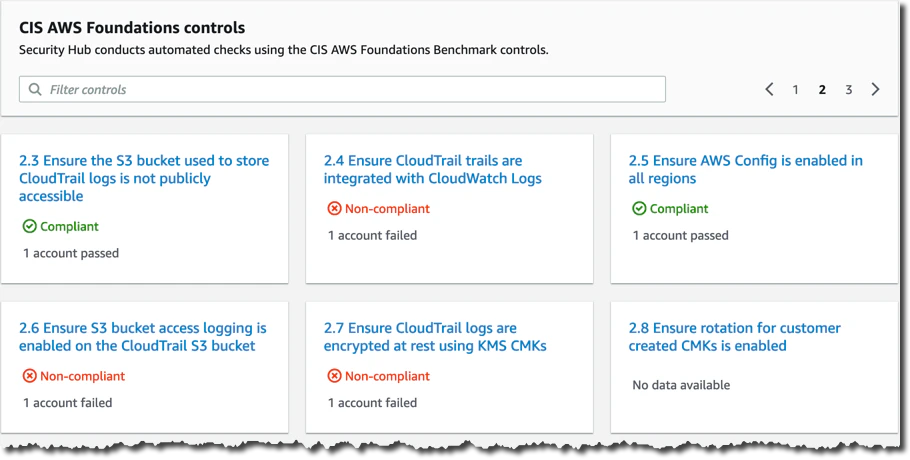
Compliance standards: Monitor and evaluate your AWS resources against frameworks like CIS AWS Foundations, PCI DSS, and NIST. You can also create custom controls to align with your organization’s unique compliance requirements.
Centralized dashboard: Aggregate findings from multiple AWS accounts and services into one dashboard for better security and compliance insights. Custom actions can help you automate response and remediation workflows directly from the Security Hub console.
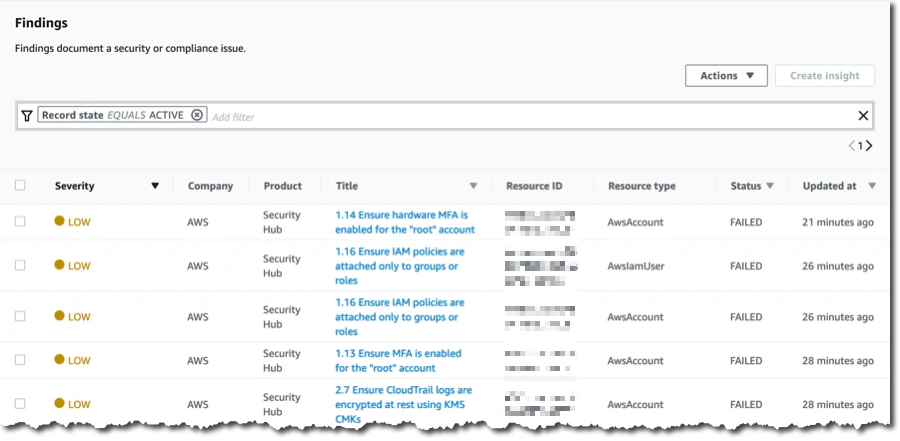
Security Hub also allows you to filter and prioritize findings to quickly identify and respond to the most urgent security threats.
2 top threat detection tools for AWS
AWS provides tools that continuously monitor and detect potential threats to your AWS accounts and workloads. These services use machine learning and threat intelligence feeds to identify and respond to security risks.
1.Amazon GuardDuty
Amazon GuardDuty is an advanced threat detection service that integrates seamlessly into the AWS ecosystem. By continuously scanning for malicious or unauthorized activities, GuardDuty helps you keep your AWS accounts and workloads secure, even as new threats emerge.
GuardDuty’s API integrates threat detection into existing security workflows and SIEM systems. Your team can also use AWS Lambda functions to automate responses to GuardDuty findings and enable rapid threat mitigation.
Key features include:
Anomaly detection: Continuously monitor AWS environment activity and identify unusual patterns that may indicate potential threats and anomalies, such as unusual API calls, suspicious port scanning, and compromised EC2 instances.
Machine learning: Detect new threats—even those you’ve never seen before—by leveraging GuardDuty’s evolving machine learning capabilities, as in the example below:
# Note: GuardDuty uses machine learning internally and its findings reflect its ML capabilities
findings = guardduty.list_findings(DetectorId=detector['DetectorId'])
for finding in findings['FindingIds']:
    print(finding)
Unusual API calls: Receive alerts for unexpected or suspicious API calls that could signal malicious activity.
# Python code snippet to filter findings related to unusual API calls
criteria = {
    'type': [{'Value': 'Recon:IAMUser/UnusualAPIActivity', 'Comparison': 'CONTAINS'}]
}
unusual_api_findings = guardduty.list_findings(DetectorId=detector['DetectorId'], FindingCriteria=criteria)
for finding in unusual_api_findings['FindingIds']:
    print(finding)
Unauthorized deployments: Detect unexpected resource deployments that may indicate a compromised account or misconfiguration.
AWS Security Best Practices [Cheat Sheet]
This cheat sheet goes beyond the essential AWS security best practices and offers actionable step-by-step implementations, relevant code snippets, and industry- leading recommendations to fortify your AWS security posture.

2. Amazon Inspector
Amazon Inspector is a powerful security assessment tool that integrates seamlessly with AWS. By automatically evaluating applications for potential vulnerabilities and deviations from AWS best practices, Inspector helps you keep your applications secure and compliant throughout their lifecycle.
For example, you can integrate Amazon Inspector into CI/CD pipelines to automate security assessments during deployment. You can also leverage Inspector’s APIs to feed vulnerability findings into your ticketing systems, which streamlines remediation workflows.
Key capabilities include:
Assessment templates: Define templates that establish the rules and standards for evaluating your applications.
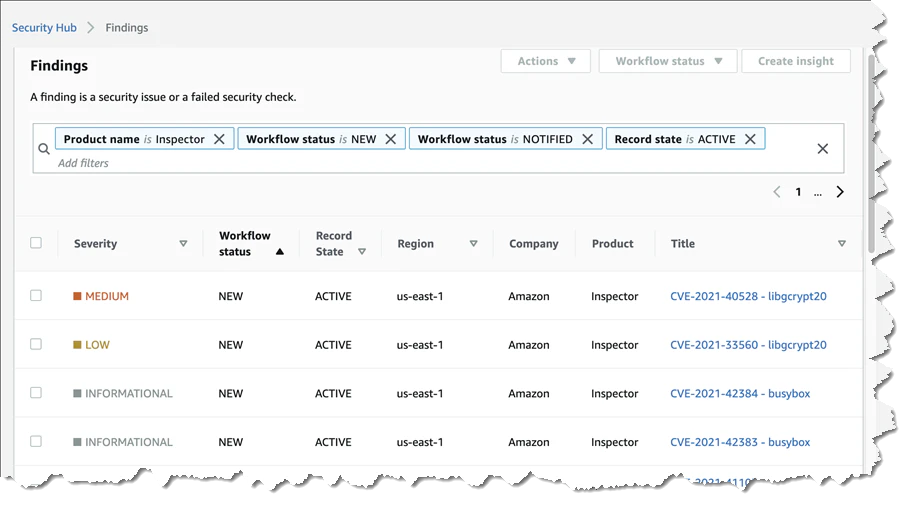
Findings: Receive detailed reports after assessments that highlight security issues and enable timely remediation.
Best practices: Verify that your applications follow AWS best practices, such as properly configured security groups or SSH settings.
2 popular data protection tools
Data is one of an organization’s most valuable assets. To help you securely store data and protect sensitive information like PII, AWS offers Secrets Manager and Amazon Macie.
1. AWS Secrets Manager
AWS Secrets Manager is essential for safeguarding access control for applications, services, and IT resources. It uses AWS Key Management Service for encryption, which provides granular control over key management.
By securely managing sensitive information, it prevents secrets from becoming vulnerabilities through three key capabilities:
Secrets rotation: Automatically update secrets at set intervals to minimize the risk of unauthorized access.
Secure and scalable secrets storage: Encrypt and store secrets securely to ensure access for authorized entities only.
Secrets monitoring: Track and audit secrets access to maintain transparency and security.
Below are two AWS Secrets Manager use cases:
Use case 1: Managing credentials for third-party services
You can securely store API keys, database credentials, and other secrets using the code below:
aws secretsmanager create-secret --name MyTestDatabaseSecret
--description "My test database secret created with the CLI"
--secret-string '{"username":"testuser","password":"mypassword"}'
This command creates a new secret called MyTestDatabaseSecret, which includes a description and a secret string in JSON format that contains a username and password.


Use case 2: Automating secrets rotation
Regularly changing secrets helps you reduce the risk of breaches. To automate secret rotation, create a Lambda function that defines the rotation logic. Then, configure the secret in AWS Secrets Manager to use this function:
aws secretsmanager rotate-secret --secret-id MyTestDatabaseSecret
--rotation-lambda-arn
arn:aws:lambda:region:account-id:function:rotation-function-name
--rotation-rules AutomaticallyAfterDays=30
The command for MyTestDatabaseSecret specifies a Lambda function to ensure automatic rotations for the secret (for example, every 30 days).
2. Amazon Macie
Amazon Macie uses machine learning and pattern recognition to detect and protect your confidential data within AWS. It also helps you understand and manage sensitive data at scale, which makes compliance with data privacy regulations easier.
Key features include:
Data discovery: Automatically scan Amazon S3 buckets to locate sensitive data within your AWS environment:
# Python code snippet to list S3 buckets and check them with Macie
import boto3

s3 = boto3.client('s3')
macie = boto3.client('macie2')

# List all S3 buckets
buckets = s3.list_buckets()
for bucket in buckets['Buckets']:
    # Check each bucket with Macie for sensitive data
    response = macie.create_classification_job(
        jobType='ONE_TIME',
        s3JobDefinition={
            'bucketDefinitions': [{'bucketName': bucket['Name']}]
        }
    )
Data classification: Categorize data based on its sensitivity, such as PII, using predefined data identifiers:
# Python code snippet to get classification findings
findings = macie.get_findings()
for finding in findings['findings']:
    print(f"Sensitive data type: {finding['type']}")
Security alerts: Receive notifications via AWS CloudWatch or SNS when Macie detects potential unauthorized access or data breaches:
# Python code snippet to get insights events
insights = cloudtrail.lookup_events(InsightSelectors=[{'InsightType': 'ApiCallRateInsight'}])
for insight in insights['Events']:
    print(insight['EventName'], insight['InsightDetails'])
You can also customize Macie’s machine learning models to detect organization-specific sensitive data patterns using a custom data identifier.
aws macie create-custom-data-identifier \
--name "CustomSSNIdentifier" \
--regex "\\b\\d{3}-\\d{2}-\\d{4}\\b" \
--keywords '["SSN","Social Security"]'
1 top identity and access management tool
Restricting who can view what’s in your ecosystem is critical in today’s digital world. The key solution here is AWS’s well-known IAM web service.
AWS IAM
AWS IAM, a cornerstone of AWS security, enables organizations to control access to their AWS services and resources. It also lets you create and manage AWS users and groups so only authorized individuals can access specific resources.
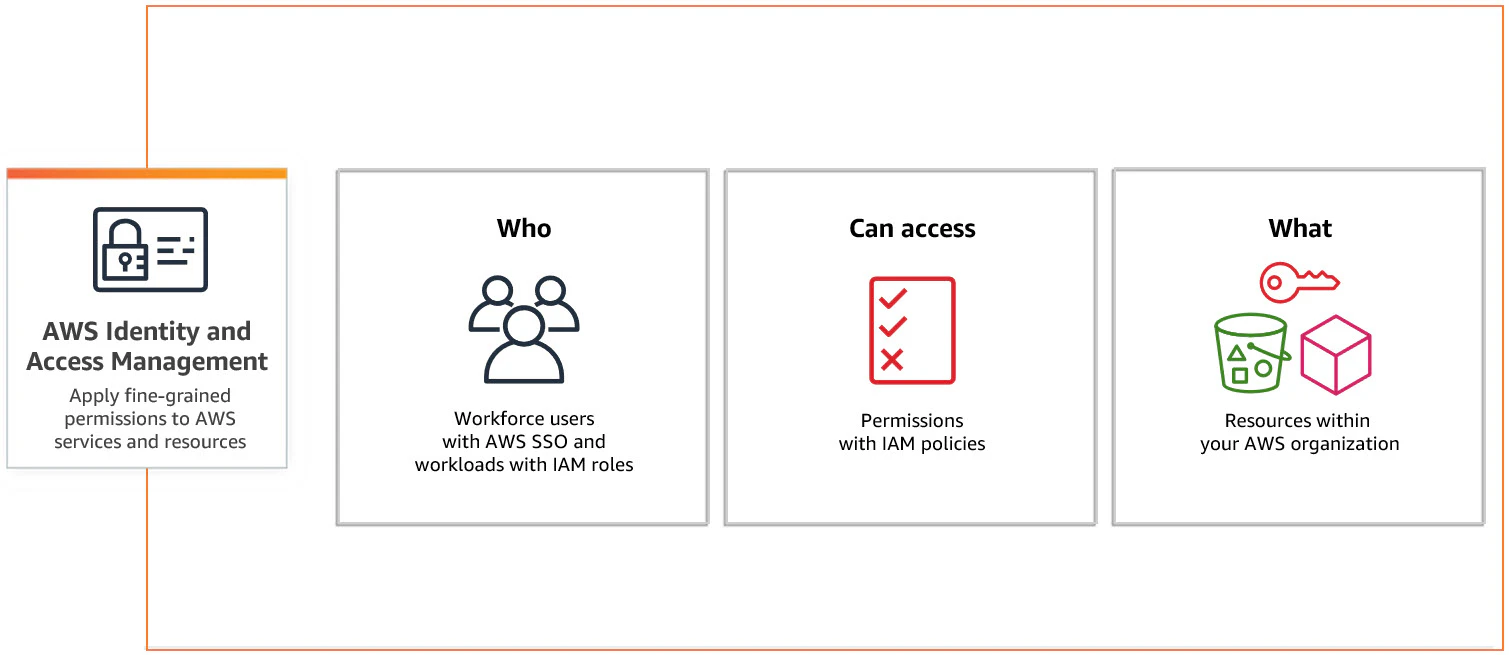
AWS IAM’s key features include:
Shared access to your AWS account: Allow multiple users to access your AWS account while maintaining secure and collaborative operations.
Granular permissions: Fine-tune permissions to ensure that users can only access the necessary resources for their job.
Secure access to applications: Integrate IAM with other AWS services to enhance application security.
Multi-factor authentication: Strengthen security by requiring two or more verification methods.
IAM is ideal for managing permissions in large teams and ensuring that users can access AWS resources without compromising security. It also restricts access to authorized personnel for sensitive data protection through the principle of least privilege (PoLP).
You can use AWS Organizations and service control policies (SCPs) to enforce PoLP. For instance, the following SCP restricts EC2 instance types:
{
 "Version": "2012-10-17",
 "Statement": [
   {
     "Sid": "LimitEC2InstanceTypes",
     "Effect": "Deny",
     "Action": "ec2:RunInstances",
     "Resource": "arn:aws:ec2:*:*:instance/*",
     "Condition": {
       "StringNotLike": {
         "ec2:InstanceType":
         ["t3.micro", "t3.small"]
       }
     }
   }
 ]
}
This policy restricts instance launches to t3.micro and t3.small to enforce cost control and security standards across the organization.
1 leading tool for network and application protection
Protecting your network and applications from potential threats is essential. By using the right tool and implementing a multi-layered security approach, you can strengthen your cloud posture as threats evolve.
The tool in this section can help you safeguard applications against risks like distributed denial-of-service (DDoS) attacks, volumetric attacks, and application layer attacks.
AWS Shield
AWS Shield is a fully managed DDoS protection service that secures AWS applications. It also ensures application availability and performance, even during a DDoS attack, without requiring any changes to your application.
Key features include:
DDoS protection: Defend against the most common DDoS attack vectors to keep your applications available:
# Python code snippet to enable AWS Shield Advanced protection
import boto3
shield = boto3.client('shield')
response = shield.create_protection(
    Name='MyProtection',
    ResourceArn='arn:aws:elasticloadbalancing:us-west-2:123456789012:loadbalancer/app/my-load-balancer/50dc6c495c0c9188'
)
Cost protection: Don’t worry about financial strain when your AWS services scale during a DDoS attack—Shield covers these scaling charges.
Threat intelligence: Gain detailed insights into ongoing and past attacks to understand the threat landscape more comprehensively and strengthen your defenses.
AWS Security Specialty Exam Prep Guide
Level up your cloud security credentials. Download the ultimate SCS-C03 exam blueprint to master AWS scenario logic, key tool checklists, and the critical incident response steps you need to pass.

Enhancing AWS security services with third-party tools
AWS offers a wide range of native security services, and many organizations use these tools as the foundation of their cloud security program. At the same time, some teams choose to incorporate third-party solutions to complement AWS capabilities, add context, or align with specific operational or architectural needs.
The value of integration
Integrating third-party tools with AWS security services can support a variety of objectives, including:
Aggregated security information: Some platforms help centralize findings and telemetry from AWS services and third-party systems. This can provide a consolidated view that helps teams analyze trends, correlate events, and understand security posture across multiple sources.
Enriched findings: Third-party tools may add additional context – such as threat intelligence, configuration data, or workload insights – that can help analysts interpret AWS findings more effectively and support investigation workflows.
Specialized capabilities: Organizations may adopt tools that offer features in areas such as SIEM, CSPM, or workload protection. These capabilities can be used alongside AWS services to align security controls with the organization’s requirements, cloud architecture, or compliance goals.
Wiz believes that integrating multiple data sources can help teams maintain consistency across policies and findings. CNAPP platforms, including Wiz, aim to provide this type of consolidated visibility by bringing together signals from AWS services and other parts of the cloud environment to support broader context and analysis.
Wiz’s approach to supporting AWS environments
Wiz’s perspective is that organizations get the most value when AWS’s native security signals are combined with broader context across identities, configurations, workloads, and data — and when that context extends across all the cloud platforms and services an organization may use. This cross-platform approach helps teams see how risks connect, propagate, or overlap across environments, even if AWS is their primary cloud.
Wiz works with AWS in several ways:
Integrations with AWS services:
Wiz connects with AWS services such as AWS CloudTrail and AWS Security Hub to ingest relevant cloud configuration and activity data. These integrations help teams view AWS-generated findings alongside information from other parts of their environment to support analysis and investigation.Contextual insights and recommendations:
When Wiz identifies a potential risk, the platform provides recommendations based on the organization’s environment and configuration. These can include guidance related to identity settings, resource configurations, or posture improvements.Optional workflow automation:
Some organizations choose to use Wiz’s automation capabilities to help streamline remediation workflows. These automations can assist with tasks such as updating configurations or adjusting identity settings, depending on internal policies and permissions.
Case study: Monese
Monese experienced these improvements firsthand. The financial service company, which operates in Europe and uses AWS, needed complete visibility into its environment to prioritize security tasks, as well as misconfiguration visibility to meet industry standards and regulatory expectations.
When Monese adopted Wiz, it gained a full view of its AWS environment. That way, its small team could manage tasks more efficiently by catching and fixing vulnerabilities—which made its cloud environment much safer, despite rising threats.
Wiz allowed us to pinpoint exactly where we had issues. If we had tried to figure out everything that was affected by log4J without Wiz, it would have taken at least seven or eight days to pinpoint everywhere that we needed to fix something. Wiz allowed us to pinpoint those areas immediately.
Aneel Sandhu, CISO, Monese
Get a demo to discover how Wiz helps you strengthen security and eliminate blind spots in AWS.
Agentless Full Stack coverage of your AWS Workloads
Learn why CISOs choose Wiz to secure AWS from code to runtime.
Other security tool roundups that you might be interested in: