Identity has long been the primary attack surface of the cloud. Infostealer malware, distributed through an industrialized cybercrime economy, is a leading initial access vector for compromising enterprise cloud, code, and AI environments. By targeting unsecured endpoints of developers through social engineering and supply chain attacks, threat actors steal credentials, API keys, and active session tokens, thereby bypassing the stronger defenses protecting most cloud environments from more direct attacks.
Stolen credentials are widely recognized as one of the most common initial infection vectors - Microsoft, Recorded Future, and Verizon’s DBIR all point to infostealers as a cause of major concern. These attacks begin with a simple malware infection on a personal device, and end with attackers gaining privileged access to your AWS, Azure, or GCP estate, and more recently to the code platforms used by your organization, such as GitHub or GitLab.
Understanding how this happens is the first step to building a resilient defense. We therefore set out to map each of the various cloud keys targeted by infostealer malware and determine the value threat actors can derive from them.
What are InfoStealers, and what secrets do they steal?
Modern infostealer attacks are the product of a mature, multi-layered supply chain serving threat actors. It begins with Malware-as-a-Service (MaaS) platforms, where potent infostealers like Lumma and RedLine are rented for as little as a few hundred dollars a month. These tools are designed for one purpose: rapid, stealthy data harvesting. They execute, scrape credentials, and exfiltrate data in seconds, often from devices that have up-to-date antivirus software.
The stolen data logs are then sold on underground marketplaces, often through Initial Access Brokers (IABs). These brokers curate the logs, validate valuable credentials, and sell verified access to high-level adversaries like ransomware cartels. This system means the time from an employee's mistaken click on a phishing link to the sale of their corporate cloud credentials can be anywhere between mere hours and many weeks or months.
However, the malware doesn't just steal passwords, it also targets multiple authentication methods and API keys to extract as much value as possible from the victim, including:
API Keys and Secret Keys: Often found in developer configuration files.
Active Session Cookies and Tokens: Allow bypassing multi-factor authentication (MFA) by hijacking an already-authenticated session.
Our analysis of secrets detected on infected machines through Wiz's integration with NordStellar reveals a concentrated threat landscape dominated by a small number of prolific infostealer families: Lumma C2, RedLine, and Vidar, account for 85.7% of all detected incidents, underscoring the commoditization of the infostealer ecosystem where a handful of malware-as-a-service offerings appear to dominate the underground market.
Notably, NordStellar identifies over 400 distinct types of non-credentials secrets being harvested, demonstrating that attackers are casting a wide net to monetize whatever access they can obtain.
Stolen cloud credentials are the primary yield for infostealers, with AWS and GCP accounting for 46% and 13% of all compromised secrets, respectively. The next major target is GitHub, where App Tokens, OAuth tokens, and Personal Access Tokens (PATs) make up roughly 10% of the total. AI platforms are also a significant piece, comprising 5% of stolen secrets, led predominantly by OpenAI API keys. These AI credentials are highly lucrative; allowing attackers to freely run their own workloads or resell the access as part of the illicit LLM resale market. In addition, these keys can potentially grant access to historical chat logs that may contain sensitive corporate data, but we’re not aware of public occurrences of this scenario.
Our analysis of the data also shows that traditional malware distribution techniques still play a major role: legitimate Windows binaries like vbc.exe (Visual Basic compiler)are frequently abused by threat actors for execution, while trojanized gaming-related files (e.g., Roblox.exe, Valorant SkinChanger.exe) show targeting of developers’ personal machines, which are often less protected than corporate endpoints.
More recently infostealer-like malware such as Miasma has targeted CI/CD pipelines, development servers and build processes. In these cases, phishing isn’t an applicable initial access vector; instead, attackers target a commonly used software dependency and hijack its latest version to inject malicious code to be executed in victim environments. These CI/CD infostealers target API keys, cloud credentials, CI tokens, and deployment artifacts, ultimately abusing these for post-compromise activity against enterprise organizations.
From Endpoint to Cloud
The path to cloud compromise starts on an end-user device, one that is already logged in to the targeted service and recently infected by an infostealer. Instead of trying to break MFA, attackers steal the session token generated after a user successfully authenticates. By later using this stolen token in their own browser, they are granted access as the legitimate user, completely bypassing MFA prompts. A single valid session token for a corporate system, especially if the user has high privileges or access to sensitive information, can enable access to many resources in the target organization’s cloud environment. See our recently published investigation into JINX-0164 as an example.
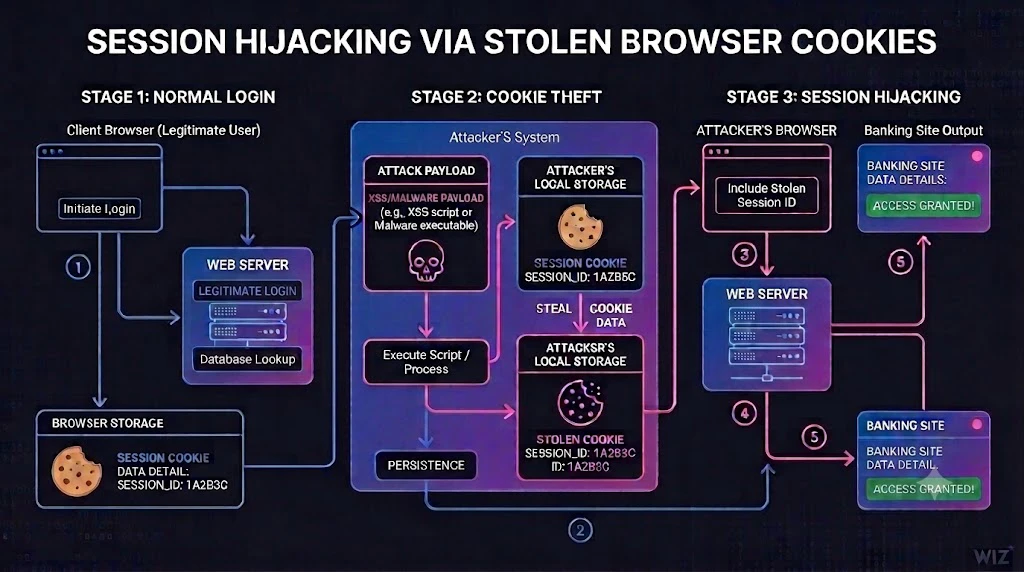
Besides session hijacking, threat actors can also make use of long-term keys and credentials harvested by infostealers, but the value of these differs depending on the target cloud environment, as detailed below.
Amazon Web Services (AWS)
In AWS, attackers focus on two main types of secrets. The first are long-term IAM access keys, which are frequently stored in plain text in configuration files or source code on developer workstations. The second target is the active session cookie for the AWS Management Console. Stealing this cookie allows an attacker to essentially bypass the MFA requirement and gain direct, interactive access to the victim's cloud resources, as described above.
Session cookies are typically extracted from each browser's on-disk cache. In modern browsers, they can also be retrieved directly from memory, either by injecting code into the browser process or by attaching a debugger to read the memory using debugging APIs.
When targeting AWS, the main files of interest to attackers are located in the following locations (the same files exist in windows under %USERPROFILE%).
~/.aws/config- Stores non-sensitive configuration settings, such as default regions, output formats, and named profiles, for the AWS CLI and SDKs.~/.aws/credentials- holds sensitive authentication keys, specifically the AWS Access Key ID and Secret Access Key, separated by profile.~/.aws/cli/cache/- Temporarily stores cached API responses and internal command data to improve AWS CLI performance and reduce duplicate API calls.~/.aws/sso/cache/- Contains the temporary, short-lived access tokens and session data generated when you authenticate using AWS IAM Identity Center (formerly AWS SSO).
While the AWS config file (.aws/config) doesn’t contain any secrets, it tells an attacker exactly which profiles, roles, and accounts the victim can access. Attackers combine this with the secrets stored in the other directories.
If configured using aws config the credentials file (.aws/credentials) includes the actual long-term secrets used to log into AWS, specifically Access Key IDs and Secret Access Keys. By default, temporary SSO tokens are not written here; however, many third-party tools that developers use (such as gimme-aws-creds) might inject temporary tokens into this file for compatibility with older SDKs. A more secure alternative is to use tools such as Granted which leverage the operating system’s keychain.
When a user authenticates via SSO using aws sso login, the resulting temporary STS tokens (Access Key, Secret Key, and Session Token) are natively cached in the CLI cache folder (.aws/cli/cache/). These tokens last anywhere from 1 to 12 hours depending on the organization's configuration, meaning there is an active window where the token is vulnerable to immediate exfiltration and use. This makes STS tokens somewhat less useful for infostealer operators and their clients unless they can sell them immediately.
Even more critical is the SSO Cache folder (.aws/sso/cache/), which contains the long-lasting OIDC tokens generated during the initial SSO login. These tokens typically last up to 90 days. Unless the user actively runs aws sso logout or the session is revoked by an admin, this massively increases the window of vulnerability, allowing infostealer operators and their clients to steal the token and then continuously mint fresh AWS credentials.
Microsoft Azure
Azure's deep integration with enterprise identity via Azure Active Directory (Entra ID) provides an avenue for infostealer-based initial access to Azure environments. A single compromised credential for a synchronized user can create a bridge for attackers to move laterally between the on-premises network and the cloud environment. The primary goal is often to compromise a privileged Azure AD account, like a Global Administrator, which provides control over the entire cloud tenant and its associated M365 services.
Threat groups like LAPSUS$ have historically specialized in using stolen credentials to pivot into Azure AD, sometimes even registering their own machine as a "trusted" device to bypass conditional access policies. Another more recent example is Miasma, which specifically targets the following files:
.azure/accessTokens.json- Stores raw, plain-text access tokens used primarily by older versions of the Azure CLI to authenticate API requests..azure/msal_token_cache.*- Serves as the modern token cache for the Azure CLI, securely storing session data and access tokens via the Microsoft Authentication Library (MSAL).
Modern info-stealers specifically target critical directories associated with Azure cloud development to compromise credentials. Their primary objective is the Azure CLI authentication cache folder (%USERPROFILE%\.azure), which contains highly sensitive plaintext configuration files.
The most valuable target in this ecosystem is accessTokens.json. This file holds raw Azure access tokens, long-lived refresh tokens, tenant IDs, resource IDs, and expiration timestamps. Stealing it grants immediate, programmatic access to the Azure Resource Manager (ARM) APIs, completely bypassing the need for web portals. A secondary, but still vital, target is azureProfile.json. While it lacks direct secrets, it exposes crucial reconnaissance data, such as subscription IDs, default tenants, and the User Principal Name (UPN), allowing attackers to script automated lateral movement with complete awareness of the victim's cloud environment.
Additionally, applications using the Microsoft Authentication Library (MSAL) generate local identity caches, often found at %localappdata%\.IdentityService\msal.cache or msalv2.cache. These caches store comprehensive Entra ID access and refresh tokens, account IDs, and specific permission scopes across core Microsoft services (Graph, Outlook, SharePoint, and Azure computing). Critically, they also contain Application Client IDs, enabling attackers to hijack active sessions, impersonate trusted enterprise applications, and thus evade anomaly detection.
A clear example of this targeting is the Vidar 2.0 malware that has specific logic to enumerate the %USERPROFILE%\.azure directory, using it to extract Azure credentials and exfiltrate the data back to the attackers.
Google Cloud Platform (GCP)
The primary risk in GCP revolves around long-lived, portable service account keys. These JSON key files, which grant programmatic access, are a top target for infostealers scanning developer machines. A stolen key associated with a privileged service account can grant an attacker immediate and extensive control over a GCP project.
When targeting GCP, the following files and environment variables are most valuable to attackers:
credentials.db- A SQLite database containing, long-lasting OAuth 2.0 refresh tokens used by the gcloud CLI.access_tokens.db- A SQLite database storing the active access tokens utilized by the gcloud CLI to interact with Google's APIs.application_default_credentials.json- A JSON document used by Google's Application Default Credentials (ADC) framework to supply authentication to Google Cloud client libraries.$GOOGLE_APPLICATION_CREDENTIALS- An environment variable that points to the exact file path of highly privileged service account JSON key files used in production or staging environments.
Google Cloud's primary command-line tool, gcloud, stores authentication state, project metadata, and session configuration data in predictable local directories. On Linux and macOS systems, this critical data is typically located within ~/.config/gcloud/, while Windows operating systems utilize the %appdata%\gcloud\directory. Infostealers exhibit precise, hardcoded targeting routines designed to capture the following high-value GCP artifacts:
First and foremost are the credentials.db and access_tokens.db files. These SQLite databases contain the highly sensitive OAuth 2.0 refresh tokens and active access tokens utilized by the gcloud CLI to interact with Google's APIs. The theft of these specific databases is particularly valuable because Google Cloud refresh tokens generally do not expire automatically unless they are explicitly revoked by an administrator or are subject to extraordinarily strict organizational boundary policies. Consequently, their theft grants adversaries persistent, long-term programmatic access to the entire GCP environment.
Secondly, infostealers target the application_default_credentials.json file. This JSON document is a critical, foundational component of Google's Application Default Credentials (ADC) framework, which is used by Google Cloud client libraries to automatically discover and utilize authentication credentials during application development an example of a recent malware that targeted these files is the TeamPCP LiteLLM supply chain infostealer, which had these specific paths in its list of exfiltration targets.
Finally, sophisticated malware variants, particularly those executing automated supply-chain attacks, specifically target environment variables, with a primary focus on $GOOGLE_APPLICATION_CREDENTIALS. In production and staging environments, this variable points to the exact file system location of service account JSON key files. Attackers parse the environment variables, extract the targeted path, and subsequently exfiltrate the associated JSON key file, granting them immediate programmatic access to GCP compute and storage services as a highly privileged, non-human identity (service account) published by Google Cloud.
GitHub
GitHub credentials represent a high-value target for infostealers due to the platform's central role in software development and the sensitive intellectual property housed in private repositories. A stolen GitHub session or Personal Access Token (PAT) grants attackers access not just to source code, but also to CI/CD secrets, deployment pipelines, and potentially the ability to inject malicious code directly into software supply chains. Underscoring its status as a prime target, our analysis shows that around 50% of infostealer malware families now actively collect GitHub credentials, making it the fourth most targeted secret across all malware strains.
When targeting GitHub, attackers focus on the following files and artifacts:
~/.config/gh/hosts.yml(or%APPDATA%\GitHub CLI\hosts.yml) - Stores the OAuth tokens and configuration settings used by the GitHub CLI (gh) to authorize access to your GitHub accounts.~/.git-credentials(or$XDG_CONFIG_HOME/git/credentials) - Holds plaintext usernames, passwords, or Personal Access Tokens (PATs) used by Git to authenticate HTTPS connections to remote repositories.~/.ssh/id_rsa,~/.ssh/id_ed25519- Contains private SSH keys used to establish secure, commonly used for passwordless authentication with remote Git servers.GITHUB_TOKEN, GH_TOKEN- Environment variables commonly used in CI/CD workflows and local development to supply active access tokens for programmatic authentication to GitHub's APIs and CLI.
The GitHub CLI (gh) stores OAuth tokens in hosts.yml, which contains plaintext tokens (prefixed gho_) when no system keyring is available. Similarly, users authenticating via HTTPS often rely on the git-credential-store helper, which writes credentials in plaintext to ~/.git-credentials in the format https://username:token@github.com.
SSH keys also remain a persistent target. Infostealers like Ghost Loader specifically extract ~/.ssh/id_rsa to gain long-term GitHub access. For session hijacking, attackers target browser cookies including user_session, __Host-user_session_same_site, and _gh_sess. Stealing these cookies allows complete bypass of MFA. Major infostealer families including Lumma and RedLine systematically harvest browser cookies and credential stores that include GitHub sessions.
GitLab
GitLab presents a similar attack surface to GitHub, as compromised GitLab credentials can grant access to source code, CI/CD variables containing deployment secrets, and container registries.
When targeting GitLab, attackers focus on the following files and variables:
~/.config/glab-cli/config.yml(or%USERPROFILE%\.config\glab-cli\config.yml) - Stores the configuration settings and personal access tokens used by the official GitLab CLI (glab) to authenticate and interact with GitLab instances./etc/gitlab-runner/config.toml(or~/.gitlab-runner/config.toml) - Contains the configuration settings and sensitive registration tokens for GitLab Runners responsible for executing CI/CD jobs.GITLAB_TOKEN, GITLAB_ACCESS_TOKEN, CI_JOB_TOKEN- Environment variables commonly used in automation scripts and CI/CD pipelines to provide programmatic, token-based authentication to GitLab's APIs and repositories.
The GitLab CLI (glab) stores authentication tokens in config.yml, which contains plaintext tokens unless the --use-keyring flag was explicitly used during authentication. Many developers also store GitLab PATs in ~/.netrc files using the format machine gitlab.com login oauth2 password <token>.
GitLab Runner configuration files (config.toml) are particularly valuable targets. These files contain runner authentication tokens (prefixed glrt-) that allow attackers to register rogue runners, intercept CI/CD jobs, or access secrets exposed during pipeline execution.
For session hijacking, the primary target is the _gitlab_session cookie, by injecting the stolen cookie into their own web browser, the attacker completely assumes the identity of the victim within the GitLab web interface.
Campaigns have exploited vulnerabilities in self-hosted GitLab instances (such as CVE-2023-7028) to distribute infostealers like StealC via the Amadey loader. Once deployed, these stealers harvest browser credentials and cookies, which frequently include GitLab session tokens among the 17 billion+ browser cookies stolen annually.
OpenAI API and ChatGPT
To bypass authentication on the web-based ChatGPT platform, infostealers specifically target the __Secure-next-auth.session-token cookie. When a user logs into ChatGPT, this token is generated and stored within the browser's local cookie database to maintain the session. By extracting the __Secure-next-auth.session-token value, threat actors can use it in their own browser and hijack the session entirely. This grants the attacker access to the victim's chat history, which frequently contains sensitive corporate data, proprietary source code, and internal business strategies.
Beyond web session cookies, developers and autonomous AI agents represent a massive attack surface for OpenAI infrastructure compromise. Infostealers systematically scan developer environments for files like credentials.json or .env files that store active OpenAI API keys (OPENAI_API_KEY) in plaintext.
Anthropic Claude Code
As AI-powered coding assistants such as Claude Code and Codex become integral to developer workflows, they have emerged as a new target category for credential theft. These tools store authentication tokens and configuration that attackers can exploit for API abuse, access to sensitive conversation history, and lateral movement into connected cloud infrastructure.
Taking Claude Code as an example, attackers often focus on the following files:
~/.claude/.credentials.json(Linux) - Stores plaintext OAuth tokens.~/.claude/settings.jsonand~/.claude/settings.local.json- Local application preferences.macOS Keychain entries (created by the
securityCLI) - Serve as high-value targets for advanced macOS malware attempting to dump the encrypted session tokens and API keys used by Claude's desktop or CLI applications.ANTHROPIC_API_KEY, ANTHROPIC_AUTH_TOKEN, CLAUDE_CODE_OAUTH_TOKEN- Are routinely scraped from system memory or shell profiles by malware to instantly hijack developer billing accounts, access sensitive prompt histories, and abuse premium AI models at the victim's expense.
On Linux systems, Claude Code stores OAuth refresh tokens in ~/.claude/.credentials.json with file mode 0600. These tokens are portable, meaning that copying the credentials file to another machine grants immediate access. An attacker with a stolen refresh token can generate new access tokens, view the victim's conversation history (which often contains proprietary code and internal documentation), and invoke any MCP (Model Context Protocol) servers the victim has configured.
On macOS, tokens are stored in the system Keychain, but the Keychain item is locked to the security binary rather than Claude Code itself. Since any process can invoke security, malware running under the same user account can extract the tokens without triggering an additional password prompt.
The recognition of AI credentials as high-value targets extends to legitimate security tooling.
The popular privilege escalation auditing suite PEASS-ng (linPEAS/winPEAS) now includes detection rules for AI coding assistant credentials. Its sensitive_files.yaml configuration explicitly searches the ~/.claude/ directory for settings.json and settings.local.json files, scanning for patterns including ANTHROPIC_API_KEY, ANTHROPIC_AUTH_TOKEN, apiKeyHelper, and mcpServers configurations. This inclusion in mainstream post-exploitation tooling signals that AI assistant credentials have become a standard target in the attacker playbook.
Appendix: Files and Environment Variables of Interest
| Platform | Name | Type | Description |
|---|---|---|---|
| AWS | ~/.aws/config | File | Non-sensitive configuration settings (regions, profiles) |
| AWS | ~/.aws/credentials | File | AWS Access Key ID and Secret Access Key |
| AWS | ~/.aws/cli/cache/ | File | Cached API responses and internal command data |
| AWS | ~/.aws/sso/cache/ | File | Temporary short-lived access tokens and session data |
| Azure | .azure/accessTokens.json | File | Raw, plain-text access tokens for Azure CLI |
| Azure | .azure/msal_token_cache.* | File | Modern token cache (session data, access tokens) |
| Azure | azureProfile.json | File | Reconnaissance data (subscription IDs, default tenants, UPN) |
| Azure | %localappdata%.IdentityService\msal.cache / msalv2.cache | File | Entra ID access/refresh tokens, client IDs |
| GCP | credentials.db | File | SQLite database containing OAuth 2.0 refresh tokens |
| GCP | access_tokens.db | File | SQLite database containing active access tokens |
| GCP | application_default_credentials.json | File | JSON document for Application Default Credentials (ADC) |
| GCP | $GOOGLE_APPLICATION_CREDENTIALS | Env Var | Points to file path of privileged service account JSON key files |
| GitHub | ~/.config/gh/hosts.yml | File | OAuth tokens and configuration settings for GitHub CLI |
| GitHub | ~/.git-credentials | File | Plaintext usernames, passwords, or Personal Access Tokens (PATs) |
| GitHub | ~/.ssh/id_rsa, ~/.ssh/id_ed25519 | File | Private SSH keys |
| GitHub | GITHUB_TOKEN, GH_TOKEN | Env Var | Active access tokens for programmatic authentication |
| GitLab | ~/.config/glab-cli/config.yml | File | Configuration settings and personal access tokens for GitLab CLI |
| GitLab | /etc/gitlab-runner/config.toml / ~/.gitlab-runner/config.toml | File | Configuration settings and registration tokens for GitLab Runners |
| GitLab | GITLAB_TOKEN, GITLAB_ACCESS_TOKEN, CI_JOB_TOKEN | Env Var | Token-based authentication for APIs and repositories |
| OpenAI | __Secure-next-auth.session-token | Cookie | Browser session token for ChatGPT web authentication |
| OpenAI | credentials.json, .env | File | Files storing active OpenAI API keys |
| OpenAI | OPENAI_API_KEY | Env Var | Active OpenAI API key |
| Anthropic | ~/.claude/.credentials.json | File | Plaintext OAuth tokens |
| Anthropic | ~/.claude/settings.json, ~/.claude/settings.local.json | File | Local application preferences |
| Anthropic | ANTHROPIC_API_KEY, ANTHROPIC_AUTH_TOKEN, CLAUDE_CODE_OAUTH_TOKEN | Env Var | Tokens for API and session access |
Additional References
M-Trends 2025: Data, Insights, and Recommendations From the Frontlines - Google Cloud, accessed October 16, 2025,
M-Trends 2025 Report - Google, accessed October 16, 2025,
InfoStealer Malware: What is it & How Does it Work?, accessed October 16, 2025,
Infostealer Malware and the Cartelisation of Cybercrime - Insights | Public Sector Network, accessed October 16, 2025,
Infostealer Malware: The Silent Threat to Your Digital Credentials - Managed IT Services & Technology Consulting | OSIbeyond, accessed October 16, 2025,
Information Stealers | North Dakota Information Technology, accessed October 16, 2025,
Information stealer malware | Cyber.gov.au, accessed October 16, 2025,
What are infostealers? And how to remediate exposures - SpyCloud, accessed October 16, 2025,
The Silent Epidemic: Infostealers and the Evolution of Cybercrime in 2025 | JD Supra, accessed October 16, 2025
Infostealers – How to Prevent and Mitigate? | Check Point Software, accessed October 16, 2025
The Silent Heist: Cybercriminals Use Information Stealer Malware to Compromise Corporate Networks | Australian Cyber Security Centre, accessed October 16, 2025
Key Differences Between Infostealer Malware and Traditional Keyloggers | Abnormal AI, accessed October 16, 2025
They’re Coming for Your Data: What Are Infostealers and How Do I Stay Safe? | ESET, accessed October 16, 2025
How to Protect Your Identity and Sessions from an Infostealer | Seraphic Security, accessed October 16, 2025
Cloud Breach: Compromising AWS IAM Credentials | Rhino Security Labs, accessed October 16, 2025
Incident Report: Stolen AWS Access Keys | Expel, accessed October 16, 2025
Infostealer Logs to Fuel a New Wave of AWS Ransomware Attacks | Under the Breach, accessed October 16, 2025
Infostealer Logs to Fuel a New Wave of AWS Ransomware Attacks | Infostealers.com, accessed October 16, 2025
Detecting Lateral Movement in Hybrid Cloud Environments | RSA Conference, accessed October 16, 2025
Understand and Investigate Lateral Movement Paths | Microsoft Defender for Identity, accessed October 16, 2025
DEV-0537 Criminal Actor Targeting Organizations for Data Exfiltration and Destruction | Microsoft Security Blog, accessed October 16, 2025
Detecting Post-Compromise Threat Activity in Microsoft Cloud Environments | CISA, accessed October 16, 2025
Stop Downloading Google Cloud Service Account Keys! | Ryan Canty, accessed October 16, 2025
Hello? Whose Service Account Keys Are These? | YouTube, accessed October 16, 2025
Leaked Credentials from Google Cloud Project | John M. Wargo, accessed October 16, 2025
5 Ways Google Cloud Can Help You Minimize Credential Theft Risk | Google Cloud, accessed October 16, 2025
Automatically Disabling Leaked Service Account Keys: What You Need to Know | Google Cloud Blog, accessed October 16, 2025
Malvertising Campaign Leads to Info Stealers Hosted on GitHub | Microsoft Security Blog, accessed October 16, 2025
Detecting the Use of Stolen AWS Lambda Credentials | Secureworks, accessed October 16, 2025
Record-Breaking Data Theft: 3.9 Billion Passwords Compromised by Infostealer Malware | eSecurity Planet, accessed October 16, 2025
What Is Lateral Movement? Prevention and Detection Methods | Fortinet, accessed October 16, 2025
Scattered Spider | CISA, accessed October 16, 2025
Remediating Potentially Compromised AWS Credentials | Amazon GuardDuty, accessed October 16, 2025
Incident Response to Cloud Security Incidents: AWS, Azure, and GCP Best Practices | Sygnia, accessed October 16, 2025
AWS vs. Azure vs. Google Cloud: Security Comparison | Sysdig, accessed October 16, 2025