Developers move fast, and in the cloud, speed is everything. Security has long aimed to keep up by “shifting left,” with the promise of catching issues earlier and making fixes easier and safer. But in practice, security often arrives disconnected from the coding workflow with legacy tools, massive alert backlogs, and noisy pipelines that can overwhelm developers without giving them the context to act.
Wiz is changing that and today, we’re excited to announce the Wiz plugin for JetBrains IDEs is now generally available to all Wiz customers. By moving security past the CI/CD gate and directly into the environment where code is written, developers can address misconfigurations, vulnerabilities, exposed secrets, and sensitive data in real time. This ensures that security becomes a seamless part of the coding flow, empowering developers to build securely from the very first line of code to deployment, and keeping pace with the speed of cloud-native development.
Bringing Wiz’s cloud context into JetBrains IDEs means developers can find and fix cloud-related security issues locally, as they code,” said Gideon Kreiner, Senior Director, Technology and Strategic Partnerships at JetBrains. “The plugin works across all our IDEs and gives teams the clarity they need to secure their cloud environments without interrupting their workflow. It’s a great example of how thoughtful integrations can help shift security left, without adding friction.
Grideon Kreiner, Senior Director, Technology and Strategic Partnerships at JetBrains
Moving Beyond IDE Scanners to Code-to-Cloud Security
The Wiz plugin for JetBrains IDEs isn’t just another security scanner, it’s security built for developers, where code is written. Instead of waiting for CI/CD builds or juggling dashboards, developers get real-time feedback as they type, allowing them to act immediately.
At the heart of this is Wiz Code, which extends Wiz’s cloud-first security intelligence into the development cycle. It doesn’t just look at code in isolation, it connects local findings to the running cloud environment, highlighting the issues that truly matter based on exposure, reachability, and ownership.
Wiz Extend already delivers this intelligence into cloud services and version control systems, giving early visibility into cloud risks. Now, the JetBrains plugin brings the same insights directly into the IDE—complementing language-aware static analysis and code quality tools while bridging the gap between cloud security context and the code developers are actively writing with:
Code-to-Cloud Context: Powered by the Wiz Security Graph, the plugin connects local code to the actual running cloud environment. This means developers see which issues truly matter, like a hardcoded secret tied to a high-privilege IAM role or a vulnerable dependency that is reachable from the internet.
Seamless Workflow Integration: Security is embedded into the coding flow, not tacked on afterward. Developers can identify misconfigurations, vulnerabilities, exposed secrets, and sensitive data as they type, without juggling dashboards or waiting for slow CI/CD builds.
Unified Standards: The plugin enforces the same security policies used in production, so fixes are always aligned with organizational goals. Developers get clear guidance and actionable remediation steps without guesswork.
Actionable Quick Fixes: Complex cloud risks can be resolved with a single click, right in JetBrains, making secure development fast and intuitive.
By combining real-time feedback, cloud context, and actionable guidance, the Wiz plugin transforms security from a post-build afterthought into a natural, integrated part of development, empowering teams to build confidently in the cloud.
Secure Code as It’s Written: Real-Time Insights and One-Click Fixes
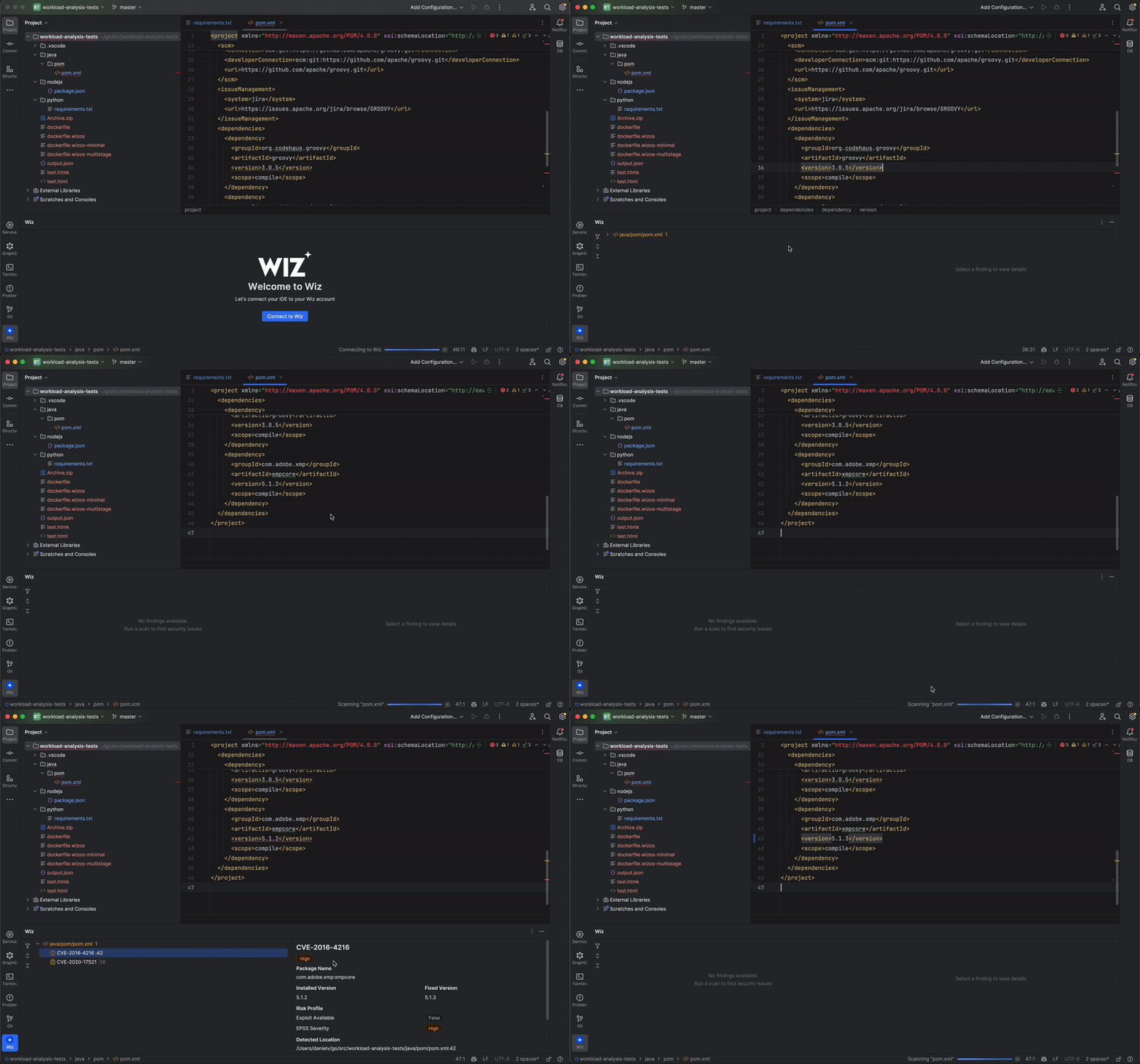
The Wiz plugin for JetBrains turns the IDE into an active security partner, delivering real-time feedback as code is written. On every file save, Wiz scans application code and infrastructure-as-code (IaC) files to surface security risks early, whether it’s a hard-coded secret, an IaC misconfiguration, or a vulnerable pattern. Developers can also run scans on demand and review all findings directly in the IDE’s Activity Bar, complete with clear explanations, severity, and precise code locations.
Inline, one-click remediation suggestions make fixes straightforward. Apply a fix, save the file, and Wiz automatically rescans to validate the change, helping developers resolve findings quickly and confidently without disrupting their workflow.
Detect Malicious Packages Before They Ever Reach Your Repo
Modern supply-chain attacks don’t wait for CI, and neither does Wiz. The Wiz plugin detects malicious packages and risky dependencies as they’re added locally, stopping threats before they’re committed, pushed, or deployed.
By correlating Wiz’s package intelligence with real cloud and runtime context, developers see not just that a dependency is risky, but why it matters, whether it introduces a backdoor, leaks secrets, or expands the attack surface of a production service. This ensures risky packages are caught at the developer’s machine, long before they reach the repository or disrupt the CI/CD pipeline.
Maintain Consistent Security Policies from IDE to Production
The Wiz plugin brings the same security policies enforced with Wiz Code in CI/CD and production directly into the IDE, ensuring developers and security teams stay aligned from the start. By automatically detecting the active repository, the plugin applies the correct organizational standards as code is written, so security is never a moving target.
This unified approach shifts enforcement earlier in the development lifecycle, reducing noise, minimizing rework, and preventing policy surprises later in CI/CD. Developers can ship with confidence, knowing their code already meets the security team’s requirements before it ever reaches production.
Get Started With the Wiz Plugin for JetBrains IDE Today
By combining code scanning with real-time cloud insights, Wiz Code surfaces misconfigurations, vulnerabilities, and risky dependencies in the IDE, prioritized by actual impact to the environment. It’s the same context the security team uses in production, now available from the very first line of code.
Install the JetBrains IDE plugin today to bring the full power of Wiz Code into your development workflow. Joint customers can follow the guide in the Wiz Docs (login required) to get started with the Wiz IDE plugin and track adoption across their organization.