
What is internal vulnerability scanning?
Internal vulnerability scanning is the process of identifying security weaknesses within your organization's internal network infrastructure. This type of scanning examines your systems from the perspective of someone who has already gained access inside the network perimeter, such as a malicious insider or an attacker who has breached a firewall. While external scanning focuses on assets directly exposed to the internet, internal scanning targets the "soft underbelly" of your network, including servers, workstations, databases, and cloud resources that are not public-facing.
Internal scans can be performed in two main ways: authenticated scanning (also known as credentialed scans) and unauthenticated scanning. Unauthenticated scans probe your network from the outside of a machine to see what is visible to a general user. In contrast, authenticated scans use trusted credentials to log into systems, providing much deeper visibility into missing patches, registry settings, and configuration issues.
This process helps you identify specific risks like misconfigurations, weak passwords, outdated software, and unauthorized services running on your devices. In modern cloud workloads, where traditional network boundaries are often blurred, internal scanning is essential to ensure that a single compromised container or virtual machine does not lead to a massive data breach.
Vulnerability Management Buyer's Guide
This buyer’s guide helps you choose the right vulnerability management solution and align teams around shared security ownership.

How internal vulnerability scanning works
The process of internal vulnerability scanning moves through several distinct phases, from discovery to reporting. It begins with the discovery phase, where the scanner identifies all active devices, servers, and services currently running on your internal network. Once the asset inventory is mapped, the scanner probes these systems using a database of known vulnerability signatures to find matches.
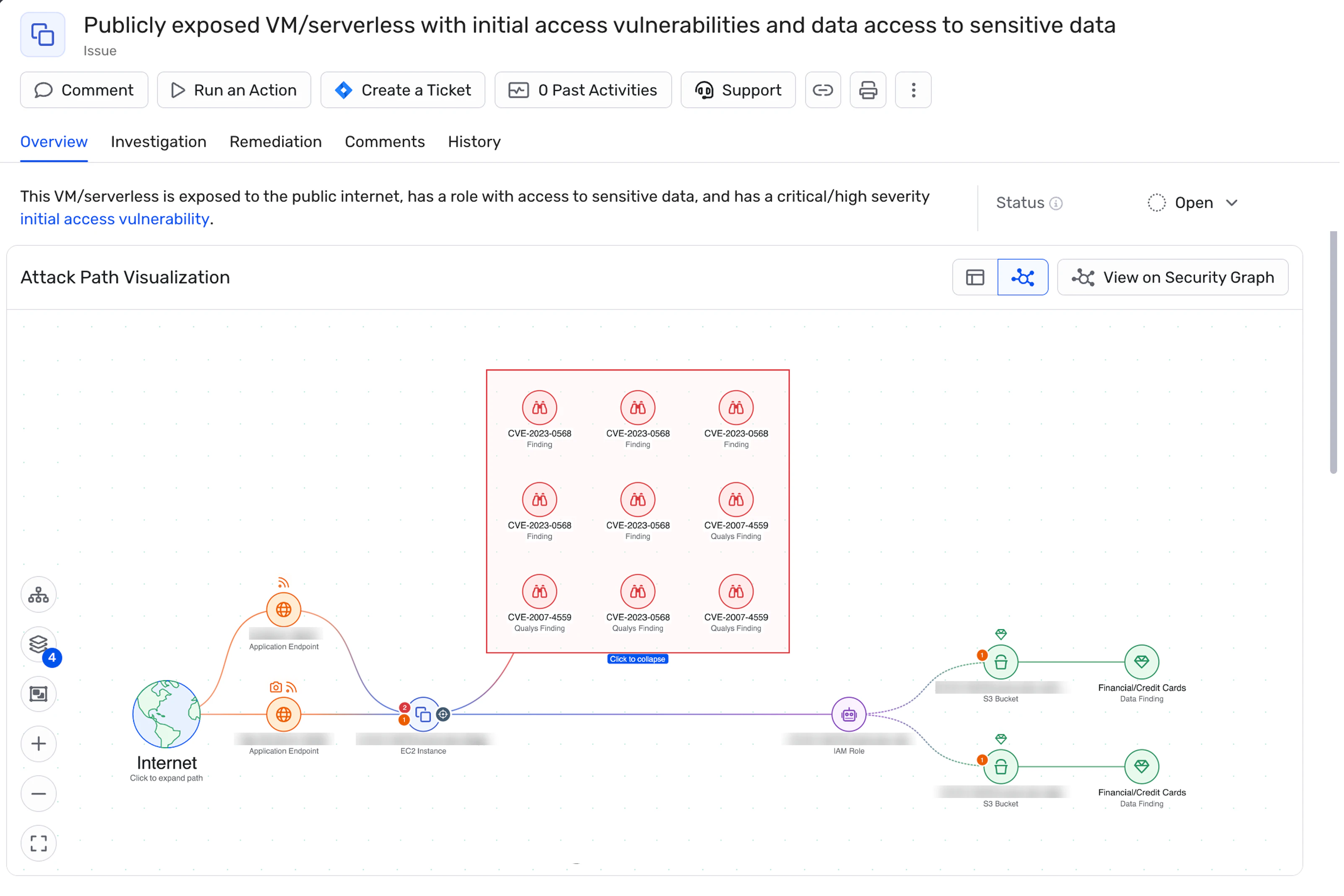
If you are running a credentialed scan, the tool will authenticate into the devices to perform a deeper patch assessment. It checks if the operating system and installed software are up to date and reviews configuration settings against security best practices. The scanner assigns risk scores to each finding based on severity and potential impact. Modern scanners correlate these vulnerabilities with network exposure, identity permissions, and data sensitivity to identify toxic combinations. For example, a medium-severity vulnerability on an internet-exposed server with admin credentials and access to customer data represents higher risk than a critical vulnerability on an isolated development system. This graph-based approach—modeling relationships between assets, identities, and data—helps separate theoretical flaws from exploitable attack paths.
Because IT environments change constantly, many organizations use continuous monitoring combined with frequent scheduled scans rather than relying solely on weekly or monthly point-in-time assessments. This approach catches new assets and configuration changes between formal scan cycles. However, for intensive active scans, it is still common practice to schedule them during maintenance windows to avoid slowing down the network.
When to scan: Establish a scanning cadence based on your environment and compliance requirements:
PCI DSS environments: Quarterly internal scans minimum, plus scans after significant network changes
Dynamic cloud environments: Continuous monitoring with daily or weekly scans for critical workloads
Stable on-premises systems: Monthly scans for production, quarterly for non-critical systems
After major changes: Scan immediately after infrastructure updates, new deployments, or configuration changes
Post-incident: Scan after security incidents to identify additional compromised systems
Internal vs external vulnerability scanning
Internal and external vulnerability scanning serve different purposes but are both necessary for a complete security program. The table below outlines the core differences between these two approaches.
| Feature | Internal Vulnerability Scanning | External Vulnerability Scanning |
|---|---|---|
| Perspective | Scans from within the trusted zone inside the firewall. | Scans from the internet, outside the network perimeter. |
| Target Assets | Internal servers, workstations, databases, and private cloud resources. | Internet-facing assets like web servers, firewalls, and email gateways. |
| Threat Simulation | Simulates an insider threat or an attacker who has already breached the network. | Simulates an external attacker performing reconnaissance on your attack surface. |
| Goal | Identify lateral movement opportunities and internal flaws. | Identify entry points accessible from the public internet. |
External scans focus on the attack surface visible to the public. They look for open ports and unpatched services that could let an attacker in. Internal scans follow an assume-breach model—a core Zero Trust principle that accepts perimeter defenses will eventually fail. This approach focuses on limiting lateral movement and blast radius after an initial compromise.
While external scans are often required for compliance, internal scans provide the visibility needed to stop lateral movement. In cloud environments, the line between internal and external is often less clear, making it vital to use tools that can assess both perspectives simultaneously.
Benefits and security implications of internal vulnerability scanning
Internal vulnerability scanning provides defense-in-depth by identifying security gaps that external scans simply cannot see. If an attacker bypasses your firewall, internal hardening is your last line of defense. Regular scanning helps you detect insider threats or compromised credentials that are being used to explore your network for weaknesses.
This practice is required or commonly expected by major frameworks. PCI DSS explicitly mandates internal vulnerability scans at least quarterly and after significant network changes. HIPAA's Security Rule requires risk analysis and appropriate technical safeguards—which typically include vulnerability management—but doesn't prescribe specific scanning frequencies. Furthermore, scanning helps you discover shadow IT—unauthorized devices or software connected to your network that IT doesn't know about.
Compliance framework requirements:
PCI DSS 4.0: Internal vulnerability scans at least quarterly and after significant changes (Requirement 11.3.1); scans must be performed by qualified personnel or ASV
HIPAA Security Rule: Risk analysis (§164.308(a)(1)) and regular review of information system activity (§164.308(a)(1)(ii)(D))—typically satisfied through vulnerability management programs
ISO 27001:2022: Control 8.8 requires management of technical vulnerabilities including identification, evaluation, and treatment
SOC 2: CC7.1 requires detection of security incidents through monitoring and vulnerability management
NIST CSF: Detect function (DE.CM-8) requires vulnerability scans at defined intervals
By revealing the true state of your internal network, scanning allows you to prioritize remediation based on actual risk. You can identify unpatched systems that would allow an attacker to jump between servers. It also validates that your network segmentation and security controls are working as intended. Finally, maintaining a baseline posture through regular scans supports incident response teams by giving them a clear picture of what "normal" looks like before an attack occurs.
Internal scanning supports Zero Trust principles:
Assume breach: Internal scans validate that lateral movement is restricted even after initial compromise
Verify explicitly: Authenticated scans verify actual system state rather than trusting configuration claims
Least privilege: Scanning identifies excessive permissions and credential exposure that violate least privilege
Micro-segmentation validation: Scans test whether network segmentation actually prevents lateral movement
Continuous verification: Regular scanning ensures security posture doesn't degrade over time
Organizations implementing Zero Trust architectures use internal scanning to validate that trust boundaries are properly enforced throughout the environment.
AWS Vulnerability Management Best Practices Cheat Sheet
Secure your AWS environment with this definitive guide to cloud defense. From agentless visibility to automated patching, get the essential blueprint for hardening your workloads and neutralizing risks before they scale.

Internal vulnerability scanning in cloud environments
Cloud environments introduce unique challenges because the concept of "internal" changes when there is no physical data center. In the cloud, cloud-native resources like containers, serverless functions, and managed databases often exist on shared infrastructure without traditional network boundaries. This means internal vulnerability scanning tools must be able to assess workloads via APIs rather than just network pings.
Agentless, API-based scanning has become common for cloud environments. This approach connects directly to AWS, Azure, GCP, and Kubernetes APIs to discover and assess resources without installing agents. For organizations with thousands of ephemeral containers and serverless functions, agentless scanning provides complete visibility without agent deployment overhead, performance impact, or coverage gaps when workloads scale rapidly.
This is especially important for ephemeral resources that may spin up and shut down in minutes. Agentless API-based assessments reduce blind spots by scanning these resources through cloud provider APIs without requiring agent installation, deployment time, or runtime overhead.
You also need to scan across hybrid environments and multiple cloud providers to ensure no blind spots exist. To catch issues even earlier, you should scan infrastructure-as-code templates before they are deployed. This integrates security into your CI/CD integration pipelines, preventing vulnerabilities from ever reaching your production environment.
Cloud-native scanning requirements:
Container images: Scan registries (Docker Hub, ECR, ACR, GCR) for vulnerabilities in base images and application layers
Kubernetes clusters: Scan both control plane configurations and workload containers; check RBAC policies, network policies, and admission controllers
Serverless functions: Analyze function packages (Lambda layers, Azure Functions) and their dependencies
IaC templates: Scan Terraform, CloudFormation, and ARM templates before deployment to catch misconfigurations
API-based discovery: Use cloud provider APIs to inventory assets across accounts and regions without agents
What Is an AI Vulnerability Scanner? Benefits and Risks
AI vulnerability scanner is a tool that uses artificial intelligence to find and prioritize security weaknesses based on real risk.
Leer más

Implementation challenges and best practices
Implementing a scanning program comes with challenges, primarily alert fatigue. Security teams are often overwhelmed by thousands of findings without knowing which ones matter most. This is compounded by false positives, where the scanner reports a vulnerability that doesn't actually exist or isn't exploitable.
Another difficulty is maintaining an accurate asset inventory in dynamic environments where IP addresses change frequently. Scanning can also cause scan-induced disruption, slowing down applications or crashing fragile legacy systems if not configured correctly.
To overcome these issues, follow these best practices:
Use authenticated scanning: This provides the most accurate data and reduces false positives by verifying exactly what software is installed.
Define ownership: Ensure every asset has a clear owner responsible for vulnerability ownership and remediation.
Automate workflows: Integrate your scanner with ticketing systems (Jira, ServiceNow) and use ownership metadata (service tags, team assignments) to route issues directly to responsible developers. Track mean time to remediation (MTTR) by team and severity. This democratizes security by enabling developers to fix their own issues without waiting for security team triage, typically reducing MTTR by 50-70%.
Explicación de la Gestión Unificada de Vulnerabilidades (UVM)
La Gestión Unificada de Vulnerabilidades (UVM) ha experimentado una evolución significativa en los últimos años, impulsada por los avances tecnológicos, los cambios en el panorama de amenazas y el aumento de las demandas regulatorias. En esta publicación, exploramos cómo ha evolucionado UVM y hacia dónde creemos que se dirige en los próximos años.
Leer más
Key capabilities to evaluate in internal vulnerability scanning solutions
When selecting a solution, look for comprehensive asset discovery capabilities. You cannot secure what you cannot see, so the tool must be able to find assets across on-premises networks, clouds, and remote endpoints.
Risk-based prioritization is essential. Look for platforms that model relationships between resources (graph-based analysis) to highlight toxic combinations and lateral movement paths. For example, the tool should identify when a vulnerable web server has network access to databases, excessive IAM permissions, and internet exposure—a combination that creates an exploitable attack path. This relationship-aware prioritization focuses remediation on vulnerabilities that actually threaten critical assets.
Prioritize vulnerabilities using multiple signals:
Exploitability: CISA KEV catalog (actively exploited), EPSS scores (likelihood of exploitation)
Exposure: Internet-facing assets, lateral movement paths, network segmentation
Asset criticality: Production vs. development, data sensitivity, business function
Identity context: Privileges attached to vulnerable systems, credential access
Compensating controls: WAF protection, network isolation, EDR coverage
This multi-factor approach typically reduces remediation workload by 90% while addressing the highest-risk 2-5% of findings first.
Continuous scanning is superior to periodic assessments, especially in the cloud. Your solution should also provide compliance mapping to help you report on standards like SOC 2 or ISO 27001. Finally, look for role-based access control and clear remediation guidance so that developers can fix their own issues without waiting for the security team.
Internal scanning tool evaluation checklist:
✓ Multi-environment coverage: On-premises, AWS, Azure, GCP, Kubernetes, hybrid
✓ Scanning modes: Both authenticated (credentialed) and unauthenticated scans
✓ Agentless + agent support: API-based scanning with optional agents for deeper telemetry
✓ Risk-based prioritization: EPSS, KEV, business context, attack path analysis
✓ CI/CD integration: Pre-deployment scanning for IaC, containers, and code
✓ Compliance mapping: Evidence collection for PCI DSS, HIPAA, SOC 2, ISO 27001
✓ RBAC and workflows: Role-based access, automated ticketing, ownership assignment
✓ Remediation guidance: Specific fix instructions, patch availability, workarounds
Organizations have consolidated multiple security tools into unified platforms to achieve holistic visibility across complex infrastructures, successfully preventing new critical vulnerabilities from entering production.
Wiz's agentless approach to internal vulnerability management
Wiz simplifies internal vulnerability management with a comprehensive, agentless approach. By connecting to your cloud environment via APIs, Wiz scans every resource—VMs, containers, serverless functions, and managed services—without deploying agents or impacting performance.
The Wiz Security Graph correlates vulnerabilities with real-world context like exposure, identities, and misconfigurations. This enables toxic combination detection and attack path analysis, showing how an attacker could move from a vulnerability to sensitive data.
Wiz Unified Vulnerability Management (UVM) brings together findings from across your stack—cloud workloads, code, containers, IaC, and more—into a single, prioritized view. It eliminates tool sprawl and enables consistent risk scoring, policy enforcement, and remediation.
Companies deploying Wiz across complex cloud environments have empowered developers to proactively manage vulnerabilities through self-service, significantly reducing the manual effort required by their security and development teams.
Get a personalized demo to see how Wiz provides comprehensive visibility across your cloud environment with agentless scanning and risk-based prioritization.
Uncover Vulnerabilities Across Your Clouds and Workloads
Learn why CISOs at the fastest growing companies choose Wiz to secure their cloud environments.
