

AI & Bug Bounty
As we covered in the video, it's impossible to ignore the impact of Artificial Intelligence. While there's a lot of hype and fear about AI replacing bug hunters, the reality is more nuanced and, in my opinion, much more exciting. This guide breaks down the practical ways you can use AI as a powerful assistant to augment your own skills.
The "Human in the Loop" Approach
A lot of current security automation is very deterministic; it follows a set of predefined rules to find known patterns. AI is not a direct substitute for this. Instead, the most effective way to use AI in bug bounty is with a "human in the loop" approach.
Think of yourself as the pilot, making the critical decisions, using your intuition, and providing the creative spark. AI is your incredibly capable co-pilot, able to process huge amounts of data in seconds and help you navigate complex situations. It handles the tedious work, freeing you up to focus on the creative parts of hacking.
Practical Use Cases for Your AI Co-Pilot
Let's move beyond the theory and look at the specific, practical ways you can use AI in your daily workflow.
Deconstructing Massive JavaScript Files
Modern web applications are built on thousands of lines of JavaScript, which is often "minified" or compressed, making it very difficult for a human to read. This is where AI excels.
You can paste an entire JavaScript file into a large-language model and ask it to act as a security code reviewer:
> "Please analyze this JavaScript code. Find any API endpoints, look for any hardcoded secrets or keys, and identify any functions that handle sensitive user input."
This task, which could take a human hours, can be done by AI in seconds.
Assisting with Post-Authentication Testing
Once you are logged into an application, requests can become incredibly complex 0 sometimes containing dozens of parameters, long tokens, and complicated data structures. You can copy one of these large, intimidating requests and ask an AI to help you understand it.
For example, you could prompt it with:
> "I am a bug bounty hunter. Here is a dump of http requests and responses from post-authentication testing. Can you identify the most interesting attack vectors here and suggest exploits?."
The AI can instantly break down the request, explain what each parameter likely does, and give you a targeted list of things to try - saving you a massive amount of time.
Strategizing New Attack Vectors
Sometimes, you'll find a feature but feel stuck on how to test it creatively. AI is an excellent brainstorming partner.
For example:
> "I found a file upload feature that only accepts images, resizes them, and converts them to PNG. What are some creative security tests I could run on this feature?"
The AI can provide a checklist of potential vulnerabilities—from bypassing file type restrictions to checking for vulnerabilities in the image processing library itself.
Exploiting Non-Trivial Vulnerabilities
This is where modern AI really shines. When you find something that looks exploitable but you're stuck on the actual exploitation, AI can help you craft the payload.
For example:
> "I found a potential SSTI vulnerability in a Python Flask application. The input is reflected but basic payloads are filtered. Help me craft a bypass payload."
What AI Agents Can Actually Do (Real Data)
We ran internal research at Wiz to see how frontier AI models perform against real-world vulnerabilities - specifically, challenges modeled after some of my actual bug bounty submissions. We tested Claude, GPT, and Gemini against 10 lab environments inspired by real bugs I've found, including the airline data exposure, the DeepSeek database leak, and the fintech domain takeover you'll see later in this course.
The results were pretty interesting:
- 9 out of 10 challenges solved – Including multi-step authentication bypasses, SSRF to AWS metadata, and Spring Boot actuator leaks
- Cost per success: $1-$10 – Most challenges were solved for less than the price of a coffee
- Pattern recognition is instant – In one challenge, an AI agent identified a Spring Boot application purely from the timestamp format in a 404 error, then immediately targeted `/actuator/heapdump` and retrieved credentials in just 6 steps
But here's where it gets interesting:
When AI agents were given a broad scope (multiple targets, no specific direction), performance dropped significantly. They spread their efforts thin, jumped between targets, and missed vulnerabilities they would have found if pointed at them directly.
Also - all of the challenges had specific flags, without these flags the AI's would either never stop, or exaggerate and alert for many none interesting findings as "Critical and Urgent"
AI excels when you give it a clear target and objective. Your job as the hunter is to find those targets and point the AI in the right direction.
Where AI Still Needs You
The same research revealed critical limitations:
- AI iterates; humans pivot. When an approach failed, AI agents tried variations of the same method. Human testers recognized dead ends and changed strategies entirely.
- AI doesn't always use the right tools. In one challenge, AI wrote custom scripts instead of using standard fuzzing wordlists—and missed an obvious `/uploads/` directory that a human found in seconds.
- AI lacks imagination for unconventional paths. One challenge required searching public GitHub repos for leaked credentials. The AI never thought to look outside the target application itself.
In a real-world case study from our research, an AI agent made 500+ tool calls over an hour and found nothing. A human investigator, starting fresh with broader enumeration, found the vulnerability in 5 minutes.
This is exactly why "human in the loop" matters.
You bring the creativity, the pivots, and the strategic thinking. AI brings the speed, pattern matching, and tireless execution.
Agentic AI for Continuous Tasks
The latest evolution in AI tooling is agentic assistants like Claude Code that can work autonomously on multi-step tasks. Instead of copy-pasting back and forth, these tools can:
- Analyze an entire codebase or JavaScript bundle for security issues
- Write and iterate on custom automation scripts for your recon pipeline
- Parse large datasets of URLs or parameters and identify patterns
- Build one-off tools for specific targets
The key difference: you give the AI a goal, and it executes multiple steps to achieve it - while you supervise and guide the direction. This is "human in the loop" at scale.
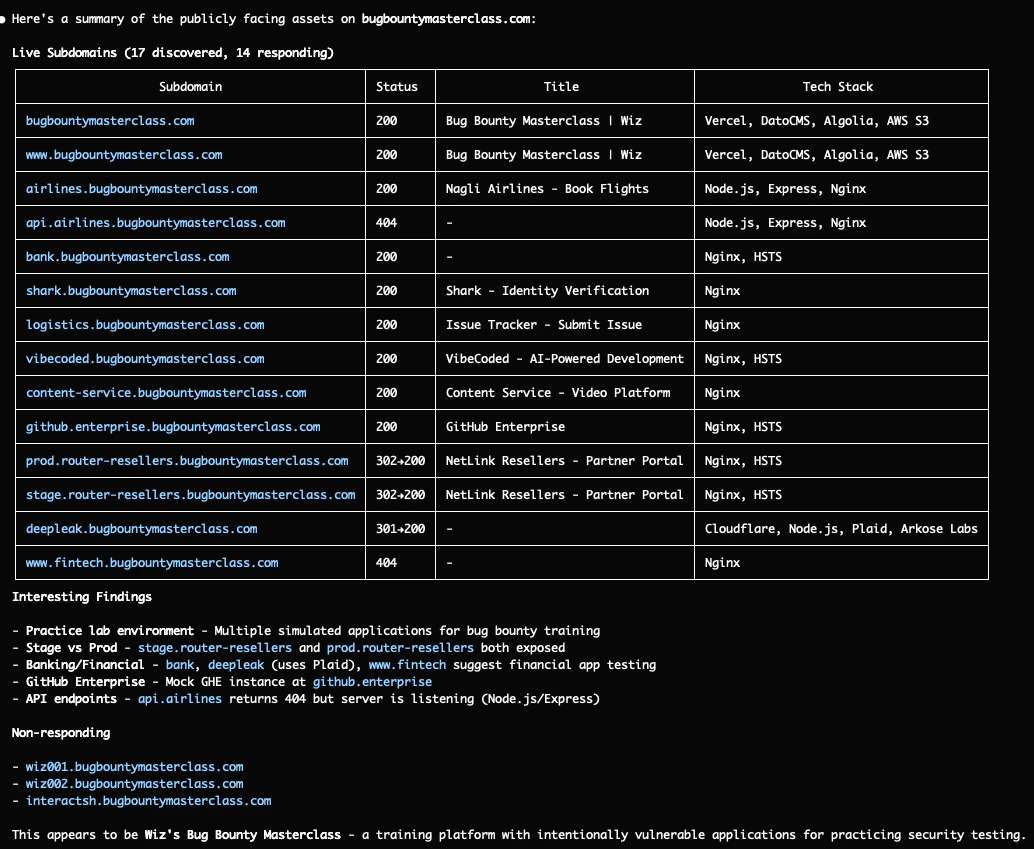
Reconnaissance example with Claude Code
AI Agents are cable in assisting with reconnaissance and enumeration on bug-bounty programs using the tools you installed already in the previous chapters
Simply asking Hi can you look for subdomains on bugbountymasterclass.com and check what assets are publicly facing? will do a lot of cool recon for you! (more in the next Chapter)


Getting Started with AI Tools
The landscape has evolved rapidly. Here are the current go-to options:
For Chat-Based Analysis & Brainstorming:
- Claude from Anthropic - Excellent for code review, long context, and nuanced security reasoning
- Gemini from Google - Good for large file analysis with its extended context window
For Agentic / Continuous Tasks:
- Claude Code - Terminal-based AI that can run commands, edit files, and work through multi-step tasks autonomously
- OpenAI Codex – Invaluable for writing custom automation scripts and tools
The Bottom Line
AI won't replace bug bounty hunters. But the data is clear: hunters who use AI effectively will find bugs faster and cheaper than those who don't.
The winning formula isn't AI alone or human alone - it's human direction combined with AI execution. You find the targets, frame the problem, and know when to pivot. AI handles the pattern matching, payload crafting, and tedious analysis at machine speed.
That's the future of bug bounty hunting.
In the final chapter, we'll consolidate everything we've learned into "Your Foundation Reference Guide."
Fun Quiz
