

Reconnaissance Overview
About This Chapter
This is a 25-minute hands-on video where I walk you through my complete reconnaissance process and all the important terminology you need to know.
I highly recommend watching the full video and following along in your terminal.
The written content below serves as your reference guide - use it to review commands, revisit concepts, and follow along during the video.
Reconnaissance
Welcome to one of my favorite parts of bug bounty hunting - Reconnaissance
Every successful hunter knows that your hunt is only as good as your recon. This is how we get the complete blueprint of our target before we attack.
The best bugs are often the simplest - found on forgotten assets that companies aren't paying attention to, or never knew existed.
Instead of just talking about theory, I'll show you how I do it - my step-by-step process for taking a company name and turning it into a map of potential targets.
- First, we'll find all the root domains by looking at things like company acquisitions and WHOIS databases.
- Next, we'll dive deep into subdomain enumeration, using both passive discovery and active brute-forcing to build a massive list of assets.
- Finally, we'll perform public exposure probing on that list - resolving, port scanning, and probing discovered domains to see what's actually live on the internet and what services are running.
By the end of this chapter, you will have a powerful, repeatable process for mapping out any target's full attack surface, and the knowledge to start finding bugs on your own.
This is where the hunt truly begins. Fire up your terminal, and let's get started.
TL;DR - What You'll Learn:
| Phase | What You'll Do | Tools |
|---|---|---|
| Passive Discovery | Query public sources for known subdomains | subfinder |
| DNS Resolution | Filter out dead/non-resolving domains | puredns, dig |
| Active Discovery | Brute-force and permutate to find hidden subdomains | puredns. Alterx |
| Root Domain Discovery | Find additional domains via acquisitions & WHOIS | Crunchbase, whoxy.com |
| Public Exposure | Probe live assets for status codes, technologies & metadata | httpx |
End result: A comprehensive list of 1,000+ live, publicly-accessible assets ready for vulnerability testing - all from a single company name.
Key Terminology
Before we dive in, let's establish the vocabulary you'll use constantly:
| Term | Definition | Example |
|---|---|---|
| Top-Level Domain (TLD) | The suffix after the final dot | .com, .io, .security |
| Root Domain | The main domain of a company (one dot left of TLD) | acme.io, acme.com |
| Subdomain | Any prefix to the root domain - often different applications | app.acme.io, staging.acme.io, docs.test.acme.io |
| Company Name | The registered organization name (useful for WHOIS lookups) | Acme LLC |
Your goal - Turn a company name into a comprehensive list of all its subdomains across all its root domains.
Phase 1: Passive DNS Discovery
Passive reconnaissance means gathering information without directly touching the target. We query public databases that already know about the target's subdomains.
Using subfinder - subfinder queries dozens of public sources (certificate transparency logs, search engines, DNS databases) and aggregates the results:
subfinder -d example.com -o passive-subdomains.txtThis single command can return hundreds or thousands of subdomains in minutes.
Pro tip: Use the `-v` (verbose) flag to see which sources each subdomain came from:
subfinder -d example.com -vPhase 2: DNS Resolution
Not all discovered subdomains are alive. Some are old records that no longer point to anything. We need to filter out the dead ones.
Using puredns
puredns checks if each subdomain actually resolves to an IP address:
cat passive-subdomains.txt | puredns resolve | tee resolved.txtExample: From 1,600 passive subdomains → ~1,200 actually resolve.
Those 400 dead domains? Don't waste time on them. Focus on what's alive.
Phase 3: Active DNS Discovery
Passive sources don't know everything. Some subdomains were never indexed. We find these through active techniques.
DNS Brute-Forcing
We guess subdomain names using a wordlist:
puredns bruteforce wordlist.txt example.com -r resolvers.txt -w bruteforce-results.txtPopular wordlists:
- `subdomains-top1million-100000.txt` (fast, good coverage)
- `best-dns-wordlist.txt` (9 million entries - thorough but a little slow)
What it does: Asks "Does `admin.example.com` exist? Does `stagingacme.ioo` exist?" for every word in the list.
DNS Permutations with Alterx
Alterx takes your existing subdomains and creates intelligent variations:
cat passive-subdomains.txt | alterx | puredns resolve | tee permutations.txtIf you know `registry.os.acme.io` exists, Alterx will try:
- admin-registry.os.example.com

- staging-registry.os.example.com

- registry-internal.os.example.com
This finds subdomains that pure brute-forcing misses.
Phase 4: Root Domain Discovery
Companies often own multiple root domains. If you only test the main domain, you're missing a huge attack surface.
Method 1: Acquisitions Lookup
When companies acquire other companies, they inherit their domains - and often forget about them.
How to find acquisitions:
1. Search Crunchbase: crunchbase.com/organization/[company]
2. Scroll to "Acquisitions"
3. Note each acquired company's domain
Example: Wiz acquired Raftt, Gem, and Dazz. Each has its own domain that could be vulnerable to forgotten assets.
Then run your full recon process on each acquired domain:
subfinder -d acquistion.com | puredns resolve | anew resolved.txtMethod 2: Reverse WHOIS Lookup
WHOIS records contain registration information. If it's not redacted, you can find other domains registered by the same organization.
whois example.comLook for the Registrant Organization field. Then use a reverse WHOIS service like whoxy.com to find all domains registered to that organization.
Real example: Looking up Dazz's WHOIS revealed two additional domains (`anygoat.io`, `tterraform.io`) registered to the same organization.
Method 3: Get Creative
- Ask AI: "What domains does [company] own?"
- Search GitHub for internal domain references
- Check LinkedIn, press releases, job postings
- Look for CTF or marketing campaign domains
Phase 5: Public Exposure Probing
You now have a list of resolved subdomains. Time to see what's actually publicly accessible.
Web Exposure with httpx
httpx probes each subdomain and extracts useful metadata:
cat resolved.txt | httpx -title -status-code -ip -cname -tech-detect -o metadata.txtWhat you get for each domain:
- Status code (200, 403, 404, etc.)
- Page title
- IP address
- CNAME records (shows if it points to AWS, Azure, etc.)
- Technologies detected (nginx, WordPress, React, etc.)
Understanding Status Codes
| Code | Meaning | Action |
|---|---|---|
| 200 | Success - page loads | Test it! |
| 301/302 | Redirect | Follow it, note where it goes |
| 403 | Forbidden on root path | other paths - other paths may work |
| 404 | Not found on root path | Still worth fuzzing other paths |
| 500 | Server error | Interesting - might indicate issues |
Important: A 403 or 404 on `/` doesn't mean the whole domain is dead. There might be accessible content at `/admin`, `/api`, or `/backup`.
Network Exposure (Non-HTTP Services)
Not everything is a website. Companies expose other services:
- FTP (port 21)
- SSH (port 22)
- Databases (MySQL 3306, PostgreSQL 5432, MongoDB 27017)
- Redis (port 6379)
- Elasticsearch (port 9200)
Port scanning with nmap can reveal these:
nmap -sV -p- --min-rate 1000 example.comFinding an open, unauthenticated database or Redis instance can be a critical finding.
---
The Complete Workflow
Here's the full reconnaissance process in order:
1. Start with company name
↓
2. Find main root domain
↓
3. Passive subdomain enumeration (subfinder)
↓
4. Resolve to filter dead domains (puredns)
↓
5. Active enumeration (brute-force + permutations)
↓
6. Find additional root domains (acquisitions + WHOIS)
↓
7. Repeat steps 3-5 for each new root domain
↓
8. Public exposure probing (httpx)
↓
9. You now have a complete attack surface map
Time investment:~30-60 minutes for a thorough recon on a medium-sized company.
Result: A comprehensive list of live, publicly-accessible assets ready for vulnerability testing.
AI Agents
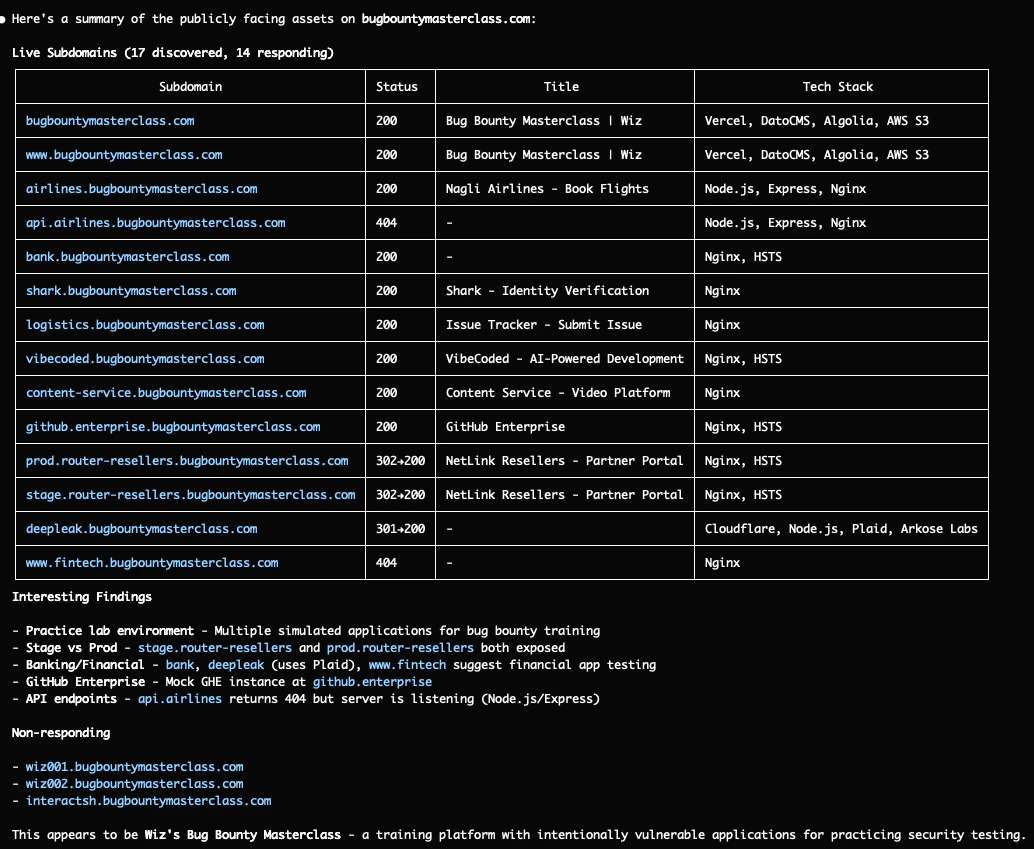
AI Agents like Claude Code are cable in assisting with reconnaissance and enumeration on bug-bounty programs using the tools you installed already in the previous chapters
Simply asking Hi can you look for subdomains on bugbountymasterclass.com and check what assets are publicly facing? will produce the nice workflow we discussed in this chapter


Key Takeaways
- Passive first, active second. Start with public sources, then brute-force what they missed.
- Don't stop at the main domain. Acquisitions and WHOIS can reveal forgotten assets.
- 403 ≠ dead. Always probe deeper—other paths might be accessible.
- Automate and save everything. Build scripts to run this process quickly on new targets.
- One extra subdomain can be worth thousands. If you find something others missed, you have exclusive hunting ground.
In the next chapter, we'll take these discovered assets and learn how to intercept and manipulate traffic using web proxies.
Fun Quiz
